







Custom Register Form, Approval Based Registration
- Install the Plugin:
- Log in to your WordPress admin panel.
- Go to Plugins > Add New.
- Search for “User Registration” by WPEverest.
- Click on “Install Now” and then activate the plugin.
- Create a Registration Form:
- After activating the plugin, go to User Registration > Add New.
- You’ll be taken to a form builder interface where you can start creating your registration form.
- Add fields like username, email, password, etc., according to your requirements.
- Customize the form settings, such as redirection after submission, notification emails, etc.
- Embed the Form:
- Once you’ve created your registration form, you’ll get a shortcode for it.
- Copy the shortcode and paste it into any page, post, or widget where you want the registration form to appear.
- Customize Registration Settings:
- Explore the settings offered by the User Registration plugin to customize the registration process further.
- You can set up user roles, enable email verification, configure redirects, and more.
- Test the Registration Process:
- Before making the registration form live, test it thoroughly to ensure that everything works as expected.
- Create test accounts to see if users can register successfully and receive confirmation emails.
- Monitor and Manage Registrations:
- Once your registration form is live, keep an eye on new registrations.
- You can manage users from the WordPress admin panel, view user details, and make changes if necessary.
- Optional Add-ons:
- WPEverest offers various add-ons for User Registration, such as MailChimp integration, WooCommerce integration, user approval, etc. You can explore and install these add-ons based on your requirements.
User Registration plugin by WPEverest offers several benefits
- Customization: The plugin allows you to create fully customizable registration forms tailored to your specific needs. You can add and arrange fields as required, choose from various field types, and style the form to match your website’s design seamlessly.
- User Experience: By providing a streamlined registration process, you enhance the user experience on your website. Users can register quickly and easily, reducing frustration and increasing the likelihood of them completing the registration process.
- Integration: The plugin seamlessly integrates with other WordPress plugins and services, such as WooCommerce, MailChimp, and Zapier. This integration allows you to extend the functionality of your registration forms and connect with external platforms efficiently.
- User Management: With the User Registration plugin, you gain access to user management tools within the WordPress dashboard. You can view, edit, and manage user registrations, including approving or denying user accounts if needed.
- Email Notifications: The plugin supports email notifications for both administrators and users. You can set up automatic email notifications for new registrations, password resets, and other relevant events, keeping users informed throughout the registration process.
- Security: User Registration provides security features such as reCAPTCHA integration to prevent spam registrations and ensure the security of user data. This helps maintain the integrity of your user database and protects against malicious activities.
- Flexibility: The plugin offers flexibility in terms of user roles and permissions. You can define custom user roles and assign specific capabilities to each role, allowing you to control access to content and features on your website effectively.
- Support and Updates: WPEverest provides regular updates and ongoing support for the User Registration plugin. This ensures compatibility with the latest versions of WordPress and addresses any issues or concerns that may arise during usage.
forms
The User Registration plugin by WPEverest offers a powerful form builder tool that allows you to create custom registration forms, login forms, and password reset forms for your WordPress website. Here’s a detailed overview of the form features provided by the plugin:
- Form Builder Interface: The plugin provides an intuitive form builder interface that enables you to create and customize registration forms without any coding knowledge. You can easily add, remove, and rearrange form fields using drag-and-drop functionality.
- Field Types: User Registration supports a wide range of field types to cater to different registration requirements. These include text fields, email fields, password fields, checkboxes, radio buttons, dropdowns, file uploads, date pickers, and more.
- Conditional Logic: You can implement conditional logic within your registration forms to show or hide specific fields based on user input. This feature allows you to create dynamic and interactive forms that adapt to users’ selections.
- Validation Rules: The plugin allows you to set validation rules for form fields to ensure that users enter valid data during registration. You can define required fields, minimum and maximum lengths, email format, and custom validation patterns.
- Multi-step Forms: User Registration supports multi-step registration forms, allowing you to break the registration process into multiple stages for a smoother user experience. You can configure each step with its own set of fields and validation rules.
- Customization Options: You have full control over the design and styling of your registration forms. The plugin provides options to customize form layouts, field labels, placeholders, CSS classes, and more, allowing you to match the forms with your website’s branding.
- Pre-built Templates: User Registration offers pre-built form templates that you can use as starting points for creating your registration forms. These templates cover common registration scenarios and can be easily customized to fit your specific requirements.
- Shortcode Integration: Once you’ve created your registration forms, you can embed them into any page, post, or widget area on your website using shortcodes. This allows you to display registration forms wherever you need them, providing flexibility in placement.
- GDPR Compliance: The plugin includes features to help you comply with GDPR regulations, such as adding consent checkboxes for data processing and providing options for users to manage their data and privacy settings.
- Spam Protection: User Registration integrates with Google reCAPTCHA to prevent spam registrations and ensure the security of your registration forms. This helps maintain the integrity of your user database and protects against malicious activities.
Overall, the form builder in the User Registration plugin offers a comprehensive set of features and customization options to create user-friendly and secure registration forms for your WordPress website. Whether you need simple registration forms or complex multi-step forms, the plugin provides the tools you need to achieve your registration goals.
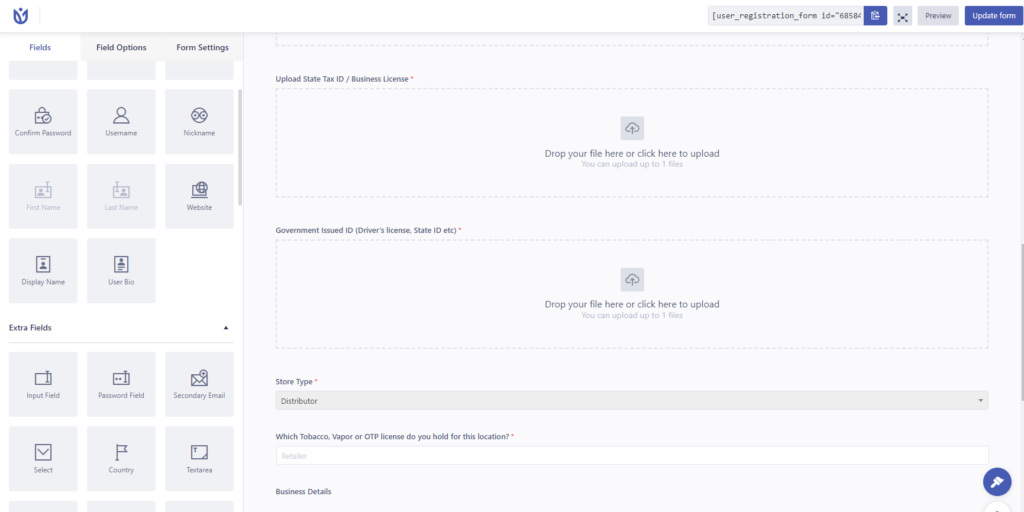
here you can simple select the elements in the forms
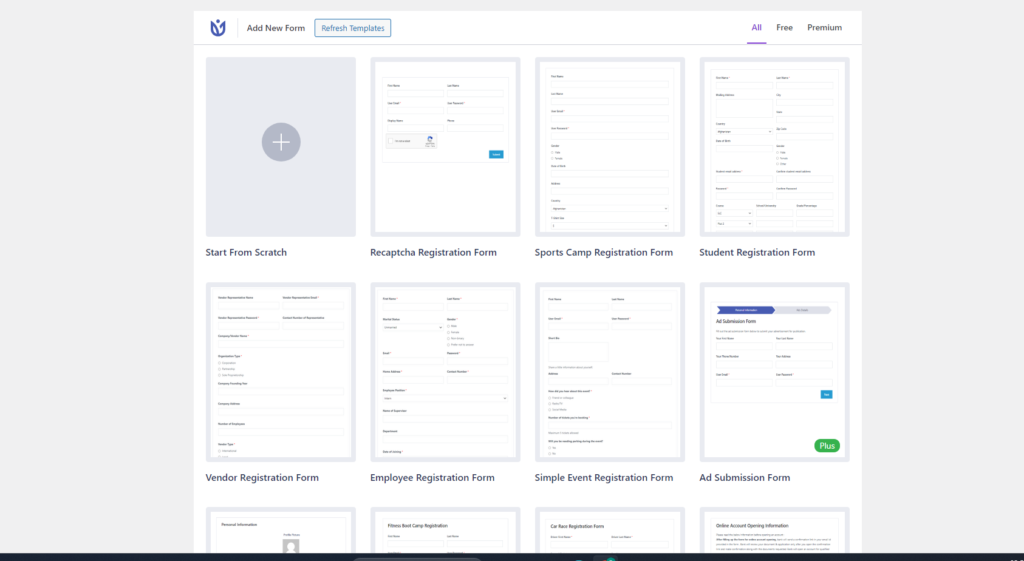
a wide range of prebuild templates are present in this plugin which makes the task easy
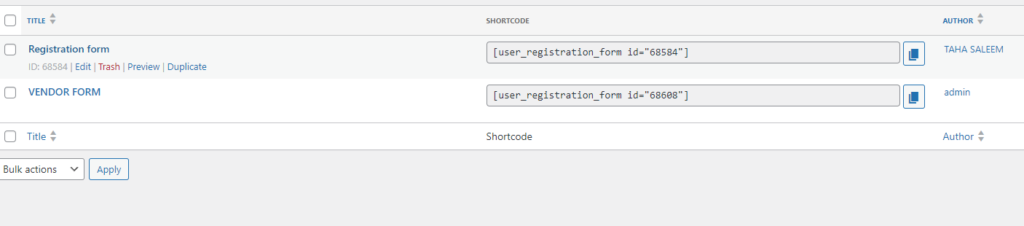
here you will get the short code which u can use where ever required
