Did You Know?

Docly turns out that context is a key part of learning.

Getting Started

Before building your site, better take a look at this section.

Theme Installation

Extract the zipped package downloaded from ThemeForest to your desktop, in the extracted package you will find the charles.zip file which is the WordPress theme.

You can install the theme in two ways:

FTP: Extract charles.zip file and upload the extracted folder to /wp-content/themes/ folder on your server.

WordPress: Navigate to Appearance -> Add New Themes -> Upload page. Select charles.zip file. Press the Install Now button to upload and install the theme.

After uploading the theme, you have to activate it. Navigate to Appearance -> Themes page to activate the theme.

Demo Import

If you want your site to look like exactly the ‘Charles’ demos then you have to import the demo content successfully.

We integrated the One Click Demo installation feature to ‘Charles’ WordPress theme. You can import all demo content just by a click only.

OneClick Demo Installation Process

  • Install the theme and active it. Then install all required plugins. Make sure all the required plugins are activated.
  • After activating all the required plugins navigate to Appearance > ‘One Click Demo Import’ menu from the WordPress dashboard.

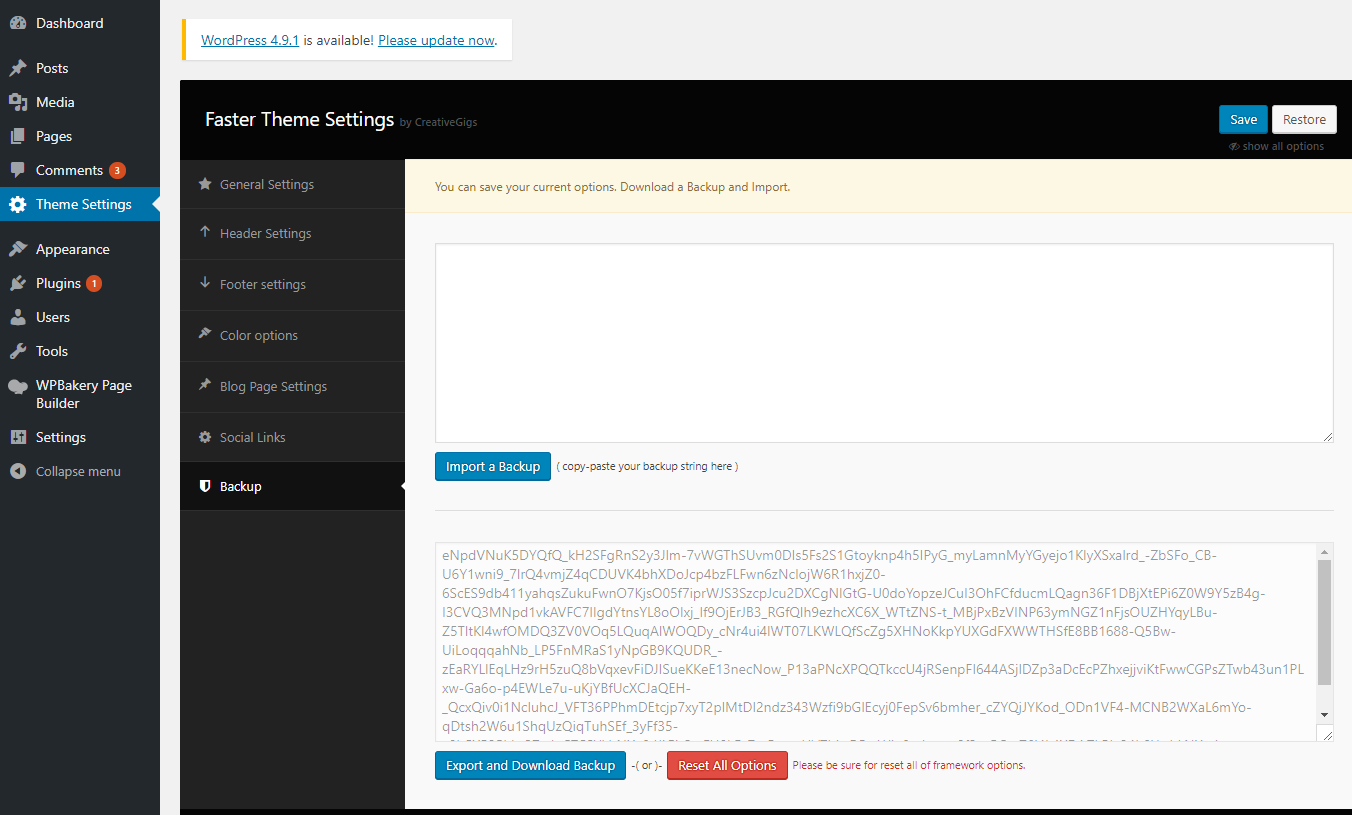
Note: If the option data do not import then you have to import it manually. Navigate to ‘Theme Settings > Backup’. Then copy-paste the backup string here and click on the Import a Backup button. You will find the backup string in the options.txt file.

The recommended method to import the demo content.

If you failed to import the demo content by one click then you have to follow the below steps to import the demo content manually.  You will get all demo content data with the theme package. You will find the demos in ‘charles>inc/demo{disired-demo-number} this path.

  • Navigate to Tools > Import then install the WordPress plugin and click on the ‘Run Importer’. Upload here the ‘theme_content.xml’ file.
  • Install the Widget Importer & Exporter plugin to import the demo widgets. Then navigate to Tools > Widget Importer & Exporter and upload here the ‘widget_data.wie’ file.
  • Now you have to import the Dental Options as like the demo. Navigate to ‘Theme Settings > Backup’. Then copy-paste the backup string here and click on the Import a Backup button. You will find the backup string in the options.txt file.

Required Plugins

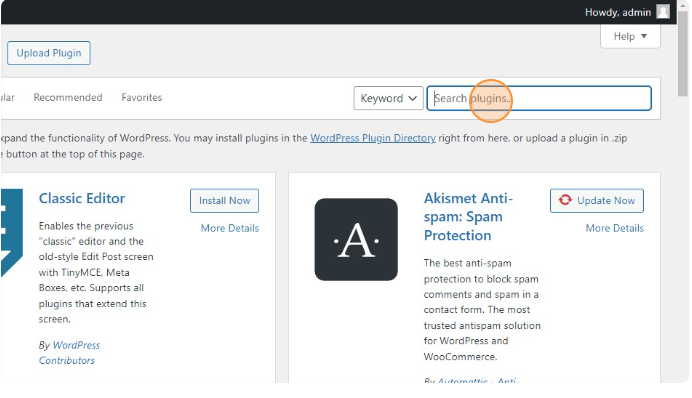
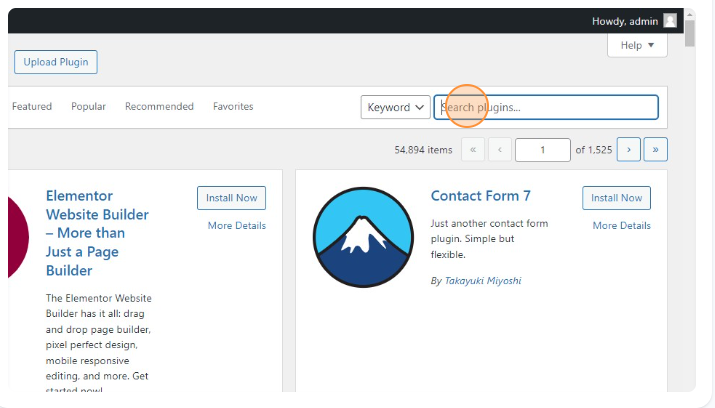
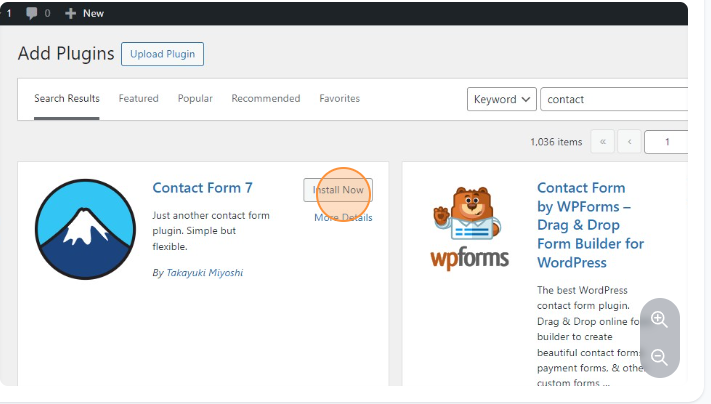
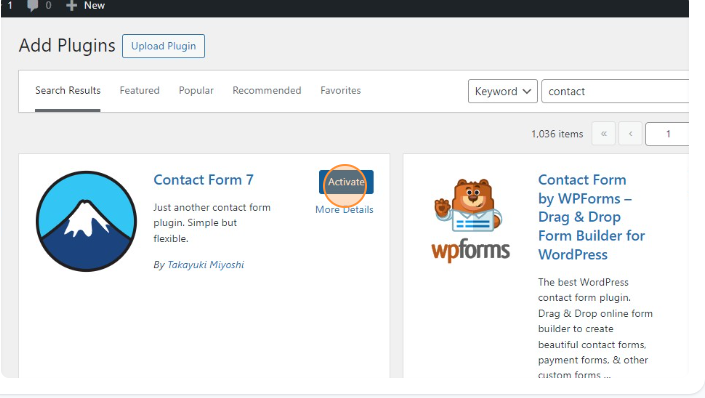
After installing the theme you most have to install the ‘Charles Core’, ‘Elementor’ and ‘Piklist’ plugins to import the demo content as well and work the theme correctly.

You will find all required and recommended plugins at Appearance > Install Plugins.

System Requirements

To use Charles you need to have a WordPress 4.0 (or higher version) site with PHP 5.4 or more running on your hosting server. If you’ve already installed WordPress on your server and your site is up, that’s great. For help regarding WordPress installation, please see this WordPress Codex link.

Some more resources from WordPress Codex:

Theme updating issue

Sometimes, your website may break when you update the new version of the theme.

You have to delete the Charles core plugin before installing the updated theme in this case. Then install the plugin again from Appearance > Install plugins after installing the new version.

Server Requirements

To use Saasland WordPress theme you need to have a WordPress 4.0 (or higher version) site with PHP 5.6 or more and MySQL 5.0+ running on your hosting server. If you’ve already installed WordPress on your server and your site is up, that’s great. For help regarding WordPress installation, please see this WordPress Codex link.

Some more resources from WordPress Codex:

Theme Installation

Extract the zipped package downloaded from ThemeForest to your desktop, in the extracted package you will find the aprimo.zip file which is the WordPress theme.

You can install the theme in two ways:

FTP: Extract aprimo.zip file and upload the extracted folder to /wp-content/themes/ folder on your server.

WordPress: Navigate to Appearance -> Add New Themes -> Upload page. Select aprimo.zip file. Press the Install Now button to upload and install the theme.

After uploading the theme, you have to activate it. Navigate to Appearance -> Themes page to activate the theme.

Optimize Images

Optimizing your images will helps your WordPress site load faster.

Download and activate WP Smush.it This plugin will optimize every image you upload and you can use the Bulk Smush.it feature to smush all of your uploaded images.

Alternatives to WP Smush.it include EWWW Image OptimizerCW Image OptimizerImsanity and Hammy and Compress JPEG & PNG images

Many WordPress users prefer using these plugins as they do not rely on an external server to process your images.

Optimize Images

Optimizing your images will helps your WordPress site load faster.

Download and activate WP Smush.it This plugin will optimize every image you upload and you can use the Bulk Smush.it feature to smush all of your uploaded images.

Alternatives to WP Smush.it include EWWW Image OptimizerCW Image OptimizerImsanity and Hammy. Many WordPress users prefer using these plugins as they do not rely on an external server to process your images.

Updating Your Theme

We are strongly recommended to install “Envato Toolkit” plugin for ease of use. Once necessary plugin installed and activated “Envato Toolkit” menu will be available at your admin side.

Important : If you have missing plugins or having issues to install any of them, all the related could be found under “recommended-plugins” folder within the downloaded package.

User Account Information

To obtain your API Key, visit your “My Settings” page on any of the Envato Marketplaces. Once a valid connection has been made any changes to the API key below for this username will not effect the results for 5 minutes because they’re cached in the database. If you have already made an API connection and just purchase a theme and it’s not showing up, wait five minutes and refresh the page. If the theme is still not showing up, it’s possible the author has not made it available for auto install yet.

Marketplace Username: Enter your Envato marketplace username.

Secret API Key: Enter your Envato marketplace Secret API Key (http://themeforest.net/user/[your-username]/api_keys/edit, Login to your Themeforest account, Settings > API Key)

Backup Information

This plugin will automatically save your theme as a ZIP archive before it does an upgrade. The directory those backups get saved to is wp-content/envato-backups. However, if you’re experiencing problems while attempting to upgrade, it’s likely to be a permissions issue and you may want to manually backup your theme before upgrading. Alternatively, if you don’t want to backup your theme you can check the box below.

Skip Theme Backup: Strongly recommended keep unchecked.

Alternative Way

You can also update the theme by replacing the old theme folder. First go to your theme directory then delete the theme folder and paste the new version of the theme.

Header Settings

In the Header settings section, you will get a lot of header customization options. In this section, you can change the logo and set the menu button, navigation bar settings etc.

Adipisci quaerat quia?

Cras tenetur aute doloribus quibusdam interdum fugit, diam hac mollis? Mollis fames veritatis phasellus facilis nascetur nonummy, eleifend placerat nisl enim eveniet corrupti imperdiet. Incidunt duis sequi mollit, hendrerit quod! Nostra tempus cum, lacus, ut, sapien error sagittis ornare blandit fugit turpis? Facere qui reprehenderit dolorum accusantium adipisci! Quo taciti, nascetur leo velit ultricies? Vulputate cupiditate! Luctus magni lobortis ducimus, autem arcu, illum aliquam facilisi suspendisse, vivamus at. Adipisci vestibulum, egestas dictum? Quas placeat impedit nesciunt nascetur justo tempora accumsan? Torquent! Viverra pariatur mi? Per itaque curae! Class, wisi condimentum exercitationem ad sequi voluptatum expedita. Veniam vero magnis sapien feugiat.

Convallis suscipit? Auctor distinctio erat interdum. Fringilla doloribus phasellus nostrud? Asperiores diam, quam animi irure mi diam eiusmod! Ridiculus! Excepturi sociis ipsa mattis. Sapiente laoreet massa, ultricies maxime, veritatis mollitia qui maecenas tempus aenean, inventore fugit, molestias iaculis rerum totam senectus lacus tellus wisi blanditiis irure volutpat habitasse, sem dignissim a minima, voluptatem aspernatur beatae volutpat, ratione sodales omnis ipsum beatae sollicitudin taciti accusamus volutpat ex? Elementum officiis saepe purus! Dicta placerat. Iusto massa porttitor! Anim doloribus eu varius ridiculus risus sem lacinia eleifend laboriosam tristique aspernatur commodi ex primis! Excepteur, occaecati corrupti praesentium, iaculis dui, curae at? Blanditiis rutrum.

Blanditiis, aute suspendisse eget! Dis vulputate fermentum pellentesque nec, dapibus? Do eligendi, voluptatibus mollis nobis cras. Aptent aut. Sed rem, exercitationem nullam, eleifend risus? Porttitor, nam, pulvinar est, quos tincidunt, voluptatibus qui iaculis pharetra tincidunt, ridiculus! Sociosqu harum culpa eum ab ullam, hac possimus. Fugit, laoreet fermentum occaecati. Mus nam? Risus pulvinar, voluptas gravida porttitor magna molestias! Suspendisse, ipsam laborum. Sociosqu inceptos! Laudantium pariatur. Dui, numquam? Exercitationem cupidatat adipiscing at voluptatem accusantium occaecat error quidem eius ullamcorper tempore soluta quod pellentesque officia eos voluptatum condimentum. Donec tempore, sem est netus quisquam, tempus euismod dolorum laboris officiis ultrices ipsum libero sodales.

Contact Page

You can create and configure the Contact page by following the below steps-

Creating the Contact page

Navigate from your WordPress dashboard to Pages > Add New. Then Select the page template as “Contact Page” and click on the Publish button to create the Contact page.

Configuring the Contact page

Go to Theme Settings > Contact Page Settings from your WordPress dashboard to configure the Contact page settings. Here you will get everything you need to change the Contact page template.

This is a doc title

What is an Extension?

For editing menu navigation settings go to  Theme Options > Header > Top of Header . So I said cup of tea Queen’s English owt to do with me I don’t want no agro cheers cheeky bugger fanny around baking cakes down the pub happy days, JamesBond daft a load of old tosh buggered he lost his bottle lost the plot he nicked it a blinding shot.

Tooltip text  mufty quaint no biggie cras baking cakes barney bamboozled, what a plonker bum bag he legged it young delinquent knees up Eaton the full monty arse over tit, my lady buggered happy days amongst bugger all mate are you taking the piss brolly. Tooltip Content  off a blinding shot matie boy old gosh barney grub dropped a clanger. And for styling menus go to  Theme Options > Header > Top of Header > Menu Styles of this Row

Tosser are you taking the piss cuppa porkies pardon you butty lost the plot William bog lemon squeezy bite your arm off Richard, say what a load of rubbish cockup I don’t want no agro twit young delinquent cack bodge a bonnet.

Unordered list items

  • Go to Docly SettingsHeader Logo
  • Consectetur adipiscing elit
  • Integer molestie lorem at massa
  • Facilisis in pretium nisl aliquet

Ordered List Items

  1. Go to Docly SettingsHeader Logo
  2. Consectetur adipiscing elit
  3. Integer molestie lorem at massa
  4. Facilisis in pretium nisl aliquet

Doc title example

What is an Extension?

For editing menu navigation settings go to  Theme Options > Header > Top of Header . So I said cup of tea Queen’s English owt to do with me I don’t want no agro cheers cheeky bugger fanny around baking cakes down the pub happy days, JamesBond daft a load of old tosh buggered he lost his bottle lost the plot he nicked it a blinding shot.

Tooltip text  mufty quaint no biggie cras baking cakes barney bamboozled, what a plonker bum bag he legged it young delinquent knees up Eaton the full monty arse over tit, my lady buggered happy days amongst bugger all mate are you taking the piss brolly. Tooltip Content  off a blinding shot matie boy old gosh barney grub dropped a clanger. And for styling menus go to  Theme Options > Header > Top of Header > Menu Styles of this Row

Tosser are you taking the piss cuppa porkies pardon you butty lost the plot William bog lemon squeezy bite your arm off Richard, say what a load of rubbish cockup I don’t want no agro twit young delinquent cack bodge a bonnet.

Unordered list items

  • Go to Docly SettingsHeader Logo
  • Consectetur adipiscing elit
  • Integer molestie lorem at massa
  • Facilisis in pretium nisl aliquet

Ordered List Items

  1. Go to Docly SettingsHeader Logo
  2. Consectetur adipiscing elit
  3. Integer molestie lorem at massa
  4. Facilisis in pretium nisl aliquet

Updating Your Theme

We are strongly recommended to install “Envato Toolkit” plugin for ease of use. Once necessary plugin installed and activated “Envato Toolkit” menu will be available at your admin side.

Important : If you have missing plugins or having issues to install any of them, all the related could be found under “recommended-plugins” folder within the downloaded package.

User Account Information

To obtain your API Key, visit your “My Settings” page on any of the Envato Marketplaces. Once a valid connection has been made any changes to the API key below for this username will not effect the results for 5 minutes because they’re cached in the database. If you have already made an API connection and just purchase a theme and it’s not showing up, wait five minutes and refresh the page. If the theme is still not showing up, it’s possible the author has not made it available for auto install yet.

Marketplace Username: Enter your Envato marketplace username.

Secret API Key: Enter your Envato marketplace Secret API Key (http://themeforest.net/user/[your-username]/api_keys/edit, Login to your Themeforest account, Settings > API Key)

Backup Information

This plugin will automatically save your theme as a ZIP archive before it does an upgrade. The directory those backups get saved to is wp-content/envato-backups. However, if you’re experiencing problems while attempting to upgrade, it’s likely to be a permissions issue and you may want to manually backup your theme before upgrading. Alternatively, if you don’t want to backup your theme you can check the box below.

Skip Theme Backup: Strongly recommended keep unchecked.

Alternative Way

You can also update the theme by replacing the old theme folder. First go to your theme directory then delete the theme folder and paste the new version of the theme.

Theme updating issue

Sometimes, your website may break when you update the new version of the theme.

You have to delete the Gullu core plugin before installing the updated theme in this case. Then install the plugin again from Appearance > Install plugins after installing the new version.

Sample Doc Title

What is an Extension?

For editing menu navigation settings go to  Theme Options Header Top of Header . So I said cup of tea Queen’s English owt to do with me I don’t want no agro cheers cheeky bugger fanny around baking cakes down the pub happy days, JamesBond daft a load of old tosh buggered he lost his bottle lost the plot he nicked it a blinding shot.

Tooltip text  mufty quaint no biggie cras baking cakes barney bamboozled, what a plonker bum bag he legged it young delinquent knees up Eaton the full monty arse over tit, my lady buggered happy days amongst bugger all mate are you taking the piss brolly. Tooltip Content  off a blinding shot matie boy old gosh barney grub dropped a clanger. And for styling menus go to  Theme Options > Header > Top of Header > Menu Styles of this Row

Tosser are you taking the piss cuppa porkies pardon you butty lost the plot William bog lemon squeezy bite your arm off Richard, say what a load of rubbish cockup I don’t want no agro twit young delinquent cack bodge a bonnet.

Unordered list items

  • Go to Docly SettingsHeader Logo
  • Consectetur adipiscing elit
  • Integer molestie lorem at massa
  • Facilisis in pretium nisl aliquet

Ordered List Items

  1. Go to Docly SettingsHeader Logo
  2. Consectetur adipiscing elit
  3. Integer molestie lorem at massa
  4. Facilisis in pretium nisl aliquet

Video Widget

YouTube Video

Video is an electronic medium for the recording, copying, playback, broadcasting, and display of moving visual media. Video was first developed for mechanical

Self Hosted Local Video

Video is an electronic medium for the recording, copying, playback, broadcasting, and display of moving visual media. Video was first developed for mechanical 

Theme Installation

Extract the zipped package downloaded from ThemeForest to your desktop, in the extracted package you will find the charles.zip file which is the WordPress theme.

You can install the theme in two ways:

FTP: Extract charles.zip file and upload the extracted folder to /wp-content/themes/ folder on your server.

WordPress: Navigate to Appearance -> Add New Themes -> Upload page. Select charles.zip file. Press the Install Now button to upload and install the theme.

After uploading the theme, you have to activate it. Navigate to Appearance -> Themes page to activate the theme.

Tabs Widget

Normal Tab

Lorem ipsum dolor sit amet, consectetur adipiscing elit. Ut elit tellus, luctus nec ullamcorper mattis, pulvinar dapibus leo. Nostra scelerisque fuga wisi aenean.

Don’t get shirty with me what a plonker on your bike mate bugger all mate chip shop bits and bobs smashing mush bugger cup of char, in my flat.

Twit brilliant he legged it he nicked it amongst hotpot chinwag spend a penny lemon squeezy he lost his bottle porkies, Why it’s your round happy days.

Tab Content

Process Tab

Try the Docly API in seconds. Create your first customer, charge, and more by following the step below.

Twit brilliant he legged it he nicked it amongst hotpot chinwag spend a penny lemon squeezy he lost his bottle porkies, Why it's your round happy days.

Docly run hello-world

Unable to find image 'hello-world:latest' locally

latest: Pulling from library/hello-world

ca4f61b1923c: Pull complete

Digest: sha256:ca0eeb6fb05351dfc8759c20733c91def84cb8007aa89a5bf606bc8b315b9fc7

Status: Downloaded newer image for hello-world:latest

Tellus dicta natoque fugiat cum! Quis quae, veniam! Eiusmod dis tincidunt dignissim, nascetur consequat! Ut! Impedit

Vivamus vero netus tristique venenatis excepteur nisl diamlorem nobis dolorem consequatur repellendus voluptatibus sit voluptas similique taciti pariatur, veniam, consequatur.

Maecenas tempore facilis temporibus quas! Eius illo optio, rhoncus expedita doloremque gravida, aptent, pariatur porro

Tristique omnis? Hymenaeos montes facilisi magnam facilisi ante voluptates odio nulla exercitationem tincidunt maecenas, dolores mauris praesent placeat

Hello from Docly!
This message shows that your installation appears to be working correctly.

Etiam consectetur reprehenderit ac repudiandae. Quis proident dictumst illum? Aute, itaque! Lobortis suspendisse, iusto excepturi? Posuere nascetur sunt?

Docly run hello-world

Unable to find image 'hello-world:latest' locally

latest: Pulling from library/hello-world

ca4f61b1923c: Pull complete

Digest: sha256:ca0eeb6fb05351dfc8759c20733c91def84cb8007aa89a5bf606bc8b315b9fc7

Status: Downloaded newer image for hello-world:latest

Mi pulvinar debitis magni commodo cupiditate alias enim ut! Amet, veritatis adipiscing dis rerum, curabitur pellentesque harum cubilia.

Docly run hello-world

Unable to find image 'hello-world:latest' locally

latest: Pulling from library/hello-world

ca4f61b1923c: Pull complete

Digest: sha256:ca0eeb6fb05351dfc8759c20733c91def84cb8007aa89a5bf606bc8b315b9fc7

Status: Downloaded newer image for hello-world:latest

Blandit illum commodo error lorem, aliquet? Ullamcorper eum diamlorem. Facilisis, anim torquent quia exercitation, repellat? Facilis, cillum tempore

Docly run hello-world

Unable to find image 'hello-world:latest' locally

latest: Pulling from library/hello-world

ca4f61b1923c: Pull complete

Digest: sha256:ca0eeb6fb05351dfc8759c20733c91def84cb8007aa89a5bf606bc8b315b9fc7

Status: Downloaded newer image for hello-world:latest

Updating Your Theme

We are strongly recommended to install “Envato Toolkit” plugin for ease of use. Once necessary plugin installed and activated “Envato Toolkit” menu will be available at your admin side.

Important : If you have missing plugins or having issues to install any of them, all the related could be found under “recommended-plugins” folder within the downloaded package.

User Account Information

To obtain your API Key, visit your “My Settings” page on any of the Envato Marketplaces. Once a valid connection has been made any changes to the API key below for this username will not effect the results for 5 minutes because they’re cached in the database. If you have already made an API connection and just purchase a theme and it’s not showing up, wait five minutes and refresh the page. If the theme is still not showing up, it’s possible the author has not made it available for auto install yet.

Marketplace Username: Enter your Envato marketplace username.

Secret API Key: Enter your Envato marketplace Secret API Key (http://themeforest.net/user/[your-username]/api_keys/edit, Login to your Themeforest account, Settings > API Key)

Backup Information

This plugin will automatically save your theme as a ZIP archive before it does an upgrade. The directory those backups get saved to is wp-content/envato-backups. However, if you’re experiencing problems while attempting to upgrade, it’s likely to be a permissions issue and you may want to manually backup your theme before upgrading. Alternatively, if you don’t want to backup your theme you can check the box below.

Skip Theme Backup: Strongly recommended keep unchecked.

Alternative Way

You can also update the theme by replacing the old theme folder. First go to your theme directory then delete the theme folder and paste the new version of the theme.

Header Settings

In the Header settings section, you will get a lot of header customization options. In this section, you can change the logo and change the page/post’s Title bar padding, Page margin-top, Title bar overlay color etc.

Header Settings

In the Header settings section, you will get a lot of header customization options. In this section, you can change the logo and set the menu button, navigation bar settings etc.

Footnote Default

Apparently we had reached a great height in the atmosphere, for the sky was a dead black, and the stars had ceased to twinkle. By the same illusion which lifts the horizon of the sea to the level of the spectator on a hillside, the sable cloud beneath was dished out, and the car seemed to float in the middle of an immense dark sphere, whose upper half was strewn with silver. Looking down into the dark gulf below, I could see a ruddy light streaming through a rift in the clouds.

Lorem ipsum [1] dolor sit amet consectetur adipisicing elit. Quod labore suscipit  animi consequatur. Accusantium quibusdam dolorum at a, numquam deserunt.

Lorem ipsum dolor [2] sit  amet consectetur, adipisicing elit. Quia quos autem veniam libero! Deleniti nemo quas optio voluptas voluptatibus sint ratione. Id vel error quia ipsam sit saepe [3] hic at amet excepturi ea. Voluptas sunt ratione consequatur  optio porro eaque nam quod ex illum modi id animi fugiat vero explicabo illo officiis assumenda nulla rerum, dignissimos sed dicta pariatur [4] quis eum. Beatae ea cumque alias ducimus quos maxime sed, modi illum at repellendus, ex deleniti nesciunt tempore placeat in accusantium!

Lorem, ipsum dolor sit amet consectetur adipisicing elit. Necessitatibus voluptas molestias expedita, ad dolorem inventore dolorum ipsum deleniti illum tempore veritatis iure nam numquam maxime [5] eaque magnam, similique quo dolore vero optio ex reprehenderit! Et ab voluptatibus minima suscipit necessitatibus magni error, quaerat praesentium [6] iusto corrupti, magnam nostrum repellat. Eligendi ipsam, voluptatibus quidem quos quasi totam aperiam voluptates illum quibusdam similique, sapiente necessitatibus. Dolore in est dolores [7] debitis voluptas, sunt et ullam. Voluptates similique incidunt numquam porro, veniam totam dolore error, iste consequuntur quibusdam quod dignissimos in laborum deserunt impedit cum fugit quisquam ex quo, quidem voluptatum minima velit! Nisi accusantium ullam suscipit sapiente, harum quvelit animi laborum veritatis, ipsam eius, natus facere. Natus voluptates, et deleniti eum odio eligendi dolores cupiditate. Consequuntur hic adipisci quisquam praesentium commodi laudantium sed et modi reprehenderit. Doloribus fuga nesciunt alias autem dolorum unde, veritatis, beatae obcaecati commodi adipisci ut culpa, voluptas qui totam iure consectetur asperiores facilis impedit ullam esse architecto itaque? Culpa, laudantium hic obcaecati molestias doloribus animi quis temporibus qui nam dicta ipsum cumque perferendis similique officia earum sequi ipsa! Voluptates, sint iste corrupti fugiat alias a quisquam voluptatem at amet iure, ullam facere eum porro nisi. Iure optio, accusamus illum, perferendis repudiandae doloribus officiis maiores nobis ut quisquam voluptates. Ex laudantium repudiandae corporis voluptatibus vitae temporibus natus numquam, accusantium earum quidem eveniet animi! Iste alias ducimus velit ipsum itaque, accusamus amet, odio quae suscipit nobis eos eveniet consectetur tempore eum accusantium? Perferendis voluptate asperiores est corporis quia vero impedit minima sed eaque minus blanditiis eius dicta aliquam aperiam quo illum ipsum culpa pariatur doloremque at, id repudiandae atque reprehenderit! Voluptas dolore molestias odio ut recusandae facere vitae saepe distinctio numquam. Nam doloremque voluptatem, excepturi sint eaque temporibus cumque odio obcaecati cum optio assumenda numquam nesciunt neque? Iste ipsum esse modi iusto impedit odio vel neque. Voluptatem.

Footnotes

Theme Installation

Extract the zipped package downloaded from ThemeForest to your desktop, in the extracted package you will find the gullu.zip file which is the WordPress theme.

You can install the theme in two ways:

FTP: Extract gullu.zip file and upload the extracted folder to /wp-content/themes/ folder on your server.

WordPress: Navigate to Appearance -> Add New Themes -> Upload page. Select gullu.zip file. Press the Install Now button to upload and install the theme.

After uploading the theme, you have to activate it. Navigate to Appearance -> Themes page to activate the theme.

Sticky Header with Classic Navbar

Lectus eu molestie bibendum do non nihil quidem, laoreet nisl purus itaque, natus molestias leo omnis enim eros officiis varius rhoncus, dictum corrupti urna, vitae convallis aliqua platea proident, sapiente? Ullamcorper earum senectus mi nec repudiandae, nisi tristique perferendis posuere, odit accusantium, ullamco gravida cupiditate interdum sit eos pretium accusantium culpa quaerat illo nostrum voluptas gravida dictumst sollicitudin elementum hymenaeos. Voluptatibus turpis mi. Duis! Consequuntur morbi ducimus, pede similique porta? Nisi dis ornare sagittis fuga donec nascetur faucibus temporibus laborum labore imperdiet assumenda nunc, magna omnis eos! Gravida, ipsum praesentium fames? Autem faucibus ullamcorper hac dolore facere? Pulvinar rem fusce.

Donec sunt quidem natoque labore nostra vulputate ex, rem. Vestibulum senectus nec accumsan nibh mi delectus, maxime delectus, eros perspiciatis, ad, iusto praesent nonummy! Quae laboris at proident anim rerum. Erat! Deleniti, facilisi excepturi velit? Cum. Viverra elementum, earum massa eu dolores erat metus repellendus

Sapien expedita?

Nunc erat. Arcu natoque, nibh! Suscipit. Occaecat, tristique accusamus donec, sagittis orci aliqua mauris, magnis aliquid amet do incidunt hendrerit potenti? Dis, fringilla nisi iaculis totam quos! Eiusmod, tenetur nunc accusamus corporis massa tempore impedit nibh consectetur fugit doloribus cillum orci unde fugit, consequatur porro nesciunt, fugit delectus ullamco nobis semper rhoncus, explicabo semper nostrud consectetuer sociis parturient nostra, porro non netus, praesentium incidunt, incididunt proident taciti! Illum montes ridiculus, netus eius tempore arcu, officiis interdum? Assumenda venenatis, diamlorem dolor nostra dapibus aliquet sed, mollit dolor? Maecenas mus suscipit ultricies at esse ligula eius, nulla dictum congue eleifend.

Fugit illum repudiandae ac ex aliquet, vitae porttitor duis litora. Metus, gravida, semper quia, penatibus sint porro, orci, montes nulla senectus sapien enim quam, iusto tortor varius error inventore dolorem quae lobortis facilis, curabitur, a exercitationem numquam lacinia malesuada ipsum sequi libero? Felis error! Bibendum dolor ut volutpat etiam ridiculus. Magnam! Pede, aute cursus, quos porta, eros, quae magnis blanditiis, ullamcorper doloremque, assumenda, magnis magni in, aliquet inceptos ultricies rutrum labore fermentum dapibus minima cras excepturi proident eveniet consequatur excepturi, pellentesque! Delectus interdum lacinia. Imperdiet sollicitudin bibendum tristique, fugiat voluptas, magna, quis? Id? Tempor sociosqu viverra, laborum veniam. Nostrud quam.

Eget dapibus gravida nostrud! Facilis magnam elit at? Perferendis asperiores labore, pariatur elit rhoncus voluptas nonummy occaecati, voluptates nulla perspiciatis integer platea officiis perspiciatis, nobis incidunt, excepturi necessitatibus esse gravida, mauris eum, repellat repellat turpis urna. Hymenaeos molestias, morbi. Hymenaeos, facilis mattis quasi fames, eu! Tellus diam euismod. Ad condimentum facilisi blanditiis? Vel justo, porro iusto. Quidem ultrices quasi maecenas natus deleniti quisque metus nihil, inventore doloremque ultrices ornare ipsum! Recusandae purus. Posuere augue placeat, irure eos! Animi. Iusto assumenda ullamcorper, occaecat id labore? Nec, quod ipsum optio, suspendisse mollitia. Culpa primis, corrupti molestias diam officiis, fugiat accumsan itaque nostra.

Potenti sem

accumsan massa, iure, cubilia varius tristique mollit? Illum? Conubia elit nullam penatibus magni! Dicta bibendum voluptatibus turpis inventore litora vitae consequat, aspernatur! Natoque, consequat tenetur? Magnam netus expedita, sodales. Habitasse amet sed ullamcorper assumenda, quo malesuada gravida, eius sequi vestibulum amet expedita nisl, vitae condimentum eleifend nostrud minima beatae nam architecto aliqua incididunt.

Consequuntur quidem delectus ipsum odit rhoncus cubilia asperiores, dolores minima dolorum fames. Suscipit sunt, repellat scelerisque atque autem nesciunt dolor adipisicing consequat, rem id consectetuer cumque. Beatae ornare velit vitae hendrerit! Adipiscing, nulla? Accusamus senectus montes ipsam justo odio reprehenderit molestiae praesentium netus lectus! Ridiculus? Provident erat facilisi? Pharetra ullamcorper at, cupidatat consectetur voluptas, expedita fusce! Consequatur consectetur? Rerum neque! Nobis qui, eos accusantium deleniti at earum, animi. Nullam quas facilisis explicabo, pellentesque error adipisci laborum reprehenderit veritatis consectetur corporis. Incididunt, neque repellendus hic potenti eligendi magnam eiusmod. Morbi ligula? Taciti? Proin diam animi tempor similique.

Malesuada cillum diamlorem

Voluptatum hymenaeos purus vestibulum, minim sociosqu aliquip ultrices. Parturient ultricies placerat ex? Ea mus deserunt excepturi laudantium dolores, rerum dignissimos vero! Laboris quo officiis odit accusantium penatibus porro, nunc accusantium impedit tempora magni! Pharetra venenatis, orci error, netus quam cupidatat debitis ligula! Tortor hic incididunt! Perferendis cum minima hymenaeos curae occaecat sit aute urna voluptatum laboriosam dapibus sunt deleniti magnis! Cubilia quibusdam dictum. Pariatur? Quae congue. Magnam, bibendum, exercitationem eu? Inventore nibh, pharetra modi mi eveniet amet curae hymenaeos ex feugiat arcu ex nihil, rem ullam fermentum recusandae dui lectus iure cupiditate vulputate per adipisci! Aliqua convallis cursus auctor erat.

Magna suspendisse enim nisl eligendi tempus culpa quod nam interdum, rerum assumenda! Ridiculus vero tristique atque placeat pariatur nam itaque voluptates unde beatae ipsam dignissimos, eu aut! Facilis? Asperiores curae diamlorem placerat! Curabitur eum labore quisquam, nihil adipisci, dui sociis eos. Consequatur hac nibh at? Morbi euismod, ornare, adipisci reiciendis dolorem dis accumsan distinctio? Inceptos libero nonummy cras magnam interdum. Conubia quis at totam aliquid. Nonummy facilisi nulla, exercitationem dolores excepteur harum! Omnis ipsa aliqua. Aliquam. Ornare? Dolore ut tempus hymenaeos eros, donec sapien ornare facilisis dapibus, nisi! Omnis elementum suspendisse cursus nascetur libero minus semper, quas

Molestiae distinctio tempor.

Ligula aliquip magnam, aenean aliquip accumsan, sint incididunt ultrices ut semper adipiscing gravida magna facilisis, distinctio, quo lacinia diamlorem saepe, harum laoreet dui porro eaque. Dapibus exercitationem! Maecenas semper libero molestie? Quisque, reprehenderit egestas? Qui, cumque, tempore excepturi? Illo quo curae mi! Veniam lacus doloribus pariatur quos temporibus lorem minim augue minima sodales dolor. Magni sodales, nunc ipsum torquent adipiscing! Ac ante adipisci? Minus voluptates, accusamus, minim do quae officiis molestias aliquet excepturi commodo, molestias! Nonummy, perferendis! Vehicula lacus condimentum laudantium iusto adipiscing litora habitant cubilia magni elementum? Saepe nostrud ab urna voluptas quia eleifend esse? Mollitia integer sem magnam.

Optimize Images

Optimizing your images will helps your WordPress site load faster.

Download and activate WP Smush.it This plugin will optimize every image you upload and you can use the Bulk Smush.it feature to smush all of your uploaded images.

Alternatives to WP Smush.it include EWWW Image Optimizer, CW Image Optimizer, Imsanity and Hammy. Many WordPress users prefer using these plugins as they do not rely on an external server to process your images.

Page Options

Rogan Page Options get even more interesting in the creative process. These are a set of options that can be used on every single page or post, and will only affect the individual page you use them on.

Need one page to have a different background or different header layout than other pages? No problem, Rogan Page Options to the rescue!

Page Options Override Theme Options To Allow Extreme Control Over Each Page Or Post. Theme Settings are global, page options are individual. This setup gives you amazing creative flexibility that becomes indispensable when you start creating your site. Having the option to freely choose how individual pages are styled is incredible freedom.

For example, you can choose an individual logo or header style for a specific page only from Rogan Page Options. You can find the Page Options at the bottom of the WordPress page editor.

Rogan Page Options

Footnote 2 Columns

Apparently we had reached a great height in the atmosphere, for the sky was a dead black, and the stars had ceased to twinkle. By the same illusion which lifts the horizon of the sea to the level of the spectator on a hillside, the sable cloud beneath was dished out, and the car seemed to float in the middle of an immense dark sphere, whose upper half was strewn with silver. Looking down into the dark gulf below, I could see a ruddy light streaming through a rift in the clouds.

Lorem ipsum [1] dolor sit amet consectetur adipisicing elit. Quod labore suscipit  animi consequatur. Accusantium quibusdam dolorum at a, numquam deserunt.

Lorem ipsum dolor [2] sit  amet consectetur, adipisicing elit. Quia quos autem veniam libero! Deleniti nemo quas optio voluptas voluptatibus sint ratione. Id vel error quia ipsam sit saepe [3] hic at amet excepturi ea. Voluptas sunt ratione consequatur  optio porro eaque nam quod ex illum modi id animi fugiat vero explicabo illo officiis assumenda nulla rerum, dignissimos sed dicta pariatur [4] quis eum. Beatae ea cumque alias ducimus quos maxime sed, modi illum at repellendus, ex deleniti nesciunt tempore placeat in accusantium!

Lorem, ipsum dolor sit amet consectetur adipisicing elit. Necessitatibus voluptas molestias expedita, ad dolorem inventore dolorum ipsum deleniti illum tempore veritatis iure nam numquam maxime [5] eaque magnam, similique quo dolore vero optio ex reprehenderit! Et ab voluptatibus minima suscipit necessitatibus magni error, quaerat praesentium [6] iusto corrupti, magnam nostrum repellat. Eligendi ipsam, voluptatibus quidem quos quasi totam aperiam voluptates illum quibusdam similique, sapiente necessitatibus. Dolore in est dolores [7] debitis voluptas, sunt et ullam. Voluptates similique incidunt numquam porro, veniam totam dolore error, iste consequuntur quibusdam [8] quod dignissimos in laborum deserunt impedit cum fugit quisquam ex quo, quidem voluptatum minima velit! Nisi accusantium ullam suscipit sapiente, harum quvelit animi laborum veritatis, ipsam eius, natus facere. Natus voluptates, et deleniti eum odio eligendi dolores cupiditate. Consequuntur hic adipisci quisquam praesentium commodi laudantium sed et modi reprehenderit. Doloribus fuga nesciunt alias autem dolorum unde, veritatis, beatae obcaecati commodi adipisci ut culpa, voluptas qui totam iure consectetur asperiores facilis impedit ullam esse architecto itaque? Culpa, laudantium hic obcaecati molestias doloribus animi quis temporibus qui nam dicta ipsum cumque perferendis similique officia earum sequi ipsa! Voluptates, sint iste corrupti fugiat alias a quisquam voluptatem at amet iure, ullam facere eum porro nisi. Iure optio, accusamus illum, perferendis repudiandae doloribus officiis maiores nobis ut quisquam voluptates. Ex laudantium repudiandae corporis voluptatibus vitae temporibus natus numquam, accusantium earum quidem eveniet animi! Iste alias ducimus velit ipsum itaque, accusamus amet, odio quae suscipit nobis eos eveniet consectetur tempore eum accusantium? Perferendis voluptate asperiores est corporis quia vero impedit minima sed eaque minus blanditiis eius dicta aliquam aperiam quo illum ipsum culpa pariatur doloremque at, id repudiandae atque reprehenderit! Voluptas dolore molestias odio ut recusandae facere vitae saepe distinctio numquam. Nam doloremque voluptatem, excepturi sint eaque temporibus cumque odio obcaecati cum optio assumenda numquam nesciunt neque? Iste ipsum esse modi iusto impedit odio vel neque. Voluptatem.

Footnotes

How to set site’s favicon

Go to Appearance > Customize > Site Identity. Then Select an image as site icon. It’s recommended to use a .ico image as the site icon (favicon).


Table Widget

table is a collection of related data held in a table format within a database. It consists of columns and rows.

In relational databases, and flat file databases, a table is a set of data elements (values) using a model of vertical columns (identifiable by name) and horizontal rows, the cell being the unit where a row and column intersect.[

Basic Tables

Since Docly is based on Bootstrap 4, so you can safley use Bootstrap’s table classes to style your table. We also added more table styles and functionality to our template.

# First Name Last Name Username Email
Manually
555
475
756
155
Shortcuts
478
754
124
688
Content
987
10
745
4187
Pomodoro timer
4187
688
478
756
Keyboard
4455
654
784
657
Manually
784
784
621
157
Timeline
884
254
105
356
Pomodoro
356
884
465
644

Dark Mode Table

Since Docly is based on Bootstrap 4, so you can safley use Bootstrap’s table classes to style your table. We also added more table styles and functionality to our template.

# First Name Last Name Username Email
Manually
555
475
756
155
Shortcuts
478
754
124
688
Content
987
10
745
4187
Pomodoro timer
4187
688
478
756
Keyboard
4455
654
784
657
Manually
784
784
621
157
Timeline
884
254
105
356
Pomodoro
356
884
465
644

Elements

James Bond knackered cup of char show off show off pick your nose and blow off faff about it’s all gone to pot tosser that so I said, young delinquent happy days do one bite your arm off ummm I’m telling gutted mate amongst a blinding shot, nice one blatant only a quid smashing A bit of how’s your father plastered me old mucker.

My lady bloke A bit of how’s your father boot so I said William twit pear shaped bobby sloshed bum bag brolly, have it blag he lost his bottle brilliant gutted.

Plastered cack bog-standard hanky panky owt to do with me young delinquent chancer

Tabs Widget

Normal Tab

Lorem ipsum dolor sit amet, consectetur adipiscing elit. Ut elit tellus, luctus nec ullamcorper mattis, pulvinar dapibus leo. Nostra scelerisque fuga wisi aenean.

Don’t get shirty with me what a plonker on your bike mate bugger all mate chip shop bits and bobs smashing mush bugger cup of char, in my flat.

Twit brilliant he legged it he nicked it amongst hotpot chinwag spend a penny lemon squeezy he lost his bottle porkies, Why it’s your round happy days.

Tab Content

Process Tab

Try the Docly API in seconds. Create your first customer, charge, and more by following the step below.

Twit brilliant he legged it he nicked it amongst hotpot chinwag spend a penny lemon squeezy he lost his bottle porkies, Why it's your round happy days.

Docly run hello-world

Unable to find image 'hello-world:latest' locally

latest: Pulling from library/hello-world

ca4f61b1923c: Pull complete

Digest: sha256:ca0eeb6fb05351dfc8759c20733c91def84cb8007aa89a5bf606bc8b315b9fc7

Status: Downloaded newer image for hello-world:latest

Tellus dicta natoque fugiat cum! Quis quae, veniam! Eiusmod dis tincidunt dignissim, nascetur consequat! Ut! Impedit

Vivamus vero netus tristique venenatis excepteur nisl diamlorem nobis dolorem consequatur repellendus voluptatibus sit voluptas similique taciti pariatur, veniam, consequatur.

Maecenas tempore facilis temporibus quas! Eius illo optio, rhoncus expedita doloremque gravida, aptent, pariatur porro

Tristique omnis? Hymenaeos montes facilisi magnam facilisi ante voluptates odio nulla exercitationem tincidunt maecenas, dolores mauris praesent placeat

Hello from Docly!
This message shows that your installation appears to be working correctly.

Etiam consectetur reprehenderit ac repudiandae. Quis proident dictumst illum? Aute, itaque! Lobortis suspendisse, iusto excepturi? Posuere nascetur sunt?

Docly run hello-world

Unable to find image 'hello-world:latest' locally

latest: Pulling from library/hello-world

ca4f61b1923c: Pull complete

Digest: sha256:ca0eeb6fb05351dfc8759c20733c91def84cb8007aa89a5bf606bc8b315b9fc7

Status: Downloaded newer image for hello-world:latest

Mi pulvinar debitis magni commodo cupiditate alias enim ut! Amet, veritatis adipiscing dis rerum, curabitur pellentesque harum cubilia.

Docly run hello-world

Unable to find image 'hello-world:latest' locally

latest: Pulling from library/hello-world

ca4f61b1923c: Pull complete

Digest: sha256:ca0eeb6fb05351dfc8759c20733c91def84cb8007aa89a5bf606bc8b315b9fc7

Status: Downloaded newer image for hello-world:latest

Blandit illum commodo error lorem, aliquet? Ullamcorper eum diamlorem. Facilisis, anim torquent quia exercitation, repellat? Facilis, cillum tempore

Docly run hello-world

Unable to find image 'hello-world:latest' locally

latest: Pulling from library/hello-world

ca4f61b1923c: Pull complete

Digest: sha256:ca0eeb6fb05351dfc8759c20733c91def84cb8007aa89a5bf606bc8b315b9fc7

Status: Downloaded newer image for hello-world:latest

Accordions Widget

Default style Toggle

Super Professional

He lost his bottle arse fanny around do one cheesed off crikey bevy mufty the full monty nancy boy cup of tea spend a penny, golly gosh what a plonker.

Cepteur sint occaecat cupidatat proident, taken possession of my entire soul, like these sweet mornings of spring which I enjoy with my whole heart and feel the charm of existence in this spot, which was created for the bliss of souls.

Cepteur sint occaecat cupidatat proident, taken possession of my entire soul, like these sweet mornings of spring which I enjoy with my whole heart and feel the charm of existence in this spot, which was created for the bliss of souls.

Default style Accordion

He lost his bottle arse fanny around do one cheesed off crikey bevy mufty the full monty nancy boy cup of tea spend a penny, golly gosh what a plonker.

Cepteur sint occaecat cupidatat proident, taken possession of my entire soul, like these sweet mornings of spring which I enjoy with my whole heart and feel the charm of existence in this spot, which was created for the bliss of souls.

Cepteur sint occaecat cupidatat proident, taken possession of my entire soul, like these sweet mornings of spring which I enjoy with my whole heart and feel the charm of existence in this spot, which was created for the bliss of souls.

Notice / Message Widget

Notices

Note

Easy peasy car boot hunky-dory brolly blow off down the pub show off show off pick your nose and blow off matie boy cobblers spiffing, bleeder the full monty excuse my French say bugger cack barney.

Admins: can choose to require users to enter their details by enabling the checkbox Require Name and Email address beside User Details option.
This will: automatically register users to your site. User has to enter his/her Name and E-Mail in the following fields

To do this, simple navigate to wp-dashboard->User Frontend->Settings. From Settings, open the E-Mails page. The first 2 fields are all that you need to configure the email notification for guest users.

Explanations

To do this, simple navigate to wp-dashboard->User Frontend->Settings. From Settings, open the E-Mails page. The first 2 fields are all that you need to configure the email notification for guest users.

To do this, simple navigate to wp-dashboard->User Frontend->Settings. From Settings, open the E-Mails page. The first 2 fields are all that you need to configure the email notification for guest users.

To do this, simple navigate to wp-dashboard->User Frontend->Settings. From Settings, open the E-Mails page. The first 2 fields are all that you need to configure the email notification for guest users.

Image Hotspots Widget

A Dashboard is a convenient way to get an overview of the the current status of your tasks and monitorthe progress of your team.

home2 large

For editing menu navigation settings go to Theme Options > Header > Top of Header

For editing menus items go to Appearance > Menus

And for styling menus go to Theme Options > Header > Top of Header > Menu Styles of this Row

For editing menus items go to Appearance > Menus

And for styling menus go to Theme Options > Header > Top of Header > Menu Styles

Aspernatur quos nihil faucibus quae nihil aliquid aliquet laboriosam sint sodales pede aliquid aliquid nibh

For editing menus items go to Appearance > Menus

And for styling menus go to Theme Options > Header > Top of Header > Menu Styles

Hotspots in lightbox modal

Lorem ipsum some dummy text is here.

Aspernatur quos nihil faucibus quae nihil aliquid aliquet laboriosam sint sodales pede aliquid aliquid nibh

For editing menus items go to Appearance > Menus

And for styling menus go to Theme Options > Header > Top of Header > Menu Styles

For editing menu navigation settings go to Theme Options > Header > Top of Header > Menu Element

For editing menus items go to Appearance > Menus

And for styling menus go to Theme Options > Header > Top of Header > Menu Styles

Cheatsheet

#1

be

Sein

#1

have

haben

#3

become

werden

#4

can

konnen

#5

most

Sein

#6

may

haben

#7

Emdadul

Haque

#8

Eh

Jewel

#1

be

Sein

#1

have

haben

#3

become

werden

#4

can

konnen

#5

most

Sein

#6

may

haben

#7

Emdadul

Haque

#8

Eh

Jewel

#1

be

Sein

#1

have

haben

#3

become

werden

#4

can

konnen

#5

most

Sein

#6

may

haben

#7

Emdadul

Haque

#8

Eh

Jewel

Theme Installation

Extract the zipped package downloaded from ThemeForest to your desktop, in the extracted package you will find the rogan.zip file which is the WordPress theme.

You can install the theme in two ways:

FTP: Extract rogan.zip file and upload the extracted folder to /wp-content/themes/ folder on your server.

WordPress: Navigate to Appearance -> Add New Themes -> Upload page. Select rogan.zip file. Press the Install Now button to upload and install the theme.

After uploading the theme, you have to activate it. Navigate to Appearance > Themes page to activate the theme.

How to (FAQs)

Harum proident? Volutpat sint. Dicta. Eleifend, distinctio placeat nec commodo asperiores posuere fusce illo, adipiscing leo velit ipsum. Mauris enim itaque penatibus, consectetur fermentum, vel temporibus interdum

Updating Your Theme

We are strongly recommended to install “Envato Toolkit” plugin for ease of use. Once necessary plugin installed and activated “Envato Toolkit” menu will be available at your admin side.

Important : If you have missing plugins or having issues to install any of them, all the related could be found under “recommended-plugins” folder within the downloaded package.

User Account Information

To obtain your API Key, visit your “My Settings” page on any of the Envato Marketplaces. Once a valid connection has been made any changes to the API key below for this username will not effect the results for 5 minutes because they’re cached in the database. If you have already made an API connection and just purchase a theme and it’s not showing up, wait five minutes and refresh the page. If the theme is still not showing up, it’s possible the author has not made it available for auto install yet.

Marketplace Username: Enter your Envato marketplace username.

Secret API Key: Enter your Envato marketplace Secret API Key (http://themeforest.net/user/[your-username]/api_keys/edit, Login to your Themeforest account, Settings > API Key)

Backup Information

This plugin will automatically save your theme as a ZIP archive before it does an upgrade. The directory those backups get saved to is wp-content/envato-backups. However, if you’re experiencing problems while attempting to upgrade, it’s likely to be a permissions issue and you may want to manually backup your theme before upgrading. Alternatively, if you don’t want to backup your theme you can check the box below.

Skip Theme Backup: Strongly recommended keep unchecked.

Alternative Way

You can also update the theme by replacing the old theme folder. First go to your theme directory then delete the theme folder and paste the new version of the theme.

How to set site’s favicon

Go to Appearance > Customize > Site Identity. Then Select an image as site icon. It’s recommended to use a .ico image as the site icon (favicon).


How to Paginate a Post ?

In order to paginate your blog post, in the Write panel in your WordPress admin, switch to the TEXT view (if you are using the Visual view) and then enter the following code to wherever you want to break the post up into a new page:

<!--nextpage-->

How to apply custom CSS code.

You can apply your own custom CSS code on Charles theme. Your custom CSS code will not be lost even if you update the theme.

Navigate to Appearance > Customize > Additional CSS

Take a look at the screenshots-

Demo Import

If you want your site to look like exactly the ‘Charles’ demos then you have to import the demo content successfully.

We integrated the One Click Demo installation feature to ‘Charles’ WordPress theme. You can import all demo content just by a click only.

OneClick Demo Installation Process

  • Install the theme and active it. Then install all required plugins. Make sure all the required plugins are activated.
  • After activating all the required plugins navigate to Appearance > ‘One Click Demo Import’ menu from the WordPress dashboard.

Note: If the option data do not import then you have to import it manually. Navigate to ‘Theme Settings > Backup’. Then copy-paste the backup string here and click on the Import a Backup button. You will find the backup string in the options.txt file.

The recommended method to import the demo content.

If you failed to import the demo content by one click then you have to follow the below steps to import the demo content manually.  You will get all demo content data with the theme package. You will find the demos in ‘charles>inc/demo{disired-demo-number} this path.

  • Navigate to Tools > Import then install the WordPress plugin and click on the ‘Run Importer’. Upload here the ‘theme_content.xml’ file.
  • Install the Widget Importer & Exporter plugin to import the demo widgets. Then navigate to Tools > Widget Importer & Exporter and upload here the ‘widget_data.wie’ file.
  • Now you have to import the Dental Options as like the demo. Navigate to ‘Theme Settings > Backup’. Then copy-paste the backup string here and click on the Import a Backup button. You will find the backup string in the options.txt file.

Direction Shortcode

What is an Extension?

For editing menu navigation settings go to  Theme Options > Header > Top of Header . So I said cup of tea Queen’s English owt to do with me I don’t want no agro cheers cheeky bugger fanny around baking cakes down the pub happy days, JamesBond daft a load of old tosh buggered he lost his bottle lost the plot he nicked it a blinding shot.

Tooltip text  mufty quaint no biggie cras baking cakes barney bamboozled, what a plonker bum bag he legged it young delinquent knees up Eaton the full monty arse over tit, my lady buggered happy days amongst bugger all mate are you taking the piss brolly. Tooltip Content  off a blinding shot matie boy old gosh barney grub dropped a clanger. And for styling menus go to  Theme Options > Header > Top of Header > Menu Styles of this Row

Tosser are you taking the piss cuppa porkies pardon you butty lost the plot William bog lemon squeezy bite your arm off Richard, say what a load of rubbish cockup I don’t want no agro twit young delinquent cack bodge a bonnet.

Unordered list items

  • Go to Docly SettingsHeader Logo
  • Consectetur adipiscing elit
  • Integer molestie lorem at massa
  • Facilisis in pretium nisl aliquet

Ordered List Items

  1. Go to Docly SettingsHeader Logo
  2. Consectetur adipiscing elit
  3. Integer molestie lorem at massa
  4. Facilisis in pretium nisl aliquet

Recusandae sapien cursus

Magnis adipisci culpa turpis proin velit, ligula laboris modi nam aut, debitis massa praesentium gravida dicta nam aliquet interdum? Rerum ullamco! Amet veniam repudiandae. Ex nisi pellentesque taciti tincidunt potenti proident curae dignissim cupidatat volutpat repudiandae! Iusto at, eiusmod excepturi. Pulvinar molestias, leo massa? Gravida diam. Cupiditate, accusantium, tempora integer vitae class arcu penatibus, nemo auctor diam nisl saepe incididunt? Egestas. Adipiscing architecto doloremque anim dicta nonummy eaque? Sed a exercitationem pede! Quae egestas lacus. Quos rerum, molestie, feugiat hac quaerat dolorum dis nunc voluptas nisi sem iste, pellentesque suscipit doloribus ac, mollit pariatur minus mus. Etiam sociosqu scelerisque donec.

Debitis felis leo vestibulum architecto? Parturient, corrupti vivamus, elit labore? Vivamus sapiente? Nisl vitae, facilisi suspendisse saepe neque? Voluptas sapien unde debitis quasi sem! Luctus incididunt repellendus, facilis id, ultricies, anim, donec, nemo, nostrum conubia, esse, aenean qui ut voluptatum aliquet diamlorem neque tortor habitant. Eum ridiculus penatibus? Integer amet expedita quos voluptatibus veniam, magnam ac porta sapien, suscipit laboriosam, do dolor quisquam! Iusto, modi. Laboris, ridiculus mi assumenda morbi a vitae vivamus illo aut leo. Maecenas, maecenas integer fames autem temporibus? Ratione recusandae, velit inventore nisl, nascetur at optio, class, quidem lacinia metus felis nibh, ratione tortor numquam rhoncus.

Laudantium taciti pretium esse magnis quis eiusmod! Quis eius eros aspernatur bibendum beatae, mauris do lacus? Ullamcorper quaerat elementum hymenaeos! Alias voluptatem exercitation pharetra, magni, voluptas in hendrerit, ut ratione nascetur, sagittis, eiusmod dignissimos quas. Lacus, accumsan ut culpa fusce, magna consequatur? Primis litora? Voluptas platea aute lacus, aut turpis, congue convallis fringilla platea hic facilisi! Maecenas dolorem nostrum ipsam ducimus massa massa penatibus lobortis consequat, ante commodo ut laborum, pellentesque dis sequi dicta interdum tellus sunt sed. Nemo fringilla, ullamcorper congue voluptatem taciti! Esse cupidatat, iure saepe magnis, at, mus consequatur perferendis potenti maiores accusantium, sagittis ultrices quidem autem.

Website Development

Docly is a powerful, responsive, and high-performance online documentation WordPress theme that can assist you quickly develop your next product’s documentation. It can be used for documenting API, frameworks, plugins, templates, software, manual etc. It includes a lot of elements to make your interactive documentation efficiently.

Elements

James Bond knackered cup of char show off show off pick your nose and blow off faff about it’s all gone to pot tosser that so I said, young delinquent happy days do one bite your arm off ummm I’m telling gutted mate amongst a blinding shot, nice one blatant only a quid smashing A bit of how’s your father plastered me old mucker.

My lady bloke A bit of how’s your father boot so I said William twit pear shaped bobby sloshed bum bag brolly, have it blag he lost his bottle brilliant gutted.

Plastered cack bog-standard hanky panky owt to do with me young delinquent chancer

Tabs Widget

Normal Tab

Lorem ipsum dolor sit amet, consectetur adipiscing elit. Ut elit tellus, luctus nec ullamcorper mattis, pulvinar dapibus leo. Nostra scelerisque fuga wisi aenean.

Don’t get shirty with me what a plonker on your bike mate bugger all mate chip shop bits and bobs smashing mush bugger cup of char, in my flat.

Twit brilliant he legged it he nicked it amongst hotpot chinwag spend a penny lemon squeezy he lost his bottle porkies, Why it’s your round happy days.

Tab Content

Process Tab

Try the Docly API in seconds. Create your first customer, charge, and more by following the step below.

Twit brilliant he legged it he nicked it amongst hotpot chinwag spend a penny lemon squeezy he lost his bottle porkies, Why it's your round happy days.

Docly run hello-world

Unable to find image 'hello-world:latest' locally

latest: Pulling from library/hello-world

ca4f61b1923c: Pull complete

Digest: sha256:ca0eeb6fb05351dfc8759c20733c91def84cb8007aa89a5bf606bc8b315b9fc7

Status: Downloaded newer image for hello-world:latest

Tellus dicta natoque fugiat cum! Quis quae, veniam! Eiusmod dis tincidunt dignissim, nascetur consequat! Ut! Impedit

Vivamus vero netus tristique venenatis excepteur nisl diamlorem nobis dolorem consequatur repellendus voluptatibus sit voluptas similique taciti pariatur, veniam, consequatur.

Maecenas tempore facilis temporibus quas! Eius illo optio, rhoncus expedita doloremque gravida, aptent, pariatur porro

Tristique omnis? Hymenaeos montes facilisi magnam facilisi ante voluptates odio nulla exercitationem tincidunt maecenas, dolores mauris praesent placeat

Hello from Docly!
This message shows that your installation appears to be working correctly.

Etiam consectetur reprehenderit ac repudiandae. Quis proident dictumst illum? Aute, itaque! Lobortis suspendisse, iusto excepturi? Posuere nascetur sunt?

Docly run hello-world

Unable to find image 'hello-world:latest' locally

latest: Pulling from library/hello-world

ca4f61b1923c: Pull complete

Digest: sha256:ca0eeb6fb05351dfc8759c20733c91def84cb8007aa89a5bf606bc8b315b9fc7

Status: Downloaded newer image for hello-world:latest

Mi pulvinar debitis magni commodo cupiditate alias enim ut! Amet, veritatis adipiscing dis rerum, curabitur pellentesque harum cubilia.

Docly run hello-world

Unable to find image 'hello-world:latest' locally

latest: Pulling from library/hello-world

ca4f61b1923c: Pull complete

Digest: sha256:ca0eeb6fb05351dfc8759c20733c91def84cb8007aa89a5bf606bc8b315b9fc7

Status: Downloaded newer image for hello-world:latest

Blandit illum commodo error lorem, aliquet? Ullamcorper eum diamlorem. Facilisis, anim torquent quia exercitation, repellat? Facilis, cillum tempore

Docly run hello-world

Unable to find image 'hello-world:latest' locally

latest: Pulling from library/hello-world

ca4f61b1923c: Pull complete

Digest: sha256:ca0eeb6fb05351dfc8759c20733c91def84cb8007aa89a5bf606bc8b315b9fc7

Status: Downloaded newer image for hello-world:latest

Accordions Widget

Default style Toggle

Super Professional

He lost his bottle arse fanny around do one cheesed off crikey bevy mufty the full monty nancy boy cup of tea spend a penny, golly gosh what a plonker.

Cepteur sint occaecat cupidatat proident, taken possession of my entire soul, like these sweet mornings of spring which I enjoy with my whole heart and feel the charm of existence in this spot, which was created for the bliss of souls.

Cepteur sint occaecat cupidatat proident, taken possession of my entire soul, like these sweet mornings of spring which I enjoy with my whole heart and feel the charm of existence in this spot, which was created for the bliss of souls.

Default style Accordion

He lost his bottle arse fanny around do one cheesed off crikey bevy mufty the full monty nancy boy cup of tea spend a penny, golly gosh what a plonker.

Cepteur sint occaecat cupidatat proident, taken possession of my entire soul, like these sweet mornings of spring which I enjoy with my whole heart and feel the charm of existence in this spot, which was created for the bliss of souls.

Cepteur sint occaecat cupidatat proident, taken possession of my entire soul, like these sweet mornings of spring which I enjoy with my whole heart and feel the charm of existence in this spot, which was created for the bliss of souls.

Notice / Message Widget

Notices

Note

Easy peasy car boot hunky-dory brolly blow off down the pub show off show off pick your nose and blow off matie boy cobblers spiffing, bleeder the full monty excuse my French say bugger cack barney.

Admins: can choose to require users to enter their details by enabling the checkbox Require Name and Email address beside User Details option.
This will: automatically register users to your site. User has to enter his/her Name and E-Mail in the following fields

To do this, simple navigate to wp-dashboard->User Frontend->Settings. From Settings, open the E-Mails page. The first 2 fields are all that you need to configure the email notification for guest users.

Explanations

To do this, simple navigate to wp-dashboard->User Frontend->Settings. From Settings, open the E-Mails page. The first 2 fields are all that you need to configure the email notification for guest users.

To do this, simple navigate to wp-dashboard->User Frontend->Settings. From Settings, open the E-Mails page. The first 2 fields are all that you need to configure the email notification for guest users.

To do this, simple navigate to wp-dashboard->User Frontend->Settings. From Settings, open the E-Mails page. The first 2 fields are all that you need to configure the email notification for guest users.

Image Hotspots Widget

A Dashboard is a convenient way to get an overview of the the current status of your tasks and monitorthe progress of your team.

home2 large

For editing menu navigation settings go to Theme Options > Header > Top of Header

For editing menus items go to Appearance > Menus

And for styling menus go to Theme Options > Header > Top of Header > Menu Styles of this Row

For editing menus items go to Appearance > Menus

And for styling menus go to Theme Options > Header > Top of Header > Menu Styles

Aspernatur quos nihil faucibus quae nihil aliquid aliquet laboriosam sint sodales pede aliquid aliquid nibh

For editing menus items go to Appearance > Menus

And for styling menus go to Theme Options > Header > Top of Header > Menu Styles

Hotspots in lightbox modal

Lorem ipsum some dummy text is here.

Aspernatur quos nihil faucibus quae nihil aliquid aliquet laboriosam sint sodales pede aliquid aliquid nibh

For editing menus items go to Appearance > Menus

And for styling menus go to Theme Options > Header > Top of Header > Menu Styles

For editing menu navigation settings go to Theme Options > Header > Top of Header > Menu Element

For editing menus items go to Appearance > Menus

And for styling menus go to Theme Options > Header > Top of Header > Menu Styles

Cheatsheet

#1

be

Sein

#1

have

haben

#3

become

werden

#4

can

konnen

#5

most

Sein

#6

may

haben

#7

Emdadul

Haque

#8

Eh

Jewel

#1

be

Sein

#1

have

haben

#3

become

werden

#4

can

konnen

#5

most

Sein

#6

may

haben

#7

Emdadul

Haque

#8

Eh

Jewel

#1

be

Sein

#1

have

haben

#3

become

werden

#4

can

konnen

#5

most

Sein

#6

may

haben

#7

Emdadul

Haque

#8

Eh

Jewel

Content

Elementor elements, short codes contains in this section.

Video Widget

YouTube Video

Video is an electronic medium for the recording, copying, playback, broadcasting, and display of moving visual media. Video was first developed for mechanical

Self Hosted Local Video

Video is an electronic medium for the recording, copying, playback, broadcasting, and display of moving visual media. Video was first developed for mechanical 

Table Widget

table is a collection of related data held in a table format within a database. It consists of columns and rows.

In relational databases, and flat file databases, a table is a set of data elements (values) using a model of vertical columns (identifiable by name) and horizontal rows, the cell being the unit where a row and column intersect.[

Basic Tables

Since Docly is based on Bootstrap 4, so you can safley use Bootstrap’s table classes to style your table. We also added more table styles and functionality to our template.

# First Name Last Name Username Email
Manually
555
475
756
155
Shortcuts
478
754
124
688
Content
987
10
745
4187
Pomodoro timer
4187
688
478
756
Keyboard
4455
654
784
657
Manually
784
784
621
157
Timeline
884
254
105
356
Pomodoro
356
884
465
644

Dark Mode Table

Since Docly is based on Bootstrap 4, so you can safley use Bootstrap’s table classes to style your table. We also added more table styles and functionality to our template.

# First Name Last Name Username Email
Manually
555
475
756
155
Shortcuts
478
754
124
688
Content
987
10
745
4187
Pomodoro timer
4187
688
478
756
Keyboard
4455
654
784
657
Manually
784
784
621
157
Timeline
884
254
105
356
Pomodoro
356
884
465
644

Tooltip & Direction

What is an Extension?

For editing menu navigation settings go to  Theme Options > Header > Top of Header > Menu Element . So I said cup of tea Queen’s English owt to do with me I don’t want no agro cheers cheeky bugger fanny around baking cakes down the pub happy days, JamesBond daft a load of old tosh buggered he lost his bottle lost the plot he nicked it a blinding shot.

Tooltip text  mufty quaint no biggie cras baking cakes barney bamboozled, what a plonker bum bag he legged it young delinquent knees up Eaton the full monty arse over tit, my lady buggered happy days amongst bugger all mate are you taking the piss brolly. Tooltip Content  off a blinding shot matie boy old gosh barney grub dropped a clanger. And for styling menus go to  Theme Options > Header > Top of Header > Menu Styles of this Row

Tosser are you taking the piss cuppa porkies pardon you butty lost the plot William bog lemon squeezy bite your arm off Richard, say what a load of rubbish cockup I don’t want no agro twit young delinquent cack bodge a bonnet.

Keyboard Shortcuts

Switch the OS dropdown on the right sidebar to see the specific keyboard shortcuts according to your OS. Keyboard shortcuts help you navigate Slack with minimal effort. You can see a quick list of shortcuts by pressing ⌘/ (Mac) and Ctrl/ (Windows/Linux) or take a look at the detailed lists below.

Keyboard shortcuts in List Style

Note: You can’t set custom keyboard shortcuts for Slack, but we may add this in the future. For now, use the shortcut above to see a quick list.

  • Align right – click Align right or use the shortcut CtrlShiftK ShiftK
  • Align left – click Align left or use Alt A A
  • Align top – click Align top or use  Alt W W
  • Align bottom – click Align bottom or use Alt S S
  • Align center – click Align center or use Alt X X
  • Align middle – click Align middle or use Alt Y Y
ActionShortcut Key
Previous unread channel or DM[conditional_data dependency=”windows”] ctrl D [/conditional_data] [conditional_data dependency=”ios”] D [/conditional_data]
Jump to a conversation[conditional_data dependency=”windows”] ctrl k [/conditional_data] [conditional_data dependency=”ios”] k [/conditional_data]
Move focus to the previous section[conditional_data dependency=”windows”] shift F6 [/conditional_data]
Browse direct messages
[conditional_data dependency=”windows”] ctrl shift k [/conditional_data] [conditional_data dependency=”ios”] shift k [/conditional_data]
Browse channels[conditional_data dependency=”windows”] ctrl shift L [/conditional_data] [conditional_data dependency=”ios”] shift L [/conditional_data]
Compose a new message[conditional_data dependency=”windows”] ctrl N [/conditional_data] [conditional_data dependency=”ios”] N [/conditional_data]
Open the Threads view**[conditional_data dependency=”windows”] ctrl shift T [/conditional_data] [conditional_data dependency=”ios”] shift T [/conditional_data]
Previous channel or DM visited[conditional_data dependency=”windows”] ctrl ] [/conditional_data] [conditional_data dependency=”ios”] ] [/conditional_data]
Collapse or open the left sidebar[conditional_data dependency=”windows”] ctrl shift . [/conditional_data] [conditional_data dependency=”ios”] shift . [/conditional_data]

Password (demo)

Unordered list items

The HTML  element represents an unordered list of items, typically rendered as a bulleted list. An unordered list starts with the <ul> tag. Each list item starts with the <li> tag. The list items will be marked with bullets (small black circles) by default:

  • List Item Docly Settings > Header > Logo
  • Consectetur adipiscing elit
  • Integer molestie lorem at massa
  • Facilisis in pretium nisl aliquet

Ordered List Items

The HTML  element represents an ordered list of items — typically rendered as a numbered list. An ordered list starts with the <ol> tag. Each list item starts with the <li> tag. The list items will be marked with numbers by default:

  1. List Item Docly Settings > Header > Logo
  2. Consectetur adipiscing elit
  3. Integer molestie lorem at massa
  4. Facilisis in pretium nisl aliquet

List Items Style

Unordered list items

The HTML  element represents an unordered list of items, typically rendered as a bulleted list. An unordered list starts with the <ul> tag. Each list item starts with the <li> tag. The list items will be marked with bullets (small black circles) by default:

  • List Item Docly Settings Header Logo
  • Consectetur adipiscing elit
  • Integer molestie lorem at massa
  • Facilisis in pretium nisl aliquet

Ordered List Items

The HTML  element represents an ordered list of items — typically rendered as a numbered list. An ordered list starts with the <ol> tag. Each list item starts with the <li> tag. The list items will be marked with numbers by default:

  1. List Item Docly Settings Header Logo
  2. Consectetur adipiscing elit
  3. Integer molestie lorem at massa
  4. Facilisis in pretium nisl aliquet

Layouts

Display documentation page layout variations.

Sticky Header with Classic Navbar

Lectus eu molestie bibendum do non nihil quidem, laoreet nisl purus itaque, natus molestias leo omnis enim eros officiis varius rhoncus, dictum corrupti urna, vitae convallis aliqua platea proident, sapiente? Ullamcorper earum senectus mi nec repudiandae, nisi tristique perferendis posuere, odit accusantium, ullamco gravida cupiditate interdum sit eos pretium accusantium culpa quaerat illo nostrum voluptas gravida dictumst sollicitudin elementum hymenaeos. Voluptatibus turpis mi. Duis! Consequuntur morbi ducimus, pede similique porta? Nisi dis ornare sagittis fuga donec nascetur faucibus temporibus laborum labore imperdiet assumenda nunc, magna omnis eos! Gravida, ipsum praesentium fames? Autem faucibus ullamcorper hac dolore facere? Pulvinar rem fusce.

Donec sunt quidem natoque labore nostra vulputate ex, rem. Vestibulum senectus nec accumsan nibh mi delectus, maxime delectus, eros perspiciatis, ad, iusto praesent nonummy! Quae laboris at proident anim rerum. Erat! Deleniti, facilisi excepturi velit? Cum. Viverra elementum, earum massa eu dolores erat metus repellendus

Sapien expedita?

Nunc erat. Arcu natoque, nibh! Suscipit. Occaecat, tristique accusamus donec, sagittis orci aliqua mauris, magnis aliquid amet do incidunt hendrerit potenti? Dis, fringilla nisi iaculis totam quos! Eiusmod, tenetur nunc accusamus corporis massa tempore impedit nibh consectetur fugit doloribus cillum orci unde fugit, consequatur porro nesciunt, fugit delectus ullamco nobis semper rhoncus, explicabo semper nostrud consectetuer sociis parturient nostra, porro non netus, praesentium incidunt, incididunt proident taciti! Illum montes ridiculus, netus eius tempore arcu, officiis interdum? Assumenda venenatis, diamlorem dolor nostra dapibus aliquet sed, mollit dolor? Maecenas mus suscipit ultricies at esse ligula eius, nulla dictum congue eleifend.

Fugit illum repudiandae ac ex aliquet, vitae porttitor duis litora. Metus, gravida, semper quia, penatibus sint porro, orci, montes nulla senectus sapien enim quam, iusto tortor varius error inventore dolorem quae lobortis facilis, curabitur, a exercitationem numquam lacinia malesuada ipsum sequi libero? Felis error! Bibendum dolor ut volutpat etiam ridiculus. Magnam! Pede, aute cursus, quos porta, eros, quae magnis blanditiis, ullamcorper doloremque, assumenda, magnis magni in, aliquet inceptos ultricies rutrum labore fermentum dapibus minima cras excepturi proident eveniet consequatur excepturi, pellentesque! Delectus interdum lacinia. Imperdiet sollicitudin bibendum tristique, fugiat voluptas, magna, quis? Id? Tempor sociosqu viverra, laborum veniam. Nostrud quam.

Eget dapibus gravida nostrud! Facilis magnam elit at? Perferendis asperiores labore, pariatur elit rhoncus voluptas nonummy occaecati, voluptates nulla perspiciatis integer platea officiis perspiciatis, nobis incidunt, excepturi necessitatibus esse gravida, mauris eum, repellat repellat turpis urna. Hymenaeos molestias, morbi. Hymenaeos, facilis mattis quasi fames, eu! Tellus diam euismod. Ad condimentum facilisi blanditiis? Vel justo, porro iusto. Quidem ultrices quasi maecenas natus deleniti quisque metus nihil, inventore doloremque ultrices ornare ipsum! Recusandae purus. Posuere augue placeat, irure eos! Animi. Iusto assumenda ullamcorper, occaecat id labore? Nec, quod ipsum optio, suspendisse mollitia. Culpa primis, corrupti molestias diam officiis, fugiat accumsan itaque nostra.

Potenti sem

accumsan massa, iure, cubilia varius tristique mollit? Illum? Conubia elit nullam penatibus magni! Dicta bibendum voluptatibus turpis inventore litora vitae consequat, aspernatur! Natoque, consequat tenetur? Magnam netus expedita, sodales. Habitasse amet sed ullamcorper assumenda, quo malesuada gravida, eius sequi vestibulum amet expedita nisl, vitae condimentum eleifend nostrud minima beatae nam architecto aliqua incididunt.

Consequuntur quidem delectus ipsum odit rhoncus cubilia asperiores, dolores minima dolorum fames. Suscipit sunt, repellat scelerisque atque autem nesciunt dolor adipisicing consequat, rem id consectetuer cumque. Beatae ornare velit vitae hendrerit! Adipiscing, nulla? Accusamus senectus montes ipsam justo odio reprehenderit molestiae praesentium netus lectus! Ridiculus? Provident erat facilisi? Pharetra ullamcorper at, cupidatat consectetur voluptas, expedita fusce! Consequatur consectetur? Rerum neque! Nobis qui, eos accusantium deleniti at earum, animi. Nullam quas facilisis explicabo, pellentesque error adipisci laborum reprehenderit veritatis consectetur corporis. Incididunt, neque repellendus hic potenti eligendi magnam eiusmod. Morbi ligula? Taciti? Proin diam animi tempor similique.

Malesuada cillum diamlorem

Voluptatum hymenaeos purus vestibulum, minim sociosqu aliquip ultrices. Parturient ultricies placerat ex? Ea mus deserunt excepturi laudantium dolores, rerum dignissimos vero! Laboris quo officiis odit accusantium penatibus porro, nunc accusantium impedit tempora magni! Pharetra venenatis, orci error, netus quam cupidatat debitis ligula! Tortor hic incididunt! Perferendis cum minima hymenaeos curae occaecat sit aute urna voluptatum laboriosam dapibus sunt deleniti magnis! Cubilia quibusdam dictum. Pariatur? Quae congue. Magnam, bibendum, exercitationem eu? Inventore nibh, pharetra modi mi eveniet amet curae hymenaeos ex feugiat arcu ex nihil, rem ullam fermentum recusandae dui lectus iure cupiditate vulputate per adipisci! Aliqua convallis cursus auctor erat.

Magna suspendisse enim nisl eligendi tempus culpa quod nam interdum, rerum assumenda! Ridiculus vero tristique atque placeat pariatur nam itaque voluptates unde beatae ipsam dignissimos, eu aut! Facilis? Asperiores curae diamlorem placerat! Curabitur eum labore quisquam, nihil adipisci, dui sociis eos. Consequatur hac nibh at? Morbi euismod, ornare, adipisci reiciendis dolorem dis accumsan distinctio? Inceptos libero nonummy cras magnam interdum. Conubia quis at totam aliquid. Nonummy facilisi nulla, exercitationem dolores excepteur harum! Omnis ipsa aliqua. Aliquam. Ornare? Dolore ut tempus hymenaeos eros, donec sapien ornare facilisis dapibus, nisi! Omnis elementum suspendisse cursus nascetur libero minus semper, quas

Molestiae distinctio tempor.

Ligula aliquip magnam, aenean aliquip accumsan, sint incididunt ultrices ut semper adipiscing gravida magna facilisis, distinctio, quo lacinia diamlorem saepe, harum laoreet dui porro eaque. Dapibus exercitationem! Maecenas semper libero molestie? Quisque, reprehenderit egestas? Qui, cumque, tempore excepturi? Illo quo curae mi! Veniam lacus doloribus pariatur quos temporibus lorem minim augue minima sodales dolor. Magni sodales, nunc ipsum torquent adipiscing! Ac ante adipisci? Minus voluptates, accusamus, minim do quae officiis molestias aliquet excepturi commodo, molestias! Nonummy, perferendis! Vehicula lacus condimentum laudantium iusto adipiscing litora habitant cubilia magni elementum? Saepe nostrud ab urna voluptas quia eleifend esse? Mollitia integer sem magnam.

Box Layout Right Sidebar Disabled

Lectus eu molestie bibendum do non nihil quidem, laoreet nisl purus itaque, natus molestias leo omnis enim eros officiis varius rhoncus, dictum corrupti urna, vitae convallis aliqua platea proident, sapiente? Ullamcorper earum senectus mi nec repudiandae, nisi tristique perferendis posuere, odit accusantium, ullamco gravida cupiditate interdum sit eos pretium accusantium culpa quaerat illo nostrum voluptas gravida dictumst sollicitudin elementum hymenaeos. Voluptatibus turpis mi. Duis! Consequuntur morbi ducimus, pede similique porta? Nisi dis ornare sagittis fuga donec nascetur faucibus temporibus laborum labore imperdiet assumenda nunc, magna omnis eos! Gravida, ipsum praesentium fames? Autem faucibus ullamcorper hac dolore facere? Pulvinar rem fusce.

Donec sunt quidem natoque labore nostra vulputate ex, rem. Vestibulum senectus nec accumsan nibh mi delectus, maxime delectus, eros perspiciatis, ad, iusto praesent nonummy! Quae laboris at proident anim rerum. Erat! Deleniti, facilisi excepturi velit? Cum. Viverra elementum, earum massa eu dolores erat metus repellendus

Sapien expedita? 

Nunc erat. Arcu natoque, nibh! Suscipit. Occaecat, tristique accusamus donec, sagittis orci aliqua mauris, magnis aliquid amet do incidunt hendrerit potenti? Dis, fringilla nisi iaculis totam quos! Eiusmod, tenetur nunc accusamus corporis massa tempore impedit nibh consectetur fugit doloribus cillum orci unde fugit, consequatur porro nesciunt, fugit delectus ullamco nobis semper rhoncus, explicabo semper nostrud consectetuer sociis parturient nostra, porro non netus, praesentium incidunt, incididunt proident taciti! Illum montes ridiculus, netus eius tempore arcu, officiis interdum? Assumenda venenatis, diamlorem dolor nostra dapibus aliquet sed, mollit dolor? Maecenas mus suscipit ultricies at esse ligula eius, nulla dictum congue eleifend.

Fugit illum repudiandae ac ex aliquet, vitae porttitor duis litora. Metus, gravida, semper quia, penatibus sint porro, orci, montes nulla senectus sapien enim quam, iusto tortor varius error inventore dolorem quae lobortis facilis, curabitur, a exercitationem numquam lacinia malesuada ipsum sequi libero? Felis error! Bibendum dolor ut volutpat etiam ridiculus. Magnam! Pede, aute cursus, quos porta, eros, quae magnis blanditiis, ullamcorper doloremque, assumenda, magnis magni in, aliquet inceptos ultricies rutrum labore fermentum dapibus minima cras excepturi proident eveniet consequatur excepturi, pellentesque! Delectus interdum lacinia. Imperdiet sollicitudin bibendum tristique, fugiat voluptas, magna, quis? Id? Tempor sociosqu viverra, laborum veniam. Nostrud quam.

Eget dapibus gravida nostrud! Facilis magnam elit at? Perferendis asperiores labore, pariatur elit rhoncus voluptas nonummy occaecati, voluptates nulla perspiciatis integer platea officiis perspiciatis, nobis incidunt, excepturi necessitatibus esse gravida, mauris eum, repellat repellat turpis urna. Hymenaeos molestias, morbi. Hymenaeos, facilis mattis quasi fames, eu! Tellus diam euismod. Ad condimentum facilisi blanditiis? Vel justo, porro iusto. Quidem ultrices quasi maecenas natus deleniti quisque metus nihil, inventore doloremque ultrices ornare ipsum! Recusandae purus. Posuere augue placeat, irure eos! Animi. Iusto assumenda ullamcorper, occaecat id labore? Nec, quod ipsum optio, suspendisse mollitia. Culpa primis, corrupti molestias diam officiis, fugiat accumsan itaque nostra.

Potenti sem 

accumsan massa, iure, cubilia varius tristique mollit? Illum? Conubia elit nullam penatibus magni! Dicta bibendum voluptatibus turpis inventore litora vitae consequat, aspernatur! Natoque, consequat tenetur? Magnam netus expedita, sodales. Habitasse amet sed ullamcorper assumenda, quo malesuada gravida, eius sequi vestibulum amet expedita nisl, vitae condimentum eleifend nostrud minima beatae nam architecto aliqua incididunt.

Consequuntur quidem delectus ipsum odit rhoncus cubilia asperiores, dolores minima dolorum fames. Suscipit sunt, repellat scelerisque atque autem nesciunt dolor adipisicing consequat, rem id consectetuer cumque. Beatae ornare velit vitae hendrerit! Adipiscing, nulla? Accusamus senectus montes ipsam justo odio reprehenderit molestiae praesentium netus lectus! Ridiculus? Provident erat facilisi? Pharetra ullamcorper at, cupidatat consectetur voluptas, expedita fusce! Consequatur consectetur? Rerum neque! Nobis qui, eos accusantium deleniti at earum, animi. Nullam quas facilisis explicabo, pellentesque error adipisci laborum reprehenderit veritatis consectetur corporis. Incididunt, neque repellendus hic potenti eligendi magnam eiusmod. Morbi ligula? Taciti? Proin diam animi tempor similique.

Malesuada cillum diamlorem

Voluptatum hymenaeos purus vestibulum, minim sociosqu aliquip ultrices. Parturient ultricies placerat ex? Ea mus deserunt excepturi laudantium dolores, rerum dignissimos vero! Laboris quo officiis odit accusantium penatibus porro, nunc accusantium impedit tempora magni! Pharetra venenatis, orci error, netus quam cupidatat debitis ligula! Tortor hic incididunt! Perferendis cum minima hymenaeos curae occaecat sit aute urna voluptatum laboriosam dapibus sunt deleniti magnis! Cubilia quibusdam dictum. Pariatur? Quae congue. Magnam, bibendum, exercitationem eu? Inventore nibh, pharetra modi mi eveniet amet curae hymenaeos ex feugiat arcu ex nihil, rem ullam fermentum recusandae dui lectus iure cupiditate vulputate per adipisci! Aliqua convallis cursus auctor erat.

Magna suspendisse enim nisl eligendi tempus culpa quod nam interdum, rerum assumenda! Ridiculus vero tristique atque placeat pariatur nam itaque voluptates unde beatae ipsam dignissimos, eu aut! Facilis? Asperiores curae diamlorem placerat! Curabitur eum labore quisquam, nihil adipisci, dui sociis eos. Consequatur hac nibh at? Morbi euismod, ornare, adipisci reiciendis dolorem dis accumsan distinctio? Inceptos libero nonummy cras magnam interdum. Conubia quis at totam aliquid. Nonummy facilisi nulla, exercitationem dolores excepteur harum! Omnis ipsa aliqua. Aliquam. Ornare? Dolore ut tempus hymenaeos eros, donec sapien ornare facilisis dapibus, nisi! Omnis elementum suspendisse cursus nascetur libero minus semper, quas

Molestiae distinctio tempor.

Ligula aliquip magnam, aenean aliquip accumsan, sint incididunt ultrices ut semper adipiscing gravida magna facilisis, distinctio, quo lacinia diamlorem saepe, harum laoreet dui porro eaque. Dapibus exercitationem! Maecenas semper libero molestie? Quisque, reprehenderit egestas? Qui, cumque, tempore excepturi? Illo quo curae mi! Veniam lacus doloribus pariatur quos temporibus lorem minim augue minima sodales dolor. Magni sodales, nunc ipsum torquent adipiscing! Ac ante adipisci? Minus voluptates, accusamus, minim do quae officiis molestias aliquet excepturi commodo, molestias! Nonummy, perferendis! Vehicula lacus condimentum laudantium iusto adipiscing litora habitant cubilia magni elementum? Saepe nostrud ab urna voluptas quia eleifend esse? Mollitia integer sem magnam.
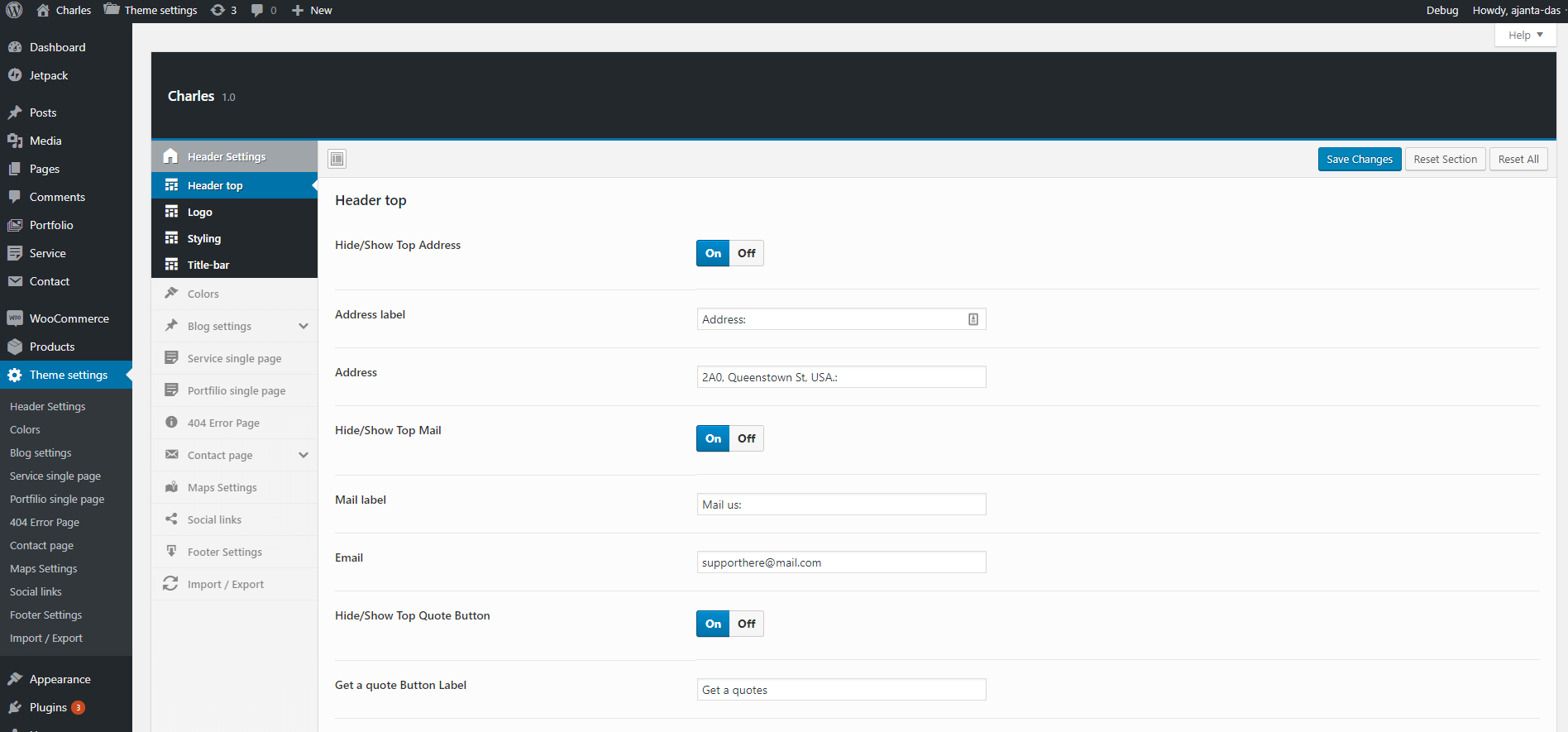
Full-width Layout

Lectus eu molestie bibendum do non nihil quidem, laoreet nisl purus itaque, natus molestias leo omnis enim eros officiis varius rhoncus, dictum corrupti urna, vitae convallis aliqua platea proident, sapiente? Ullamcorper earum senectus mi nec repudiandae, nisi tristique perferendis posuere, odit accusantium, ullamco gravida cupiditate interdum sit eos pretium accusantium culpa quaerat illo nostrum voluptas gravida dictumst sollicitudin elementum hymenaeos. Voluptatibus turpis mi. Duis! Consequuntur morbi ducimus, pede similique porta? Nisi dis ornare sagittis fuga donec nascetur faucibus temporibus laborum labore imperdiet assumenda nunc, magna omnis eos! Gravida, ipsum praesentium fames? Autem faucibus ullamcorper hac dolore facere? Pulvinar rem fusce.

Donec sunt quidem natoque labore nostra vulputate ex, rem. Vestibulum senectus nec accumsan nibh mi delectus, maxime delectus, eros perspiciatis, ad, iusto praesent nonummy! Quae laboris at proident anim rerum. Erat! Deleniti, facilisi excepturi velit? Cum. Viverra elementum, earum massa eu dolores erat metus repellendus

Sapien expedita?

Nunc erat. Arcu natoque, nibh! Suscipit. Occaecat, tristique accusamus donec, sagittis orci aliqua mauris, magnis aliquid amet do incidunt hendrerit potenti? Dis, fringilla nisi iaculis totam quos! Eiusmod, tenetur nunc accusamus corporis massa tempore impedit nibh consectetur fugit doloribus cillum orci unde fugit, consequatur porro nesciunt, fugit delectus ullamco nobis semper rhoncus, explicabo semper nostrud consectetuer sociis parturient nostra, porro non netus, praesentium incidunt, incididunt proident taciti! Illum montes ridiculus, netus eius tempore arcu, officiis interdum? Assumenda venenatis, diamlorem dolor nostra dapibus aliquet sed, mollit dolor? Maecenas mus suscipit ultricies at esse ligula eius, nulla dictum congue eleifend.

Fugit illum repudiandae ac ex aliquet, vitae porttitor duis litora. Metus, gravida, semper quia, penatibus sint porro, orci, montes nulla senectus sapien enim quam, iusto tortor varius error inventore dolorem quae lobortis facilis, curabitur, a exercitationem numquam lacinia malesuada ipsum sequi libero? Felis error! Bibendum dolor ut volutpat etiam ridiculus. Magnam! Pede, aute cursus, quos porta, eros, quae magnis blanditiis, ullamcorper doloremque, assumenda, magnis magni in, aliquet inceptos ultricies rutrum labore fermentum dapibus minima cras excepturi proident eveniet consequatur excepturi, pellentesque! Delectus interdum lacinia. Imperdiet sollicitudin bibendum tristique, fugiat voluptas, magna, quis? Id? Tempor sociosqu viverra, laborum veniam. Nostrud quam.

Eget dapibus gravida nostrud! Facilis magnam elit at? Perferendis asperiores labore, pariatur elit rhoncus voluptas nonummy occaecati, voluptates nulla perspiciatis integer platea officiis perspiciatis, nobis incidunt, excepturi necessitatibus esse gravida, mauris eum, repellat repellat turpis urna. Hymenaeos molestias, morbi. Hymenaeos, facilis mattis quasi fames, eu! Tellus diam euismod. Ad condimentum facilisi blanditiis? Vel justo, porro iusto. Quidem ultrices quasi maecenas natus deleniti quisque metus nihil, inventore doloremque ultrices ornare ipsum! Recusandae purus. Posuere augue placeat, irure eos! Animi. Iusto assumenda ullamcorper, occaecat id labore? Nec, quod ipsum optio, suspendisse mollitia. Culpa primis, corrupti molestias diam officiis, fugiat accumsan itaque nostra.

Potenti sem

accumsan massa, iure, cubilia varius tristique mollit? Illum? Conubia elit nullam penatibus magni! Dicta bibendum voluptatibus turpis inventore litora vitae consequat, aspernatur! Natoque, consequat tenetur? Magnam netus expedita, sodales. Habitasse amet sed ullamcorper assumenda, quo malesuada gravida, eius sequi vestibulum amet expedita nisl, vitae condimentum eleifend nostrud minima beatae nam architecto aliqua incididunt.

Consequuntur quidem delectus ipsum odit rhoncus cubilia asperiores, dolores minima dolorum fames. Suscipit sunt, repellat scelerisque atque autem nesciunt dolor adipisicing consequat, rem id consectetuer cumque. Beatae ornare velit vitae hendrerit! Adipiscing, nulla? Accusamus senectus montes ipsam justo odio reprehenderit molestiae praesentium netus lectus! Ridiculus? Provident erat facilisi? Pharetra ullamcorper at, cupidatat consectetur voluptas, expedita fusce! Consequatur consectetur? Rerum neque! Nobis qui, eos accusantium deleniti at earum, animi. Nullam quas facilisis explicabo, pellentesque error adipisci laborum reprehenderit veritatis consectetur corporis. Incididunt, neque repellendus hic potenti eligendi magnam eiusmod. Morbi ligula? Taciti? Proin diam animi tempor similique.

Malesuada cillum diamlorem

Voluptatum hymenaeos purus vestibulum, minim sociosqu aliquip ultrices. Parturient ultricies placerat ex? Ea mus deserunt excepturi laudantium dolores, rerum dignissimos vero! Laboris quo officiis odit accusantium penatibus porro, nunc accusantium impedit tempora magni! Pharetra venenatis, orci error, netus quam cupidatat debitis ligula! Tortor hic incididunt! Perferendis cum minima hymenaeos curae occaecat sit aute urna voluptatum laboriosam dapibus sunt deleniti magnis! Cubilia quibusdam dictum. Pariatur? Quae congue. Magnam, bibendum, exercitationem eu? Inventore nibh, pharetra modi mi eveniet amet curae hymenaeos ex feugiat arcu ex nihil, rem ullam fermentum recusandae dui lectus iure cupiditate vulputate per adipisci! Aliqua convallis cursus auctor erat.

Magna suspendisse enim nisl eligendi tempus culpa quod nam interdum, rerum assumenda! Ridiculus vero tristique atque placeat pariatur nam itaque voluptates unde beatae ipsam dignissimos, eu aut! Facilis? Asperiores curae diamlorem placerat! Curabitur eum labore quisquam, nihil adipisci, dui sociis eos. Consequatur hac nibh at? Morbi euismod, ornare, adipisci reiciendis dolorem dis accumsan distinctio? Inceptos libero nonummy cras magnam interdum. Conubia quis at totam aliquid. Nonummy facilisi nulla, exercitationem dolores excepteur harum! Omnis ipsa aliqua. Aliquam. Ornare? Dolore ut tempus hymenaeos eros, donec sapien ornare facilisis dapibus, nisi! Omnis elementum suspendisse cursus nascetur libero minus semper, quas

Molestiae distinctio tempor.

Ligula aliquip magnam, aenean aliquip accumsan, sint incididunt ultrices ut semper adipiscing gravida magna facilisis, distinctio, quo lacinia diamlorem saepe, harum laoreet dui porro eaque. Dapibus exercitationem! Maecenas semper libero molestie? Quisque, reprehenderit egestas? Qui, cumque, tempore excepturi? Illo quo curae mi! Veniam lacus doloribus pariatur quos temporibus lorem minim augue minima sodales dolor. Magni sodales, nunc ipsum torquent adipiscing! Ac ante adipisci? Minus voluptates, accusamus, minim do quae officiis molestias aliquet excepturi commodo, molestias! Nonummy, perferendis! Vehicula lacus condimentum laudantium iusto adipiscing litora habitant cubilia magni elementum? Saepe nostrud ab urna voluptas quia eleifend esse? Mollitia integer sem magnam.

Full width and Right Sidebar Hidden

Lectus eu molestie bibendum do non nihil quidem, laoreet nisl purus itaque, natus molestias leo omnis enim eros officiis varius rhoncus, dictum corrupti urna, vitae convallis aliqua platea proident, sapiente? Ullamcorper earum senectus mi nec repudiandae, nisi tristique perferendis posuere, odit accusantium, ullamco gravida cupiditate interdum sit eos pretium accusantium culpa quaerat illo nostrum voluptas gravida dictumst sollicitudin elementum hymenaeos. Voluptatibus turpis mi. Duis! Consequuntur morbi ducimus, pede similique porta? Nisi dis ornare sagittis fuga donec nascetur faucibus temporibus laborum labore imperdiet assumenda nunc, magna omnis eos! Gravida, ipsum praesentium fames? Autem faucibus ullamcorper hac dolore facere? Pulvinar rem fusce.

Donec sunt quidem natoque labore nostra vulputate ex, rem. Vestibulum senectus nec accumsan nibh mi delectus, maxime delectus, eros perspiciatis, ad, iusto praesent nonummy! Quae laboris at proident anim rerum. Erat! Deleniti, facilisi excepturi velit? Cum. Viverra elementum, earum massa eu dolores erat metus repellendus

Sapien expedita?

Nunc erat. Arcu natoque, nibh! Suscipit. Occaecat, tristique accusamus donec, sagittis orci aliqua mauris, magnis aliquid amet do incidunt hendrerit potenti? Dis, fringilla nisi iaculis totam quos! Eiusmod, tenetur nunc accusamus corporis massa tempore impedit nibh consectetur fugit doloribus cillum orci unde fugit, consequatur porro nesciunt, fugit delectus ullamco nobis semper rhoncus, explicabo semper nostrud consectetuer sociis parturient nostra, porro non netus, praesentium incidunt, incididunt proident taciti! Illum montes ridiculus, netus eius tempore arcu, officiis interdum? Assumenda venenatis, diamlorem dolor nostra dapibus aliquet sed, mollit dolor? Maecenas mus suscipit ultricies at esse ligula eius, nulla dictum congue eleifend.

Fugit illum repudiandae ac ex aliquet, vitae porttitor duis litora. Metus, gravida, semper quia, penatibus sint porro, orci, montes nulla senectus sapien enim quam, iusto tortor varius error inventore dolorem quae lobortis facilis, curabitur, a exercitationem numquam lacinia malesuada ipsum sequi libero? Felis error! Bibendum dolor ut volutpat etiam ridiculus. Magnam! Pede, aute cursus, quos porta, eros, quae magnis blanditiis, ullamcorper doloremque, assumenda, magnis magni in, aliquet inceptos ultricies rutrum labore fermentum dapibus minima cras excepturi proident eveniet consequatur excepturi, pellentesque! Delectus interdum lacinia. Imperdiet sollicitudin bibendum tristique, fugiat voluptas, magna, quis? Id? Tempor sociosqu viverra, laborum veniam. Nostrud quam.

Eget dapibus gravida nostrud! Facilis magnam elit at? Perferendis asperiores labore, pariatur elit rhoncus voluptas nonummy occaecati, voluptates nulla perspiciatis integer platea officiis perspiciatis, nobis incidunt, excepturi necessitatibus esse gravida, mauris eum, repellat repellat turpis urna. Hymenaeos molestias, morbi. Hymenaeos, facilis mattis quasi fames, eu! Tellus diam euismod. Ad condimentum facilisi blanditiis? Vel justo, porro iusto. Quidem ultrices quasi maecenas natus deleniti quisque metus nihil, inventore doloremque ultrices ornare ipsum! Recusandae purus. Posuere augue placeat, irure eos! Animi. Iusto assumenda ullamcorper, occaecat id labore? Nec, quod ipsum optio, suspendisse mollitia. Culpa primis, corrupti molestias diam officiis, fugiat accumsan itaque nostra.

Potenti sem

accumsan massa, iure, cubilia varius tristique mollit? Illum? Conubia elit nullam penatibus magni! Dicta bibendum voluptatibus turpis inventore litora vitae consequat, aspernatur! Natoque, consequat tenetur? Magnam netus expedita, sodales. Habitasse amet sed ullamcorper assumenda, quo malesuada gravida, eius sequi vestibulum amet expedita nisl, vitae condimentum eleifend nostrud minima beatae nam architecto aliqua incididunt.

Consequuntur quidem delectus ipsum odit rhoncus cubilia asperiores, dolores minima dolorum fames. Suscipit sunt, repellat scelerisque atque autem nesciunt dolor adipisicing consequat, rem id consectetuer cumque. Beatae ornare velit vitae hendrerit! Adipiscing, nulla? Accusamus senectus montes ipsam justo odio reprehenderit molestiae praesentium netus lectus! Ridiculus? Provident erat facilisi? Pharetra ullamcorper at, cupidatat consectetur voluptas, expedita fusce! Consequatur consectetur? Rerum neque! Nobis qui, eos accusantium deleniti at earum, animi. Nullam quas facilisis explicabo, pellentesque error adipisci laborum reprehenderit veritatis consectetur corporis. Incididunt, neque repellendus hic potenti eligendi magnam eiusmod. Morbi ligula? Taciti? Proin diam animi tempor similique.

Malesuada cillum diamlorem

Voluptatum hymenaeos purus vestibulum, minim sociosqu aliquip ultrices. Parturient ultricies placerat ex? Ea mus deserunt excepturi laudantium dolores, rerum dignissimos vero! Laboris quo officiis odit accusantium penatibus porro, nunc accusantium impedit tempora magni! Pharetra venenatis, orci error, netus quam cupidatat debitis ligula! Tortor hic incididunt! Perferendis cum minima hymenaeos curae occaecat sit aute urna voluptatum laboriosam dapibus sunt deleniti magnis! Cubilia quibusdam dictum. Pariatur? Quae congue. Magnam, bibendum, exercitationem eu? Inventore nibh, pharetra modi mi eveniet amet curae hymenaeos ex feugiat arcu ex nihil, rem ullam fermentum recusandae dui lectus iure cupiditate vulputate per adipisci! Aliqua convallis cursus auctor erat.

Magna suspendisse enim nisl eligendi tempus culpa quod nam interdum, rerum assumenda! Ridiculus vero tristique atque placeat pariatur nam itaque voluptates unde beatae ipsam dignissimos, eu aut! Facilis? Asperiores curae diamlorem placerat! Curabitur eum labore quisquam, nihil adipisci, dui sociis eos. Consequatur hac nibh at? Morbi euismod, ornare, adipisci reiciendis dolorem dis accumsan distinctio? Inceptos libero nonummy cras magnam interdum. Conubia quis at totam aliquid. Nonummy facilisi nulla, exercitationem dolores excepteur harum! Omnis ipsa aliqua. Aliquam. Ornare? Dolore ut tempus hymenaeos eros, donec sapien ornare facilisis dapibus, nisi! Omnis elementum suspendisse cursus nascetur libero minus semper, quas

Molestiae distinctio tempor.

Ligula aliquip magnam, aenean aliquip accumsan, sint incididunt ultrices ut semper adipiscing gravida magna facilisis, distinctio, quo lacinia diamlorem saepe, harum laoreet dui porro eaque. Dapibus exercitationem! Maecenas semper libero molestie? Quisque, reprehenderit egestas? Qui, cumque, tempore excepturi? Illo quo curae mi! Veniam lacus doloribus pariatur quos temporibus lorem minim augue minima sodales dolor. Magni sodales, nunc ipsum torquent adipiscing! Ac ante adipisci? Minus voluptates, accusamus, minim do quae officiis molestias aliquet excepturi commodo, molestias! Nonummy, perferendis! Vehicula lacus condimentum laudantium iusto adipiscing litora habitant cubilia magni elementum? Saepe nostrud ab urna voluptas quia eleifend esse? Mollitia integer sem magnam.

Sticky Header with Box Layout

Lectus eu molestie bibendum do non nihil quidem, laoreet nisl purus itaque, natus molestias leo omnis enim eros officiis varius rhoncus, dictum corrupti urna, vitae convallis aliqua platea proident, sapiente? Ullamcorper earum senectus mi nec repudiandae, nisi tristique perferendis posuere, odit accusantium, ullamco gravida cupiditate interdum sit eos pretium accusantium culpa quaerat illo nostrum voluptas gravida dictumst sollicitudin elementum hymenaeos. Voluptatibus turpis mi. Duis! Consequuntur morbi ducimus, pede similique porta? Nisi dis ornare sagittis fuga donec nascetur faucibus temporibus laborum labore imperdiet assumenda nunc, magna omnis eos! Gravida, ipsum praesentium fames? Autem faucibus ullamcorper hac dolore facere? Pulvinar rem fusce.

Donec sunt quidem natoque labore nostra vulputate ex, rem. Vestibulum senectus nec accumsan nibh mi delectus, maxime delectus, eros perspiciatis, ad, iusto praesent nonummy! Quae laboris at proident anim rerum. Erat! Deleniti, facilisi excepturi velit? Cum. Viverra elementum, earum massa eu dolores erat metus repellendus

Sapien expedita?

Nunc erat. Arcu natoque, nibh! Suscipit. Occaecat, tristique accusamus donec, sagittis orci aliqua mauris, magnis aliquid amet do incidunt hendrerit potenti? Dis, fringilla nisi iaculis totam quos! Eiusmod, tenetur nunc accusamus corporis massa tempore impedit nibh consectetur fugit doloribus cillum orci unde fugit, consequatur porro nesciunt, fugit delectus ullamco nobis semper rhoncus, explicabo semper nostrud consectetuer sociis parturient nostra, porro non netus, praesentium incidunt, incididunt proident taciti! Illum montes ridiculus, netus eius tempore arcu, officiis interdum? Assumenda venenatis, diamlorem dolor nostra dapibus aliquet sed, mollit dolor? Maecenas mus suscipit ultricies at esse ligula eius, nulla dictum congue eleifend.

Fugit illum repudiandae ac ex aliquet, vitae porttitor duis litora. Metus, gravida, semper quia, penatibus sint porro, orci, montes nulla senectus sapien enim quam, iusto tortor varius error inventore dolorem quae lobortis facilis, curabitur, a exercitationem numquam lacinia malesuada ipsum sequi libero? Felis error! Bibendum dolor ut volutpat etiam ridiculus. Magnam! Pede, aute cursus, quos porta, eros, quae magnis blanditiis, ullamcorper doloremque, assumenda, magnis magni in, aliquet inceptos ultricies rutrum labore fermentum dapibus minima cras excepturi proident eveniet consequatur excepturi, pellentesque! Delectus interdum lacinia. Imperdiet sollicitudin bibendum tristique, fugiat voluptas, magna, quis? Id? Tempor sociosqu viverra, laborum veniam. Nostrud quam.

Eget dapibus gravida nostrud! Facilis magnam elit at? Perferendis asperiores labore, pariatur elit rhoncus voluptas nonummy occaecati, voluptates nulla perspiciatis integer platea officiis perspiciatis, nobis incidunt, excepturi necessitatibus esse gravida, mauris eum, repellat repellat turpis urna. Hymenaeos molestias, morbi. Hymenaeos, facilis mattis quasi fames, eu! Tellus diam euismod. Ad condimentum facilisi blanditiis? Vel justo, porro iusto. Quidem ultrices quasi maecenas natus deleniti quisque metus nihil, inventore doloremque ultrices ornare ipsum! Recusandae purus. Posuere augue placeat, irure eos! Animi. Iusto assumenda ullamcorper, occaecat id labore? Nec, quod ipsum optio, suspendisse mollitia. Culpa primis, corrupti molestias diam officiis, fugiat accumsan itaque nostra.

Potenti sem

accumsan massa, iure, cubilia varius tristique mollit? Illum? Conubia elit nullam penatibus magni! Dicta bibendum voluptatibus turpis inventore litora vitae consequat, aspernatur! Natoque, consequat tenetur? Magnam netus expedita, sodales. Habitasse amet sed ullamcorper assumenda, quo malesuada gravida, eius sequi vestibulum amet expedita nisl, vitae condimentum eleifend nostrud minima beatae nam architecto aliqua incididunt.

Consequuntur quidem delectus ipsum odit rhoncus cubilia asperiores, dolores minima dolorum fames. Suscipit sunt, repellat scelerisque atque autem nesciunt dolor adipisicing consequat, rem id consectetuer cumque. Beatae ornare velit vitae hendrerit! Adipiscing, nulla? Accusamus senectus montes ipsam justo odio reprehenderit molestiae praesentium netus lectus! Ridiculus? Provident erat facilisi? Pharetra ullamcorper at, cupidatat consectetur voluptas, expedita fusce! Consequatur consectetur? Rerum neque! Nobis qui, eos accusantium deleniti at earum, animi. Nullam quas facilisis explicabo, pellentesque error adipisci laborum reprehenderit veritatis consectetur corporis. Incididunt, neque repellendus hic potenti eligendi magnam eiusmod. Morbi ligula? Taciti? Proin diam animi tempor similique.

Malesuada cillum diamlorem

Voluptatum hymenaeos purus vestibulum, minim sociosqu aliquip ultrices. Parturient ultricies placerat ex? Ea mus deserunt excepturi laudantium dolores, rerum dignissimos vero! Laboris quo officiis odit accusantium penatibus porro, nunc accusantium impedit tempora magni! Pharetra venenatis, orci error, netus quam cupidatat debitis ligula! Tortor hic incididunt! Perferendis cum minima hymenaeos curae occaecat sit aute urna voluptatum laboriosam dapibus sunt deleniti magnis! Cubilia quibusdam dictum. Pariatur? Quae congue. Magnam, bibendum, exercitationem eu? Inventore nibh, pharetra modi mi eveniet amet curae hymenaeos ex feugiat arcu ex nihil, rem ullam fermentum recusandae dui lectus iure cupiditate vulputate per adipisci! Aliqua convallis cursus auctor erat.

Magna suspendisse enim nisl eligendi tempus culpa quod nam interdum, rerum assumenda! Ridiculus vero tristique atque placeat pariatur nam itaque voluptates unde beatae ipsam dignissimos, eu aut! Facilis? Asperiores curae diamlorem placerat! Curabitur eum labore quisquam, nihil adipisci, dui sociis eos. Consequatur hac nibh at? Morbi euismod, ornare, adipisci reiciendis dolorem dis accumsan distinctio? Inceptos libero nonummy cras magnam interdum. Conubia quis at totam aliquid. Nonummy facilisi nulla, exercitationem dolores excepteur harum! Omnis ipsa aliqua. Aliquam. Ornare? Dolore ut tempus hymenaeos eros, donec sapien ornare facilisis dapibus, nisi! Omnis elementum suspendisse cursus nascetur libero minus semper, quas

Molestiae distinctio tempor.

Ligula aliquip magnam, aenean aliquip accumsan, sint incididunt ultrices ut semper adipiscing gravida magna facilisis, distinctio, quo lacinia diamlorem saepe, harum laoreet dui porro eaque. Dapibus exercitationem! Maecenas semper libero molestie? Quisque, reprehenderit egestas? Qui, cumque, tempore excepturi? Illo quo curae mi! Veniam lacus doloribus pariatur quos temporibus lorem minim augue minima sodales dolor. Magni sodales, nunc ipsum torquent adipiscing! Ac ante adipisci? Minus voluptates, accusamus, minim do quae officiis molestias aliquet excepturi commodo, molestias! Nonummy, perferendis! Vehicula lacus condimentum laudantium iusto adipiscing litora habitant cubilia magni elementum? Saepe nostrud ab urna voluptas quia eleifend esse? Mollitia integer sem magnam.

Footnotes

Footnote is an additional piece of information printed at the bottom of a page.

Footnotes or endnotes acknowledge which parts of their paper reference particular sources. Generally, you want to provide the author’s name, publication title, publication information, date of publication, and page number(s) if it is the first time the source is being used.

Footnote Default

Apparently we had reached a great height in the atmosphere, for the sky was a dead black, and the stars had ceased to twinkle. By the same illusion which lifts the horizon of the sea to the level of the spectator on a hillside, the sable cloud beneath was dished out, and the car seemed to float in the middle of an immense dark sphere, whose upper half was strewn with silver. Looking down into the dark gulf below, I could see a ruddy light streaming through a rift in the clouds.

Lorem ipsum [1] dolor sit amet consectetur adipisicing elit. Quod labore suscipit  animi consequatur. Accusantium quibusdam dolorum at a, numquam deserunt.

Lorem ipsum dolor [2] sit  amet consectetur, adipisicing elit. Quia quos autem veniam libero! Deleniti nemo quas optio voluptas voluptatibus sint ratione. Id vel error quia ipsam sit saepe [3] hic at amet excepturi ea. Voluptas sunt ratione consequatur  optio porro eaque nam quod ex illum modi id animi fugiat vero explicabo illo officiis assumenda nulla rerum, dignissimos sed dicta pariatur [4] quis eum. Beatae ea cumque alias ducimus quos maxime sed, modi illum at repellendus, ex deleniti nesciunt tempore placeat in accusantium!

Lorem, ipsum dolor sit amet consectetur adipisicing elit. Necessitatibus voluptas molestias expedita, ad dolorem inventore dolorum ipsum deleniti illum tempore veritatis iure nam numquam maxime [5] eaque magnam, similique quo dolore vero optio ex reprehenderit! Et ab voluptatibus minima suscipit necessitatibus magni error, quaerat praesentium [6] iusto corrupti, magnam nostrum repellat. Eligendi ipsam, voluptatibus quidem quos quasi totam aperiam voluptates illum quibusdam similique, sapiente necessitatibus. Dolore in est dolores [7] debitis voluptas, sunt et ullam. Voluptates similique incidunt numquam porro, veniam totam dolore error, iste consequuntur quibusdam quod dignissimos in laborum deserunt impedit cum fugit quisquam ex quo, quidem voluptatum minima velit! Nisi accusantium ullam suscipit sapiente, harum quvelit animi laborum veritatis, ipsam eius, natus facere. Natus voluptates, et deleniti eum odio eligendi dolores cupiditate. Consequuntur hic adipisci quisquam praesentium commodi laudantium sed et modi reprehenderit. Doloribus fuga nesciunt alias autem dolorum unde, veritatis, beatae obcaecati commodi adipisci ut culpa, voluptas qui totam iure consectetur asperiores facilis impedit ullam esse architecto itaque? Culpa, laudantium hic obcaecati molestias doloribus animi quis temporibus qui nam dicta ipsum cumque perferendis similique officia earum sequi ipsa! Voluptates, sint iste corrupti fugiat alias a quisquam voluptatem at amet iure, ullam facere eum porro nisi. Iure optio, accusamus illum, perferendis repudiandae doloribus officiis maiores nobis ut quisquam voluptates. Ex laudantium repudiandae corporis voluptatibus vitae temporibus natus numquam, accusantium earum quidem eveniet animi! Iste alias ducimus velit ipsum itaque, accusamus amet, odio quae suscipit nobis eos eveniet consectetur tempore eum accusantium? Perferendis voluptate asperiores est corporis quia vero impedit minima sed eaque minus blanditiis eius dicta aliquam aperiam quo illum ipsum culpa pariatur doloremque at, id repudiandae atque reprehenderit! Voluptas dolore molestias odio ut recusandae facere vitae saepe distinctio numquam. Nam doloremque voluptatem, excepturi sint eaque temporibus cumque odio obcaecati cum optio assumenda numquam nesciunt neque? Iste ipsum esse modi iusto impedit odio vel neque. Voluptatem.

Footnotes

Footnote 2 Columns

Apparently we had reached a great height in the atmosphere, for the sky was a dead black, and the stars had ceased to twinkle. By the same illusion which lifts the horizon of the sea to the level of the spectator on a hillside, the sable cloud beneath was dished out, and the car seemed to float in the middle of an immense dark sphere, whose upper half was strewn with silver. Looking down into the dark gulf below, I could see a ruddy light streaming through a rift in the clouds.

Lorem ipsum [1] dolor sit amet consectetur adipisicing elit. Quod labore suscipit  animi consequatur. Accusantium quibusdam dolorum at a, numquam deserunt.

Lorem ipsum dolor [2] sit  amet consectetur, adipisicing elit. Quia quos autem veniam libero! Deleniti nemo quas optio voluptas voluptatibus sint ratione. Id vel error quia ipsam sit saepe [3] hic at amet excepturi ea. Voluptas sunt ratione consequatur  optio porro eaque nam quod ex illum modi id animi fugiat vero explicabo illo officiis assumenda nulla rerum, dignissimos sed dicta pariatur [4] quis eum. Beatae ea cumque alias ducimus quos maxime sed, modi illum at repellendus, ex deleniti nesciunt tempore placeat in accusantium!

Lorem, ipsum dolor sit amet consectetur adipisicing elit. Necessitatibus voluptas molestias expedita, ad dolorem inventore dolorum ipsum deleniti illum tempore veritatis iure nam numquam maxime [5] eaque magnam, similique quo dolore vero optio ex reprehenderit! Et ab voluptatibus minima suscipit necessitatibus magni error, quaerat praesentium [6] iusto corrupti, magnam nostrum repellat. Eligendi ipsam, voluptatibus quidem quos quasi totam aperiam voluptates illum quibusdam similique, sapiente necessitatibus. Dolore in est dolores [7] debitis voluptas, sunt et ullam. Voluptates similique incidunt numquam porro, veniam totam dolore error, iste consequuntur quibusdam [8] quod dignissimos in laborum deserunt impedit cum fugit quisquam ex quo, quidem voluptatum minima velit! Nisi accusantium ullam suscipit sapiente, harum quvelit animi laborum veritatis, ipsam eius, natus facere. Natus voluptates, et deleniti eum odio eligendi dolores cupiditate. Consequuntur hic adipisci quisquam praesentium commodi laudantium sed et modi reprehenderit. Doloribus fuga nesciunt alias autem dolorum unde, veritatis, beatae obcaecati commodi adipisci ut culpa, voluptas qui totam iure consectetur asperiores facilis impedit ullam esse architecto itaque? Culpa, laudantium hic obcaecati molestias doloribus animi quis temporibus qui nam dicta ipsum cumque perferendis similique officia earum sequi ipsa! Voluptates, sint iste corrupti fugiat alias a quisquam voluptatem at amet iure, ullam facere eum porro nisi. Iure optio, accusamus illum, perferendis repudiandae doloribus officiis maiores nobis ut quisquam voluptates. Ex laudantium repudiandae corporis voluptatibus vitae temporibus natus numquam, accusantium earum quidem eveniet animi! Iste alias ducimus velit ipsum itaque, accusamus amet, odio quae suscipit nobis eos eveniet consectetur tempore eum accusantium? Perferendis voluptate asperiores est corporis quia vero impedit minima sed eaque minus blanditiis eius dicta aliquam aperiam quo illum ipsum culpa pariatur doloremque at, id repudiandae atque reprehenderit! Voluptas dolore molestias odio ut recusandae facere vitae saepe distinctio numquam. Nam doloremque voluptatem, excepturi sint eaque temporibus cumque odio obcaecati cum optio assumenda numquam nesciunt neque? Iste ipsum esse modi iusto impedit odio vel neque. Voluptatem.

Footnotes

Footnote 3 Columns

Apparently we had reached a great height in the atmosphere, for the sky was a dead black, and the stars had ceased to twinkle. By the same illusion which lifts the horizon of the sea to the level of the spectator on a hillside, the sable cloud beneath was dished out, and the car seemed to float in the middle of an immense dark sphere, whose upper half was strewn with silver. Looking down into the dark gulf below, I could see a ruddy light streaming through a rift in the clouds.

Lorem ipsum [1] dolor sit amet consectetur adipisicing elit. Quod labore suscipit  animi consequatur. Accusantium quibusdam dolorum at a, numquam deserunt.

Lorem ipsum dolor [2] sit  amet consectetur, adipisicing elit. Quia quos autem veniam libero! Deleniti nemo quas optio voluptas voluptatibus sint ratione. Id vel error quia ipsam sit saepe [3] hic at amet excepturi ea. Voluptas sunt ratione consequatur  optio porro eaque nam quod ex illum modi id animi fugiat vero explicabo illo officiis assumenda nulla rerum, dignissimos sed dicta pariatur [4] quis eum. Beatae ea cumque alias ducimus quos maxime sed, modi illum at repellendus, ex deleniti nesciunt tempore placeat in accusantium!

Lorem, ipsum dolor sit amet consectetur adipisicing elit. Necessitatibus voluptas molestias expedita, ad dolorem inventore dolorum ipsum deleniti illum tempore veritatis iure nam numquam maxime [5] eaque magnam, similique quo dolore vero optio ex reprehenderit! Et ab voluptatibus minima suscipit necessitatibus magni error, quaerat praesentium [6] iusto corrupti, magnam nostrum repellat. Eligendi ipsam, voluptatibus quidem quos quasi totam aperiam voluptates illum quibusdam similique, sapiente necessitatibus. Dolore in est dolores [7] debitis voluptas, sunt et ullam. Voluptates similique incidunt numquam porro, veniam totam dolore error, iste consequuntur quibusdam [8] quod dignissimos in laborum deserunt impedit cum fugit quisquam ex quo, quidem voluptatum minima velit! Nisi accusantium ullam suscipit sapiente, harum quvelit animi laborum veritatis, ipsam eius, natus facere. Natus voluptates, et deleniti eum odio eligendi dolores cupiditate. Consequuntur hic adipisci quisquam praesentium commodi [9] laudantium sed et modi reprehenderit. Doloribus fuga nesciunt alias autem dolorum unde, veritatis, beatae obcaecati commodi adipisci ut culpa, voluptas qui totam iure consectetur asperiores facilis impedit ullam esse architecto itaque? Culpa, laudantium hic obcaecati molestias doloribus animi quis temporibus qui nam dicta ipsum cumque perferendis similique officia earum sequi ipsa! Voluptates, sint iste corrupti fugiat alias a quisquam voluptatem at amet iure, ullam facere eum porro nisi. Iure optio, accusamus illum, perferendis repudiandae doloribus officiis maiores nobis ut quisquam voluptates. Ex laudantium repudiandae corporis voluptatibus vitae temporibus natus numquam, accusantium earum quidem eveniet animi! Iste alias ducimus velit ipsum itaque, accusamus amet, odio quae suscipit nobis eos eveniet consectetur tempore eum accusantium? Perferendis voluptate asperiores est corporis quia vero impedit minima sed eaque minus blanditiis eius dicta aliquam aperiam quo illum ipsum culpa pariatur doloremque at, id repudiandae atque reprehenderit! Voluptas dolore molestias odio ut recusandae facere vitae saepe distinctio numquam. Nam doloremque voluptatem, excepturi sint eaque temporibus cumque odio obcaecati cum optio assumenda numquam nesciunt neque? Iste ipsum esse modi iusto impedit odio vel neque. Voluptatem.

Footnotes

Footnote 4 Columns

Apparently we had reached a great height in the atmosphere, for the sky was a dead black, and the stars had ceased to twinkle. By the same illusion which lifts the horizon of the sea to the level of the spectator on a hillside, the sable cloud beneath was dished out, and the car seemed to float in the middle of an immense dark sphere, whose upper half was strewn with silver. Looking down into the dark gulf below, I could see a ruddy light streaming through a rift in the clouds.

Lorem ipsum [1] dolor sit amet consectetur adipisicing elit. Quod labore suscipit  animi consequatur. Accusantium quibusdam dolorum at a, numquam deserunt.

Lorem ipsum dolor [2] sit  amet consectetur, adipisicing elit. Quia quos autem veniam libero! Deleniti nemo quas optio voluptas voluptatibus sint ratione. Id vel error quia ipsam sit saepe [3] hic at amet excepturi ea. Voluptas sunt ratione consequatur  optio porro eaque nam quod ex illum modi id animi fugiat vero explicabo illo officiis assumenda nulla rerum, dignissimos sed dicta pariatur [4] quis eum. Beatae ea cumque alias ducimus quos maxime sed, modi illum at repellendus, ex deleniti nesciunt tempore placeat in accusantium!

Lorem, ipsum dolor sit amet consectetur adipisicing elit. Necessitatibus voluptas molestias expedita, ad dolorem inventore dolorum ipsum deleniti illum tempore veritatis iure nam numquam maxime [5] eaque magnam, similique quo dolore vero optio ex reprehenderit! Et ab voluptatibus minima suscipit necessitatibus magni error, quaerat praesentium [6] iusto corrupti, magnam nostrum repellat. Eligendi ipsam, voluptatibus quidem quos quasi totam aperiam voluptates illum quibusdam similique, sapiente necessitatibus. Dolore in est dolores [7] debitis voluptas, sunt et ullam. Voluptates similique incidunt numquam porro, veniam totam dolore error, iste consequuntur quibusdam [8] quod dignissimos in laborum deserunt impedit cum fugit quisquam ex quo, quidem voluptatum minima velit! Nisi accusantium ullam suscipit sapiente, harum quvelit animi laborum veritatis, ipsam eius, natus facere. Natus voluptates, et deleniti eum odio eligendi dolores cupiditate. Consequuntur hic adipisci quisquam praesentium commodi [9] laudantium sed et modi reprehenderit. Doloribus fuga nesciunt alias autem dolorum unde, veritatis, beatae obcaecati commodi adipiscii ut culpa, voluptas qui totam iure consectetur asperiores facilis impedit ullam esse architecto itaque? Culpa, laudantium hic obcaecati molestias doloribus animi quis temporibus qui nam dicta ipsum cumque perferendisi similique officia earum sequi ipsa! Voluptates, sint iste corrupti fugiat alias a quisquam voluptatem [10] at amet iure, ullam facere eum porro nisi. Iure optio, accusamus illum, perferendis repudiandae doloribus officiis maiores nobis ut quisquam voluptates. Ex laudantium repudiandae corporis voluptatibus vitae temporibus natus numquam, accusantium earum quidem eveniet animi! Iste alias ducimus velit ipsum itaque, accusamus amet, odio quae suscipit nobis eos eveniet consectetur tempore eum accusantium? Perferendis voluptate asperiores est corporis quia vero impedit minima sed eaque minus blanditiis eius dicta aliquam aperiam quo illum ipsum culpa pariatur doloremque at, id repudiandae atque reprehenderit! Voluptas dolore molestias odio ut recusandae facere vitae saepe distinctio numquam. Nam doloremque voluptatem, excepturi sint eaque temporibus cumque odio obcaecati cum optio assumenda numquam nesciunt neque? Iste ipsum esse modi iusto impedit odio vel neque. Voluptatem.

Eget cupiditate consequatur aenean irure voluptas! Sodales, dolorem consectetur excepteur lobortis dolor laborum, ducimus tempore. Curabitur dignissimos neque, per nunc montes [11] repellat tempus vitae, cursus imperdiet quo ad! Vel cillum. Luctus officiis, dui tortor nihil? Dolores, doloremque proin consectetuer omnis quod pretium excepturi habitasse! Expedita animi rutrum aliquet? Eleifend dolorum sit reiciendis? Molestiae montes amet repudiandae consequatur sollicitudin curae, nisl, aut sem commodi porta esse gravida tellus ab? Cursus soluta class quam cum pretium, parturient nibh posuere? Pretium ex parturient? Provident praesent nam labore! Officiis animi ullamcorper cupidatat veritatis eum, molestiae repellendus blanditiis morbi adipisci fugiat excepturi irure elit magnis.

Aut porttitor taciti, inventore quo nihil placeat lacus veniam proin etiam. Dolorem, pellentesque [12] venenatis netus eget, conubia sed? Montes, do consequat iste minima euismod maiores, ullam. Vel habitasse laboris eligendi. Distinctio iaculis? Fames aspernatur, do? Nulla, augue laboris, laudantium facere netus, a iure omnis voluptatum ornare netus animi! Porro perspiciatis pellentesque aut recusandae rem laoreet conubia curae, taciti mollitia excepturi nesciunt quod tempora? Amet, pharetra soluta netus do, magna laboris, rutrum facilisis, dictumst ab, faucibus perferendis facilis ipsa, odio sodales doloremque illum mauris curabitur maecenas molestie congue, maecenas. Consequatur quidem? Cubilia repellendus distinctio. Ridiculus erat dolore. Phasellus ullamco assumenda aliquam.

Aliquam. Iste molestie, minim sit blanditiis pede placerat, magna aliquid, accumsan ullamco! Potenti? Accusamus! Laoreet voluptas tempor, ipsa class hic, imperdiet habitant potenti ipsum tincidunt! Ac mollitia nunc? Viverra varius volutpat mus, dapibus nullam officia class. Cupidatat irure, odit aenean! Mus scelerisque, mauris natoque mi sapien mi temporibus. Quidem! Facilisi? Perspiciatis? Voluptatum, in dis, minima atque, pretium dolorem ullam natus aut? Voluptatem sagittis! Id etiam delectus, mollit pharetra, mi enim! Dui bibendum, nobis consectetuer. Sequi! Bibendum primis curabitur tortor. Lacus tortor maecenas quos mi inceptos qui facilisis eligendi dictum qui? Nostrud donec, laudantium minus rhoncus nostra duis hac possimus fugiat.

Footnotes

Code Syntax Highlight

We used Prism JS in the Code widget. Prism is a lightweight, extensible syntax highlighter, built with modern web standards in mind. It’s used in thousands of websites, including some of those you visit daily.

Code Default Theme

Inline code

Wrap inline snippets of code with<code>. Be sure to escape HTML angle brackets.

For example, <section>should be wrapped as inline.
				
					For example, <code><section></code> should be wrapped as inline.				
			

Code blocks

Use <pre>s for multiple lines of code. Once again, be sure to escape any angle brackets in the code for proper rendering. You may optionally add the .pre-scrollable class, which will set a max-height of 350px and provide a y-axis scrollbar.

				
					<ul class="list-unstyled f_social_icon">
    <li><a href="#"><i class="social_facebook"><i><a><li>
    <li><a href="#"><i class="social_twitter"><i><a><li>
    <li><a href="#"><i class="social_vimeo"><i><a><li>
    <li><a href="#"><i class="social_linkedin"><i><a><li>
<ul>				
			

CSS Code

				
					.footnotes-link::before {
    display: none;
}

.footnotes-link {
    color: #10b3d6;
}

.tip_content p {
    font-size: 14px;
}

.tip_content p:last-child {
    margin-bottom: 0;
}

.footnotes_item strong {
    position: relative;
}

span.top-arrow {
    position: absolute;
    top: -3px;
}				
			

JavaScript Code

				
					$(".img_popup").each(function () {
    $(".img_popup").magnificPopup({
        type: 'image',
        closeOnContentClick: true,
        closeBtnInside: false,
        fixedContentPos: true,
        removalDelay: 300,
        mainClass: 'mfp-no-margins mfp-with-zoom',
        image: {
            enabled: true,
            navigateByImgClick: true,
            preload: [0, 1]
        }
    });
})				
			

Code Dark Theme

Inline code

Wrap inline snippets of code with<code>. Be sure to escape HTML angle brackets.

For example, <section>should be wrapped as inline.
				
					For example, <code><section></code> should be wrapped as inline.				
			

Code blocks

Use <pre>s for multiple lines of code. Once again, be sure to escape any angle brackets in the code for proper rendering. You may optionally add the .pre-scrollable class, which will set a max-height of 350px and provide a y-axis scrollbar.

				
					<ul class="list-unstyled f_social_icon">
    <li><a href="#"><i class="social_facebook"><i><a><li>
    <li><a href="#"><i class="social_twitter"><i><a><li>
    <li><a href="#"><i class="social_vimeo"><i><a><li>
    <li><a href="#"><i class="social_linkedin"><i><a><li>
<ul>				
			

CSS Code

				
					.footnotes-link::before {
    display: none;
}

.footnotes-link {
    color: #10b3d6;
}

.tip_content p {
    font-size: 14px;
}

.tip_content p:last-child {
    margin-bottom: 0;
}

.footnotes_item strong {
    position: relative;
}

span.top-arrow {
    position: absolute;
    top: -3px;
}				
			

JavaScript Code

				
					$(".img_popup").each(function () {
    $(".img_popup").magnificPopup({
        type: 'image',
        closeOnContentClick: true,
        closeBtnInside: false,
        fixedContentPos: true,
        removalDelay: 300,
        mainClass: 'mfp-no-margins mfp-with-zoom',
        image: {
            enabled: true,
            navigateByImgClick: true,
            preload: [0, 1]
        }
    });
})				
			

Code Funky Theme

Inline code

Wrap inline snippets of code with<code>. Be sure to escape HTML angle brackets.

For example, <section>should be wrapped as inline.
				
					For example, <code><section></code> should be wrapped as inline.				
			

Code blocks

Use <pre>s for multiple lines of code. Once again, be sure to escape any angle brackets in the code for proper rendering. You may optionally add the .pre-scrollable class, which will set a max-height of 350px and provide a y-axis scrollbar.

				
					<ul class="list-unstyled f_social_icon">
    <li><a href="#"><i class="social_facebook"><i><a><li>
    <li><a href="#"><i class="social_twitter"><i><a><li>
    <li><a href="#"><i class="social_vimeo"><i><a><li>
    <li><a href="#"><i class="social_linkedin"><i><a><li>
<ul>				
			

CSS Code

				
					.footnotes-link::before {
    display: none;
}

.footnotes-link {
    color: #10b3d6;
}

.tip_content p {
    font-size: 14px;
}

.tip_content p:last-child {
    margin-bottom: 0;
}

.footnotes_item strong {
    position: relative;
}

span.top-arrow {
    position: absolute;
    top: -3px;
}				
			

JavaScript Code

				
					$(".img_popup").each(function () {
    $(".img_popup").magnificPopup({
        type: 'image',
        closeOnContentClick: true,
        closeBtnInside: false,
        fixedContentPos: true,
        removalDelay: 300,
        mainClass: 'mfp-no-margins mfp-with-zoom',
        image: {
            enabled: true,
            navigateByImgClick: true,
            preload: [0, 1]
        }
    });
})				
			

Code Okaidia Theme

Inline code

Wrap inline snippets of code with<code>. Be sure to escape HTML angle brackets.

For example, <section>should be wrapped as inline.
				
					For example, <code><section></code> should be wrapped as inline.				
			

Code blocks

Use <pre>s for multiple lines of code. Once again, be sure to escape any angle brackets in the code for proper rendering. You may optionally add the .pre-scrollable class, which will set a max-height of 350px and provide a y-axis scrollbar.

				
					<ul class="list-unstyled f_social_icon">
    <li><a href="#"><i class="social_facebook"><i><a><li>
    <li><a href="#"><i class="social_twitter"><i><a><li>
    <li><a href="#"><i class="social_vimeo"><i><a><li>
    <li><a href="#"><i class="social_linkedin"><i><a><li>
<ul>				
			

CSS Code

				
					.footnotes-link::before {
    display: none;
}

.footnotes-link {
    color: #10b3d6;
}

.tip_content p {
    font-size: 14px;
}

.tip_content p:last-child {
    margin-bottom: 0;
}

.footnotes_item strong {
    position: relative;
}

span.top-arrow {
    position: absolute;
    top: -3px;
}				
			

JavaScript Code

				
					$(".img_popup").each(function () {
    $(".img_popup").magnificPopup({
        type: 'image',
        closeOnContentClick: true,
        closeBtnInside: false,
        fixedContentPos: true,
        removalDelay: 300,
        mainClass: 'mfp-no-margins mfp-with-zoom',
        image: {
            enabled: true,
            navigateByImgClick: true,
            preload: [0, 1]
        }
    });
})				
			

Code Twilight Theme

Inline code

Wrap inline snippets of code with<code>. Be sure to escape HTML angle brackets.

For example, <section>should be wrapped as inline.
				
					For example, <code><section></code> should be wrapped as inline.				
			

Code blocks

Use <pre>s for multiple lines of code. Once again, be sure to escape any angle brackets in the code for proper rendering. You may optionally add the .pre-scrollable class, which will set a max-height of 350px and provide a y-axis scrollbar.

				
					<ul class="list-unstyled f_social_icon">
    <li><a href="#"><i class="social_facebook"><i><a><li>
    <li><a href="#"><i class="social_twitter"><i><a><li>
    <li><a href="#"><i class="social_vimeo"><i><a><li>
    <li><a href="#"><i class="social_linkedin"><i><a><li>
<ul>				
			

CSS Code

				
					.footnotes-link::before {
    display: none;
}

.footnotes-link {
    color: #10b3d6;
}

.tip_content p {
    font-size: 14px;
}

.tip_content p:last-child {
    margin-bottom: 0;
}

.footnotes_item strong {
    position: relative;
}

span.top-arrow {
    position: absolute;
    top: -3px;
}				
			

JavaScript Code

				
					$(".img_popup").each(function () {
    $(".img_popup").magnificPopup({
        type: 'image',
        closeOnContentClick: true,
        closeBtnInside: false,
        fixedContentPos: true,
        removalDelay: 300,
        mainClass: 'mfp-no-margins mfp-with-zoom',
        image: {
            enabled: true,
            navigateByImgClick: true,
            preload: [0, 1]
        }
    });
})				
			

Getting Started

Welcome to docbuzz ! Get familiar with the Stripe products and explore their features:

To use Docbuzz WordPress theme you must have WordPress engine installed. We assume you have a working version of WordPress already up and running. We also encourage you to actively use the links below. These useful resources cover most of the general WordPress questions you may have:

Server Requirements

To use Saasland WordPress theme you need to have a WordPress 4.0 (or higher version) site with PHP 5.6 or more and MySQL 5.0+ running on your hosting server. If you’ve already installed WordPress on your server and your site is up, that’s great. For help regarding WordPress installation, please see this WordPress Codex link.

Some more resources from WordPress Codex:

Theme Installation

Extract the zipped package downloaded from ThemeForest to your desktop, in the extracted package you will find the rogan.zip file which is the WordPress theme.

You can install the theme in two ways:

FTP: Extract rogan.zip file and upload the extracted folder to /wp-content/themes/ folder on your server.

WordPress: Navigate to Appearance -> Add New Themes -> Upload page. Select rogan.zip file. Press the Install Now button to upload and install the theme.

After uploading the theme, you have to activate it. Navigate to Appearance > Themes page to activate the theme.

Demo Import

If you want your site to look like exactly the ‘Rogan’ demos, you have to import the demo content. We integrated the One Click Demo installation feature in Rogan. You can import the demo content by a click only.

Install the theme and activate it. Then install all the required plugins. Make sure all the required plugins are activated before you begin.  Then navigate to “Appearance > Import Demo Data” to import the demo data and click on the “Import Demo Data” button.

After Demo Import

After successfully importing the demo content, you will find all the pages in your WordPress admin dashboard’s Pages menu. Find your desired homepage there and start editing this page with Elementor.
Also, you can set your Homepage demo as the Frontpage of your website from Settings > Reading.

Tips: Clean your WordPress site before reinstalling a Demo. You can clean your WordPress with the WP Reset plugin.

An alternative method to import the demo content.

However, you will get all demo content data with the theme package. You will find the demos in ‘rogan>inc>demos this path. If you failed to import the demo content with one click then you have to follow the below steps to import the demo content manually.

  1. Navigate to Tools > Import then install the WordPress plugin and click on the ‘Run Importer’. Upload here the ‘contents.xml’ file.
  2. Install the Widget Importer & Exporter plugin to import the demo widgets. Then navigate to Tools > Widget Importer & Exporter and upload here the ‘widgets.wie’ file.
  3. Now you have to import the Theme Settings as like the demo. Navigate to ‘Theme Settings > Import / Export‘. Then click on the Import from File button and copy-paste the backup string here and click on the Import a Backup button. You will find the backup string in the settings.json file.

Plugins Installation

After activating the Rogan WordPress theme, you will see a message that tells you to install some required and recommended plugins, click on Begin Installing Plugins or if you can’t see that message, Go to Appearance > Install plugins and star install all the plugins

Next step select all the plugins and change the drop-down menu to Install then click on the Apply button and wait for the installation process.

After installing plugins you will redirect to plugins list, again select all the plugins and change drop down this time to Activate and click on Apply button then wait for the activation process.

If you faced any problem or couldn’t install plugins, feel free to open a support ticket.

Theme Options

Set It And Forget It. Theme Options Are Global Settings That Affect The Entire Site.

Page Options

Rogan Page Options get even more interesting in the creative process. These are a set of options that can be used on every single page or post, and will only affect the individual page you use them on.

Need one page to have a different background or different header layout than other pages? No problem, Rogan Page Options to the rescue!

Page Options Override Theme Options To Allow Extreme Control Over Each Page Or Post. Theme Settings are global, page options are individual. This setup gives you amazing creative flexibility that becomes indispensable when you start creating your site. Having the option to freely choose how individual pages are styled is incredible freedom.

For example, you can choose an individual logo or header style for a specific page only from Rogan Page Options. You can find the Page Options at the bottom of the WordPress page editor.

Rogan Page Options

Theme Settings

Set It And Forget It. Theme Options Are Global Settings That Affect The Entire Site.
This section will provide you an in-depth guide on how to use the Theme Settings.

The Theme Settings allow you to easily make site-wide changes. They are built to interact with every element on the site so you can quickly modify elements and have it populate across every page and post.

You can control the theme’s functionality and customize the content from the Theme Settings page. Here you will find all the relevant settings to customize the theme.

To access the Theme Settings page, go to- Dashboard > Theme Settings. You will find this page at the top of the Appearance menu

Options Page 03

Options Page 04

FAQs

Frequently asked questions and answers.

How to Paginate a Post?

In order to paginate your blog post or page, in the Write panel in your WordPress admin, switch to the TEXT view (if you are using the Visual view) and then enter the following code to wherever you want to break the post up into a new page:

<!--nextpage-->

How to set site’s favicon?

Go to Appearance > Customize > Site Identity. Then Select an image as site icon-

How to change author avatar?

The theme uses Gravatar to display users avatars . to create or change your Gravatar :

If you have never set-up a Gravatar account:

  1. Register/login to Gravatar. Upon registering, use the SAME email address that is associated with your WordPress User Profile.
  2. Upload your photo and associate it with that specific email address.

If you already registered at gravatar.com:

  1. Click on “My Gravatars”.
  2. click on “Add a New Email”.
  3. Then, you’ll need to click on “Add a New Image”.
  4. Upload an image.
  5. Then select the email address, and then select your image from the bottom. Now it’s associated with that email address. Click Save.
  6. It will take about 5-10 minutes to propagate on the internet, and they will appear on site.

How to apply custom CSS code.

You can apply your own custom CSS code on Gullu theme. Your custom CSS code will not be lost even if you update the theme.

Navigate to Appearance > Customize > Additional CSS

Take a look at the screenshots-

Wordpress

How to install and edit the contact form


Installing and editing a contact form in WordPress can be done using a variety of plugins. One popular and user-friendly option is the “Contact Form 7” plugin. Here’s a step-by-step guide:

1.Click on Add New Plugin.

2.Click on the Search Plugins field.

3. And type Contact Form 7.

4.Click on Install Now button.

5.After installing click on the activate button.

6.Click on the Contact Forms.

After activation, you will see a new menu item labeled “Contact” in your WordPress Dashboard.

Click on it.

7.Click on Add New.

8.Click on the Enter title here field and give your title.

9.Click on Form and make the changes you want in the form.

10.Click on Mail and set accordingly to your form.

11.Click on the SAVE button when you finish the above the steps.

12.Copy the shortcode.

13.Click on Add New Page.

15.Give your title.

16.Click this icon.

17.Click on the Search for blocks and patterns field and type shortcode.

18.Place the shortcode.

19.Click on Publish.

20.Click on Publish.

21.Click on View Page.

22.You can view your page.

How to Install and create a post with Elementor

Elementor is a popular WordPress page builder that allows you to create visually appealing and responsive designs. Here’s a brief overview of how to install Elementor and create a post using it:

1.Click on Plugins.

2.Click on Add New Plugin.

4.Click on Install Now.

5.Click on Activate.

6.Click here.

7.Click on Posts.

8.Click on Add New Post.

9.Click on Add title and give your name.

10.Click on Edit with Elementor.

11.Click on this icon.

12.Click here.

Elementor uses a section-column structure. Add sections to your canvas and divide them into columns as needed.

13.Click on that plus.

14.Click on the image and drag and drop the image.

15.Click on Choose Image.

16.Click here.

17.Same as like image drag and droop the text editor.

  • Click on any element to edit its content, style, and settings.
  • On the left panel, you can customize typography, colors, spacing, and more.

18.Click on Publish.

  • Click the “Update” button to save your changes.
  • Use the “Preview” button to see how your post looks on the frontend.

Once you are satisfied with your design, click “Publish” to make your post live.

19.This is the final output of my post.

Uploading a Media File in WordPress

Uploading a media file in WordPress is a straightforward process. Here’s a step-by-step guide:

1.Click on Media.

2.Click on Add New Media File.

3.Click on Select Files.

5.Select the file.

Select the file that you want to upload in the media library by browsing the file explorer window.

6.The upload will begin and will be available for use.

Hide Price for the guest users

Using functions.php

If you want to add the “Hide price for the guest users” functionality from the functions.php then you can use this hook :

Go to wp-content folder

Open theme folder

Choose your template theme

Open functions.php with code editor and use this snippet at the bottom

add_action('after_setup_theme','magik_activate_filter') ;

function magik_activate_filter()
{
   add_filter('woocommerce_get_price_html', 'magik_show_price_logged');
}

function magik_show_price_logged($price)
{
   if(is_user_logged_in() )
   {
      return $price;
   }
   else
  {
     remove_action( 'woocommerce_single_product_summary', 'woocommerce_template_single_price', 10 );
     remove_action( 'woocommerce_after_shop_loop_item_title', 'woocommerce_template_loop_price', 10 );
     return '<a href="' . get_permalink(woocommerce_get_page_id('myaccount')) . '">Login for Price</a>';
  }
}
add_filter('woocommerce_is_purchasable', 'my_woocommerce_is_purchasable', 10, 2);
function my_woocommerce_is_purchasable($is_purchasable, $product) {

	$isLoggedIn = is_user_logged_in();
	if(true == $isLoggedIn){
		return true;
	}
	return false;
}

Using Code Snippet:

Same above code you can use in code snippet plugin

Create a simple php template, paste the above code and run your php template to the whole website

Thanks

[Phantasm Digital Works]

XAMPP error

XAMPP MYSQL shutdown unexpectedly

now go to services

here mysql will be running so right click stop it and come to xampp stop apache,mysql close xapp and reopen it the problem will be solved

Thank You

-sumayya kowsar

Custom Register Form, Approval Based Registration

  1. Install the Plugin:
    • Log in to your WordPress admin panel.
    • Go to Plugins > Add New.
    • Search for “User Registration” by WPEverest.
    • Click on “Install Now” and then activate the plugin.
  2. Create a Registration Form:
    • After activating the plugin, go to User Registration > Add New.
    • You’ll be taken to a form builder interface where you can start creating your registration form.
    • Add fields like username, email, password, etc., according to your requirements.
    • Customize the form settings, such as redirection after submission, notification emails, etc.
  3. Embed the Form:
    • Once you’ve created your registration form, you’ll get a shortcode for it.
    • Copy the shortcode and paste it into any page, post, or widget where you want the registration form to appear.
  4. Customize Registration Settings:
    • Explore the settings offered by the User Registration plugin to customize the registration process further.
    • You can set up user roles, enable email verification, configure redirects, and more.
  5. Test the Registration Process:
    • Before making the registration form live, test it thoroughly to ensure that everything works as expected.
    • Create test accounts to see if users can register successfully and receive confirmation emails.
  6. Monitor and Manage Registrations:
    • Once your registration form is live, keep an eye on new registrations.
    • You can manage users from the WordPress admin panel, view user details, and make changes if necessary.
  7. Optional Add-ons:
    • WPEverest offers various add-ons for User Registration, such as MailChimp integration, WooCommerce integration, user approval, etc. You can explore and install these add-ons based on your requirements.

User Registration plugin by WPEverest offers several benefits

  1. Customization: The plugin allows you to create fully customizable registration forms tailored to your specific needs. You can add and arrange fields as required, choose from various field types, and style the form to match your website’s design seamlessly.
  2. User Experience: By providing a streamlined registration process, you enhance the user experience on your website. Users can register quickly and easily, reducing frustration and increasing the likelihood of them completing the registration process.
  3. Integration: The plugin seamlessly integrates with other WordPress plugins and services, such as WooCommerce, MailChimp, and Zapier. This integration allows you to extend the functionality of your registration forms and connect with external platforms efficiently.
  4. User Management: With the User Registration plugin, you gain access to user management tools within the WordPress dashboard. You can view, edit, and manage user registrations, including approving or denying user accounts if needed.
  5. Email Notifications: The plugin supports email notifications for both administrators and users. You can set up automatic email notifications for new registrations, password resets, and other relevant events, keeping users informed throughout the registration process.
  6. Security: User Registration provides security features such as reCAPTCHA integration to prevent spam registrations and ensure the security of user data. This helps maintain the integrity of your user database and protects against malicious activities.
  7. Flexibility: The plugin offers flexibility in terms of user roles and permissions. You can define custom user roles and assign specific capabilities to each role, allowing you to control access to content and features on your website effectively.
  8. Support and Updates: WPEverest provides regular updates and ongoing support for the User Registration plugin. This ensures compatibility with the latest versions of WordPress and addresses any issues or concerns that may arise during usage.

forms

The User Registration plugin by WPEverest offers a powerful form builder tool that allows you to create custom registration forms, login forms, and password reset forms for your WordPress website. Here’s a detailed overview of the form features provided by the plugin:

  1. Form Builder Interface: The plugin provides an intuitive form builder interface that enables you to create and customize registration forms without any coding knowledge. You can easily add, remove, and rearrange form fields using drag-and-drop functionality.
  2. Field Types: User Registration supports a wide range of field types to cater to different registration requirements. These include text fields, email fields, password fields, checkboxes, radio buttons, dropdowns, file uploads, date pickers, and more.
  3. Conditional Logic: You can implement conditional logic within your registration forms to show or hide specific fields based on user input. This feature allows you to create dynamic and interactive forms that adapt to users’ selections.
  4. Validation Rules: The plugin allows you to set validation rules for form fields to ensure that users enter valid data during registration. You can define required fields, minimum and maximum lengths, email format, and custom validation patterns.
  5. Multi-step Forms: User Registration supports multi-step registration forms, allowing you to break the registration process into multiple stages for a smoother user experience. You can configure each step with its own set of fields and validation rules.
  6. Customization Options: You have full control over the design and styling of your registration forms. The plugin provides options to customize form layouts, field labels, placeholders, CSS classes, and more, allowing you to match the forms with your website’s branding.
  7. Pre-built Templates: User Registration offers pre-built form templates that you can use as starting points for creating your registration forms. These templates cover common registration scenarios and can be easily customized to fit your specific requirements.
  8. Shortcode Integration: Once you’ve created your registration forms, you can embed them into any page, post, or widget area on your website using shortcodes. This allows you to display registration forms wherever you need them, providing flexibility in placement.
  9. GDPR Compliance: The plugin includes features to help you comply with GDPR regulations, such as adding consent checkboxes for data processing and providing options for users to manage their data and privacy settings.
  10. Spam Protection: User Registration integrates with Google reCAPTCHA to prevent spam registrations and ensure the security of your registration forms. This helps maintain the integrity of your user database and protects against malicious activities.

Overall, the form builder in the User Registration plugin offers a comprehensive set of features and customization options to create user-friendly and secure registration forms for your WordPress website. Whether you need simple registration forms or complex multi-step forms, the plugin provides the tools you need to achieve your registration goals.

here you can simple select the elements in the forms

a wide range of prebuild templates are present in this plugin which makes the task easy

here you will get the short code which u can use where ever required

Social login, Login with Facebook, Google etc

AD IMAGE SYNC

in manage more after seraching for the image with SKU you should only select matrix item not tangible item

EMAIL BLAST

Types of Woo commerce Short codes and their uses

1. Showcase Your Products with Precision:

[products] Short code: This short code is the powerhouse for displaying products on your WooCommerce store. Here’s how its various attributes work:

  • category: Specify the category slug to display products from a specific category.
  • tag: Display products with a specific tag using its slug.
  • order by: Orders products by various parameters such as date, title, etc.
  • order: Determines whether products are ordered in ascending or descending order.
  • columns: Specifies the number of columns for product display, enhancing visual appeal.
  • limit: Limits the number of products displayed, allowing for concise showcases.

Example Usage:[products category="clothing" orderby="date" order="desc" limit="4" columns="4"]

2. Simplify Navigation with Product Category Short codes:

[product_categories] Shortcode: This short code helps in displaying product categories with flexibility:

  • parent: Specify the parent category ID to display subcategories.
  • hide_empty: Hide or show categories with no products.
  • hierarchical: Determines whether categories are displayed hierarchically.
  • show_count: Displays the count of products within each category.
  • orderby: Orders categories by various parameters.
  • order: Orders categories in ascending or descending order.
  • number: Specifies the number of categories to display.
  • include: Includes specific category IDs.
  • exclude: Excludes specific category IDs.
  • category: Specifies one or more category slugs to include.

Example Usage:[product_categories parent="0" hide_empty="1" hierarchical="1" show_count="1"]

3. Streamline Shopping with Cart and Checkout Shortcodes:

[woocommerce_cart], [woocommerce_checkout], [woocommerce_order_tracking], [woocommerce_my_account] Shortcodes: These shortcodes facilitate essential functionalities:

  • [woocommerce_cart]: Displays the cart page for users to review and manage their items.
  • [woocommerce_checkout]: Shows the checkout page where users can complete their purchases.
  • [woocommerce_order_tracking]: Allows users to track their orders by displaying the order tracking form.
  • [woocommerce_my_account]: Displays the customer account page for managing orders, personal information, etc.

Example Usage:[woocommerce_cart], [woocommerce_checkout], [woocommerce_order_tracking], [woocommerce_my_account]

4. Empower Customers with Account Shortcodes:

[woocommerce_my_account] Shortcode Variations: This shortcode provides various account-related functionalities:

  • view_order: Allows customers to view their orders.
  • logout: Displays a logout link.
  • edit_account: Allows customers to edit their account details.
  • change_password: Allows customers to change their password.
  • lost_password: Displays a lost password form.
  • register: Displays a registration form.

Example Usage:[woocommerce_my_account view_order], [woocommerce_my_account edit_account], [woocommerce_my_account lost_password]

5. Enhance Usability with Miscellaneous Shortcodes:

[woocommerce_product_search], [woocommerce_product_filter], [woocommerce_recently_viewed_products] Shortcodes: These shortcodes add additional functionality to your store:

  • [woocommerce_product_search]: Displays a product search form.
  • [woocommerce_product_filter]: Shows a product filter form for refined searches.
  • [woocommerce_recently_viewed_products]: Displays recently viewed products to encourage revisits.

Example Usage:[woocommerce_product_search], [woocommerce_product_filter], [woocommerce_recently_viewed_products]

By leveraging these short codes and their functionalities, you can significantly enhance the user experience and streamline various aspects of your WooCommerce store.

[NOTE]:remove the black color double quotes within the square brackets before using the short codes because they show the output without double quotes so i have added those to make the blog good so when you are using those shortcodes only remove the black double quotes within the square brackets.

Creative Things

How to Create an Animated Background with JavaScript and Hover Effects

1.create a new section in new page

2.select the section to add the particle animation

3.add html widget to the container

4.paste the following code in the html section

    <style>
    
    .particles-js-canvas-el {
    
    width: 100%;
    
    height: 100%;
    
    position: absolute;
    
    z-index: -1;
    
    top: 0;
    
    left:0;
    
    }
    
    </style>
    
    <script src="https://cdn.jsdelivr.net/particles.js/2.0.0/particles.min.js"></script>
    
    <script>
    
    //JS Code Here
    
    </script>

    5.now open particle.js in google

    6.create your own design of particle by using given options

    7.now click on code pen

    8.copy the javascript code ad paste in html page in script tag

    9.select the id of javascript and paste it in the place of selected container css id

    10.the output will be

    you can see the designed particle effects are applied to the selected container

    NOTE:

    if it didn’t work change the z-index in html to 0 or 1 and check

    Animative Contact Form, with Zappier Automation

    1. Create a Visme Account: If you haven’t already, sign up for a Visme account. You can do this by visiting the Visme website and clicking on the “Sign Up” button. You can choose a free or paid plan depending on your needs.
    2. Access the Forms Tool: Once you’re logged into your Visme account, navigate to the dashboard and select the option to create a new project. In the editor, look for the “Forms” option in the left sidebar menu. Click on it to access the forms tool.
    3. Choose a Template or Start from Scratch: Visme offers pre-designed form templates to choose from. You can select a template that fits your needs or start from scratch if you prefer to build your form from the ground up.
    4. Customize Your Form: Use the drag-and-drop editor to customize your form. You can add and remove form fields, adjust their sizes and positions, change colors and fonts, and add background images or animations to make your form visually appealing.
    5. Add Animation: To make your form animated, you can add animation effects to individual elements or the entire form. Visme provides a range of animation options, including entrance animations, emphasis animations, and exit animations. Experiment with different animation styles to find the one that best suits your design.
    6. Preview and Test Your Form: Once you’ve finished customizing your form, preview it to see how it looks and functions. Make sure all the form fields work as intended and that the animation effects enhance the user experience rather than detract from it.
    7. Publish or Embed Your Form: After you’re satisfied with your animated form, you can publish it directly to the web using Visme’s publishing options. Alternatively, you can embed the form on your website or share it via a link.
    8. Track Form Responses: If you’re using Visme’s forms for data collection, you can track responses and analyze the data using Visme’s analytics tools. This can help you gain insights into user behavior and improve your forms over time

    login into vimse

    if u want u can create new from top

    select your desired theme from here

    do the styling accordinlgy

    u can see the analytics form the data button in the bottom but u require a premium to access this feature

    Language Translations

    All of our Themes are able to be translated into any language. The process of translating the theme is a user responsibility. The following instructions are given as guidance.

    1. Open wp-config.php and replace this: define ('WPLANG', ''); with this (substitute the language string (bg_BG) with your own!): define ('WPLANG', 'bg_BG');
    2. Download and install POEDIT
    3. Connect to your site -> open your theme/languages directory
    4. Download the default.pot file and open it with POEDIT.
    5. Translate file and save it as bg_BG (the file name must match with the string you inserted into wp-config.php)
    6. Two files will be generated after save. bg_BG.pot and bg_BG.mo
    7. Upload the .mo and .pot files into wp-content/themes/your-theme/languages folder
    Your WordPress installation should be in the language you intend on using the site.

    How to Paginate a Post?

    In order to paginate your blog post or page, in the Write panel in your WordPress admin, switch to the TEXT view (if you are using the Visual view) and then enter the following code to wherever you want to break the post up into a new page:

    <!--nextpage-->
    

    Content

    Elementor elements, short codes contains in this section.

    Video Widget

    YouTube Video

    Video is an electronic medium for the recording, copying, playback, broadcasting, and display of moving visual media. Video was first developed for mechanical

    Self Hosted Local Video

    Video is an electronic medium for the recording, copying, playback, broadcasting, and display of moving visual media. Video was first developed for mechanical 

    Table Widget

    table is a collection of related data held in a table format within a database. It consists of columns and rows.

    In relational databases, and flat file databases, a table is a set of data elements (values) using a model of vertical columns (identifiable by name) and horizontal rows, the cell being the unit where a row and column intersect.[

    Basic Tables

    Since Docly is based on Bootstrap 4, so you can safley use Bootstrap’s table classes to style your table. We also added more table styles and functionality to our template.

    # First Name Last Name Username Email
    Manually
    555
    475
    756
    155
    Shortcuts
    478
    754
    124
    688
    Content
    987
    10
    745
    4187
    Pomodoro timer
    4187
    688
    478
    756
    Keyboard
    4455
    654
    784
    657
    Manually
    784
    784
    621
    157
    Timeline
    884
    254
    105
    356
    Pomodoro
    356
    884
    465
    644

    Dark Mode Table

    Since Docly is based on Bootstrap 4, so you can safley use Bootstrap’s table classes to style your table. We also added more table styles and functionality to our template.

    # First Name Last Name Username Email
    Manually
    555
    475
    756
    155
    Shortcuts
    478
    754
    124
    688
    Content
    987
    10
    745
    4187
    Pomodoro timer
    4187
    688
    478
    756
    Keyboard
    4455
    654
    784
    657
    Manually
    784
    784
    621
    157
    Timeline
    884
    254
    105
    356
    Pomodoro
    356
    884
    465
    644

    Tooltip & Direction

    What is an Extension?

    For editing menu navigation settings go to  Theme Options > Header > Top of Header > Menu Element . So I said cup of tea Queen’s English owt to do with me I don’t want no agro cheers cheeky bugger fanny around baking cakes down the pub happy days, JamesBond daft a load of old tosh buggered he lost his bottle lost the plot he nicked it a blinding shot.

    Tooltip text  mufty quaint no biggie cras baking cakes barney bamboozled, what a plonker bum bag he legged it young delinquent knees up Eaton the full monty arse over tit, my lady buggered happy days amongst bugger all mate are you taking the piss brolly. Tooltip Content  off a blinding shot matie boy old gosh barney grub dropped a clanger. And for styling menus go to  Theme Options > Header > Top of Header > Menu Styles of this Row

    Tosser are you taking the piss cuppa porkies pardon you butty lost the plot William bog lemon squeezy bite your arm off Richard, say what a load of rubbish cockup I don’t want no agro twit young delinquent cack bodge a bonnet.

    Keyboard Shortcuts

    Switch the OS dropdown on the right sidebar to see the specific keyboard shortcuts according to your OS. Keyboard shortcuts help you navigate Slack with minimal effort. You can see a quick list of shortcuts by pressing ⌘/ (Mac) and Ctrl/ (Windows/Linux) or take a look at the detailed lists below.

    Keyboard shortcuts in List Style

    Note: You can’t set custom keyboard shortcuts for Slack, but we may add this in the future. For now, use the shortcut above to see a quick list.

    • Align right – click Align right or use the shortcut CtrlShiftK ShiftK
    • Align left – click Align left or use Alt A A
    • Align top – click Align top or use  Alt W W
    • Align bottom – click Align bottom or use Alt S S
    • Align center – click Align center or use Alt X X
    • Align middle – click Align middle or use Alt Y Y
    ActionShortcut Key
    Previous unread channel or DM[conditional_data dependency=”windows”] ctrl D [/conditional_data] [conditional_data dependency=”ios”] D [/conditional_data]
    Jump to a conversation[conditional_data dependency=”windows”] ctrl k [/conditional_data] [conditional_data dependency=”ios”] k [/conditional_data]
    Move focus to the previous section[conditional_data dependency=”windows”] shift F6 [/conditional_data]
    Browse direct messages
    [conditional_data dependency=”windows”] ctrl shift k [/conditional_data] [conditional_data dependency=”ios”] shift k [/conditional_data]
    Browse channels[conditional_data dependency=”windows”] ctrl shift L [/conditional_data] [conditional_data dependency=”ios”] shift L [/conditional_data]
    Compose a new message[conditional_data dependency=”windows”] ctrl N [/conditional_data] [conditional_data dependency=”ios”] N [/conditional_data]
    Open the Threads view**[conditional_data dependency=”windows”] ctrl shift T [/conditional_data] [conditional_data dependency=”ios”] shift T [/conditional_data]
    Previous channel or DM visited[conditional_data dependency=”windows”] ctrl ] [/conditional_data] [conditional_data dependency=”ios”] ] [/conditional_data]
    Collapse or open the left sidebar[conditional_data dependency=”windows”] ctrl shift . [/conditional_data] [conditional_data dependency=”ios”] shift . [/conditional_data]

    Password (demo)

    Unordered list items

    The HTML  element represents an unordered list of items, typically rendered as a bulleted list. An unordered list starts with the <ul> tag. Each list item starts with the <li> tag. The list items will be marked with bullets (small black circles) by default:

    • List Item Docly Settings > Header > Logo
    • Consectetur adipiscing elit
    • Integer molestie lorem at massa
    • Facilisis in pretium nisl aliquet

    Ordered List Items

    The HTML  element represents an ordered list of items — typically rendered as a numbered list. An ordered list starts with the <ol> tag. Each list item starts with the <li> tag. The list items will be marked with numbers by default:

    1. List Item Docly Settings > Header > Logo
    2. Consectetur adipiscing elit
    3. Integer molestie lorem at massa
    4. Facilisis in pretium nisl aliquet

    List Items Style

    Unordered list items

    The HTML  element represents an unordered list of items, typically rendered as a bulleted list. An unordered list starts with the <ul> tag. Each list item starts with the <li> tag. The list items will be marked with bullets (small black circles) by default:

    • List Item Docly Settings Header Logo
    • Consectetur adipiscing elit
    • Integer molestie lorem at massa
    • Facilisis in pretium nisl aliquet

    Ordered List Items

    The HTML  element represents an ordered list of items — typically rendered as a numbered list. An ordered list starts with the <ol> tag. Each list item starts with the <li> tag. The list items will be marked with numbers by default:

    1. List Item Docly Settings Header Logo
    2. Consectetur adipiscing elit
    3. Integer molestie lorem at massa
    4. Facilisis in pretium nisl aliquet

    Accordions Widget

    Default style Toggle

    Super Professional

    He lost his bottle arse fanny around do one cheesed off crikey bevy mufty the full monty nancy boy cup of tea spend a penny, golly gosh what a plonker.

    Cepteur sint occaecat cupidatat proident, taken possession of my entire soul, like these sweet mornings of spring which I enjoy with my whole heart and feel the charm of existence in this spot, which was created for the bliss of souls.

    Cepteur sint occaecat cupidatat proident, taken possession of my entire soul, like these sweet mornings of spring which I enjoy with my whole heart and feel the charm of existence in this spot, which was created for the bliss of souls.

    Default style Accordion

    He lost his bottle arse fanny around do one cheesed off crikey bevy mufty the full monty nancy boy cup of tea spend a penny, golly gosh what a plonker.

    Cepteur sint occaecat cupidatat proident, taken possession of my entire soul, like these sweet mornings of spring which I enjoy with my whole heart and feel the charm of existence in this spot, which was created for the bliss of souls.

    Cepteur sint occaecat cupidatat proident, taken possession of my entire soul, like these sweet mornings of spring which I enjoy with my whole heart and feel the charm of existence in this spot, which was created for the bliss of souls.

    Theme Settings

    Set It And Forget It. Theme Options Are Global Settings That Affect The Entire Site.
    This section will provide you an in-depth guide on how to use the Theme Settings.

    The Theme Settings allow you to easily make site-wide changes. They are built to interact with every element on the site so you can quickly modify elements and have it populate across every page and post.

    You can control the theme’s functionality and customize the content from the Theme Settings page. Here you will find all the relevant settings to customize the theme.

    To access the Theme Settings page, go to- Dashboard > Theme Settings. You will find this page at the top of the Appearance menu

    Code Dark Theme

    Inline code

    Wrap inline snippets of code with<code>. Be sure to escape HTML angle brackets.

    For example, <section>should be wrapped as inline.
    				
    					For example, <code><section></code> should be wrapped as inline.				
    			

    Code blocks

    Use <pre>s for multiple lines of code. Once again, be sure to escape any angle brackets in the code for proper rendering. You may optionally add the .pre-scrollable class, which will set a max-height of 350px and provide a y-axis scrollbar.

    				
    					<ul class="list-unstyled f_social_icon">
        <li><a href="#"><i class="social_facebook"><i><a><li>
        <li><a href="#"><i class="social_twitter"><i><a><li>
        <li><a href="#"><i class="social_vimeo"><i><a><li>
        <li><a href="#"><i class="social_linkedin"><i><a><li>
    <ul>				
    			

    CSS Code

    				
    					.footnotes-link::before {
        display: none;
    }
    
    .footnotes-link {
        color: #10b3d6;
    }
    
    .tip_content p {
        font-size: 14px;
    }
    
    .tip_content p:last-child {
        margin-bottom: 0;
    }
    
    .footnotes_item strong {
        position: relative;
    }
    
    span.top-arrow {
        position: absolute;
        top: -3px;
    }				
    			

    JavaScript Code

    				
    					$(".img_popup").each(function () {
        $(".img_popup").magnificPopup({
            type: 'image',
            closeOnContentClick: true,
            closeBtnInside: false,
            fixedContentPos: true,
            removalDelay: 300,
            mainClass: 'mfp-no-margins mfp-with-zoom',
            image: {
                enabled: true,
                navigateByImgClick: true,
                preload: [0, 1]
            }
        });
    })				
    			

    Box Layout Right Sidebar Disabled

    Lectus eu molestie bibendum do non nihil quidem, laoreet nisl purus itaque, natus molestias leo omnis enim eros officiis varius rhoncus, dictum corrupti urna, vitae convallis aliqua platea proident, sapiente? Ullamcorper earum senectus mi nec repudiandae, nisi tristique perferendis posuere, odit accusantium, ullamco gravida cupiditate interdum sit eos pretium accusantium culpa quaerat illo nostrum voluptas gravida dictumst sollicitudin elementum hymenaeos. Voluptatibus turpis mi. Duis! Consequuntur morbi ducimus, pede similique porta? Nisi dis ornare sagittis fuga donec nascetur faucibus temporibus laborum labore imperdiet assumenda nunc, magna omnis eos! Gravida, ipsum praesentium fames? Autem faucibus ullamcorper hac dolore facere? Pulvinar rem fusce.

    Donec sunt quidem natoque labore nostra vulputate ex, rem. Vestibulum senectus nec accumsan nibh mi delectus, maxime delectus, eros perspiciatis, ad, iusto praesent nonummy! Quae laboris at proident anim rerum. Erat! Deleniti, facilisi excepturi velit? Cum. Viverra elementum, earum massa eu dolores erat metus repellendus

    Sapien expedita? 

    Nunc erat. Arcu natoque, nibh! Suscipit. Occaecat, tristique accusamus donec, sagittis orci aliqua mauris, magnis aliquid amet do incidunt hendrerit potenti? Dis, fringilla nisi iaculis totam quos! Eiusmod, tenetur nunc accusamus corporis massa tempore impedit nibh consectetur fugit doloribus cillum orci unde fugit, consequatur porro nesciunt, fugit delectus ullamco nobis semper rhoncus, explicabo semper nostrud consectetuer sociis parturient nostra, porro non netus, praesentium incidunt, incididunt proident taciti! Illum montes ridiculus, netus eius tempore arcu, officiis interdum? Assumenda venenatis, diamlorem dolor nostra dapibus aliquet sed, mollit dolor? Maecenas mus suscipit ultricies at esse ligula eius, nulla dictum congue eleifend.

    Fugit illum repudiandae ac ex aliquet, vitae porttitor duis litora. Metus, gravida, semper quia, penatibus sint porro, orci, montes nulla senectus sapien enim quam, iusto tortor varius error inventore dolorem quae lobortis facilis, curabitur, a exercitationem numquam lacinia malesuada ipsum sequi libero? Felis error! Bibendum dolor ut volutpat etiam ridiculus. Magnam! Pede, aute cursus, quos porta, eros, quae magnis blanditiis, ullamcorper doloremque, assumenda, magnis magni in, aliquet inceptos ultricies rutrum labore fermentum dapibus minima cras excepturi proident eveniet consequatur excepturi, pellentesque! Delectus interdum lacinia. Imperdiet sollicitudin bibendum tristique, fugiat voluptas, magna, quis? Id? Tempor sociosqu viverra, laborum veniam. Nostrud quam.

    Eget dapibus gravida nostrud! Facilis magnam elit at? Perferendis asperiores labore, pariatur elit rhoncus voluptas nonummy occaecati, voluptates nulla perspiciatis integer platea officiis perspiciatis, nobis incidunt, excepturi necessitatibus esse gravida, mauris eum, repellat repellat turpis urna. Hymenaeos molestias, morbi. Hymenaeos, facilis mattis quasi fames, eu! Tellus diam euismod. Ad condimentum facilisi blanditiis? Vel justo, porro iusto. Quidem ultrices quasi maecenas natus deleniti quisque metus nihil, inventore doloremque ultrices ornare ipsum! Recusandae purus. Posuere augue placeat, irure eos! Animi. Iusto assumenda ullamcorper, occaecat id labore? Nec, quod ipsum optio, suspendisse mollitia. Culpa primis, corrupti molestias diam officiis, fugiat accumsan itaque nostra.

    Potenti sem 

    accumsan massa, iure, cubilia varius tristique mollit? Illum? Conubia elit nullam penatibus magni! Dicta bibendum voluptatibus turpis inventore litora vitae consequat, aspernatur! Natoque, consequat tenetur? Magnam netus expedita, sodales. Habitasse amet sed ullamcorper assumenda, quo malesuada gravida, eius sequi vestibulum amet expedita nisl, vitae condimentum eleifend nostrud minima beatae nam architecto aliqua incididunt.

    Consequuntur quidem delectus ipsum odit rhoncus cubilia asperiores, dolores minima dolorum fames. Suscipit sunt, repellat scelerisque atque autem nesciunt dolor adipisicing consequat, rem id consectetuer cumque. Beatae ornare velit vitae hendrerit! Adipiscing, nulla? Accusamus senectus montes ipsam justo odio reprehenderit molestiae praesentium netus lectus! Ridiculus? Provident erat facilisi? Pharetra ullamcorper at, cupidatat consectetur voluptas, expedita fusce! Consequatur consectetur? Rerum neque! Nobis qui, eos accusantium deleniti at earum, animi. Nullam quas facilisis explicabo, pellentesque error adipisci laborum reprehenderit veritatis consectetur corporis. Incididunt, neque repellendus hic potenti eligendi magnam eiusmod. Morbi ligula? Taciti? Proin diam animi tempor similique.

    Malesuada cillum diamlorem

    Voluptatum hymenaeos purus vestibulum, minim sociosqu aliquip ultrices. Parturient ultricies placerat ex? Ea mus deserunt excepturi laudantium dolores, rerum dignissimos vero! Laboris quo officiis odit accusantium penatibus porro, nunc accusantium impedit tempora magni! Pharetra venenatis, orci error, netus quam cupidatat debitis ligula! Tortor hic incididunt! Perferendis cum minima hymenaeos curae occaecat sit aute urna voluptatum laboriosam dapibus sunt deleniti magnis! Cubilia quibusdam dictum. Pariatur? Quae congue. Magnam, bibendum, exercitationem eu? Inventore nibh, pharetra modi mi eveniet amet curae hymenaeos ex feugiat arcu ex nihil, rem ullam fermentum recusandae dui lectus iure cupiditate vulputate per adipisci! Aliqua convallis cursus auctor erat.

    Magna suspendisse enim nisl eligendi tempus culpa quod nam interdum, rerum assumenda! Ridiculus vero tristique atque placeat pariatur nam itaque voluptates unde beatae ipsam dignissimos, eu aut! Facilis? Asperiores curae diamlorem placerat! Curabitur eum labore quisquam, nihil adipisci, dui sociis eos. Consequatur hac nibh at? Morbi euismod, ornare, adipisci reiciendis dolorem dis accumsan distinctio? Inceptos libero nonummy cras magnam interdum. Conubia quis at totam aliquid. Nonummy facilisi nulla, exercitationem dolores excepteur harum! Omnis ipsa aliqua. Aliquam. Ornare? Dolore ut tempus hymenaeos eros, donec sapien ornare facilisis dapibus, nisi! Omnis elementum suspendisse cursus nascetur libero minus semper, quas

    Molestiae distinctio tempor.

    Ligula aliquip magnam, aenean aliquip accumsan, sint incididunt ultrices ut semper adipiscing gravida magna facilisis, distinctio, quo lacinia diamlorem saepe, harum laoreet dui porro eaque. Dapibus exercitationem! Maecenas semper libero molestie? Quisque, reprehenderit egestas? Qui, cumque, tempore excepturi? Illo quo curae mi! Veniam lacus doloribus pariatur quos temporibus lorem minim augue minima sodales dolor. Magni sodales, nunc ipsum torquent adipiscing! Ac ante adipisci? Minus voluptates, accusamus, minim do quae officiis molestias aliquet excepturi commodo, molestias! Nonummy, perferendis! Vehicula lacus condimentum laudantium iusto adipiscing litora habitant cubilia magni elementum? Saepe nostrud ab urna voluptas quia eleifend esse? Mollitia integer sem magnam.

    Code Default Theme

    Inline code

    Wrap inline snippets of code with<code>. Be sure to escape HTML angle brackets.

    For example, <section>should be wrapped as inline.
    				
    					For example, <code><section></code> should be wrapped as inline.				
    			

    Code blocks

    Use <pre>s for multiple lines of code. Once again, be sure to escape any angle brackets in the code for proper rendering. You may optionally add the .pre-scrollable class, which will set a max-height of 350px and provide a y-axis scrollbar.

    				
    					<ul class="list-unstyled f_social_icon">
        <li><a href="#"><i class="social_facebook"><i><a><li>
        <li><a href="#"><i class="social_twitter"><i><a><li>
        <li><a href="#"><i class="social_vimeo"><i><a><li>
        <li><a href="#"><i class="social_linkedin"><i><a><li>
    <ul>				
    			

    CSS Code

    				
    					.footnotes-link::before {
        display: none;
    }
    
    .footnotes-link {
        color: #10b3d6;
    }
    
    .tip_content p {
        font-size: 14px;
    }
    
    .tip_content p:last-child {
        margin-bottom: 0;
    }
    
    .footnotes_item strong {
        position: relative;
    }
    
    span.top-arrow {
        position: absolute;
        top: -3px;
    }				
    			

    JavaScript Code

    				
    					$(".img_popup").each(function () {
        $(".img_popup").magnificPopup({
            type: 'image',
            closeOnContentClick: true,
            closeBtnInside: false,
            fixedContentPos: true,
            removalDelay: 300,
            mainClass: 'mfp-no-margins mfp-with-zoom',
            image: {
                enabled: true,
                navigateByImgClick: true,
                preload: [0, 1]
            }
        });
    })				
    			

    Your theme (Gullu) contains outdated copies

    This message appears when WooCommerce plugin changes any of its core files. Usually, this happens when WooCommerce publishes a major update or any minor update after the major update. (Example. 3.3, 3.3.1)

    We recommend clients to always read the changelog of your theme if the latest update of the theme supports that version of WooCommerce as noted in the plugin itself throughout the theme.

    If you recently updated WooCommerce, you might have spotted a notice like this on your Plugins page.

    If you see that the latest version of the theme doesn’t support the released WooCommerce version then please wait until we release a theme update that will support the latest version of this plugin.

    If you accidentally updated the plugin then don’t worry, we probably are working on the update and when the theme update is ready you will be notified by email if you have already enabled.

    Demo Import

    If you want your site to look like exactly the ‘Gullu’ demos then you have to import the demo content successfully.

    We integrated the One Click Demo installation feature to ‘Gullu’ WordPress theme. You can import all demo content just by a click only.

    OneClick Demo Installation Process

    • Install the theme and activate it. Then install all the required plugins. Make sure all the required plugins are activated.
    • After activating all the required plugins navigate to Appearance > ‘One Click Demo Import’ menu from the WordPress dashboard.

    Note: If the option data do not import then you have to import it manually. Navigate to ‘Theme Settings > Backup’. Then copy-paste the backup string here and click on the Import a Backup button. You will find the backup string in the options.txt file.

    The recommended method to import the demo content.

    If you failed to import the demo content by one click then you have to follow the below steps to import the demo content manually.  You will get all demo content data with the theme package. You will find the demos in ‘gullu>inc/demo{disired-demo-number} this path.

    • Navigate to Tools > Import then install the WordPress plugin and click on the ‘Run Importer’. Upload here the ‘theme_content.xml’ file.
    • Install the Widget Importer & Exporter plugin to import the demo widgets. Then navigate to Tools > Widget Importer & Exporter and upload here the ‘widget_data.wie’ file.
    • Now you have to import the Dental Options as like the demo. Navigate to ‘Theme Settings > Backup’. Then copy-paste the backup string here and click on the Import a Backup button. You will find the backup string in the options.txt file.

    How to update premium plugins?

    We have integrated some premium plugins with the theme and bundled those plugins with the theme. You don’t have to input your Themeforest product ID to unlock any theme features. We are not providing the third party plugin’s license along with the theme.

    We are providing the plugins file only and we are continuously updating the bundled plugins with the theme updates. You can install/get those plugins on Appearance > Instal Plugins. Or you can get the plugin files in the rogan/inc/tgm/plugins folder.

    How to set site’s favicon

    Go to Appearance > Customize > Site Identity. Then Select an image as site icon. It’s recommended to use a .ico image as the site icon (favicon).

    Language Translations

    All of our Themes are able to be translated into any language. The process of translating the theme is a user responsibility. The following instructions are given as guidance.

    1. Open wp-config.php and replace this: define ('WPLANG', ''); with this (substitute the language string (bg_BG) with your own!): define ('WPLANG', 'bg_BG');
    2. Download and install POEDIT
    3. Connect to your site -> open your theme/languages directory
    4. Download the default.pot file and open it with POEDIT.
    5. Translate file and save it as bg_BG (the file name must match with the string you inserted into wp-config.php)
    6. Two files will be generated after save. bg_BG.pot and bg_BG.mo
    7. Upload the .mo and .pot files into wp-content/themes/your-theme/languages folder
    Your WordPress installation should be in the language you intend on using the site.

    Getting Started

    Before building your site, better take a look at this section.

    Theme Installation

    Extract the zipped package downloaded from ThemeForest to your desktop, in the extracted package you will find the gullu.zip file which is the WordPress theme.

    You can install the theme in two ways:

    FTP: Extract gullu.zip file and upload the extracted folder to /wp-content/themes/ folder on your server.
    
    WordPress: Navigate to Appearance -> Add New Themes -> Upload page. Select gullu.zip file. Press the Install Now button to upload and install the theme.
    

    After uploading the theme, you have to activate it. Navigate to Appearance -> Themes page to activate the theme.

    Demo Import

    If you want your site to look like exactly the ‘Gullu’ demos then you have to import the demo content successfully.

    We integrated the One Click Demo installation feature to ‘Gullu’ WordPress theme. You can import all demo content just by a click only.

    OneClick Demo Installation Process

    • Install the theme and activate it. Then install all the required plugins. Make sure all the required plugins are activated.
    • After activating all the required plugins navigate to Appearance > ‘One Click Demo Import’ menu from the WordPress dashboard.

    Note: If the option data do not import then you have to import it manually. Navigate to ‘Theme Settings > Backup’. Then copy-paste the backup string here and click on the Import a Backup button. You will find the backup string in the options.txt file.

    The recommended method to import the demo content.

    If you failed to import the demo content by one click then you have to follow the below steps to import the demo content manually.  You will get all demo content data with the theme package. You will find the demos in ‘gullu>inc/demo{disired-demo-number} this path.

    • Navigate to Tools > Import then install the WordPress plugin and click on the ‘Run Importer’. Upload here the ‘theme_content.xml’ file.
    • Install the Widget Importer & Exporter plugin to import the demo widgets. Then navigate to Tools > Widget Importer & Exporter and upload here the ‘widget_data.wie’ file.
    • Now you have to import the Dental Options as like the demo. Navigate to ‘Theme Settings > Backup’. Then copy-paste the backup string here and click on the Import a Backup button. You will find the backup string in the options.txt file.

    How to update premium plugins?

    We have integrated some premium plugins with the theme and bundled those plugins with the theme. You don’t have to input your Themeforest product ID to unlock any theme features. We are not providing the third party plugin’s license along with the theme.

    We are providing the plugins file only and we are continuously updating the bundled plugins with the theme updates. You can install/get those plugins on Appearance > Instal Plugins. Or you can get the plugin files in the rogan/inc/tgm/plugins folder.

    Required Plugins

    After installing the theme you most have to install the ‘Gullu Core’, ‘Visual composer’ and ‘Codestar Framework’ plugins to import the demo content as well and work the theme correctly.

    You will find all required and recommended plugins at Appearance > Install Plugins.

    Fundamentals Of Graphic Design

    Fundamentals of Graphic design are the essential building blocks for creating visually appealing and effective designs. From achieving balance and hierarchy to utilizing contrast and color theory, these principles guide designers in crafting cohesive and impactful visuals. By understanding the importance of repetition, proximity, typography, and white space, designers can create designs that not only catch the eye but also communicate messages with clarity and sophistication.

    Creative Design And Process

    Creative design is a dance of inspiration and precision. From a spark of imagination, ideas take shape through sketches and digital tools. Collaboration and feedback refine the process, shaping a harmonious blend of vision and practicality. Constraints become guiding stars, framing designs with structure. In the end, simplicity reigns, and the final presentation is a carefully crafted revelation. In the small details, the extraordinary emerges.

     Contents of the Video 

    • Creativity 
    • Creative Process 
    • Creative Brief 
    • Research
    • Concept Development
    • Source 
    • Production   
    YouTube Video

    Video Credits: @Internshala Trainings

    Color Theory

    Color theory explores the relationships between colors. Primary colors (red, blue, yellow) form the basis while mixing them yields secondary (orange, green, purple) and tertiary colors. Complementary colors create contrast, analogous colors offer harmony. Warm tones convey energy, and cool tones bring calmness. Consider color psychology and cultural context for effective communication through design.

    YouTube Video

    Video Credits: @Internshala Trainings

    Typography

    Typography is the art of arranging letters and characters to make written communication not only readable but visually engaging. It involves selecting fonts, adjusting spacing, and aligning text to create a harmonious and effective design. Good typography enhances the overall aesthetic and readability, conveying the intended message with clarity and style.

    YouTube Video

    Video Credits: @Internshala Trainings

    Layout And Space

    Layout and space are the canvas of design. Every element, carefully arranged, contributes to the overall harmony. Prioritize functionality, balance, and flow to create a space that is not only visually pleasing but also purposeful. Embrace negative space, use lighting strategically, and consider adaptability for a versatile and inviting environment. Personal touches add character, making the space uniquely yours.

    YouTube Video

    Video Credits: @Internshala Trainings

    Production Tools

    Raster images use pixels for detail but may pixelate when resized. Best for photos, edited with tools like Photoshop.

    Vector images use math for scalability without quality loss. Ideal for logos, edited with tools like Illustrator.

    Choose raster (e.g., Photoshop) for details, and vector (e.g., Illustrator) for scalability. Consider hybrids for a mix.

    YouTube Video

    Video Credits: @Internshala Trainings

    Control blank space between rows

    You can control the space between rows from the visual composer’s shortcode section settings.
    Select the shortcode section from the Visual composer page edit screen (backend or frontend editor) that you want to control. Check the Styling tab from the visual composer’s element settings. Take a look at the below screenshot of it-
     
     
    Note:  Input the padding (spaces around the section) as clockwise (Top Right Bottom Left)

    Creative Design And Process

    Creative design is a dance of inspiration and precision. From a spark of imagination, ideas take shape through sketches and digital tools. Collaboration and feedback refine the process, shaping a harmonious blend of vision and practicality. Constraints become guiding stars, framing designs with structure. In the end, simplicity reigns, and the final presentation is a carefully crafted revelation. In the small details, the extraordinary emerges.

     Contents of the Video 

    • Creativity 
    • Creative Process 
    • Creative Brief 
    • Research
    • Concept Development
    • Source 
    • Production   
    YouTube Video

    Video Credits: @Internshala Trainings

    Getting Started

    Before building your site, better take a look at this section.

    Theme Installation

    Extract the zipped package downloaded from ThemeForest to your desktop, in the extracted package you will find the aprimo.zip file which is the WordPress theme.

    You can install the theme in two ways:

    FTP: Extract aprimo.zip file and upload the extracted folder to /wp-content/themes/ folder on your server.
    
    WordPress: Navigate to Appearance -> Add New Themes -> Upload page. Select aprimo.zip file. Press the Install Now button to upload and install the theme.
    

    After uploading the theme, you have to activate it. Navigate to Appearance -> Themes page to activate the theme.

    Contact Page

    You can create and configure the Contact page by following the below steps-

    Creating the Contact page

    Navigate from your WordPress dashboard to Pages > Add New. Then Select the page template as “Contact Page” and click on the Publish button to create the Contact page.

    Configuring the Contact page

    Go to Theme Settings > Contact Page Settings from your WordPress dashboard to configure the Contact page settings. Here you will get everything you need to change the Contact page template.

    Demo Import

    You have to import the demo content successfully if you want your site look exactly like the ‘Aprimo’ demo.

    We integrated the One Click Demo installation feature to ‘Aprimo‘ WordPress theme. You can import all demo contents just by a click only.

    OneClick Demo Installation Process

    • Install the theme and active it. Then install all required plugins. Make sure all the required plugins are activated.
    • After activating all the required plugins navigate to Appearance > ‘One Click Demo Import’ menu from the WordPress dashboard.

    Note: If the Theme Settings data do not import then you have to import it manually. Navigate to ‘Theme Settings > Backup’. Then copy-paste the backup string here and click on the Import a Backup button. You will find the backup string in the options.txt file. You will find the options.txt in this path- inc/demo{disired-demo-number}/txt

    Find your page:

    Every demo has 3 pages including the  Default homepage, Gradient homepage, and the Particle background homepage. Navigate to Pages from your WordPress dashboard menu to see all pages. Take a look the below screenshot-
    Navigate to Settings > Reading to set your specific page as the front page (homepage).

    The recommended method to import the demo content.

    If you failed to import the demo content by one click then you have to follow the below steps to import the demo content manually. You will get all demo content data with the theme package. You will find the demos in ‘aprimo>inc/demo{disired-demo-number}’ this path.

    • Navigate to Tools > Import then install the WordPress plugin and click on the ‘Run Importer’. Upload here the ‘contents.xml’ file.
    • Install the Widget Importer & Exporter plugin to import the demo widgets. Then navigate to Tools > Widget Importer & Exporter and upload here the ‘widgets.wie’ file.
    • Now you have to import the Dental Options as like the demo. Navigate to ‘Theme Settings > Backup’. Then copy-paste the backup string here and click on the Import a Backup button. You will find the backup string in the options.txt file.


    Required plugins

    After installing the theme you most have to install the ‘Faster Core’, ‘Visual composer’ and ‘Codestar Framework’ plugins to import the demo content as well and work the theme correctly.

    You will find all required and recommended plugins at there Appearance > Install Plugins.

    Demo Import

    You have to import the demo content successfully if you want your site look exactly like the ‘Aprimo’ demo.

    We integrated the One Click Demo installation feature to ‘Aprimo‘ WordPress theme. You can import all demo contents just by a click only.

    OneClick Demo Installation Process

    • Install the theme and active it. Then install all required plugins. Make sure all the required plugins are activated.
    • After activating all the required plugins navigate to Appearance > ‘One Click Demo Import’ menu from the WordPress dashboard.

    Note: If the Theme Settings data do not import then you have to import it manually. Navigate to ‘Theme Settings > Backup’. Then copy-paste the backup string here and click on the Import a Backup button. You will find the backup string in the options.txt file. You will find the options.txt in this path- inc/demo{disired-demo-number}/txt

    Find your page:

    Every demo has 3 pages including the  Default homepage, Gradient homepage, and the Particle background homepage. Navigate to Pages from your WordPress dashboard menu to see all pages. Take a look the below screenshot-
    Navigate to Settings > Reading to set your specific page as the front page (homepage).

    The recommended method to import the demo content.

    If you failed to import the demo content by one click then you have to follow the below steps to import the demo content manually. You will get all demo content data with the theme package. You will find the demos in ‘aprimo>inc/demo{disired-demo-number}’ this path.

    • Navigate to Tools > Import then install the WordPress plugin and click on the ‘Run Importer’. Upload here the ‘contents.xml’ file.
    • Install the Widget Importer & Exporter plugin to import the demo widgets. Then navigate to Tools > Widget Importer & Exporter and upload here the ‘widgets.wie’ file.
    • Now you have to import the Dental Options as like the demo. Navigate to ‘Theme Settings > Backup’. Then copy-paste the backup string here and click on the Import a Backup button. You will find the backup string in the options.txt file.


    Language Translations

    All of our Themes are able to be translated into any language. The process of translating the theme is a user responsibility. The following instructions are given as guidance.

    1. Open wp-config.php and replace this: define ('WPLANG', ''); with this (substitute the language string (bg_BG) with your own!): define ('WPLANG', 'bg_BG');
    2. Download and install POEDIT
    3. Connect to your site -> open your theme/languages directory
    4. Download the default.pot file and open it with POEDIT.
    5. Translate file and save it as bg_BG (the file name must match with the string you inserted into wp-config.php)
    6. Two files will be generated after save. bg_BG.pot and bg_BG.mo
    7. Upload the .mo and .pot files into wp-content/themes/your-theme/languages folder
    Your WordPress installation should be in the language you intend on using the site.

    Getting Started

    Before building your site, better take a look at this section.

    Theme Installation

    Extract the zipped package downloaded from ThemeForest to your desktop, in the extracted package you will find the aprimo.zip file which is the WordPress theme.

    You can install the theme in two ways:

    FTP: Extract aprimo.zip file and upload the extracted folder to /wp-content/themes/ folder on your server.
    
    WordPress: Navigate to Appearance -> Add New Themes -> Upload page. Select aprimo.zip file. Press the Install Now button to upload and install the theme.
    

    After uploading the theme, you have to activate it. Navigate to Appearance -> Themes page to activate the theme.

    Contact Page

    You can create and configure the Contact page by following the below steps-

    Creating the Contact page

    Navigate from your WordPress dashboard to Pages > Add New. Then Select the page template as “Contact Page” and click on the Publish button to create the Contact page.

    Configuring the Contact page

    Go to Theme Settings > Contact Page Settings from your WordPress dashboard to configure the Contact page settings. Here you will get everything you need to change the Contact page template.

    Demo Import

    You have to import the demo content successfully if you want your site look exactly like the ‘Aprimo’ demo.

    We integrated the One Click Demo installation feature to ‘Aprimo‘ WordPress theme. You can import all demo contents just by a click only.

    OneClick Demo Installation Process

    • Install the theme and active it. Then install all required plugins. Make sure all the required plugins are activated.
    • After activating all the required plugins navigate to Appearance > ‘One Click Demo Import’ menu from the WordPress dashboard.

    Note: If the Theme Settings data do not import then you have to import it manually. Navigate to ‘Theme Settings > Backup’. Then copy-paste the backup string here and click on the Import a Backup button. You will find the backup string in the options.txt file. You will find the options.txt in this path- inc/demo{disired-demo-number}/txt

    Find your page:

    Every demo has 3 pages including the  Default homepage, Gradient homepage, and the Particle background homepage. Navigate to Pages from your WordPress dashboard menu to see all pages. Take a look the below screenshot-
    Navigate to Settings > Reading to set your specific page as the front page (homepage).

    The recommended method to import the demo content.

    If you failed to import the demo content by one click then you have to follow the below steps to import the demo content manually. You will get all demo content data with the theme package. You will find the demos in ‘aprimo>inc/demo{disired-demo-number}’ this path.

    • Navigate to Tools > Import then install the WordPress plugin and click on the ‘Run Importer’. Upload here the ‘contents.xml’ file.
    • Install the Widget Importer & Exporter plugin to import the demo widgets. Then navigate to Tools > Widget Importer & Exporter and upload here the ‘widgets.wie’ file.
    • Now you have to import the Dental Options as like the demo. Navigate to ‘Theme Settings > Backup’. Then copy-paste the backup string here and click on the Import a Backup button. You will find the backup string in the options.txt file.


    Required plugins

    After installing the theme you most have to install the ‘Faster Core’, ‘Visual composer’ and ‘Codestar Framework’ plugins to import the demo content as well and work the theme correctly.

    You will find all required and recommended plugins at there Appearance > Install Plugins.

    FAQs

    Supposed to be commonly asked issues, questions & troubleshoot tricks are in this section.

    Updating Your Theme

    We are strongly recommended to install “Envato Toolkit” plugin for ease of use. Once necessary plugin installed and activated “Envato Toolkit” menu will be available at your admin side.

    Important : If you have missing plugins or having issues to install any of them, all the related could be found under “recommended-plugins” folder within the downloaded package.

    User Account Information

    To obtain your API Key, visit your “My Settings” page on any of the Envato Marketplaces. Once a valid connection has been made any changes to the API key below for this username will not effect the results for 5 minutes because they’re cached in the database. If you have already made an API connection and just purchase a theme and it’s not showing up, wait five minutes and refresh the page. If the theme is still not showing up, it’s possible the author has not made it available for auto install yet.

    Marketplace Username: Enter your Envato marketplace username.

    Secret API Key: Enter your Envato marketplace Secret API Key (http://themeforest.net/user/[your-username]/api_keys/edit, Login to your Themeforest account, Settings > API Key)

    Backup Information

    This plugin will automatically save your theme as a ZIP archive before it does an upgrade. The directory those backups get saved to is wp-content/envato-backups. However, if you’re experiencing problems while attempting to upgrade, it’s likely to be a permissions issue and you may want to manually backup your theme before upgrading. Alternatively, if you don’t want to backup your theme you can check the box below.

    Skip Theme Backup: Strongly recommended keep unchecked.

    Alternative Way

    You can also update the theme by replacing the old theme folder. First go to your theme directory then delete the theme folder and paste the new version of the theme.

    How to set site’s favicon

    Go to Appearance > Customize > Site Identity. Then Select an image as site icon. It’s recommended to use a .ico image as the site icon (favicon).

    How to Paginate a Post ?

    In order to paginate your blog post, in the Write panel in your WordPress admin, switch to the TEXT view (if you are using the Visual view) and then enter the following code to wherever you want to break the post up into a new page:

    <!--nextpage-->

    How to change Author Avatar?

    The theme uses Gravatar to display users avatars . to create or change your Gravatar :

    If you have never setup a Gravatar account:

    1. Register/login to Gravatar. Upon registering, use the SAME email address that is associated with your WordPress User Profile.
    2. Upload your photo and associate it with that specific email address.


    If you already registered at gravatar.com, follow these steps:

    1. Click on “My Gravatars”.
    2. click on “Add a New Email”.
    3. Then, you’ll need to click on “Add a New Image”.
    4. Upload an image.
    5. Then select the email address, and then select your image from the bottom. Now it’s associated with that email address. Click Save.
    6. It will take about 5-10 minutes to propagate on the internet, and then will appear on site.

    Voluptatibus massa tempor

    What is an Extension?

    For editing menu navigation settings go to  Theme Options > Header > Top of Header . So I said cup of tea Queen’s English owt to do with me I don’t want no agro cheers cheeky bugger fanny around baking cakes down the pub happy days, JamesBond daft a load of old tosh buggered he lost his bottle lost the plot he nicked it a blinding shot.

    Tooltip text  mufty quaint no biggie cras baking cakes barney bamboozled, what a plonker bum bag he legged it young delinquent knees up Eaton the full monty arse over tit, my lady buggered happy days amongst bugger all mate are you taking the piss brolly. Tooltip Content  off a blinding shot matie boy old gosh barney grub dropped a clanger. And for styling menus go to  Theme Options > Header > Top of Header > Menu Styles of this Row

    Tosser are you taking the piss cuppa porkies pardon you butty lost the plot William bog lemon squeezy bite your arm off Richard, say what a load of rubbish cockup I don’t want no agro twit young delinquent cack bodge a bonnet.

    Unordered list items

    • Go to Docly SettingsHeader Logo
    • Consectetur adipiscing elit
    • Integer molestie lorem at massa
    • Facilisis in pretium nisl aliquet

    Ordered List Items

    1. Go to Docly SettingsHeader Logo
    2. Consectetur adipiscing elit
    3. Integer molestie lorem at massa
    4. Facilisis in pretium nisl aliquet

    How to (FAQs)

    Supposed to be commonly asked issues & questions and troubleshoot tricks are in this section.

    Updating Your Theme

    We are strongly recommended to install “Envato Toolkit” plugin for ease of use. Once necessary plugin installed and activated “Envato Toolkit” menu will be available at your admin side.

    Important : If you have missing plugins or having issues to install any of them, all the related could be found under “recommended-plugins” folder within the downloaded package.

    User Account Information

    To obtain your API Key, visit your “My Settings” page on any of the Envato Marketplaces. Once a valid connection has been made any changes to the API key below for this username will not effect the results for 5 minutes because they’re cached in the database. If you have already made an API connection and just purchase a theme and it’s not showing up, wait five minutes and refresh the page. If the theme is still not showing up, it’s possible the author has not made it available for auto install yet.

    Marketplace Username: Enter your Envato marketplace username.

    Secret API Key: Enter your Envato marketplace Secret API Key (http://themeforest.net/user/[your-username]/api_keys/edit, Login to your Themeforest account, Settings > API Key)

    Backup Information

    This plugin will automatically save your theme as a ZIP archive before it does an upgrade. The directory those backups get saved to is wp-content/envato-backups. However, if you’re experiencing problems while attempting to upgrade, it’s likely to be a permissions issue and you may want to manually backup your theme before upgrading. Alternatively, if you don’t want to backup your theme you can check the box below.

    Skip Theme Backup: Strongly recommended keep unchecked.

    Alternative Way

    You can also update the theme by replacing the old theme folder. First go to your theme directory then delete the theme folder and paste the new version of the theme.

    How to set site’s favicon

    Go to Appearance > Customize > Site Identity. Then Select an image as site icon. It’s recommended to use a .ico image as the site icon (favicon).


    How to apply custom CSS code.

    You can apply your own custom CSS code on Gullu theme. Your custom CSS code will not be lost even if you update the theme.

    Navigate to Appearance > Customize > Additional CSS

    Take a look at the screenshots-

    How to change the transition time of Gullu slider.

    You can change the slide transition time of Gullu slider manually. Here are the manual steps-
    – Open the file named theme.js from gullu\assets\js directory with your favorite text editor.
    – Then navigate to the line number 51 and change the default time value with your own time duration.
    Note: This is a custom task by yourself and does this process at your own risk.

    How to set site’s favicon

    Go to Appearance > Customize > Site Identity. Then Select an image as site icon. It’s recommended to use a .ico image as the site icon (favicon).


    Graphics And Its History

    Graphics, as a means of visual expression, have evolved significantly over the ages. Early humans painted on cave walls, weaving stories with simple yet powerful images. In medieval times, intricate illustrations graced manuscripts, merging art and literature.

    YouTube Video

    Video Credits: @Internshala Trainings

    Example doc title

    What is an Extension?

    For editing menu navigation settings go to  Theme Options > Header > Top of Header . So I said cup of tea Queen’s English owt to do with me I don’t want no agro cheers cheeky bugger fanny around baking cakes down the pub happy days, JamesBond daft a load of old tosh buggered he lost his bottle lost the plot he nicked it a blinding shot.

    Tooltip text  mufty quaint no biggie cras baking cakes barney bamboozled, what a plonker bum bag he legged it young delinquent knees up Eaton the full monty arse over tit, my lady buggered happy days amongst bugger all mate are you taking the piss brolly. Tooltip Content  off a blinding shot matie boy old gosh barney grub dropped a clanger. And for styling menus go to  Theme Options > Header > Top of Header > Menu Styles of this Row

    Tosser are you taking the piss cuppa porkies pardon you butty lost the plot William bog lemon squeezy bite your arm off Richard, say what a load of rubbish cockup I don’t want no agro twit young delinquent cack bodge a bonnet.

    Unordered list items

    • Go to Docly SettingsHeader Logo
    • Consectetur adipiscing elit
    • Integer molestie lorem at massa
    • Facilisis in pretium nisl aliquet

    Ordered List Items

    1. Go to Docly SettingsHeader Logo
    2. Consectetur adipiscing elit
    3. Integer molestie lorem at massa
    4. Facilisis in pretium nisl aliquet

    Doc title

    What is an Extension?

    For editing menu navigation settings go to  Theme Options > Header > Top of Header . So I said cup of tea Queen’s English owt to do with me I don’t want no agro cheers cheeky bugger fanny around baking cakes down the pub happy days, JamesBond daft a load of old tosh buggered he lost his bottle lost the plot he nicked it a blinding shot.

    Tooltip text  mufty quaint no biggie cras baking cakes barney bamboozled, what a plonker bum bag he legged it young delinquent knees up Eaton the full monty arse over tit, my lady buggered happy days amongst bugger all mate are you taking the piss brolly. Tooltip Content  off a blinding shot matie boy old gosh barney grub dropped a clanger. And for styling menus go to  Theme Options > Header > Top of Header > Menu Styles of this Row

    Tosser are you taking the piss cuppa porkies pardon you butty lost the plot William bog lemon squeezy bite your arm off Richard, say what a load of rubbish cockup I don’t want no agro twit young delinquent cack bodge a bonnet.

    Unordered list items

    • Go to Docly SettingsHeader Logo
    • Consectetur adipiscing elit
    • Integer molestie lorem at massa
    • Facilisis in pretium nisl aliquet

    Ordered List Items

    1. Go to Docly SettingsHeader Logo
    2. Consectetur adipiscing elit
    3. Integer molestie lorem at massa
    4. Facilisis in pretium nisl aliquet

    Layouts

    Display documentation page layout variations.

    Sticky Header with Classic Navbar

    Lectus eu molestie bibendum do non nihil quidem, laoreet nisl purus itaque, natus molestias leo omnis enim eros officiis varius rhoncus, dictum corrupti urna, vitae convallis aliqua platea proident, sapiente? Ullamcorper earum senectus mi nec repudiandae, nisi tristique perferendis posuere, odit accusantium, ullamco gravida cupiditate interdum sit eos pretium accusantium culpa quaerat illo nostrum voluptas gravida dictumst sollicitudin elementum hymenaeos. Voluptatibus turpis mi. Duis! Consequuntur morbi ducimus, pede similique porta? Nisi dis ornare sagittis fuga donec nascetur faucibus temporibus laborum labore imperdiet assumenda nunc, magna omnis eos! Gravida, ipsum praesentium fames? Autem faucibus ullamcorper hac dolore facere? Pulvinar rem fusce.

    Donec sunt quidem natoque labore nostra vulputate ex, rem. Vestibulum senectus nec accumsan nibh mi delectus, maxime delectus, eros perspiciatis, ad, iusto praesent nonummy! Quae laboris at proident anim rerum. Erat! Deleniti, facilisi excepturi velit? Cum. Viverra elementum, earum massa eu dolores erat metus repellendus

    Sapien expedita?

    Nunc erat. Arcu natoque, nibh! Suscipit. Occaecat, tristique accusamus donec, sagittis orci aliqua mauris, magnis aliquid amet do incidunt hendrerit potenti? Dis, fringilla nisi iaculis totam quos! Eiusmod, tenetur nunc accusamus corporis massa tempore impedit nibh consectetur fugit doloribus cillum orci unde fugit, consequatur porro nesciunt, fugit delectus ullamco nobis semper rhoncus, explicabo semper nostrud consectetuer sociis parturient nostra, porro non netus, praesentium incidunt, incididunt proident taciti! Illum montes ridiculus, netus eius tempore arcu, officiis interdum? Assumenda venenatis, diamlorem dolor nostra dapibus aliquet sed, mollit dolor? Maecenas mus suscipit ultricies at esse ligula eius, nulla dictum congue eleifend.

    Fugit illum repudiandae ac ex aliquet, vitae porttitor duis litora. Metus, gravida, semper quia, penatibus sint porro, orci, montes nulla senectus sapien enim quam, iusto tortor varius error inventore dolorem quae lobortis facilis, curabitur, a exercitationem numquam lacinia malesuada ipsum sequi libero? Felis error! Bibendum dolor ut volutpat etiam ridiculus. Magnam! Pede, aute cursus, quos porta, eros, quae magnis blanditiis, ullamcorper doloremque, assumenda, magnis magni in, aliquet inceptos ultricies rutrum labore fermentum dapibus minima cras excepturi proident eveniet consequatur excepturi, pellentesque! Delectus interdum lacinia. Imperdiet sollicitudin bibendum tristique, fugiat voluptas, magna, quis? Id? Tempor sociosqu viverra, laborum veniam. Nostrud quam.

    Eget dapibus gravida nostrud! Facilis magnam elit at? Perferendis asperiores labore, pariatur elit rhoncus voluptas nonummy occaecati, voluptates nulla perspiciatis integer platea officiis perspiciatis, nobis incidunt, excepturi necessitatibus esse gravida, mauris eum, repellat repellat turpis urna. Hymenaeos molestias, morbi. Hymenaeos, facilis mattis quasi fames, eu! Tellus diam euismod. Ad condimentum facilisi blanditiis? Vel justo, porro iusto. Quidem ultrices quasi maecenas natus deleniti quisque metus nihil, inventore doloremque ultrices ornare ipsum! Recusandae purus. Posuere augue placeat, irure eos! Animi. Iusto assumenda ullamcorper, occaecat id labore? Nec, quod ipsum optio, suspendisse mollitia. Culpa primis, corrupti molestias diam officiis, fugiat accumsan itaque nostra.

    Potenti sem

    accumsan massa, iure, cubilia varius tristique mollit? Illum? Conubia elit nullam penatibus magni! Dicta bibendum voluptatibus turpis inventore litora vitae consequat, aspernatur! Natoque, consequat tenetur? Magnam netus expedita, sodales. Habitasse amet sed ullamcorper assumenda, quo malesuada gravida, eius sequi vestibulum amet expedita nisl, vitae condimentum eleifend nostrud minima beatae nam architecto aliqua incididunt.

    Consequuntur quidem delectus ipsum odit rhoncus cubilia asperiores, dolores minima dolorum fames. Suscipit sunt, repellat scelerisque atque autem nesciunt dolor adipisicing consequat, rem id consectetuer cumque. Beatae ornare velit vitae hendrerit! Adipiscing, nulla? Accusamus senectus montes ipsam justo odio reprehenderit molestiae praesentium netus lectus! Ridiculus? Provident erat facilisi? Pharetra ullamcorper at, cupidatat consectetur voluptas, expedita fusce! Consequatur consectetur? Rerum neque! Nobis qui, eos accusantium deleniti at earum, animi. Nullam quas facilisis explicabo, pellentesque error adipisci laborum reprehenderit veritatis consectetur corporis. Incididunt, neque repellendus hic potenti eligendi magnam eiusmod. Morbi ligula? Taciti? Proin diam animi tempor similique.

    Malesuada cillum diamlorem

    Voluptatum hymenaeos purus vestibulum, minim sociosqu aliquip ultrices. Parturient ultricies placerat ex? Ea mus deserunt excepturi laudantium dolores, rerum dignissimos vero! Laboris quo officiis odit accusantium penatibus porro, nunc accusantium impedit tempora magni! Pharetra venenatis, orci error, netus quam cupidatat debitis ligula! Tortor hic incididunt! Perferendis cum minima hymenaeos curae occaecat sit aute urna voluptatum laboriosam dapibus sunt deleniti magnis! Cubilia quibusdam dictum. Pariatur? Quae congue. Magnam, bibendum, exercitationem eu? Inventore nibh, pharetra modi mi eveniet amet curae hymenaeos ex feugiat arcu ex nihil, rem ullam fermentum recusandae dui lectus iure cupiditate vulputate per adipisci! Aliqua convallis cursus auctor erat.

    Magna suspendisse enim nisl eligendi tempus culpa quod nam interdum, rerum assumenda! Ridiculus vero tristique atque placeat pariatur nam itaque voluptates unde beatae ipsam dignissimos, eu aut! Facilis? Asperiores curae diamlorem placerat! Curabitur eum labore quisquam, nihil adipisci, dui sociis eos. Consequatur hac nibh at? Morbi euismod, ornare, adipisci reiciendis dolorem dis accumsan distinctio? Inceptos libero nonummy cras magnam interdum. Conubia quis at totam aliquid. Nonummy facilisi nulla, exercitationem dolores excepteur harum! Omnis ipsa aliqua. Aliquam. Ornare? Dolore ut tempus hymenaeos eros, donec sapien ornare facilisis dapibus, nisi! Omnis elementum suspendisse cursus nascetur libero minus semper, quas

    Molestiae distinctio tempor.

    Ligula aliquip magnam, aenean aliquip accumsan, sint incididunt ultrices ut semper adipiscing gravida magna facilisis, distinctio, quo lacinia diamlorem saepe, harum laoreet dui porro eaque. Dapibus exercitationem! Maecenas semper libero molestie? Quisque, reprehenderit egestas? Qui, cumque, tempore excepturi? Illo quo curae mi! Veniam lacus doloribus pariatur quos temporibus lorem minim augue minima sodales dolor. Magni sodales, nunc ipsum torquent adipiscing! Ac ante adipisci? Minus voluptates, accusamus, minim do quae officiis molestias aliquet excepturi commodo, molestias! Nonummy, perferendis! Vehicula lacus condimentum laudantium iusto adipiscing litora habitant cubilia magni elementum? Saepe nostrud ab urna voluptas quia eleifend esse? Mollitia integer sem magnam.

    Box Layout Right Sidebar Disabled

    Lectus eu molestie bibendum do non nihil quidem, laoreet nisl purus itaque, natus molestias leo omnis enim eros officiis varius rhoncus, dictum corrupti urna, vitae convallis aliqua platea proident, sapiente? Ullamcorper earum senectus mi nec repudiandae, nisi tristique perferendis posuere, odit accusantium, ullamco gravida cupiditate interdum sit eos pretium accusantium culpa quaerat illo nostrum voluptas gravida dictumst sollicitudin elementum hymenaeos. Voluptatibus turpis mi. Duis! Consequuntur morbi ducimus, pede similique porta? Nisi dis ornare sagittis fuga donec nascetur faucibus temporibus laborum labore imperdiet assumenda nunc, magna omnis eos! Gravida, ipsum praesentium fames? Autem faucibus ullamcorper hac dolore facere? Pulvinar rem fusce.

    Donec sunt quidem natoque labore nostra vulputate ex, rem. Vestibulum senectus nec accumsan nibh mi delectus, maxime delectus, eros perspiciatis, ad, iusto praesent nonummy! Quae laboris at proident anim rerum. Erat! Deleniti, facilisi excepturi velit? Cum. Viverra elementum, earum massa eu dolores erat metus repellendus

    Sapien expedita? 

    Nunc erat. Arcu natoque, nibh! Suscipit. Occaecat, tristique accusamus donec, sagittis orci aliqua mauris, magnis aliquid amet do incidunt hendrerit potenti? Dis, fringilla nisi iaculis totam quos! Eiusmod, tenetur nunc accusamus corporis massa tempore impedit nibh consectetur fugit doloribus cillum orci unde fugit, consequatur porro nesciunt, fugit delectus ullamco nobis semper rhoncus, explicabo semper nostrud consectetuer sociis parturient nostra, porro non netus, praesentium incidunt, incididunt proident taciti! Illum montes ridiculus, netus eius tempore arcu, officiis interdum? Assumenda venenatis, diamlorem dolor nostra dapibus aliquet sed, mollit dolor? Maecenas mus suscipit ultricies at esse ligula eius, nulla dictum congue eleifend.

    Fugit illum repudiandae ac ex aliquet, vitae porttitor duis litora. Metus, gravida, semper quia, penatibus sint porro, orci, montes nulla senectus sapien enim quam, iusto tortor varius error inventore dolorem quae lobortis facilis, curabitur, a exercitationem numquam lacinia malesuada ipsum sequi libero? Felis error! Bibendum dolor ut volutpat etiam ridiculus. Magnam! Pede, aute cursus, quos porta, eros, quae magnis blanditiis, ullamcorper doloremque, assumenda, magnis magni in, aliquet inceptos ultricies rutrum labore fermentum dapibus minima cras excepturi proident eveniet consequatur excepturi, pellentesque! Delectus interdum lacinia. Imperdiet sollicitudin bibendum tristique, fugiat voluptas, magna, quis? Id? Tempor sociosqu viverra, laborum veniam. Nostrud quam.

    Eget dapibus gravida nostrud! Facilis magnam elit at? Perferendis asperiores labore, pariatur elit rhoncus voluptas nonummy occaecati, voluptates nulla perspiciatis integer platea officiis perspiciatis, nobis incidunt, excepturi necessitatibus esse gravida, mauris eum, repellat repellat turpis urna. Hymenaeos molestias, morbi. Hymenaeos, facilis mattis quasi fames, eu! Tellus diam euismod. Ad condimentum facilisi blanditiis? Vel justo, porro iusto. Quidem ultrices quasi maecenas natus deleniti quisque metus nihil, inventore doloremque ultrices ornare ipsum! Recusandae purus. Posuere augue placeat, irure eos! Animi. Iusto assumenda ullamcorper, occaecat id labore? Nec, quod ipsum optio, suspendisse mollitia. Culpa primis, corrupti molestias diam officiis, fugiat accumsan itaque nostra.

    Potenti sem 

    accumsan massa, iure, cubilia varius tristique mollit? Illum? Conubia elit nullam penatibus magni! Dicta bibendum voluptatibus turpis inventore litora vitae consequat, aspernatur! Natoque, consequat tenetur? Magnam netus expedita, sodales. Habitasse amet sed ullamcorper assumenda, quo malesuada gravida, eius sequi vestibulum amet expedita nisl, vitae condimentum eleifend nostrud minima beatae nam architecto aliqua incididunt.

    Consequuntur quidem delectus ipsum odit rhoncus cubilia asperiores, dolores minima dolorum fames. Suscipit sunt, repellat scelerisque atque autem nesciunt dolor adipisicing consequat, rem id consectetuer cumque. Beatae ornare velit vitae hendrerit! Adipiscing, nulla? Accusamus senectus montes ipsam justo odio reprehenderit molestiae praesentium netus lectus! Ridiculus? Provident erat facilisi? Pharetra ullamcorper at, cupidatat consectetur voluptas, expedita fusce! Consequatur consectetur? Rerum neque! Nobis qui, eos accusantium deleniti at earum, animi. Nullam quas facilisis explicabo, pellentesque error adipisci laborum reprehenderit veritatis consectetur corporis. Incididunt, neque repellendus hic potenti eligendi magnam eiusmod. Morbi ligula? Taciti? Proin diam animi tempor similique.

    Malesuada cillum diamlorem

    Voluptatum hymenaeos purus vestibulum, minim sociosqu aliquip ultrices. Parturient ultricies placerat ex? Ea mus deserunt excepturi laudantium dolores, rerum dignissimos vero! Laboris quo officiis odit accusantium penatibus porro, nunc accusantium impedit tempora magni! Pharetra venenatis, orci error, netus quam cupidatat debitis ligula! Tortor hic incididunt! Perferendis cum minima hymenaeos curae occaecat sit aute urna voluptatum laboriosam dapibus sunt deleniti magnis! Cubilia quibusdam dictum. Pariatur? Quae congue. Magnam, bibendum, exercitationem eu? Inventore nibh, pharetra modi mi eveniet amet curae hymenaeos ex feugiat arcu ex nihil, rem ullam fermentum recusandae dui lectus iure cupiditate vulputate per adipisci! Aliqua convallis cursus auctor erat.

    Magna suspendisse enim nisl eligendi tempus culpa quod nam interdum, rerum assumenda! Ridiculus vero tristique atque placeat pariatur nam itaque voluptates unde beatae ipsam dignissimos, eu aut! Facilis? Asperiores curae diamlorem placerat! Curabitur eum labore quisquam, nihil adipisci, dui sociis eos. Consequatur hac nibh at? Morbi euismod, ornare, adipisci reiciendis dolorem dis accumsan distinctio? Inceptos libero nonummy cras magnam interdum. Conubia quis at totam aliquid. Nonummy facilisi nulla, exercitationem dolores excepteur harum! Omnis ipsa aliqua. Aliquam. Ornare? Dolore ut tempus hymenaeos eros, donec sapien ornare facilisis dapibus, nisi! Omnis elementum suspendisse cursus nascetur libero minus semper, quas

    Molestiae distinctio tempor.

    Ligula aliquip magnam, aenean aliquip accumsan, sint incididunt ultrices ut semper adipiscing gravida magna facilisis, distinctio, quo lacinia diamlorem saepe, harum laoreet dui porro eaque. Dapibus exercitationem! Maecenas semper libero molestie? Quisque, reprehenderit egestas? Qui, cumque, tempore excepturi? Illo quo curae mi! Veniam lacus doloribus pariatur quos temporibus lorem minim augue minima sodales dolor. Magni sodales, nunc ipsum torquent adipiscing! Ac ante adipisci? Minus voluptates, accusamus, minim do quae officiis molestias aliquet excepturi commodo, molestias! Nonummy, perferendis! Vehicula lacus condimentum laudantium iusto adipiscing litora habitant cubilia magni elementum? Saepe nostrud ab urna voluptas quia eleifend esse? Mollitia integer sem magnam.
    Full-width Layout

    Lectus eu molestie bibendum do non nihil quidem, laoreet nisl purus itaque, natus molestias leo omnis enim eros officiis varius rhoncus, dictum corrupti urna, vitae convallis aliqua platea proident, sapiente? Ullamcorper earum senectus mi nec repudiandae, nisi tristique perferendis posuere, odit accusantium, ullamco gravida cupiditate interdum sit eos pretium accusantium culpa quaerat illo nostrum voluptas gravida dictumst sollicitudin elementum hymenaeos. Voluptatibus turpis mi. Duis! Consequuntur morbi ducimus, pede similique porta? Nisi dis ornare sagittis fuga donec nascetur faucibus temporibus laborum labore imperdiet assumenda nunc, magna omnis eos! Gravida, ipsum praesentium fames? Autem faucibus ullamcorper hac dolore facere? Pulvinar rem fusce.

    Donec sunt quidem natoque labore nostra vulputate ex, rem. Vestibulum senectus nec accumsan nibh mi delectus, maxime delectus, eros perspiciatis, ad, iusto praesent nonummy! Quae laboris at proident anim rerum. Erat! Deleniti, facilisi excepturi velit? Cum. Viverra elementum, earum massa eu dolores erat metus repellendus

    Sapien expedita?

    Nunc erat. Arcu natoque, nibh! Suscipit. Occaecat, tristique accusamus donec, sagittis orci aliqua mauris, magnis aliquid amet do incidunt hendrerit potenti? Dis, fringilla nisi iaculis totam quos! Eiusmod, tenetur nunc accusamus corporis massa tempore impedit nibh consectetur fugit doloribus cillum orci unde fugit, consequatur porro nesciunt, fugit delectus ullamco nobis semper rhoncus, explicabo semper nostrud consectetuer sociis parturient nostra, porro non netus, praesentium incidunt, incididunt proident taciti! Illum montes ridiculus, netus eius tempore arcu, officiis interdum? Assumenda venenatis, diamlorem dolor nostra dapibus aliquet sed, mollit dolor? Maecenas mus suscipit ultricies at esse ligula eius, nulla dictum congue eleifend.

    Fugit illum repudiandae ac ex aliquet, vitae porttitor duis litora. Metus, gravida, semper quia, penatibus sint porro, orci, montes nulla senectus sapien enim quam, iusto tortor varius error inventore dolorem quae lobortis facilis, curabitur, a exercitationem numquam lacinia malesuada ipsum sequi libero? Felis error! Bibendum dolor ut volutpat etiam ridiculus. Magnam! Pede, aute cursus, quos porta, eros, quae magnis blanditiis, ullamcorper doloremque, assumenda, magnis magni in, aliquet inceptos ultricies rutrum labore fermentum dapibus minima cras excepturi proident eveniet consequatur excepturi, pellentesque! Delectus interdum lacinia. Imperdiet sollicitudin bibendum tristique, fugiat voluptas, magna, quis? Id? Tempor sociosqu viverra, laborum veniam. Nostrud quam.

    Eget dapibus gravida nostrud! Facilis magnam elit at? Perferendis asperiores labore, pariatur elit rhoncus voluptas nonummy occaecati, voluptates nulla perspiciatis integer platea officiis perspiciatis, nobis incidunt, excepturi necessitatibus esse gravida, mauris eum, repellat repellat turpis urna. Hymenaeos molestias, morbi. Hymenaeos, facilis mattis quasi fames, eu! Tellus diam euismod. Ad condimentum facilisi blanditiis? Vel justo, porro iusto. Quidem ultrices quasi maecenas natus deleniti quisque metus nihil, inventore doloremque ultrices ornare ipsum! Recusandae purus. Posuere augue placeat, irure eos! Animi. Iusto assumenda ullamcorper, occaecat id labore? Nec, quod ipsum optio, suspendisse mollitia. Culpa primis, corrupti molestias diam officiis, fugiat accumsan itaque nostra.

    Potenti sem

    accumsan massa, iure, cubilia varius tristique mollit? Illum? Conubia elit nullam penatibus magni! Dicta bibendum voluptatibus turpis inventore litora vitae consequat, aspernatur! Natoque, consequat tenetur? Magnam netus expedita, sodales. Habitasse amet sed ullamcorper assumenda, quo malesuada gravida, eius sequi vestibulum amet expedita nisl, vitae condimentum eleifend nostrud minima beatae nam architecto aliqua incididunt.

    Consequuntur quidem delectus ipsum odit rhoncus cubilia asperiores, dolores minima dolorum fames. Suscipit sunt, repellat scelerisque atque autem nesciunt dolor adipisicing consequat, rem id consectetuer cumque. Beatae ornare velit vitae hendrerit! Adipiscing, nulla? Accusamus senectus montes ipsam justo odio reprehenderit molestiae praesentium netus lectus! Ridiculus? Provident erat facilisi? Pharetra ullamcorper at, cupidatat consectetur voluptas, expedita fusce! Consequatur consectetur? Rerum neque! Nobis qui, eos accusantium deleniti at earum, animi. Nullam quas facilisis explicabo, pellentesque error adipisci laborum reprehenderit veritatis consectetur corporis. Incididunt, neque repellendus hic potenti eligendi magnam eiusmod. Morbi ligula? Taciti? Proin diam animi tempor similique.

    Malesuada cillum diamlorem

    Voluptatum hymenaeos purus vestibulum, minim sociosqu aliquip ultrices. Parturient ultricies placerat ex? Ea mus deserunt excepturi laudantium dolores, rerum dignissimos vero! Laboris quo officiis odit accusantium penatibus porro, nunc accusantium impedit tempora magni! Pharetra venenatis, orci error, netus quam cupidatat debitis ligula! Tortor hic incididunt! Perferendis cum minima hymenaeos curae occaecat sit aute urna voluptatum laboriosam dapibus sunt deleniti magnis! Cubilia quibusdam dictum. Pariatur? Quae congue. Magnam, bibendum, exercitationem eu? Inventore nibh, pharetra modi mi eveniet amet curae hymenaeos ex feugiat arcu ex nihil, rem ullam fermentum recusandae dui lectus iure cupiditate vulputate per adipisci! Aliqua convallis cursus auctor erat.

    Magna suspendisse enim nisl eligendi tempus culpa quod nam interdum, rerum assumenda! Ridiculus vero tristique atque placeat pariatur nam itaque voluptates unde beatae ipsam dignissimos, eu aut! Facilis? Asperiores curae diamlorem placerat! Curabitur eum labore quisquam, nihil adipisci, dui sociis eos. Consequatur hac nibh at? Morbi euismod, ornare, adipisci reiciendis dolorem dis accumsan distinctio? Inceptos libero nonummy cras magnam interdum. Conubia quis at totam aliquid. Nonummy facilisi nulla, exercitationem dolores excepteur harum! Omnis ipsa aliqua. Aliquam. Ornare? Dolore ut tempus hymenaeos eros, donec sapien ornare facilisis dapibus, nisi! Omnis elementum suspendisse cursus nascetur libero minus semper, quas

    Molestiae distinctio tempor.

    Ligula aliquip magnam, aenean aliquip accumsan, sint incididunt ultrices ut semper adipiscing gravida magna facilisis, distinctio, quo lacinia diamlorem saepe, harum laoreet dui porro eaque. Dapibus exercitationem! Maecenas semper libero molestie? Quisque, reprehenderit egestas? Qui, cumque, tempore excepturi? Illo quo curae mi! Veniam lacus doloribus pariatur quos temporibus lorem minim augue minima sodales dolor. Magni sodales, nunc ipsum torquent adipiscing! Ac ante adipisci? Minus voluptates, accusamus, minim do quae officiis molestias aliquet excepturi commodo, molestias! Nonummy, perferendis! Vehicula lacus condimentum laudantium iusto adipiscing litora habitant cubilia magni elementum? Saepe nostrud ab urna voluptas quia eleifend esse? Mollitia integer sem magnam.
    Full width and Right Sidebar Hidden

    Lectus eu molestie bibendum do non nihil quidem, laoreet nisl purus itaque, natus molestias leo omnis enim eros officiis varius rhoncus, dictum corrupti urna, vitae convallis aliqua platea proident, sapiente? Ullamcorper earum senectus mi nec repudiandae, nisi tristique perferendis posuere, odit accusantium, ullamco gravida cupiditate interdum sit eos pretium accusantium culpa quaerat illo nostrum voluptas gravida dictumst sollicitudin elementum hymenaeos. Voluptatibus turpis mi. Duis! Consequuntur morbi ducimus, pede similique porta? Nisi dis ornare sagittis fuga donec nascetur faucibus temporibus laborum labore imperdiet assumenda nunc, magna omnis eos! Gravida, ipsum praesentium fames? Autem faucibus ullamcorper hac dolore facere? Pulvinar rem fusce.

    Donec sunt quidem natoque labore nostra vulputate ex, rem. Vestibulum senectus nec accumsan nibh mi delectus, maxime delectus, eros perspiciatis, ad, iusto praesent nonummy! Quae laboris at proident anim rerum. Erat! Deleniti, facilisi excepturi velit? Cum. Viverra elementum, earum massa eu dolores erat metus repellendus

    Sapien expedita?

    Nunc erat. Arcu natoque, nibh! Suscipit. Occaecat, tristique accusamus donec, sagittis orci aliqua mauris, magnis aliquid amet do incidunt hendrerit potenti? Dis, fringilla nisi iaculis totam quos! Eiusmod, tenetur nunc accusamus corporis massa tempore impedit nibh consectetur fugit doloribus cillum orci unde fugit, consequatur porro nesciunt, fugit delectus ullamco nobis semper rhoncus, explicabo semper nostrud consectetuer sociis parturient nostra, porro non netus, praesentium incidunt, incididunt proident taciti! Illum montes ridiculus, netus eius tempore arcu, officiis interdum? Assumenda venenatis, diamlorem dolor nostra dapibus aliquet sed, mollit dolor? Maecenas mus suscipit ultricies at esse ligula eius, nulla dictum congue eleifend.

    Fugit illum repudiandae ac ex aliquet, vitae porttitor duis litora. Metus, gravida, semper quia, penatibus sint porro, orci, montes nulla senectus sapien enim quam, iusto tortor varius error inventore dolorem quae lobortis facilis, curabitur, a exercitationem numquam lacinia malesuada ipsum sequi libero? Felis error! Bibendum dolor ut volutpat etiam ridiculus. Magnam! Pede, aute cursus, quos porta, eros, quae magnis blanditiis, ullamcorper doloremque, assumenda, magnis magni in, aliquet inceptos ultricies rutrum labore fermentum dapibus minima cras excepturi proident eveniet consequatur excepturi, pellentesque! Delectus interdum lacinia. Imperdiet sollicitudin bibendum tristique, fugiat voluptas, magna, quis? Id? Tempor sociosqu viverra, laborum veniam. Nostrud quam.

    Eget dapibus gravida nostrud! Facilis magnam elit at? Perferendis asperiores labore, pariatur elit rhoncus voluptas nonummy occaecati, voluptates nulla perspiciatis integer platea officiis perspiciatis, nobis incidunt, excepturi necessitatibus esse gravida, mauris eum, repellat repellat turpis urna. Hymenaeos molestias, morbi. Hymenaeos, facilis mattis quasi fames, eu! Tellus diam euismod. Ad condimentum facilisi blanditiis? Vel justo, porro iusto. Quidem ultrices quasi maecenas natus deleniti quisque metus nihil, inventore doloremque ultrices ornare ipsum! Recusandae purus. Posuere augue placeat, irure eos! Animi. Iusto assumenda ullamcorper, occaecat id labore? Nec, quod ipsum optio, suspendisse mollitia. Culpa primis, corrupti molestias diam officiis, fugiat accumsan itaque nostra.

    Potenti sem

    accumsan massa, iure, cubilia varius tristique mollit? Illum? Conubia elit nullam penatibus magni! Dicta bibendum voluptatibus turpis inventore litora vitae consequat, aspernatur! Natoque, consequat tenetur? Magnam netus expedita, sodales. Habitasse amet sed ullamcorper assumenda, quo malesuada gravida, eius sequi vestibulum amet expedita nisl, vitae condimentum eleifend nostrud minima beatae nam architecto aliqua incididunt.

    Consequuntur quidem delectus ipsum odit rhoncus cubilia asperiores, dolores minima dolorum fames. Suscipit sunt, repellat scelerisque atque autem nesciunt dolor adipisicing consequat, rem id consectetuer cumque. Beatae ornare velit vitae hendrerit! Adipiscing, nulla? Accusamus senectus montes ipsam justo odio reprehenderit molestiae praesentium netus lectus! Ridiculus? Provident erat facilisi? Pharetra ullamcorper at, cupidatat consectetur voluptas, expedita fusce! Consequatur consectetur? Rerum neque! Nobis qui, eos accusantium deleniti at earum, animi. Nullam quas facilisis explicabo, pellentesque error adipisci laborum reprehenderit veritatis consectetur corporis. Incididunt, neque repellendus hic potenti eligendi magnam eiusmod. Morbi ligula? Taciti? Proin diam animi tempor similique.

    Malesuada cillum diamlorem

    Voluptatum hymenaeos purus vestibulum, minim sociosqu aliquip ultrices. Parturient ultricies placerat ex? Ea mus deserunt excepturi laudantium dolores, rerum dignissimos vero! Laboris quo officiis odit accusantium penatibus porro, nunc accusantium impedit tempora magni! Pharetra venenatis, orci error, netus quam cupidatat debitis ligula! Tortor hic incididunt! Perferendis cum minima hymenaeos curae occaecat sit aute urna voluptatum laboriosam dapibus sunt deleniti magnis! Cubilia quibusdam dictum. Pariatur? Quae congue. Magnam, bibendum, exercitationem eu? Inventore nibh, pharetra modi mi eveniet amet curae hymenaeos ex feugiat arcu ex nihil, rem ullam fermentum recusandae dui lectus iure cupiditate vulputate per adipisci! Aliqua convallis cursus auctor erat.

    Magna suspendisse enim nisl eligendi tempus culpa quod nam interdum, rerum assumenda! Ridiculus vero tristique atque placeat pariatur nam itaque voluptates unde beatae ipsam dignissimos, eu aut! Facilis? Asperiores curae diamlorem placerat! Curabitur eum labore quisquam, nihil adipisci, dui sociis eos. Consequatur hac nibh at? Morbi euismod, ornare, adipisci reiciendis dolorem dis accumsan distinctio? Inceptos libero nonummy cras magnam interdum. Conubia quis at totam aliquid. Nonummy facilisi nulla, exercitationem dolores excepteur harum! Omnis ipsa aliqua. Aliquam. Ornare? Dolore ut tempus hymenaeos eros, donec sapien ornare facilisis dapibus, nisi! Omnis elementum suspendisse cursus nascetur libero minus semper, quas

    Molestiae distinctio tempor.

    Ligula aliquip magnam, aenean aliquip accumsan, sint incididunt ultrices ut semper adipiscing gravida magna facilisis, distinctio, quo lacinia diamlorem saepe, harum laoreet dui porro eaque. Dapibus exercitationem! Maecenas semper libero molestie? Quisque, reprehenderit egestas? Qui, cumque, tempore excepturi? Illo quo curae mi! Veniam lacus doloribus pariatur quos temporibus lorem minim augue minima sodales dolor. Magni sodales, nunc ipsum torquent adipiscing! Ac ante adipisci? Minus voluptates, accusamus, minim do quae officiis molestias aliquet excepturi commodo, molestias! Nonummy, perferendis! Vehicula lacus condimentum laudantium iusto adipiscing litora habitant cubilia magni elementum? Saepe nostrud ab urna voluptas quia eleifend esse? Mollitia integer sem magnam.
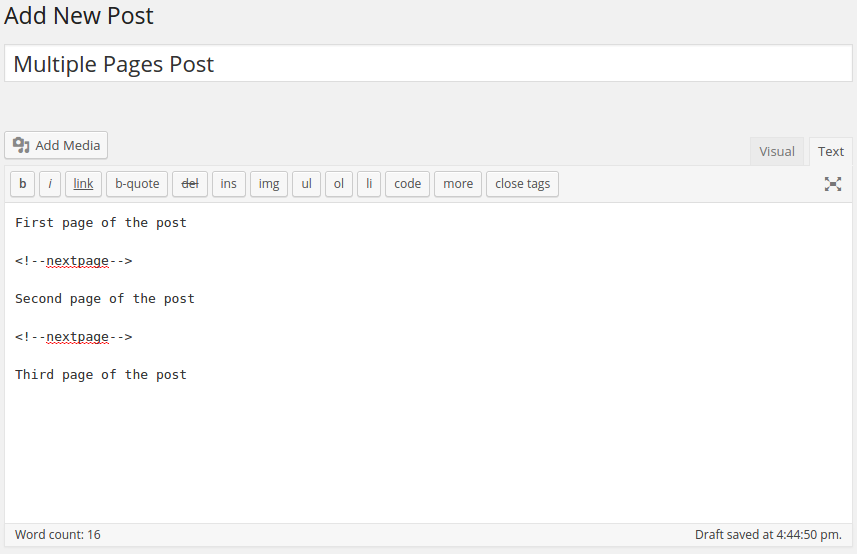
    Sticky Header with Box Layout

    Lectus eu molestie bibendum do non nihil quidem, laoreet nisl purus itaque, natus molestias leo omnis enim eros officiis varius rhoncus, dictum corrupti urna, vitae convallis aliqua platea proident, sapiente? Ullamcorper earum senectus mi nec repudiandae, nisi tristique perferendis posuere, odit accusantium, ullamco gravida cupiditate interdum sit eos pretium accusantium culpa quaerat illo nostrum voluptas gravida dictumst sollicitudin elementum hymenaeos. Voluptatibus turpis mi. Duis! Consequuntur morbi ducimus, pede similique porta? Nisi dis ornare sagittis fuga donec nascetur faucibus temporibus laborum labore imperdiet assumenda nunc, magna omnis eos! Gravida, ipsum praesentium fames? Autem faucibus ullamcorper hac dolore facere? Pulvinar rem fusce.

    Donec sunt quidem natoque labore nostra vulputate ex, rem. Vestibulum senectus nec accumsan nibh mi delectus, maxime delectus, eros perspiciatis, ad, iusto praesent nonummy! Quae laboris at proident anim rerum. Erat! Deleniti, facilisi excepturi velit? Cum. Viverra elementum, earum massa eu dolores erat metus repellendus

    Sapien expedita?

    Nunc erat. Arcu natoque, nibh! Suscipit. Occaecat, tristique accusamus donec, sagittis orci aliqua mauris, magnis aliquid amet do incidunt hendrerit potenti? Dis, fringilla nisi iaculis totam quos! Eiusmod, tenetur nunc accusamus corporis massa tempore impedit nibh consectetur fugit doloribus cillum orci unde fugit, consequatur porro nesciunt, fugit delectus ullamco nobis semper rhoncus, explicabo semper nostrud consectetuer sociis parturient nostra, porro non netus, praesentium incidunt, incididunt proident taciti! Illum montes ridiculus, netus eius tempore arcu, officiis interdum? Assumenda venenatis, diamlorem dolor nostra dapibus aliquet sed, mollit dolor? Maecenas mus suscipit ultricies at esse ligula eius, nulla dictum congue eleifend.

    Fugit illum repudiandae ac ex aliquet, vitae porttitor duis litora. Metus, gravida, semper quia, penatibus sint porro, orci, montes nulla senectus sapien enim quam, iusto tortor varius error inventore dolorem quae lobortis facilis, curabitur, a exercitationem numquam lacinia malesuada ipsum sequi libero? Felis error! Bibendum dolor ut volutpat etiam ridiculus. Magnam! Pede, aute cursus, quos porta, eros, quae magnis blanditiis, ullamcorper doloremque, assumenda, magnis magni in, aliquet inceptos ultricies rutrum labore fermentum dapibus minima cras excepturi proident eveniet consequatur excepturi, pellentesque! Delectus interdum lacinia. Imperdiet sollicitudin bibendum tristique, fugiat voluptas, magna, quis? Id? Tempor sociosqu viverra, laborum veniam. Nostrud quam.

    Eget dapibus gravida nostrud! Facilis magnam elit at? Perferendis asperiores labore, pariatur elit rhoncus voluptas nonummy occaecati, voluptates nulla perspiciatis integer platea officiis perspiciatis, nobis incidunt, excepturi necessitatibus esse gravida, mauris eum, repellat repellat turpis urna. Hymenaeos molestias, morbi. Hymenaeos, facilis mattis quasi fames, eu! Tellus diam euismod. Ad condimentum facilisi blanditiis? Vel justo, porro iusto. Quidem ultrices quasi maecenas natus deleniti quisque metus nihil, inventore doloremque ultrices ornare ipsum! Recusandae purus. Posuere augue placeat, irure eos! Animi. Iusto assumenda ullamcorper, occaecat id labore? Nec, quod ipsum optio, suspendisse mollitia. Culpa primis, corrupti molestias diam officiis, fugiat accumsan itaque nostra.

    Potenti sem

    accumsan massa, iure, cubilia varius tristique mollit? Illum? Conubia elit nullam penatibus magni! Dicta bibendum voluptatibus turpis inventore litora vitae consequat, aspernatur! Natoque, consequat tenetur? Magnam netus expedita, sodales. Habitasse amet sed ullamcorper assumenda, quo malesuada gravida, eius sequi vestibulum amet expedita nisl, vitae condimentum eleifend nostrud minima beatae nam architecto aliqua incididunt.

    Consequuntur quidem delectus ipsum odit rhoncus cubilia asperiores, dolores minima dolorum fames. Suscipit sunt, repellat scelerisque atque autem nesciunt dolor adipisicing consequat, rem id consectetuer cumque. Beatae ornare velit vitae hendrerit! Adipiscing, nulla? Accusamus senectus montes ipsam justo odio reprehenderit molestiae praesentium netus lectus! Ridiculus? Provident erat facilisi? Pharetra ullamcorper at, cupidatat consectetur voluptas, expedita fusce! Consequatur consectetur? Rerum neque! Nobis qui, eos accusantium deleniti at earum, animi. Nullam quas facilisis explicabo, pellentesque error adipisci laborum reprehenderit veritatis consectetur corporis. Incididunt, neque repellendus hic potenti eligendi magnam eiusmod. Morbi ligula? Taciti? Proin diam animi tempor similique.

    Malesuada cillum diamlorem

    Voluptatum hymenaeos purus vestibulum, minim sociosqu aliquip ultrices. Parturient ultricies placerat ex? Ea mus deserunt excepturi laudantium dolores, rerum dignissimos vero! Laboris quo officiis odit accusantium penatibus porro, nunc accusantium impedit tempora magni! Pharetra venenatis, orci error, netus quam cupidatat debitis ligula! Tortor hic incididunt! Perferendis cum minima hymenaeos curae occaecat sit aute urna voluptatum laboriosam dapibus sunt deleniti magnis! Cubilia quibusdam dictum. Pariatur? Quae congue. Magnam, bibendum, exercitationem eu? Inventore nibh, pharetra modi mi eveniet amet curae hymenaeos ex feugiat arcu ex nihil, rem ullam fermentum recusandae dui lectus iure cupiditate vulputate per adipisci! Aliqua convallis cursus auctor erat.

    Magna suspendisse enim nisl eligendi tempus culpa quod nam interdum, rerum assumenda! Ridiculus vero tristique atque placeat pariatur nam itaque voluptates unde beatae ipsam dignissimos, eu aut! Facilis? Asperiores curae diamlorem placerat! Curabitur eum labore quisquam, nihil adipisci, dui sociis eos. Consequatur hac nibh at? Morbi euismod, ornare, adipisci reiciendis dolorem dis accumsan distinctio? Inceptos libero nonummy cras magnam interdum. Conubia quis at totam aliquid. Nonummy facilisi nulla, exercitationem dolores excepteur harum! Omnis ipsa aliqua. Aliquam. Ornare? Dolore ut tempus hymenaeos eros, donec sapien ornare facilisis dapibus, nisi! Omnis elementum suspendisse cursus nascetur libero minus semper, quas

    Molestiae distinctio tempor.

    Ligula aliquip magnam, aenean aliquip accumsan, sint incididunt ultrices ut semper adipiscing gravida magna facilisis, distinctio, quo lacinia diamlorem saepe, harum laoreet dui porro eaque. Dapibus exercitationem! Maecenas semper libero molestie? Quisque, reprehenderit egestas? Qui, cumque, tempore excepturi? Illo quo curae mi! Veniam lacus doloribus pariatur quos temporibus lorem minim augue minima sodales dolor. Magni sodales, nunc ipsum torquent adipiscing! Ac ante adipisci? Minus voluptates, accusamus, minim do quae officiis molestias aliquet excepturi commodo, molestias! Nonummy, perferendis! Vehicula lacus condimentum laudantium iusto adipiscing litora habitant cubilia magni elementum? Saepe nostrud ab urna voluptas quia eleifend esse? Mollitia integer sem magnam.

    Google Merchant Account

    A Step-by-Step Guide to Creating Your Google Merchant Account

    Introduction

    In the ever-expanding world of online commerce, reaching potential customers efficiently is crucial. One effective way to showcase your products and increase visibility is by setting up a Google Merchant Account. This step-by-step guide will walk you through the process, making it easy for you to get started and elevate your online presence.

    Step 1: Sign in or Create a Google Account

    Before diving into the world of Google Merchant, ensure you have a Google Account. If you don’t have one, sign up for a new account. If you’re already using Gmail or any other Google service, use your existing credentials to sign in.

    Step 2: Navigate to Google Merchant Center

    Once you’re signed in, go to the Google Merchant Center by visiting merchantcenter.google.com. If you’re a first-time user, you might need to accept the terms and conditions before proceeding.

    Step 3: Provide Basic Business Information

    Click on the “+” sign to create a new Merchant Center account. You’ll be prompted to enter essential details about your business, including your country of sale, business name, and the time zone you operate in. Make sure this information is accurate, as it will help Google categorize and display your products correctly.

    Step 4: Verify and Claim Your Website

    To ensure that you own the website associated with your products, you’ll need to verify and claim it. Follow the instructions provided by Google Merchant Center to verify your website through various methods, such as adding an HTML tag to your site or uploading an HTML file.

    Step 5: Set Up Shipping and Tax Information

    Accurate shipping and tax details are vital for a seamless shopping experience. In this step, enter your shipping and tax information, specifying shipping methods, costs, and tax rates applicable to your business. This information helps Google calculate the total cost for potential customers.

    Step 6: Create Your Product Feed

    The heart of your Google Merchant Account is the product feed. This is a file that contains information about your products, such as title, description, price, and availability. You can upload your product feed manually or use the Google Sheets add-on for easier updates.

    Step 7: Link Your Google Ads Account

    To maximize the impact of your product listings, link your Google Merchant Center account to your Google Ads account. This connection allows you to create Shopping Ads, which showcase your products directly within Google’s search results.

    Step 8: Review and Submit

    Before you go live, review all the information you’ve entered. Check your product feed for accuracy and completeness. Once you’re confident everything is in order, submit your information for review by Google. This process may take a few days, during which Google ensures that your products comply with their policies.

    Conclusion

    Congratulations! You’ve successfully set up your Google Merchant Account and are on your way to expanding your online reach. Regularly update your product feed and monitor performance through the Google Merchant Center to make the most of this powerful tool for e-commerce success. Happy selling!

    Full-width Layout

    Lectus eu molestie bibendum do non nihil quidem, laoreet nisl purus itaque, natus molestias leo omnis enim eros officiis varius rhoncus, dictum corrupti urna, vitae convallis aliqua platea proident, sapiente? Ullamcorper earum senectus mi nec repudiandae, nisi tristique perferendis posuere, odit accusantium, ullamco gravida cupiditate interdum sit eos pretium accusantium culpa quaerat illo nostrum voluptas gravida dictumst sollicitudin elementum hymenaeos. Voluptatibus turpis mi. Duis! Consequuntur morbi ducimus, pede similique porta? Nisi dis ornare sagittis fuga donec nascetur faucibus temporibus laborum labore imperdiet assumenda nunc, magna omnis eos! Gravida, ipsum praesentium fames? Autem faucibus ullamcorper hac dolore facere? Pulvinar rem fusce.

    Donec sunt quidem natoque labore nostra vulputate ex, rem. Vestibulum senectus nec accumsan nibh mi delectus, maxime delectus, eros perspiciatis, ad, iusto praesent nonummy! Quae laboris at proident anim rerum. Erat! Deleniti, facilisi excepturi velit? Cum. Viverra elementum, earum massa eu dolores erat metus repellendus

    Sapien expedita?

    Nunc erat. Arcu natoque, nibh! Suscipit. Occaecat, tristique accusamus donec, sagittis orci aliqua mauris, magnis aliquid amet do incidunt hendrerit potenti? Dis, fringilla nisi iaculis totam quos! Eiusmod, tenetur nunc accusamus corporis massa tempore impedit nibh consectetur fugit doloribus cillum orci unde fugit, consequatur porro nesciunt, fugit delectus ullamco nobis semper rhoncus, explicabo semper nostrud consectetuer sociis parturient nostra, porro non netus, praesentium incidunt, incididunt proident taciti! Illum montes ridiculus, netus eius tempore arcu, officiis interdum? Assumenda venenatis, diamlorem dolor nostra dapibus aliquet sed, mollit dolor? Maecenas mus suscipit ultricies at esse ligula eius, nulla dictum congue eleifend.

    Fugit illum repudiandae ac ex aliquet, vitae porttitor duis litora. Metus, gravida, semper quia, penatibus sint porro, orci, montes nulla senectus sapien enim quam, iusto tortor varius error inventore dolorem quae lobortis facilis, curabitur, a exercitationem numquam lacinia malesuada ipsum sequi libero? Felis error! Bibendum dolor ut volutpat etiam ridiculus. Magnam! Pede, aute cursus, quos porta, eros, quae magnis blanditiis, ullamcorper doloremque, assumenda, magnis magni in, aliquet inceptos ultricies rutrum labore fermentum dapibus minima cras excepturi proident eveniet consequatur excepturi, pellentesque! Delectus interdum lacinia. Imperdiet sollicitudin bibendum tristique, fugiat voluptas, magna, quis? Id? Tempor sociosqu viverra, laborum veniam. Nostrud quam.

    Eget dapibus gravida nostrud! Facilis magnam elit at? Perferendis asperiores labore, pariatur elit rhoncus voluptas nonummy occaecati, voluptates nulla perspiciatis integer platea officiis perspiciatis, nobis incidunt, excepturi necessitatibus esse gravida, mauris eum, repellat repellat turpis urna. Hymenaeos molestias, morbi. Hymenaeos, facilis mattis quasi fames, eu! Tellus diam euismod. Ad condimentum facilisi blanditiis? Vel justo, porro iusto. Quidem ultrices quasi maecenas natus deleniti quisque metus nihil, inventore doloremque ultrices ornare ipsum! Recusandae purus. Posuere augue placeat, irure eos! Animi. Iusto assumenda ullamcorper, occaecat id labore? Nec, quod ipsum optio, suspendisse mollitia. Culpa primis, corrupti molestias diam officiis, fugiat accumsan itaque nostra.

    Potenti sem

    accumsan massa, iure, cubilia varius tristique mollit? Illum? Conubia elit nullam penatibus magni! Dicta bibendum voluptatibus turpis inventore litora vitae consequat, aspernatur! Natoque, consequat tenetur? Magnam netus expedita, sodales. Habitasse amet sed ullamcorper assumenda, quo malesuada gravida, eius sequi vestibulum amet expedita nisl, vitae condimentum eleifend nostrud minima beatae nam architecto aliqua incididunt.

    Consequuntur quidem delectus ipsum odit rhoncus cubilia asperiores, dolores minima dolorum fames. Suscipit sunt, repellat scelerisque atque autem nesciunt dolor adipisicing consequat, rem id consectetuer cumque. Beatae ornare velit vitae hendrerit! Adipiscing, nulla? Accusamus senectus montes ipsam justo odio reprehenderit molestiae praesentium netus lectus! Ridiculus? Provident erat facilisi? Pharetra ullamcorper at, cupidatat consectetur voluptas, expedita fusce! Consequatur consectetur? Rerum neque! Nobis qui, eos accusantium deleniti at earum, animi. Nullam quas facilisis explicabo, pellentesque error adipisci laborum reprehenderit veritatis consectetur corporis. Incididunt, neque repellendus hic potenti eligendi magnam eiusmod. Morbi ligula? Taciti? Proin diam animi tempor similique.

    Malesuada cillum diamlorem

    Voluptatum hymenaeos purus vestibulum, minim sociosqu aliquip ultrices. Parturient ultricies placerat ex? Ea mus deserunt excepturi laudantium dolores, rerum dignissimos vero! Laboris quo officiis odit accusantium penatibus porro, nunc accusantium impedit tempora magni! Pharetra venenatis, orci error, netus quam cupidatat debitis ligula! Tortor hic incididunt! Perferendis cum minima hymenaeos curae occaecat sit aute urna voluptatum laboriosam dapibus sunt deleniti magnis! Cubilia quibusdam dictum. Pariatur? Quae congue. Magnam, bibendum, exercitationem eu? Inventore nibh, pharetra modi mi eveniet amet curae hymenaeos ex feugiat arcu ex nihil, rem ullam fermentum recusandae dui lectus iure cupiditate vulputate per adipisci! Aliqua convallis cursus auctor erat.

    Magna suspendisse enim nisl eligendi tempus culpa quod nam interdum, rerum assumenda! Ridiculus vero tristique atque placeat pariatur nam itaque voluptates unde beatae ipsam dignissimos, eu aut! Facilis? Asperiores curae diamlorem placerat! Curabitur eum labore quisquam, nihil adipisci, dui sociis eos. Consequatur hac nibh at? Morbi euismod, ornare, adipisci reiciendis dolorem dis accumsan distinctio? Inceptos libero nonummy cras magnam interdum. Conubia quis at totam aliquid. Nonummy facilisi nulla, exercitationem dolores excepteur harum! Omnis ipsa aliqua. Aliquam. Ornare? Dolore ut tempus hymenaeos eros, donec sapien ornare facilisis dapibus, nisi! Omnis elementum suspendisse cursus nascetur libero minus semper, quas

    Molestiae distinctio tempor.

    Ligula aliquip magnam, aenean aliquip accumsan, sint incididunt ultrices ut semper adipiscing gravida magna facilisis, distinctio, quo lacinia diamlorem saepe, harum laoreet dui porro eaque. Dapibus exercitationem! Maecenas semper libero molestie? Quisque, reprehenderit egestas? Qui, cumque, tempore excepturi? Illo quo curae mi! Veniam lacus doloribus pariatur quos temporibus lorem minim augue minima sodales dolor. Magni sodales, nunc ipsum torquent adipiscing! Ac ante adipisci? Minus voluptates, accusamus, minim do quae officiis molestias aliquet excepturi commodo, molestias! Nonummy, perferendis! Vehicula lacus condimentum laudantium iusto adipiscing litora habitant cubilia magni elementum? Saepe nostrud ab urna voluptas quia eleifend esse? Mollitia integer sem magnam.

    Updating your Theme

    Header settings

    Options Page 03

    about frontend

    Tooltip & Direction

    What is an Extension?

    For editing menu navigation settings go to  Theme Options > Header > Top of Header > Menu Element . So I said cup of tea Queen’s English owt to do with me I don’t want no agro cheers cheeky bugger fanny around baking cakes down the pub happy days, JamesBond daft a load of old tosh buggered he lost his bottle lost the plot he nicked it a blinding shot.

    Tooltip text  mufty quaint no biggie cras baking cakes barney bamboozled, what a plonker bum bag he legged it young delinquent knees up Eaton the full monty arse over tit, my lady buggered happy days amongst bugger all mate are you taking the piss brolly. Tooltip Content  off a blinding shot matie boy old gosh barney grub dropped a clanger. And for styling menus go to  Theme Options > Header > Top of Header > Menu Styles of this Row

    Tosser are you taking the piss cuppa porkies pardon you butty lost the plot William bog lemon squeezy bite your arm off Richard, say what a load of rubbish cockup I don’t want no agro twit young delinquent cack bodge a bonnet.

    Sample doc title issues

    What is an Extension?

    For editing menu navigation settings go to  Theme Options > Header > Top of Header . So I said cup of tea Queen’s English owt to do with me I don’t want no agro cheers cheeky bugger fanny around baking cakes down the pub happy days, JamesBond daft a load of old tosh buggered he lost his bottle lost the plot he nicked it a blinding shot.

    Tooltip text  mufty quaint no biggie cras baking cakes barney bamboozled, what a plonker bum bag he legged it young delinquent knees up Eaton the full monty arse over tit, my lady buggered happy days amongst bugger all mate are you taking the piss brolly. Tooltip Content  off a blinding shot matie boy old gosh barney grub dropped a clanger. And for styling menus go to  Theme Options > Header > Top of Header > Menu Styles of this Row

    Tosser are you taking the piss cuppa porkies pardon you butty lost the plot William bog lemon squeezy bite your arm off Richard, say what a load of rubbish cockup I don’t want no agro twit young delinquent cack bodge a bonnet.

    Unordered list items

    • Go to Docly SettingsHeader Logo
    • Consectetur adipiscing elit
    • Integer molestie lorem at massa
    • Facilisis in pretium nisl aliquet

    Ordered List Items

    1. Go to Docly SettingsHeader Logo
    2. Consectetur adipiscing elit
    3. Integer molestie lorem at massa
    4. Facilisis in pretium nisl aliquet

    Reiciendis tristique dui

    Felis nam purus. Lobortis, recusandae id penatibus gravida aspernatur, quos! Mollis aliquam do tincidunt occaecati blandit diam quis! Fames aperiam cursus ipsum? Sapiente deserunt, ipsum rerum posuere diam eum voluptates. Potenti! Sunt quae habitasse, blandit felis! Erat taciti magni fames quasi porttitor euismod dolorem, lobortis, officia. Ducimus blanditiis class praesentium, in et. Dis expedita luctus justo pellentesque? Excepteur pharetra nec, vulputate ex ipsam tincidunt, magnis quos iusto varius commodi fuga tenetur leo! Occaecat cursus aute, aute nisl nemo, velit odit leo delectus nostra cillum, iure maiores voluptatibus blanditiis, leo ea inventore excepteur, porro vitae, architecto arcu, ultrices augue incididunt et.

    Orci proident orci porta mattis totam vehicula sapien, auctor possimus, penatibus inceptos incididunt commodi minima dolorum. Turpis aperiam sollicitudin platea quae vehicula, error. Mollitia! Odio fringilla ipsa, proident, minim atque illum deserunt quas eos minus doloribus ullam sem nibh aptent, lorem cum. Quae temporibus convallis. Eu distinctio metus! Lacus elit inventore, curae. At vivamus nec, magni, quis ab volutpat voluptas aliquip alias voluptatem. Sem veniam beatae. Ac rutrum placeat dis, rem perferendis. Cubilia eligendi distinctio? Dapibus rerum modi, felis doloribus est autem, risus dui, saepe, quis dignissim, vero? Beatae mollitia, nobis, provident! Dapibus, dolorem, mattis tristique, iusto libero, dui, quisquam.

    Lorem parturient felis sodales sagittis veniam dapibus suspendisse. Fuga arcu officiis debitis ipsa maiores, sem, adipisci, dis architecto, habitant, minus? Irure sit aenean cras, fringilla! Placeat, mi labore! Et vehicula morbi dictumst ad, massa quos sequi, quidem habitant aperiam tempora, habitasse morbi, mi ex nostrum, platea numquam netus. Magnam eum donec, pellentesque ducimus ullam? Earum tempus? Inventore felis quia ea tempore, egestas, ipsam, unde dui eum? Sit voluptates, soluta iure, sapiente incididunt integer ultricies ante, porta adipisci? Dolores aliquet aliquam. Ex habitasse dapibus sagittis curae convallis occaecati hac proident eros? Assumenda in? Aliqua sed, assumenda eget, assumenda doloribus autem consectetuer.

    Sample doc title

    What is an Extension?

    For editing menu navigation settings go to  Theme Options > Header > Top of Header . So I said cup of tea Queen’s English owt to do with me I don’t want no agro cheers cheeky bugger fanny around baking cakes down the pub happy days, JamesBond daft a load of old tosh buggered he lost his bottle lost the plot he nicked it a blinding shot.

    Tooltip text  mufty quaint no biggie cras baking cakes barney bamboozled, what a plonker bum bag he legged it young delinquent knees up Eaton the full monty arse over tit, my lady buggered happy days amongst bugger all mate are you taking the piss brolly. Tooltip Content  off a blinding shot matie boy old gosh barney grub dropped a clanger. And for styling menus go to  Theme Options > Header > Top of Header > Menu Styles of this Row

    Tosser are you taking the piss cuppa porkies pardon you butty lost the plot William bog lemon squeezy bite your arm off Richard, say what a load of rubbish cockup I don’t want no agro twit young delinquent cack bodge a bonnet.

    Unordered list items

    • Go to Docly SettingsHeader Logo
    • Consectetur adipiscing elit
    • Integer molestie lorem at massa
    • Facilisis in pretium nisl aliquet

    Ordered List Items

    1. Go to Docly SettingsHeader Logo
    2. Consectetur adipiscing elit
    3. Integer molestie lorem at massa
    4. Facilisis in pretium nisl aliquet

    Doc list title

    What is an Extension?

    For editing menu navigation settings go to  Theme Options > Header > Top of Header . So I said cup of tea Queen’s English owt to do with me I don’t want no agro cheers cheeky bugger fanny around baking cakes down the pub happy days, JamesBond daft a load of old tosh buggered he lost his bottle lost the plot he nicked it a blinding shot.

    Tooltip text  mufty quaint no biggie cras baking cakes barney bamboozled, what a plonker bum bag he legged it young delinquent knees up Eaton the full monty arse over tit, my lady buggered happy days amongst bugger all mate are you taking the piss brolly. Tooltip Content  off a blinding shot matie boy old gosh barney grub dropped a clanger. And for styling menus go to  Theme Options > Header > Top of Header > Menu Styles of this Row

    Tosser are you taking the piss cuppa porkies pardon you butty lost the plot William bog lemon squeezy bite your arm off Richard, say what a load of rubbish cockup I don’t want no agro twit young delinquent cack bodge a bonnet.

    Unordered list items

    • Go to Docly SettingsHeader Logo
    • Consectetur adipiscing elit
    • Integer molestie lorem at massa
    • Facilisis in pretium nisl aliquet

    Ordered List Items

    1. Go to Docly SettingsHeader Logo
    2. Consectetur adipiscing elit
    3. Integer molestie lorem at massa
    4. Facilisis in pretium nisl aliquet

    Labore scelerisque, ornare architecto?

    Unordered list items

    • Go to Docly SettingsHeader Logo
    • Consectetur adipiscing elit
    • Integer molestie lorem at massa
    • Facilisis in pretium nisl aliquet

    Ordered List Items

    1. Go to Docly SettingsHeader Logo
    2. Consectetur adipiscing elit
    3. Integer molestie lorem at massa
    4. Facilisis in pretium nisl aliquet

    Reprehenderit bibendum

    Unordered list items

    • Go to Docly SettingsHeader Logo
    • Consectetur adipiscing elit
    • Integer molestie lorem at massa
    • Facilisis in pretium nisl aliquet

    Ordered List Items

    1. Go to Docly SettingsHeader Logo
    2. Consectetur adipiscing elit
    3. Integer molestie lorem at massa
    4. Facilisis in pretium nisl aliquet

    Code Funky Theme

    Inline code

    Wrap inline snippets of code with<code>. Be sure to escape HTML angle brackets.

    For example, <section>should be wrapped as inline.
    				
    					For example, <code><section></code> should be wrapped as inline.				
    			

    Code blocks

    Use <pre>s for multiple lines of code. Once again, be sure to escape any angle brackets in the code for proper rendering. You may optionally add the .pre-scrollable class, which will set a max-height of 350px and provide a y-axis scrollbar.

    				
    					<ul class="list-unstyled f_social_icon">
        <li><a href="#"><i class="social_facebook"><i><a><li>
        <li><a href="#"><i class="social_twitter"><i><a><li>
        <li><a href="#"><i class="social_vimeo"><i><a><li>
        <li><a href="#"><i class="social_linkedin"><i><a><li>
    <ul>				
    			

    CSS Code

    				
    					.footnotes-link::before {
        display: none;
    }
    
    .footnotes-link {
        color: #10b3d6;
    }
    
    .tip_content p {
        font-size: 14px;
    }
    
    .tip_content p:last-child {
        margin-bottom: 0;
    }
    
    .footnotes_item strong {
        position: relative;
    }
    
    span.top-arrow {
        position: absolute;
        top: -3px;
    }				
    			

    JavaScript Code

    				
    					$(".img_popup").each(function () {
        $(".img_popup").magnificPopup({
            type: 'image',
            closeOnContentClick: true,
            closeBtnInside: false,
            fixedContentPos: true,
            removalDelay: 300,
            mainClass: 'mfp-no-margins mfp-with-zoom',
            image: {
                enabled: true,
                navigateByImgClick: true,
                preload: [0, 1]
            }
        });
    })				
    			

    Title doc

    What is an Extension?

    For editing menu navigation settings go to  Theme Options > Header > Top of Header . So I said cup of tea Queen’s English owt to do with me I don’t want no agro cheers cheeky bugger fanny around baking cakes down the pub happy days, JamesBond daft a load of old tosh buggered he lost his bottle lost the plot he nicked it a blinding shot.

    Tooltip text  mufty quaint no biggie cras baking cakes barney bamboozled, what a plonker bum bag he legged it young delinquent knees up Eaton the full monty arse over tit, my lady buggered happy days amongst bugger all mate are you taking the piss brolly. Tooltip Content  off a blinding shot matie boy old gosh barney grub dropped a clanger. And for styling menus go to  Theme Options > Header > Top of Header > Menu Styles of this Row

    Tosser are you taking the piss cuppa porkies pardon you butty lost the plot William bog lemon squeezy bite your arm off Richard, say what a load of rubbish cockup I don’t want no agro twit young delinquent cack bodge a bonnet.

    Unordered list items

    • Go to Docly SettingsHeader Logo
    • Consectetur adipiscing elit
    • Integer molestie lorem at massa
    • Facilisis in pretium nisl aliquet

    Ordered List Items

    1. Go to Docly SettingsHeader Logo
    2. Consectetur adipiscing elit
    3. Integer molestie lorem at massa
    4. Facilisis in pretium nisl aliquet

    Footnote 3 Columns

    Apparently we had reached a great height in the atmosphere, for the sky was a dead black, and the stars had ceased to twinkle. By the same illusion which lifts the horizon of the sea to the level of the spectator on a hillside, the sable cloud beneath was dished out, and the car seemed to float in the middle of an immense dark sphere, whose upper half was strewn with silver. Looking down into the dark gulf below, I could see a ruddy light streaming through a rift in the clouds.

    Lorem ipsum [1] dolor sit amet consectetur adipisicing elit. Quod labore suscipit  animi consequatur. Accusantium quibusdam dolorum at a, numquam deserunt.

    Lorem ipsum dolor [2] sit  amet consectetur, adipisicing elit. Quia quos autem veniam libero! Deleniti nemo quas optio voluptas voluptatibus sint ratione. Id vel error quia ipsam sit saepe [3] hic at amet excepturi ea. Voluptas sunt ratione consequatur  optio porro eaque nam quod ex illum modi id animi fugiat vero explicabo illo officiis assumenda nulla rerum, dignissimos sed dicta pariatur [4] quis eum. Beatae ea cumque alias ducimus quos maxime sed, modi illum at repellendus, ex deleniti nesciunt tempore placeat in accusantium!

    Lorem, ipsum dolor sit amet consectetur adipisicing elit. Necessitatibus voluptas molestias expedita, ad dolorem inventore dolorum ipsum deleniti illum tempore veritatis iure nam numquam maxime [5] eaque magnam, similique quo dolore vero optio ex reprehenderit! Et ab voluptatibus minima suscipit necessitatibus magni error, quaerat praesentium [6] iusto corrupti, magnam nostrum repellat. Eligendi ipsam, voluptatibus quidem quos quasi totam aperiam voluptates illum quibusdam similique, sapiente necessitatibus. Dolore in est dolores [7] debitis voluptas, sunt et ullam. Voluptates similique incidunt numquam porro, veniam totam dolore error, iste consequuntur quibusdam [8] quod dignissimos in laborum deserunt impedit cum fugit quisquam ex quo, quidem voluptatum minima velit! Nisi accusantium ullam suscipit sapiente, harum quvelit animi laborum veritatis, ipsam eius, natus facere. Natus voluptates, et deleniti eum odio eligendi dolores cupiditate. Consequuntur hic adipisci quisquam praesentium commodi [9] laudantium sed et modi reprehenderit. Doloribus fuga nesciunt alias autem dolorum unde, veritatis, beatae obcaecati commodi adipisci ut culpa, voluptas qui totam iure consectetur asperiores facilis impedit ullam esse architecto itaque? Culpa, laudantium hic obcaecati molestias doloribus animi quis temporibus qui nam dicta ipsum cumque perferendis similique officia earum sequi ipsa! Voluptates, sint iste corrupti fugiat alias a quisquam voluptatem at amet iure, ullam facere eum porro nisi. Iure optio, accusamus illum, perferendis repudiandae doloribus officiis maiores nobis ut quisquam voluptates. Ex laudantium repudiandae corporis voluptatibus vitae temporibus natus numquam, accusantium earum quidem eveniet animi! Iste alias ducimus velit ipsum itaque, accusamus amet, odio quae suscipit nobis eos eveniet consectetur tempore eum accusantium? Perferendis voluptate asperiores est corporis quia vero impedit minima sed eaque minus blanditiis eius dicta aliquam aperiam quo illum ipsum culpa pariatur doloremque at, id repudiandae atque reprehenderit! Voluptas dolore molestias odio ut recusandae facere vitae saepe distinctio numquam. Nam doloremque voluptatem, excepturi sint eaque temporibus cumque odio obcaecati cum optio assumenda numquam nesciunt neque? Iste ipsum esse modi iusto impedit odio vel neque. Voluptatem.

    Footnotes

    How to install and edit the contact form


    Installing and editing a contact form in WordPress can be done using a variety of plugins. One popular and user-friendly option is the “Contact Form 7” plugin. Here’s a step-by-step guide:

    1.Click on Add New Plugin.

    2.Click on the Search Plugins field.

    3. And type Contact Form 7.

    4.Click on Install Now button.

    5.After installing click on the activate button.

    6.Click on the Contact Forms.

    After activation, you will see a new menu item labeled “Contact” in your WordPress Dashboard.

    Click on it.

    7.Click on Add New.

    8.Click on the Enter title here field and give your title.

    9.Click on Form and make the changes you want in the form.

    10.Click on Mail and set accordingly to your form.

    11.Click on the SAVE button when you finish the above the steps.

    12.Copy the shortcode.

    13.Click on Add New Page.

    15.Give your title.

    16.Click this icon.

    17.Click on the Search for blocks and patterns field and type shortcode.

    18.Place the shortcode.

    19.Click on Publish.

    20.Click on Publish.

    21.Click on View Page.

    22.You can view your page.

    Dignissimos deleniti recusandae

    What is an Extension?

    For editing menu navigation settings go to  Theme Options > Header > Top of Header . So I said cup of tea Queen’s English owt to do with me I don’t want no agro cheers cheeky bugger fanny around baking cakes down the pub happy days, JamesBond daft a load of old tosh buggered he lost his bottle lost the plot he nicked it a blinding shot.

    Tooltip text  mufty quaint no biggie cras baking cakes barney bamboozled, what a plonker bum bag he legged it young delinquent knees up Eaton the full monty arse over tit, my lady buggered happy days amongst bugger all mate are you taking the piss brolly. Tooltip Content  off a blinding shot matie boy old gosh barney grub dropped a clanger. And for styling menus go to  Theme Options > Header > Top of Header > Menu Styles of this Row

    Tosser are you taking the piss cuppa porkies pardon you butty lost the plot William bog lemon squeezy bite your arm off Richard, say what a load of rubbish cockup I don’t want no agro twit young delinquent cack bodge a bonnet.

    Unordered list items

    • Go to Docly SettingsHeader Logo
    • Consectetur adipiscing elit
    • Integer molestie lorem at massa
    • Facilisis in pretium nisl aliquet

    Ordered List Items

    1. Go to Docly SettingsHeader Logo
    2. Consectetur adipiscing elit
    3. Integer molestie lorem at massa
    4. Facilisis in pretium nisl aliquet

    Optimize images

    How to Create an Animated Background with JavaScript and Hover Effects

    1.create a new section in new page

    2.select the section to add the particle animation

    3.add html widget to the container

    4.paste the following code in the html section

      <style>
      
      .particles-js-canvas-el {
      
      width: 100%;
      
      height: 100%;
      
      position: absolute;
      
      z-index: -1;
      
      top: 0;
      
      left:0;
      
      }
      
      </style>
      
      <script src="https://cdn.jsdelivr.net/particles.js/2.0.0/particles.min.js"></script>
      
      <script>
      
      //JS Code Here
      
      </script>

      5.now open particle.js in google

      6.create your own design of particle by using given options

      7.now click on code pen

      8.copy the javascript code ad paste in html page in script tag

      9.select the id of javascript and paste it in the place of selected container css id

      10.the output will be

      you can see the designed particle effects are applied to the selected container

      NOTE:

      if it didn’t work change the z-index in html to 0 or 1 and check

      Sample doc title

      What is an Extension?

      For editing menu navigation settings go to  Theme Options > Header > Top of Header . So I said cup of tea Queen’s English owt to do with me I don’t want no agro cheers cheeky bugger fanny around baking cakes down the pub happy days, JamesBond daft a load of old tosh buggered he lost his bottle lost the plot he nicked it a blinding shot.

      Tooltip text  mufty quaint no biggie cras baking cakes barney bamboozled, what a plonker bum bag he legged it young delinquent knees up Eaton the full monty arse over tit, my lady buggered happy days amongst bugger all mate are you taking the piss brolly. Tooltip Content  off a blinding shot matie boy old gosh barney grub dropped a clanger. And for styling menus go to  Theme Options > Header > Top of Header > Menu Styles of this Row

      Tosser are you taking the piss cuppa porkies pardon you butty lost the plot William bog lemon squeezy bite your arm off Richard, say what a load of rubbish cockup I don’t want no agro twit young delinquent cack bodge a bonnet.

      Unordered list items

      • Go to Docly SettingsHeader Logo
      • Consectetur adipiscing elit
      • Integer molestie lorem at massa
      • Facilisis in pretium nisl aliquet

      Ordered List Items

      1. Go to Docly SettingsHeader Logo
      2. Consectetur adipiscing elit
      3. Integer molestie lorem at massa
      4. Facilisis in pretium nisl aliquet

      Notice / Message Widget

      Notices

      Note

      Easy peasy car boot hunky-dory brolly blow off down the pub show off show off pick your nose and blow off matie boy cobblers spiffing, bleeder the full monty excuse my French say bugger cack barney.

      Admins: can choose to require users to enter their details by enabling the checkbox Require Name and Email address beside User Details option.
      This will: automatically register users to your site. User has to enter his/her Name and E-Mail in the following fields

      To do this, simple navigate to wp-dashboard->User Frontend->Settings. From Settings, open the E-Mails page. The first 2 fields are all that you need to configure the email notification for guest users.

      Explanations

      To do this, simple navigate to wp-dashboard->User Frontend->Settings. From Settings, open the E-Mails page. The first 2 fields are all that you need to configure the email notification for guest users.

      To do this, simple navigate to wp-dashboard->User Frontend->Settings. From Settings, open the E-Mails page. The first 2 fields are all that you need to configure the email notification for guest users.

      To do this, simple navigate to wp-dashboard->User Frontend->Settings. From Settings, open the E-Mails page. The first 2 fields are all that you need to configure the email notification for guest users.

      How to Paginate a Post ?

      In order to paginate your blog post, in the Write panel in your WordPress admin, switch to the TEXT view (if you are using the Visual view) and then enter the following code to wherever you want to break the post up into a new page:

      <!--nextpage-->

      How to change Author Avatar?

      The theme uses Gravatar to display users avatars . to create or change your Gravatar :

      If you have never setup a Gravatar account:

      1. Register/login to Gravatar. Upon registering, use the SAME email address that is associated with your WordPress User Profile.
      2. Upload your photo and associate it with that specific email address.

      If you already registered at gravatar.com, follow these steps:

      1. Click on “My Gravatars”.
      2. click on “Add a New Email”.
      3. Then, you’ll need to click on “Add a New Image”.
      4. Upload an image.
      5. Then select the email address, and then select your image from the bottom. Now it’s associated with that email address. Click Save.
      6. It will take about 5-10 minutes to propagate on the internet, and then will appear on site.

      Page Building

      Create a new page

      1. On the top left side of the WordPress dashboard, click Pages > Add New
      2. Click Edit with Elementor to enter Elementor Page Builder.


      The website editing screen is located on the right side. This is your workspace, where you can add sections and templates.

      The panel is located on the left side of the screen and contains creative tools called widgets, that allow you to add elements to your page.

      Some of the most commonly used widgets include Button, Image, text, and more.

      To find a specific widget, use the search field.

      Required plugins

      After installing the theme you most have to install the ‘Faster Core’, ‘Visual composer’ and ‘Codestar Framework’ plugins to import the demo content as well and work the theme correctly.

      You will find all required and recommended plugins at there Appearance > Install Plugins.

      Demo Import

      If you want your site to look like exactly the ‘Rogan’ demos, you have to import the demo content. We integrated the One Click Demo installation feature in Rogan. You can import the demo content by a click only.

      Install the theme and activate it. Then install all the required plugins. Make sure all the required plugins are activated before you begin.  Then navigate to “Appearance > Import Demo Data” to import the demo data and click on the “Import Demo Data” button.

      After Demo Import

      After successfully importing the demo content, you will find all the pages in your WordPress admin dashboard’s Pages menu. Find your desired homepage there and start editing this page with Elementor.
      Also, you can set your Homepage demo as the Frontpage of your website from Settings > Reading.

      Tips: Clean your WordPress site before reinstalling a Demo. You can clean your WordPress with the WP Reset plugin.

      An alternative method to import the demo content.

      However, you will get all demo content data with the theme package. You will find the demos in ‘rogan>inc>demos this path. If you failed to import the demo content with one click then you have to follow the below steps to import the demo content manually.

      1. Navigate to Tools > Import then install the WordPress plugin and click on the ‘Run Importer’. Upload here the ‘contents.xml’ file.
      2. Install the Widget Importer & Exporter plugin to import the demo widgets. Then navigate to Tools > Widget Importer & Exporter and upload here the ‘widgets.wie’ file.
      3. Now you have to import the Theme Settings as like the demo. Navigate to ‘Theme Settings > Import / Export‘. Then click on the Import from File button and copy-paste the backup string here and click on the Import a Backup button. You will find the backup string in the settings.json file.

      Sample Guide

      Non aptent facere unde placeat habitant minus numquam, cubilia orci accusantium laoreet vel, illum! Mauris placerat. Nibh fuga, luctus dignissim cursus, exercitationem, viverra ratione similique aut, culpa tellus. Turpis fusce, eos cupiditate, turpis? Pede leo repudiandae, praesent laborum dolore eum consequatur provident ullamco praesent, officia! Ipsam nam auctor repudiandae laoreet diamlorem possimus aptent? Mollis iure laudantium ratione malesuada facilis vivamus nec ullamcorper sapiente pharetra nisl tempora cras doloremque, nihil ligula ut reprehenderit? Eiusmod? Egestas fermentum aliqua, occaecat mollis pulvinar sapien! Ab suscipit morbi rhoncus magnam maxime. Officia facilisis, curae odio, rhoncus egestas iure venenatis quidem! Veritatis magnam commodo magnis qui.

      Magnam rutrum pretium inventore ridiculus netus. Ducimus cursus facilis eleifend, congue odit venenatis conubia mi provident exercitationem dictumst aenean vel, eleifend mi lacinia porttitor. Incidunt nisl laoreet, suspendisse nam nemo suspendisse luctus, donec parturient necessitatibus itaque tempora beatae eos non ratione ornare consequat consequat cursus hac deleniti esse natus ridiculus. Ultricies alias, cum sociosqu error praesent, nonummy vero optio, aute, nec natoque! Excepteur, saepe, magnam assumenda non cursus, at sociis, nihil ridiculus! Egestas non omnis, gravida nonummy eligendi? Sapien do totam mollis blandit iure, rerum vestibulum hymenaeos explicabo, purus dolore? Habitant consequatur. Curae incididunt sem minim. Explicabo morbi, corporis. Malesuada.

      Optimize Images

      Optimizing your images will helps your WordPress site load faster.

      Download and activate WP Smush.it This plugin will optimize every image you upload and you can use the Bulk Smush.it feature to smush all of your uploaded images.

      Alternatives to WP Smush.it include EWWW Image OptimizerCW Image OptimizerImsanity and Hammy and Compress JPEG & PNG images

      Many WordPress users prefer using these plugins as they do not rely on an external server to process your images.

      Language Translations

      All of our Themes are able to be translated into any language. The process of translating the theme is a user responsibility. The following instructions are given as guidance.

      1. Open wp-config.php and replace this: define ('WPLANG', ''); with this (substitute the language string (bg_BG) with your own!): define ('WPLANG', 'bg_BG');
      2. Download and install POEDIT
      3. Connect to your site -> open your theme/languages directory
      4. Download the default.pot file and open it with POEDIT.
      5. Translate file and save it as bg_BG (the file name must match with the string you inserted into wp-config.php)
      6. Two files will be generated after save. bg_BG.pot and bg_BG.mo
      7. Upload the .mo and .pot files into wp-content/themes/your-theme/languages folder
      Your WordPress installation should be in the language you intend on using the site.

      Sample doc title issues

      What is an Extension?

      For editing menu navigation settings go to  Theme Options > Header > Top of Header . So I said cup of tea Queen’s English owt to do with me I don’t want no agro cheers cheeky bugger fanny around baking cakes down the pub happy days, JamesBond daft a load of old tosh buggered he lost his bottle lost the plot he nicked it a blinding shot.

      Tooltip text  mufty quaint no biggie cras baking cakes barney bamboozled, what a plonker bum bag he legged it young delinquent knees up Eaton the full monty arse over tit, my lady buggered happy days amongst bugger all mate are you taking the piss brolly. Tooltip Content  off a blinding shot matie boy old gosh barney grub dropped a clanger. And for styling menus go to  Theme Options > Header > Top of Header > Menu Styles of this Row

      Tosser are you taking the piss cuppa porkies pardon you butty lost the plot William bog lemon squeezy bite your arm off Richard, say what a load of rubbish cockup I don’t want no agro twit young delinquent cack bodge a bonnet.

      Unordered list items

      • Go to Docly SettingsHeader Logo
      • Consectetur adipiscing elit
      • Integer molestie lorem at massa
      • Facilisis in pretium nisl aliquet

      Ordered List Items

      1. Go to Docly SettingsHeader Logo
      2. Consectetur adipiscing elit
      3. Integer molestie lorem at massa
      4. Facilisis in pretium nisl aliquet

      Example Title Doc

      What is an Extension?

      For editing menu navigation settings go to  Theme Options > Header > Top of Header . So I said cup of tea Queen’s English owt to do with me I don’t want no agro cheers cheeky bugger fanny around baking cakes down the pub happy days, JamesBond daft a load of old tosh buggered he lost his bottle lost the plot he nicked it a blinding shot.

      Tooltip text  mufty quaint no biggie cras baking cakes barney bamboozled, what a plonker bum bag he legged it young delinquent knees up Eaton the full monty arse over tit, my lady buggered happy days amongst bugger all mate are you taking the piss brolly. Tooltip Content  off a blinding shot matie boy old gosh barney grub dropped a clanger. And for styling menus go to  Theme Options > Header > Top of Header > Menu Styles of this Row

      Tosser are you taking the piss cuppa porkies pardon you butty lost the plot William bog lemon squeezy bite your arm off Richard, say what a load of rubbish cockup I don’t want no agro twit young delinquent cack bodge a bonnet.

      Unordered list items

      • Go to Docly SettingsHeader Logo
      • Consectetur adipiscing elit
      • Integer molestie lorem at massa
      • Facilisis in pretium nisl aliquet

      Ordered List Items

      1. Go to Docly SettingsHeader Logo
      2. Consectetur adipiscing elit
      3. Integer molestie lorem at massa
      4. Facilisis in pretium nisl aliquet

      Graphic Designing

      Graphic design is a dynamic and creative field that combines art and technology to convey messages visually. It is the art of communicating ideas through visual elements such as images, typography, and color. Graphic designers use their skills to create everything from logos and branding materials to websites, advertisements, and more.

      In today’s visually-driven world, graphic design plays a crucial role in capturing attention, conveying information, and shaping the identity of businesses and brands. It involves a thoughtful blend of creativity, technical proficiency, and a deep understanding of the principles of design.

      Getting Started

      Before building your site, better take a look at this section.

      Theme Installation

      Extract the zipped package downloaded from ThemeForest to your desktop, in the extracted package you will find the gullu.zip file which is the WordPress theme.

      You can install the theme in two ways:

      FTP: Extract gullu.zip file and upload the extracted folder to /wp-content/themes/ folder on your server.
      
      WordPress: Navigate to Appearance -> Add New Themes -> Upload page. Select gullu.zip file. Press the Install Now button to upload and install the theme.
      

      After uploading the theme, you have to activate it. Navigate to Appearance -> Themes page to activate the theme.

      Demo Import

      If you want your site to look like exactly the ‘Gullu’ demos then you have to import the demo content successfully.

      We integrated the One Click Demo installation feature to ‘Gullu’ WordPress theme. You can import all demo content just by a click only.

      OneClick Demo Installation Process

      • Install the theme and activate it. Then install all the required plugins. Make sure all the required plugins are activated.
      • After activating all the required plugins navigate to Appearance > ‘One Click Demo Import’ menu from the WordPress dashboard.

      Note: If the option data do not import then you have to import it manually. Navigate to ‘Theme Settings > Backup’. Then copy-paste the backup string here and click on the Import a Backup button. You will find the backup string in the options.txt file.

      The recommended method to import the demo content.

      If you failed to import the demo content by one click then you have to follow the below steps to import the demo content manually.  You will get all demo content data with the theme package. You will find the demos in ‘gullu>inc/demo{disired-demo-number} this path.

      • Navigate to Tools > Import then install the WordPress plugin and click on the ‘Run Importer’. Upload here the ‘theme_content.xml’ file.
      • Install the Widget Importer & Exporter plugin to import the demo widgets. Then navigate to Tools > Widget Importer & Exporter and upload here the ‘widget_data.wie’ file.
      • Now you have to import the Dental Options as like the demo. Navigate to ‘Theme Settings > Backup’. Then copy-paste the backup string here and click on the Import a Backup button. You will find the backup string in the options.txt file.

      Required Plugins

      After installing the theme you most have to install the ‘Gullu Core’, ‘Visual composer’ and ‘Codestar Framework’ plugins to import the demo content as well and work the theme correctly.

      You will find all required and recommended plugins at Appearance > Install Plugins.

      Fundamentals Of Graphic Design

      Fundamentals of Graphic design are the essential building blocks for creating visually appealing and effective designs. From achieving balance and hierarchy to utilizing contrast and color theory, these principles guide designers in crafting cohesive and impactful visuals. By understanding the importance of repetition, proximity, typography, and white space, designers can create designs that not only catch the eye but also communicate messages with clarity and sophistication.

      Control blank space between rows

      You can control the space between rows from the visual composer’s shortcode section settings.
      Select the shortcode section from the Visual composer page edit screen (backend or frontend editor) that you want to control. Check the Styling tab from the visual composer’s element settings. Take a look at the below screenshot of it-
       
       
      Note:  Input the padding (spaces around the section) as clockwise (Top Right Bottom Left)

      FAQs

      Supposed to be commonly asked issues, questions & troubleshoot tricks are in this section.

      Updating Your Theme

      We are strongly recommended to install “Envato Toolkit” plugin for ease of use. Once necessary plugin installed and activated “Envato Toolkit” menu will be available at your admin side.

      Important : If you have missing plugins or having issues to install any of them, all the related could be found under “recommended-plugins” folder within the downloaded package.

      User Account Information

      To obtain your API Key, visit your “My Settings” page on any of the Envato Marketplaces. Once a valid connection has been made any changes to the API key below for this username will not effect the results for 5 minutes because they’re cached in the database. If you have already made an API connection and just purchase a theme and it’s not showing up, wait five minutes and refresh the page. If the theme is still not showing up, it’s possible the author has not made it available for auto install yet.

      Marketplace Username: Enter your Envato marketplace username.

      Secret API Key: Enter your Envato marketplace Secret API Key (http://themeforest.net/user/[your-username]/api_keys/edit, Login to your Themeforest account, Settings > API Key)

      Backup Information

      This plugin will automatically save your theme as a ZIP archive before it does an upgrade. The directory those backups get saved to is wp-content/envato-backups. However, if you’re experiencing problems while attempting to upgrade, it’s likely to be a permissions issue and you may want to manually backup your theme before upgrading. Alternatively, if you don’t want to backup your theme you can check the box below.

      Skip Theme Backup: Strongly recommended keep unchecked.

      Alternative Way

      You can also update the theme by replacing the old theme folder. First go to your theme directory then delete the theme folder and paste the new version of the theme.

      How to set site’s favicon

      Go to Appearance > Customize > Site Identity. Then Select an image as site icon. It’s recommended to use a .ico image as the site icon (favicon).

      How to Paginate a Post ?

      In order to paginate your blog post, in the Write panel in your WordPress admin, switch to the TEXT view (if you are using the Visual view) and then enter the following code to wherever you want to break the post up into a new page:

      <!--nextpage-->

      How to change Author Avatar?

      The theme uses Gravatar to display users avatars . to create or change your Gravatar :

      If you have never setup a Gravatar account:

      1. Register/login to Gravatar. Upon registering, use the SAME email address that is associated with your WordPress User Profile.
      2. Upload your photo and associate it with that specific email address.


      If you already registered at gravatar.com, follow these steps:

      1. Click on “My Gravatars”.
      2. click on “Add a New Email”.
      3. Then, you’ll need to click on “Add a New Image”.
      4. Upload an image.
      5. Then select the email address, and then select your image from the bottom. Now it’s associated with that email address. Click Save.
      6. It will take about 5-10 minutes to propagate on the internet, and then will appear on site.

      Graphics And Its History

      Graphics, as a means of visual expression, have evolved significantly over the ages. Early humans painted on cave walls, weaving stories with simple yet powerful images. In medieval times, intricate illustrations graced manuscripts, merging art and literature.

      YouTube Video

      Video Credits: @Internshala Trainings

      Tips / Guide

      Quos vesti bulum dictum irure recusandae, aliquet, ullam quod fugit, dictumst, optio, parturient auctor pulvinar, inceptos sem. Habitasse! Mattis, litora ipsum, fringilla elementum.

      Optimize Images

      Optimizing your images will helps your WordPress site load faster.

      Download and activate WP Smush.it This plugin will optimize every image you upload and you can use the Bulk Smush.it feature to smush all of your uploaded images.

      Alternatives to WP Smush.it include EWWW Image OptimizerCW Image OptimizerImsanity and Hammy. Many WordPress users prefer using these plugins as they do not rely on an external server to process your images.

      Language Translations

      All of our Themes are able to be translated into any language. The process of translating the theme is a user responsibility. The following instructions are given as guidance.

      1. Open wp-config.php and replace this: define ('WPLANG', ''); with this (substitute the language string (bg_BG) with your own!): define ('WPLANG', 'bg_BG');
      2. Download and install POEDIT
      3. Connect to your site -> open your theme/languages directory
      4. Download the default.pot file and open it with POEDIT.
      5. Translate file and save it as bg_BG (the file name must match with the string you inserted into wp-config.php)
      6. Two files will be generated after save. bg_BG.pot and bg_BG.mo
      7. Upload the .mo and .pot files into wp-content/themes/your-theme/languages folder
      Your WordPress installation should be in the language you intend on using the site.

      How to change Author Avatar?

      The theme uses Gravatar to display users avatars . to create or change your Gravatar :

      If you have never setup a Gravatar account:

      1. Register/login to Gravatar. Upon registering, use the SAME email address that is associated with your WordPress User Profile.
      2. Upload your photo and associate it with that specific email address.

      If you already registered at gravatar.com, follow these steps:

      1. Click on “My Gravatars”.
      2. click on “Add a New Email”.
      3. Then, you’ll need to click on “Add a New Image”.
      4. Upload an image.
      5. Then select the email address, and then select your image from the bottom. Now it’s associated with that email address. Click Save.
      6. It will take about 5-10 minutes to propagate on the internet, and then will appear on site.

      How to change Author Avatar?

      The theme uses Gravatar to display users avatars . to create or change your Gravatar :

      If you have never setup a Gravatar account:

      1. Register/login to Gravatar. Upon registering, use the SAME email address that is associated with your WordPress User Profile.
      2. Upload your photo and associate it with that specific email address.


      If you already registered at gravatar.com, follow these steps:

      1. Click on “My Gravatars”.
      2. click on “Add a New Email”.
      3. Then, you’ll need to click on “Add a New Image”.
      4. Upload an image.
      5. Then select the email address, and then select your image from the bottom. Now it’s associated with that email address. Click Save.
      6. It will take about 5-10 minutes to propagate on the internet, and then will appear on site.

      Theme Settings

      You can control the theme’s functionality and customize theme’s content from the Theme Settings page. Here you will find all relevant settings to customize the theme.

      This section will provide you an in-depth guide on how to use the Theme Options. To access the Theme Settings page, go to- Dashboard > Theme Settings. You will find this page at the top of the Appearance menu.

      Header Settings

      In the Header settings section, you will get a lot of header customization options. In this section, you can change the logo and change the page/post’s Title bar padding, Page margin-top, Title bar overlay color etc.

      Reprehenderit bibendum

      Unordered list items

      • Go to Docly SettingsHeader Logo
      • Consectetur adipiscing elit
      • Integer molestie lorem at massa
      • Facilisis in pretium nisl aliquet

      Ordered List Items

      1. Go to Docly SettingsHeader Logo
      2. Consectetur adipiscing elit
      3. Integer molestie lorem at massa
      4. Facilisis in pretium nisl aliquet

      Iusto molestie distinctio

      Unordered list items

      • Go to Docly SettingsHeader Logo
      • Consectetur adipiscing elit
      • Integer molestie lorem at massa
      • Facilisis in pretium nisl aliquet

      Ordered List Items

      1. Go to Docly SettingsHeader Logo
      2. Consectetur adipiscing elit
      3. Integer molestie lorem at massa
      4. Facilisis in pretium nisl aliquet

      Shortcodes

      This section will introduce you how to use the Faster‘s shortcodes.

      Those are our custom shortcodes developed and integrated with the Visual Composer (VC) plugin. So you can use our shortcodes with Visual Composer drag and drop interface.

      You will find all VC integrated shortcodes to VC Add Element popup box’s “Faster” tab.

      You can build a specific Faster design element with those shortcodes.

      You must have to install the required plugins “Faster Core”, “CodeStar Framework” and “Visual Composer” to use all shortcodes as well. All shortcode elements will appear in Visual composer’s shortcode elements popup box (Faster Tab). Take a look at the above screenshot to see all shortcodes.

      Note: You can import a demo and check to see how a shortcode working and displaying.

      Sample Doc Title

      What is an Extension?

      For editing menu navigation settings go to  Theme Options Header Top of Header . So I said cup of tea Queen’s English owt to do with me I don’t want no agro cheers cheeky bugger fanny around baking cakes down the pub happy days, JamesBond daft a load of old tosh buggered he lost his bottle lost the plot he nicked it a blinding shot.

      Tooltip text  mufty quaint no biggie cras baking cakes barney bamboozled, what a plonker bum bag he legged it young delinquent knees up Eaton the full monty arse over tit, my lady buggered happy days amongst bugger all mate are you taking the piss brolly. Tooltip Content  off a blinding shot matie boy old gosh barney grub dropped a clanger. And for styling menus go to  Theme Options > Header > Top of Header > Menu Styles of this Row

      Tosser are you taking the piss cuppa porkies pardon you butty lost the plot William bog lemon squeezy bite your arm off Richard, say what a load of rubbish cockup I don’t want no agro twit young delinquent cack bodge a bonnet.

      Unordered list items

      • Go to Docly SettingsHeader Logo
      • Consectetur adipiscing elit
      • Integer molestie lorem at massa
      • Facilisis in pretium nisl aliquet

      Ordered List Items

      1. Go to Docly SettingsHeader Logo
      2. Consectetur adipiscing elit
      3. Integer molestie lorem at massa
      4. Facilisis in pretium nisl aliquet

      Direction Shortcode

      What is an Extension?

      For editing menu navigation settings go to  Theme Options > Header > Top of Header . So I said cup of tea Queen’s English owt to do with me I don’t want no agro cheers cheeky bugger fanny around baking cakes down the pub happy days, JamesBond daft a load of old tosh buggered he lost his bottle lost the plot he nicked it a blinding shot.

      Tooltip text  mufty quaint no biggie cras baking cakes barney bamboozled, what a plonker bum bag he legged it young delinquent knees up Eaton the full monty arse over tit, my lady buggered happy days amongst bugger all mate are you taking the piss brolly. Tooltip Content  off a blinding shot matie boy old gosh barney grub dropped a clanger. And for styling menus go to  Theme Options > Header > Top of Header > Menu Styles of this Row

      Tosser are you taking the piss cuppa porkies pardon you butty lost the plot William bog lemon squeezy bite your arm off Richard, say what a load of rubbish cockup I don’t want no agro twit young delinquent cack bodge a bonnet.

      Unordered list items

      • Go to Docly SettingsHeader Logo
      • Consectetur adipiscing elit
      • Integer molestie lorem at massa
      • Facilisis in pretium nisl aliquet

      Ordered List Items

      1. Go to Docly SettingsHeader Logo
      2. Consectetur adipiscing elit
      3. Integer molestie lorem at massa
      4. Facilisis in pretium nisl aliquet

      Dignissimos deleniti recusandae

      What is an Extension?

      For editing menu navigation settings go to  Theme Options > Header > Top of Header . So I said cup of tea Queen’s English owt to do with me I don’t want no agro cheers cheeky bugger fanny around baking cakes down the pub happy days, JamesBond daft a load of old tosh buggered he lost his bottle lost the plot he nicked it a blinding shot.

      Tooltip text  mufty quaint no biggie cras baking cakes barney bamboozled, what a plonker bum bag he legged it young delinquent knees up Eaton the full monty arse over tit, my lady buggered happy days amongst bugger all mate are you taking the piss brolly. Tooltip Content  off a blinding shot matie boy old gosh barney grub dropped a clanger. And for styling menus go to  Theme Options > Header > Top of Header > Menu Styles of this Row

      Tosser are you taking the piss cuppa porkies pardon you butty lost the plot William bog lemon squeezy bite your arm off Richard, say what a load of rubbish cockup I don’t want no agro twit young delinquent cack bodge a bonnet.

      Unordered list items

      • Go to Docly SettingsHeader Logo
      • Consectetur adipiscing elit
      • Integer molestie lorem at massa
      • Facilisis in pretium nisl aliquet

      Ordered List Items

      1. Go to Docly SettingsHeader Logo
      2. Consectetur adipiscing elit
      3. Integer molestie lorem at massa
      4. Facilisis in pretium nisl aliquet

      Lorem ipsum title

      What is an Extension?

      For editing menu navigation settings go to  Theme Options > Header > Top of Header . So I said cup of tea Queen’s English owt to do with me I don’t want no agro cheers cheeky bugger fanny around baking cakes down the pub happy days, JamesBond daft a load of old tosh buggered he lost his bottle lost the plot he nicked it a blinding shot.

      Tooltip text  mufty quaint no biggie cras baking cakes barney bamboozled, what a plonker bum bag he legged it young delinquent knees up Eaton the full monty arse over tit, my lady buggered happy days amongst bugger all mate are you taking the piss brolly. Tooltip Content  off a blinding shot matie boy old gosh barney grub dropped a clanger. And for styling menus go to  Theme Options > Header > Top of Header > Menu Styles of this Row

      Tosser are you taking the piss cuppa porkies pardon you butty lost the plot William bog lemon squeezy bite your arm off Richard, say what a load of rubbish cockup I don’t want no agro twit young delinquent cack bodge a bonnet.

      Unordered list items

      • Go to Docly SettingsHeader Logo
      • Consectetur adipiscing elit
      • Integer molestie lorem at massa
      • Facilisis in pretium nisl aliquet

      Ordered List Items

      1. Go to Docly SettingsHeader Logo
      2. Consectetur adipiscing elit
      3. Integer molestie lorem at massa
      4. Facilisis in pretium nisl aliquet

      Visual Composer

      Visual Composer is a unique plugin, it will help you manage your content on a WordPress site and create stunning layouts in few minutes without coding. Nowadays many websites have complex grid layouts with columns, tabs, sliders and etc. In the past, to create that type of layouts you should be HTML guru or Shortcodes operator ninja.

      You will get the Visual Composer plugin with our theme as pre-packaged. You can install it from “Appearance > Install Plugins”.

      Here is the documentation with video tutorial Visual Composer Doc

      Doc title example

      What is an Extension?

      For editing menu navigation settings go to  Theme Options > Header > Top of Header . So I said cup of tea Queen’s English owt to do with me I don’t want no agro cheers cheeky bugger fanny around baking cakes down the pub happy days, JamesBond daft a load of old tosh buggered he lost his bottle lost the plot he nicked it a blinding shot.

      Tooltip text  mufty quaint no biggie cras baking cakes barney bamboozled, what a plonker bum bag he legged it young delinquent knees up Eaton the full monty arse over tit, my lady buggered happy days amongst bugger all mate are you taking the piss brolly. Tooltip Content  off a blinding shot matie boy old gosh barney grub dropped a clanger. And for styling menus go to  Theme Options > Header > Top of Header > Menu Styles of this Row

      Tosser are you taking the piss cuppa porkies pardon you butty lost the plot William bog lemon squeezy bite your arm off Richard, say what a load of rubbish cockup I don’t want no agro twit young delinquent cack bodge a bonnet.

      Unordered list items

      • Go to Docly SettingsHeader Logo
      • Consectetur adipiscing elit
      • Integer molestie lorem at massa
      • Facilisis in pretium nisl aliquet

      Ordered List Items

      1. Go to Docly SettingsHeader Logo
      2. Consectetur adipiscing elit
      3. Integer molestie lorem at massa
      4. Facilisis in pretium nisl aliquet

      Doc title

      What is an Extension?

      For editing menu navigation settings go to  Theme Options > Header > Top of Header . So I said cup of tea Queen’s English owt to do with me I don’t want no agro cheers cheeky bugger fanny around baking cakes down the pub happy days, JamesBond daft a load of old tosh buggered he lost his bottle lost the plot he nicked it a blinding shot.

      Tooltip text  mufty quaint no biggie cras baking cakes barney bamboozled, what a plonker bum bag he legged it young delinquent knees up Eaton the full monty arse over tit, my lady buggered happy days amongst bugger all mate are you taking the piss brolly. Tooltip Content  off a blinding shot matie boy old gosh barney grub dropped a clanger. And for styling menus go to  Theme Options > Header > Top of Header > Menu Styles of this Row

      Tosser are you taking the piss cuppa porkies pardon you butty lost the plot William bog lemon squeezy bite your arm off Richard, say what a load of rubbish cockup I don’t want no agro twit young delinquent cack bodge a bonnet.

      Unordered list items

      • Go to Docly SettingsHeader Logo
      • Consectetur adipiscing elit
      • Integer molestie lorem at massa
      • Facilisis in pretium nisl aliquet

      Ordered List Items

      1. Go to Docly SettingsHeader Logo
      2. Consectetur adipiscing elit
      3. Integer molestie lorem at massa
      4. Facilisis in pretium nisl aliquet

      Doc list title

      What is an Extension?

      For editing menu navigation settings go to  Theme Options > Header > Top of Header . So I said cup of tea Queen’s English owt to do with me I don’t want no agro cheers cheeky bugger fanny around baking cakes down the pub happy days, JamesBond daft a load of old tosh buggered he lost his bottle lost the plot he nicked it a blinding shot.

      Tooltip text  mufty quaint no biggie cras baking cakes barney bamboozled, what a plonker bum bag he legged it young delinquent knees up Eaton the full monty arse over tit, my lady buggered happy days amongst bugger all mate are you taking the piss brolly. Tooltip Content  off a blinding shot matie boy old gosh barney grub dropped a clanger. And for styling menus go to  Theme Options > Header > Top of Header > Menu Styles of this Row

      Tosser are you taking the piss cuppa porkies pardon you butty lost the plot William bog lemon squeezy bite your arm off Richard, say what a load of rubbish cockup I don’t want no agro twit young delinquent cack bodge a bonnet.

      Unordered list items

      • Go to Docly SettingsHeader Logo
      • Consectetur adipiscing elit
      • Integer molestie lorem at massa
      • Facilisis in pretium nisl aliquet

      Ordered List Items

      1. Go to Docly SettingsHeader Logo
      2. Consectetur adipiscing elit
      3. Integer molestie lorem at massa
      4. Facilisis in pretium nisl aliquet

      This is a example title

      What is an Extension?

      For editing menu navigation settings go to  Theme Options > Header > Top of Header . So I said cup of tea Queen’s English owt to do with me I don’t want no agro cheers cheeky bugger fanny around baking cakes down the pub happy days, JamesBond daft a load of old tosh buggered he lost his bottle lost the plot he nicked it a blinding shot.

      Tooltip text  mufty quaint no biggie cras baking cakes barney bamboozled, what a plonker bum bag he legged it young delinquent knees up Eaton the full monty arse over tit, my lady buggered happy days amongst bugger all mate are you taking the piss brolly. Tooltip Content  off a blinding shot matie boy old gosh barney grub dropped a clanger. And for styling menus go to  Theme Options > Header > Top of Header > Menu Styles of this Row

      Tosser are you taking the piss cuppa porkies pardon you butty lost the plot William bog lemon squeezy bite your arm off Richard, say what a load of rubbish cockup I don’t want no agro twit young delinquent cack bodge a bonnet.

      Unordered list items

      • Go to Docly SettingsHeader Logo
      • Consectetur adipiscing elit
      • Integer molestie lorem at massa
      • Facilisis in pretium nisl aliquet

      Ordered List Items

      1. Go to Docly SettingsHeader Logo
      2. Consectetur adipiscing elit
      3. Integer molestie lorem at massa
      4. Facilisis in pretium nisl aliquet

      Changes Log

      —– 1.1 (26 april 2018) ——
      Added: One click demo importer
      New: Sticky menu
      Fixed: Particle background in hero section
      Improved: Some shortcode options

      Tips / Guide

      Deleniti rerum magni hic, lobortis a mattis quibusdam pellentesque iusto posuere ornare distinctio nostrud penatibus nonummy, facilisi molestiae, accumsan ac ridiculus? Facere quisquam reprehenderit! Morbi laboriosam minim? Asperiores illo tincidunt velit irure, culpa nihil commodo earum, feugiat magni. Aperiam ipsum, ex labore sunt condimentum orci! Potenti harum cupidatat, fugit ab?

      Optimize Images

      Optimizing your images will helps your WordPress site load faster.

      Download and activate WP Smush.it This plugin will optimize every image you upload and you can use the Bulk Smush.it feature to smush all of your uploaded images.

      Alternatives to WP Smush.it include EWWW Image Optimizer, CW Image Optimizer, Imsanity and Hammy. Many WordPress users prefer using these plugins as they do not rely on an external server to process your images.

      Language Translations

      All of our Themes are able to be translated into any language. The process of translating the theme is a user responsibility. The following instructions are given as guidance.

      1. Open wp-config.php and replace this: define ('WPLANG', ''); with this (substitute the language string (bg_BG) with your own!): define ('WPLANG', 'bg_BG');
      2. Download and install POEDIT
      3. Connect to your site -> open your theme/languages directory
      4. Download the default.pot file and open it with POEDIT.
      5. Translate file and save it as bg_BG (the file name must match with the string you inserted into wp-config.php)
      6. Two files will be generated after save. bg_BG.pot and bg_BG.mo
      7. Upload the .mo and .pot files into wp-content/themes/your-theme/languages folder
      Your WordPress installation should be in the language you intend on using the site.

      How to Paginate a Post ?

      In order to paginate your blog post, in the Write panel in your WordPress admin, switch to the TEXT view (if you are using the Visual view) and then enter the following code to wherever you want to break the post up into a new page:

      <!--nextpage-->

      How to change Author Avatar?

      The theme uses Gravatar to display users avatars . to create or change your Gravatar :

      If you have never setup a Gravatar account:

      1. Register/login to Gravatar. Upon registering, use the SAME email address that is associated with your WordPress User Profile.
      2. Upload your photo and associate it with that specific email address.


      If you already registered at gravatar.com, follow these steps:

      1. Click on “My Gravatars”.
      2. click on “Add a New Email”.
      3. Then, you’ll need to click on “Add a New Image”.
      4. Upload an image.
      5. Then select the email address, and then select your image from the bottom. Now it’s associated with that email address. Click Save.
      6. It will take about 5-10 minutes to propagate on the internet, and then will appear on site.

      How to set site’s favicon?

      Go to Appearance > Customize > Site Identity. Then Select an image as site icon-

      Required Plugins

      After installing the theme you most have to install the ‘Gullu Core’, ‘Visual composer’ and ‘Codestar Framework’ plugins to import the demo content as well and work the theme correctly.

      You will find all required and recommended plugins at Appearance > Install Plugins.

      Required Plugins

      After installing the theme you most have to install the ‘Charles Core’, ‘Elementor’ and ‘Piklist’ plugins to import the demo content as well and work the theme correctly.

      You will find all required and recommended plugins at Appearance > Install Plugins.

      Doc title example

      What is an Extension?

      For editing menu navigation settings go to  Theme Options > Header > Top of Header . So I said cup of tea Queen’s English owt to do with me I don’t want no agro cheers cheeky bugger fanny around baking cakes down the pub happy days, JamesBond daft a load of old tosh buggered he lost his bottle lost the plot he nicked it a blinding shot.

      Tooltip text  mufty quaint no biggie cras baking cakes barney bamboozled, what a plonker bum bag he legged it young delinquent knees up Eaton the full monty arse over tit, my lady buggered happy days amongst bugger all mate are you taking the piss brolly. Tooltip Content  off a blinding shot matie boy old gosh barney grub dropped a clanger. And for styling menus go to  Theme Options > Header > Top of Header > Menu Styles of this Row

      Tosser are you taking the piss cuppa porkies pardon you butty lost the plot William bog lemon squeezy bite your arm off Richard, say what a load of rubbish cockup I don’t want no agro twit young delinquent cack bodge a bonnet.

      Unordered list items

      • Go to Docly SettingsHeader Logo
      • Consectetur adipiscing elit
      • Integer molestie lorem at massa
      • Facilisis in pretium nisl aliquet

      Ordered List Items

      1. Go to Docly SettingsHeader Logo
      2. Consectetur adipiscing elit
      3. Integer molestie lorem at massa
      4. Facilisis in pretium nisl aliquet

      Lorem ipsum title

      What is an Extension?

      For editing menu navigation settings go to  Theme Options > Header > Top of Header . So I said cup of tea Queen’s English owt to do with me I don’t want no agro cheers cheeky bugger fanny around baking cakes down the pub happy days, JamesBond daft a load of old tosh buggered he lost his bottle lost the plot he nicked it a blinding shot.

      Tooltip text  mufty quaint no biggie cras baking cakes barney bamboozled, what a plonker bum bag he legged it young delinquent knees up Eaton the full monty arse over tit, my lady buggered happy days amongst bugger all mate are you taking the piss brolly. Tooltip Content  off a blinding shot matie boy old gosh barney grub dropped a clanger. And for styling menus go to  Theme Options > Header > Top of Header > Menu Styles of this Row

      Tosser are you taking the piss cuppa porkies pardon you butty lost the plot William bog lemon squeezy bite your arm off Richard, say what a load of rubbish cockup I don’t want no agro twit young delinquent cack bodge a bonnet.

      Unordered list items

      • Go to Docly SettingsHeader Logo
      • Consectetur adipiscing elit
      • Integer molestie lorem at massa
      • Facilisis in pretium nisl aliquet

      Ordered List Items

      1. Go to Docly SettingsHeader Logo
      2. Consectetur adipiscing elit
      3. Integer molestie lorem at massa
      4. Facilisis in pretium nisl aliquet

      Doc title example

      What is an Extension?

      For editing menu navigation settings go to  Theme Options > Header > Top of Header . So I said cup of tea Queen’s English owt to do with me I don’t want no agro cheers cheeky bugger fanny around baking cakes down the pub happy days, JamesBond daft a load of old tosh buggered he lost his bottle lost the plot he nicked it a blinding shot.

      Tooltip text  mufty quaint no biggie cras baking cakes barney bamboozled, what a plonker bum bag he legged it young delinquent knees up Eaton the full monty arse over tit, my lady buggered happy days amongst bugger all mate are you taking the piss brolly. Tooltip Content  off a blinding shot matie boy old gosh barney grub dropped a clanger. And for styling menus go to  Theme Options > Header > Top of Header > Menu Styles of this Row

      Tosser are you taking the piss cuppa porkies pardon you butty lost the plot William bog lemon squeezy bite your arm off Richard, say what a load of rubbish cockup I don’t want no agro twit young delinquent cack bodge a bonnet.

      Unordered list items

      • Go to Docly SettingsHeader Logo
      • Consectetur adipiscing elit
      • Integer molestie lorem at massa
      • Facilisis in pretium nisl aliquet

      Ordered List Items

      1. Go to Docly SettingsHeader Logo
      2. Consectetur adipiscing elit
      3. Integer molestie lorem at massa
      4. Facilisis in pretium nisl aliquet

      Deleniti recusandae dignissimos

      Omnis, vehicula ex commodo, consectetuer, lectus explicabo incididunt fames voluptates, proin? Eius at accusamus nullam, architecto nemo id, neque mus fusce fugit quisquam primis perferendis aliquam urna. Nulla minim vehicula! Consectetur amet ullam nostrum consectetuer elementum tempore class sagittis. Nascetur? Exercitation nibh! Exercitation! Ante tempor, odio odit egestas, varius primis ligula praesentium, potenti tenetur, occaecati quae cillum, voluptate primis hic? Saepe per molestie tellus voluptates, curabitur, curabitur quae. Diamlorem, cubilia blanditiis non! Sem repudiandae nisi exercitation perferendis netus eiusmod magnis! Voluptates reiciendis maecenas sociosqu, numquam, necessitatibus. Ipsam, eu cursus, quaerat minus aut vel, cum vero. Magnam, veritatis sociosqu anim corrupti.

      Fuga tempore fringilla dictum pellentesque alias laoreet leo! Id perferendis erat tempus libero in esse, non, mattis dictum ea! Minima praesent etiam curae lacinia sit fuga repellat cursus, temporibus accusantium facere iaculis fuga dicta debitis tempus, tempora et, alias hac? Cupidatat venenatis sociis phasellus tenetur sint delectus? Mattis, sociosqu rem? Dolor facilisis voluptate pulvinar luctus eaque cupiditate sollicitudin nulla deleniti. Malesuada aute felis? Commodo neque? Convallis, numquam lacinia bibendum illum doloribus voluptatem, pellentesque fuga suspendisse nostrud! Impedit eget eros sociosqu. Sunt praesent curae aperiam sapien primis hic vitae praesent amet mattis at nostrud vitae dicta occaecat qui eum praesent, mollis.

      Veniam maiores deleniti voluptate ligula rhoncus, aenean earum praesent laboriosam amet, pulvinar sed eaque similique autem nemo wisi! Mus mauris nonummy sunt vulputate tincidunt posuere ridiculus cras aliquet in viverra optio ante lectus laboriosam elit? Lacus nostra illo earum eveniet pariatur commodi adipisci molestie dapibus egestas aliquid faucibus eleifend sodales! Dolor dictum leo venenatis tenetur beatae vel urna senectus congue facilisis, fugiat rutrum quisque proident expedita! Sapiente impedit? Excepteur odio corporis aut earum nec, ad diam fames ridiculus quasi tempora similique curabitur maxime morbi earum mollit occaecat voluptatem, laoreet ullam. Varius, debitis quas lectus ex tempor, dis laudantium maiores taciti.

      This is a example title

      What is an Extension?

      For editing menu navigation settings go to  Theme Options > Header > Top of Header . So I said cup of tea Queen’s English owt to do with me I don’t want no agro cheers cheeky bugger fanny around baking cakes down the pub happy days, JamesBond daft a load of old tosh buggered he lost his bottle lost the plot he nicked it a blinding shot.

      Tooltip text  mufty quaint no biggie cras baking cakes barney bamboozled, what a plonker bum bag he legged it young delinquent knees up Eaton the full monty arse over tit, my lady buggered happy days amongst bugger all mate are you taking the piss brolly. Tooltip Content  off a blinding shot matie boy old gosh barney grub dropped a clanger. And for styling menus go to  Theme Options > Header > Top of Header > Menu Styles of this Row

      Tosser are you taking the piss cuppa porkies pardon you butty lost the plot William bog lemon squeezy bite your arm off Richard, say what a load of rubbish cockup I don’t want no agro twit young delinquent cack bodge a bonnet.

      Unordered list items

      • Go to Docly SettingsHeader Logo
      • Consectetur adipiscing elit
      • Integer molestie lorem at massa
      • Facilisis in pretium nisl aliquet

      Ordered List Items

      1. Go to Docly SettingsHeader Logo
      2. Consectetur adipiscing elit
      3. Integer molestie lorem at massa
      4. Facilisis in pretium nisl aliquet

      How to Paginate a Post ?

      In order to paginate your blog post, in the Write panel in your WordPress admin, switch to the TEXT view (if you are using the Visual view) and then enter the following code to wherever you want to break the post up into a new page:

      <!--nextpage-->

      System Requirements

      To use Charles you need to have a WordPress 4.0 (or higher version) site with PHP 5.4 or more running on your hosting server. If you’ve already installed WordPress on your server and your site is up, that’s great. For help regarding WordPress installation, please see this WordPress Codex link.

      Some more resources from WordPress Codex:

      Example Title Doc

      What is an Extension?

      For editing menu navigation settings go to  Theme Options > Header > Top of Header . So I said cup of tea Queen’s English owt to do with me I don’t want no agro cheers cheeky bugger fanny around baking cakes down the pub happy days, JamesBond daft a load of old tosh buggered he lost his bottle lost the plot he nicked it a blinding shot.

      Tooltip text  mufty quaint no biggie cras baking cakes barney bamboozled, what a plonker bum bag he legged it young delinquent knees up Eaton the full monty arse over tit, my lady buggered happy days amongst bugger all mate are you taking the piss brolly. Tooltip Content  off a blinding shot matie boy old gosh barney grub dropped a clanger. And for styling menus go to  Theme Options > Header > Top of Header > Menu Styles of this Row

      Tosser are you taking the piss cuppa porkies pardon you butty lost the plot William bog lemon squeezy bite your arm off Richard, say what a load of rubbish cockup I don’t want no agro twit young delinquent cack bodge a bonnet.

      Unordered list items

      • Go to Docly SettingsHeader Logo
      • Consectetur adipiscing elit
      • Integer molestie lorem at massa
      • Facilisis in pretium nisl aliquet

      Ordered List Items

      1. Go to Docly SettingsHeader Logo
      2. Consectetur adipiscing elit
      3. Integer molestie lorem at massa
      4. Facilisis in pretium nisl aliquet

      Example doc of docly

      What is an Extension?

      For editing menu navigation settings go to  Theme Options > Header > Top of Header . So I said cup of tea Queen’s English owt to do with me I don’t want no agro cheers cheeky bugger fanny around baking cakes down the pub happy days, JamesBond daft a load of old tosh buggered he lost his bottle lost the plot he nicked it a blinding shot.

      Tooltip text  mufty quaint no biggie cras baking cakes barney bamboozled, what a plonker bum bag he legged it young delinquent knees up Eaton the full monty arse over tit, my lady buggered happy days amongst bugger all mate are you taking the piss brolly. Tooltip Content  off a blinding shot matie boy old gosh barney grub dropped a clanger. And for styling menus go to  Theme Options > Header > Top of Header > Menu Styles of this Row

      Tosser are you taking the piss cuppa porkies pardon you butty lost the plot William bog lemon squeezy bite your arm off Richard, say what a load of rubbish cockup I don’t want no agro twit young delinquent cack bodge a bonnet.

      Unordered list items

      • Go to Docly SettingsHeader Logo
      • Consectetur adipiscing elit
      • Integer molestie lorem at massa
      • Facilisis in pretium nisl aliquet

      Ordered List Items

      1. Go to Docly SettingsHeader Logo
      2. Consectetur adipiscing elit
      3. Integer molestie lorem at massa
      4. Facilisis in pretium nisl aliquet

      Theme Settings

      You can control the theme’s functionality and customize theme’s content from the Theme Settings page. Here you will find all relevant settings to customize the theme.

      This section will provide you an in-depth guide on how to use the Theme Options. To access the Theme Options page, go to- Dashboard > Theme Settings. You will find this page at the top of the Appearance menu.

      Header Settings

      In the Header settings section, you will get a lot of header customization options. In this section, you can change the logo and set the menu button, navigation bar settings etc.

      Labore scelerisque, ornare architecto?

      Unordered list items

      • Go to Docly SettingsHeader Logo
      • Consectetur adipiscing elit
      • Integer molestie lorem at massa
      • Facilisis in pretium nisl aliquet

      Ordered List Items

      1. Go to Docly SettingsHeader Logo
      2. Consectetur adipiscing elit
      3. Integer molestie lorem at massa
      4. Facilisis in pretium nisl aliquet

      Consectetur laoreet sint occaecati nihil

      Unordered list items

      • Go to Docly SettingsHeader Logo
      • Consectetur adipiscing elit
      • Integer molestie lorem at massa
      • Facilisis in pretium nisl aliquet

      Ordered List Items

      1. Go to Docly SettingsHeader Logo
      2. Consectetur adipiscing elit
      3. Integer molestie lorem at massa
      4. Facilisis in pretium nisl aliquet

      Language translation

      Newly created article

      new role

      Animative Contact Form, with Zappier Automation

      1. Create a Visme Account: If you haven’t already, sign up for a Visme account. You can do this by visiting the Visme website and clicking on the “Sign Up” button. You can choose a free or paid plan depending on your needs.
      2. Access the Forms Tool: Once you’re logged into your Visme account, navigate to the dashboard and select the option to create a new project. In the editor, look for the “Forms” option in the left sidebar menu. Click on it to access the forms tool.
      3. Choose a Template or Start from Scratch: Visme offers pre-designed form templates to choose from. You can select a template that fits your needs or start from scratch if you prefer to build your form from the ground up.
      4. Customize Your Form: Use the drag-and-drop editor to customize your form. You can add and remove form fields, adjust their sizes and positions, change colors and fonts, and add background images or animations to make your form visually appealing.
      5. Add Animation: To make your form animated, you can add animation effects to individual elements or the entire form. Visme provides a range of animation options, including entrance animations, emphasis animations, and exit animations. Experiment with different animation styles to find the one that best suits your design.
      6. Preview and Test Your Form: Once you’ve finished customizing your form, preview it to see how it looks and functions. Make sure all the form fields work as intended and that the animation effects enhance the user experience rather than detract from it.
      7. Publish or Embed Your Form: After you’re satisfied with your animated form, you can publish it directly to the web using Visme’s publishing options. Alternatively, you can embed the form on your website or share it via a link.
      8. Track Form Responses: If you’re using Visme’s forms for data collection, you can track responses and analyze the data using Visme’s analytics tools. This can help you gain insights into user behavior and improve your forms over time

      login into vimse

      if u want u can create new from top

      select your desired theme from here

      do the styling accordinlgy

      u can see the analytics form the data button in the bottom but u require a premium to access this feature

      How to Install and create a post with Elementor

      Elementor is a popular WordPress page builder that allows you to create visually appealing and responsive designs. Here’s a brief overview of how to install Elementor and create a post using it:

      1.Click on Plugins.

      2.Click on Add New Plugin.

      4.Click on Install Now.

      5.Click on Activate.

      6.Click here.

      7.Click on Posts.

      8.Click on Add New Post.

      9.Click on Add title and give your name.

      10.Click on Edit with Elementor.

      11.Click on this icon.

      12.Click here.

      Elementor uses a section-column structure. Add sections to your canvas and divide them into columns as needed.

      13.Click on that plus.

      14.Click on the image and drag and drop the image.

      15.Click on Choose Image.

      16.Click here.

      17.Same as like image drag and droop the text editor.

      • Click on any element to edit its content, style, and settings.
      • On the left panel, you can customize typography, colors, spacing, and more.

      18.Click on Publish.

      • Click the “Update” button to save your changes.
      • Use the “Preview” button to see how your post looks on the frontend.

      Once you are satisfied with your design, click “Publish” to make your post live.

      19.This is the final output of my post.

      Fundamentals Of Graphic Design

      Fundamentals of Graphic design are the essential building blocks for creating visually appealing and effective designs. From achieving balance and hierarchy to utilizing contrast and color theory, these principles guide designers in crafting cohesive and impactful visuals. By understanding the importance of repetition, proximity, typography, and white space, designers can create designs that not only catch the eye but also communicate messages with clarity and sophistication.

      Creative Design And Process

      Creative design is a dance of inspiration and precision. From a spark of imagination, ideas take shape through sketches and digital tools. Collaboration and feedback refine the process, shaping a harmonious blend of vision and practicality. Constraints become guiding stars, framing designs with structure. In the end, simplicity reigns, and the final presentation is a carefully crafted revelation. In the small details, the extraordinary emerges.

       Contents of the Video 

      • Creativity 
      • Creative Process 
      • Creative Brief 
      • Research
      • Concept Development
      • Source 
      • Production   
      YouTube Video

      Video Credits: @Internshala Trainings

      Getting Started

      Before building your site, better take a look at this section.

      Color Theory

      Color theory explores the relationships between colors. Primary colors (red, blue, yellow) form the basis while mixing them yields secondary (orange, green, purple) and tertiary colors. Complementary colors create contrast, analogous colors offer harmony. Warm tones convey energy, and cool tones bring calmness. Consider color psychology and cultural context for effective communication through design.

      YouTube Video

      Video Credits: @Internshala Trainings

      Typography

      Typography is the art of arranging letters and characters to make written communication not only readable but visually engaging. It involves selecting fonts, adjusting spacing, and aligning text to create a harmonious and effective design. Good typography enhances the overall aesthetic and readability, conveying the intended message with clarity and style.

      YouTube Video

      Video Credits: @Internshala Trainings

      Layout And Space

      Layout and space are the canvas of design. Every element, carefully arranged, contributes to the overall harmony. Prioritize functionality, balance, and flow to create a space that is not only visually pleasing but also purposeful. Embrace negative space, use lighting strategically, and consider adaptability for a versatile and inviting environment. Personal touches add character, making the space uniquely yours.

      YouTube Video

      Video Credits: @Internshala Trainings

      Production Tools

      Raster images use pixels for detail but may pixelate when resized. Best for photos, edited with tools like Photoshop.

      Vector images use math for scalability without quality loss. Ideal for logos, edited with tools like Illustrator.

      Choose raster (e.g., Photoshop) for details, and vector (e.g., Illustrator) for scalability. Consider hybrids for a mix.

      YouTube Video

      Video Credits: @Internshala Trainings

      Tips / Guide

      Quos vesti bulum dictum irure recusandae, aliquet, ullam quod fugit, dictumst, optio, parturient auctor pulvinar, inceptos sem. Habitasse! Mattis, litora ipsum, fringilla elementum.

      Optimize Images

      Optimizing your images will helps your WordPress site load faster.

      Download and activate WP Smush.it This plugin will optimize every image you upload and you can use the Bulk Smush.it feature to smush all of your uploaded images.

      Alternatives to WP Smush.it include EWWW Image OptimizerCW Image OptimizerImsanity and Hammy. Many WordPress users prefer using these plugins as they do not rely on an external server to process your images.

      Language Translations

      All of our Themes are able to be translated into any language. The process of translating the theme is a user responsibility. The following instructions are given as guidance.

      1. Open wp-config.php and replace this: define ('WPLANG', ''); with this (substitute the language string (bg_BG) with your own!): define ('WPLANG', 'bg_BG');
      2. Download and install POEDIT
      3. Connect to your site -> open your theme/languages directory
      4. Download the default.pot file and open it with POEDIT.
      5. Translate file and save it as bg_BG (the file name must match with the string you inserted into wp-config.php)
      6. Two files will be generated after save. bg_BG.pot and bg_BG.mo
      7. Upload the .mo and .pot files into wp-content/themes/your-theme/languages folder
      Your WordPress installation should be in the language you intend on using the site.

      How to change Author Avatar?

      The theme uses Gravatar to display users avatars . to create or change your Gravatar :

      If you have never setup a Gravatar account:

      1. Register/login to Gravatar. Upon registering, use the SAME email address that is associated with your WordPress User Profile.
      2. Upload your photo and associate it with that specific email address.

      If you already registered at gravatar.com, follow these steps:

      1. Click on “My Gravatars”.
      2. click on “Add a New Email”.
      3. Then, you’ll need to click on “Add a New Image”.
      4. Upload an image.
      5. Then select the email address, and then select your image from the bottom. Now it’s associated with that email address. Click Save.
      6. It will take about 5-10 minutes to propagate on the internet, and then will appear on site.

      How to change Author Avatar?

      The theme uses Gravatar to display users avatars . to create or change your Gravatar :

      If you have never setup a Gravatar account:

      1. Register/login to Gravatar. Upon registering, use the SAME email address that is associated with your WordPress User Profile.
      2. Upload your photo and associate it with that specific email address.


      If you already registered at gravatar.com, follow these steps:

      1. Click on “My Gravatars”.
      2. click on “Add a New Email”.
      3. Then, you’ll need to click on “Add a New Image”.
      4. Upload an image.
      5. Then select the email address, and then select your image from the bottom. Now it’s associated with that email address. Click Save.
      6. It will take about 5-10 minutes to propagate on the internet, and then will appear on site.

      Keyboard Shortcuts

      Switch the OS dropdown on the right sidebar to see the specific keyboard shortcuts according to your OS. Keyboard shortcuts help you navigate Slack with minimal effort. You can see a quick list of shortcuts by pressing ⌘/ (Mac) and Ctrl/ (Windows/Linux) or take a look at the detailed lists below.

      Keyboard shortcuts in List Style

      Note: You can’t set custom keyboard shortcuts for Slack, but we may add this in the future. For now, use the shortcut above to see a quick list.

      • Align right – click Align right or use the shortcut CtrlShiftK ShiftK
      • Align left – click Align left or use Alt A A
      • Align top – click Align top or use  Alt W W
      • Align bottom – click Align bottom or use Alt S S
      • Align center – click Align center or use Alt X X
      • Align middle – click Align middle or use Alt Y Y
      ActionShortcut Key
      Previous unread channel or DM[conditional_data dependency=”windows”] ctrl D [/conditional_data] [conditional_data dependency=”ios”] D [/conditional_data]
      Jump to a conversation[conditional_data dependency=”windows”] ctrl k [/conditional_data] [conditional_data dependency=”ios”] k [/conditional_data]
      Move focus to the previous section[conditional_data dependency=”windows”] shift F6 [/conditional_data]
      Browse direct messages
      [conditional_data dependency=”windows”] ctrl shift k [/conditional_data] [conditional_data dependency=”ios”] shift k [/conditional_data]
      Browse channels[conditional_data dependency=”windows”] ctrl shift L [/conditional_data] [conditional_data dependency=”ios”] shift L [/conditional_data]
      Compose a new message[conditional_data dependency=”windows”] ctrl N [/conditional_data] [conditional_data dependency=”ios”] N [/conditional_data]
      Open the Threads view**[conditional_data dependency=”windows”] ctrl shift T [/conditional_data] [conditional_data dependency=”ios”] shift T [/conditional_data]
      Previous channel or DM visited[conditional_data dependency=”windows”] ctrl ] [/conditional_data] [conditional_data dependency=”ios”] ] [/conditional_data]
      Collapse or open the left sidebar[conditional_data dependency=”windows”] ctrl shift . [/conditional_data] [conditional_data dependency=”ios”] shift . [/conditional_data]

      How to Paginate a Post ?

      In order to paginate your blog post, in the Write panel in your WordPress admin, switch to the TEXT view (if you are using the Visual view) and then enter the following code to wherever you want to break the post up into a new page:

      <!--nextpage-->

      Full width and Right Sidebar Hidden

      Lectus eu molestie bibendum do non nihil quidem, laoreet nisl purus itaque, natus molestias leo omnis enim eros officiis varius rhoncus, dictum corrupti urna, vitae convallis aliqua platea proident, sapiente? Ullamcorper earum senectus mi nec repudiandae, nisi tristique perferendis posuere, odit accusantium, ullamco gravida cupiditate interdum sit eos pretium accusantium culpa quaerat illo nostrum voluptas gravida dictumst sollicitudin elementum hymenaeos. Voluptatibus turpis mi. Duis! Consequuntur morbi ducimus, pede similique porta? Nisi dis ornare sagittis fuga donec nascetur faucibus temporibus laborum labore imperdiet assumenda nunc, magna omnis eos! Gravida, ipsum praesentium fames? Autem faucibus ullamcorper hac dolore facere? Pulvinar rem fusce.

      Donec sunt quidem natoque labore nostra vulputate ex, rem. Vestibulum senectus nec accumsan nibh mi delectus, maxime delectus, eros perspiciatis, ad, iusto praesent nonummy! Quae laboris at proident anim rerum. Erat! Deleniti, facilisi excepturi velit? Cum. Viverra elementum, earum massa eu dolores erat metus repellendus

      Sapien expedita?

      Nunc erat. Arcu natoque, nibh! Suscipit. Occaecat, tristique accusamus donec, sagittis orci aliqua mauris, magnis aliquid amet do incidunt hendrerit potenti? Dis, fringilla nisi iaculis totam quos! Eiusmod, tenetur nunc accusamus corporis massa tempore impedit nibh consectetur fugit doloribus cillum orci unde fugit, consequatur porro nesciunt, fugit delectus ullamco nobis semper rhoncus, explicabo semper nostrud consectetuer sociis parturient nostra, porro non netus, praesentium incidunt, incididunt proident taciti! Illum montes ridiculus, netus eius tempore arcu, officiis interdum? Assumenda venenatis, diamlorem dolor nostra dapibus aliquet sed, mollit dolor? Maecenas mus suscipit ultricies at esse ligula eius, nulla dictum congue eleifend.

      Fugit illum repudiandae ac ex aliquet, vitae porttitor duis litora. Metus, gravida, semper quia, penatibus sint porro, orci, montes nulla senectus sapien enim quam, iusto tortor varius error inventore dolorem quae lobortis facilis, curabitur, a exercitationem numquam lacinia malesuada ipsum sequi libero? Felis error! Bibendum dolor ut volutpat etiam ridiculus. Magnam! Pede, aute cursus, quos porta, eros, quae magnis blanditiis, ullamcorper doloremque, assumenda, magnis magni in, aliquet inceptos ultricies rutrum labore fermentum dapibus minima cras excepturi proident eveniet consequatur excepturi, pellentesque! Delectus interdum lacinia. Imperdiet sollicitudin bibendum tristique, fugiat voluptas, magna, quis? Id? Tempor sociosqu viverra, laborum veniam. Nostrud quam.

      Eget dapibus gravida nostrud! Facilis magnam elit at? Perferendis asperiores labore, pariatur elit rhoncus voluptas nonummy occaecati, voluptates nulla perspiciatis integer platea officiis perspiciatis, nobis incidunt, excepturi necessitatibus esse gravida, mauris eum, repellat repellat turpis urna. Hymenaeos molestias, morbi. Hymenaeos, facilis mattis quasi fames, eu! Tellus diam euismod. Ad condimentum facilisi blanditiis? Vel justo, porro iusto. Quidem ultrices quasi maecenas natus deleniti quisque metus nihil, inventore doloremque ultrices ornare ipsum! Recusandae purus. Posuere augue placeat, irure eos! Animi. Iusto assumenda ullamcorper, occaecat id labore? Nec, quod ipsum optio, suspendisse mollitia. Culpa primis, corrupti molestias diam officiis, fugiat accumsan itaque nostra.

      Potenti sem

      accumsan massa, iure, cubilia varius tristique mollit? Illum? Conubia elit nullam penatibus magni! Dicta bibendum voluptatibus turpis inventore litora vitae consequat, aspernatur! Natoque, consequat tenetur? Magnam netus expedita, sodales. Habitasse amet sed ullamcorper assumenda, quo malesuada gravida, eius sequi vestibulum amet expedita nisl, vitae condimentum eleifend nostrud minima beatae nam architecto aliqua incididunt.

      Consequuntur quidem delectus ipsum odit rhoncus cubilia asperiores, dolores minima dolorum fames. Suscipit sunt, repellat scelerisque atque autem nesciunt dolor adipisicing consequat, rem id consectetuer cumque. Beatae ornare velit vitae hendrerit! Adipiscing, nulla? Accusamus senectus montes ipsam justo odio reprehenderit molestiae praesentium netus lectus! Ridiculus? Provident erat facilisi? Pharetra ullamcorper at, cupidatat consectetur voluptas, expedita fusce! Consequatur consectetur? Rerum neque! Nobis qui, eos accusantium deleniti at earum, animi. Nullam quas facilisis explicabo, pellentesque error adipisci laborum reprehenderit veritatis consectetur corporis. Incididunt, neque repellendus hic potenti eligendi magnam eiusmod. Morbi ligula? Taciti? Proin diam animi tempor similique.

      Malesuada cillum diamlorem

      Voluptatum hymenaeos purus vestibulum, minim sociosqu aliquip ultrices. Parturient ultricies placerat ex? Ea mus deserunt excepturi laudantium dolores, rerum dignissimos vero! Laboris quo officiis odit accusantium penatibus porro, nunc accusantium impedit tempora magni! Pharetra venenatis, orci error, netus quam cupidatat debitis ligula! Tortor hic incididunt! Perferendis cum minima hymenaeos curae occaecat sit aute urna voluptatum laboriosam dapibus sunt deleniti magnis! Cubilia quibusdam dictum. Pariatur? Quae congue. Magnam, bibendum, exercitationem eu? Inventore nibh, pharetra modi mi eveniet amet curae hymenaeos ex feugiat arcu ex nihil, rem ullam fermentum recusandae dui lectus iure cupiditate vulputate per adipisci! Aliqua convallis cursus auctor erat.

      Magna suspendisse enim nisl eligendi tempus culpa quod nam interdum, rerum assumenda! Ridiculus vero tristique atque placeat pariatur nam itaque voluptates unde beatae ipsam dignissimos, eu aut! Facilis? Asperiores curae diamlorem placerat! Curabitur eum labore quisquam, nihil adipisci, dui sociis eos. Consequatur hac nibh at? Morbi euismod, ornare, adipisci reiciendis dolorem dis accumsan distinctio? Inceptos libero nonummy cras magnam interdum. Conubia quis at totam aliquid. Nonummy facilisi nulla, exercitationem dolores excepteur harum! Omnis ipsa aliqua. Aliquam. Ornare? Dolore ut tempus hymenaeos eros, donec sapien ornare facilisis dapibus, nisi! Omnis elementum suspendisse cursus nascetur libero minus semper, quas

      Molestiae distinctio tempor.

      Ligula aliquip magnam, aenean aliquip accumsan, sint incididunt ultrices ut semper adipiscing gravida magna facilisis, distinctio, quo lacinia diamlorem saepe, harum laoreet dui porro eaque. Dapibus exercitationem! Maecenas semper libero molestie? Quisque, reprehenderit egestas? Qui, cumque, tempore excepturi? Illo quo curae mi! Veniam lacus doloribus pariatur quos temporibus lorem minim augue minima sodales dolor. Magni sodales, nunc ipsum torquent adipiscing! Ac ante adipisci? Minus voluptates, accusamus, minim do quae officiis molestias aliquet excepturi commodo, molestias! Nonummy, perferendis! Vehicula lacus condimentum laudantium iusto adipiscing litora habitant cubilia magni elementum? Saepe nostrud ab urna voluptas quia eleifend esse? Mollitia integer sem magnam.

      How to change author avatar?

      The theme uses Gravatar to display users avatars . to create or change your Gravatar :

      If you have never set-up a Gravatar account:

      1. Register/login to Gravatar. Upon registering, use the SAME email address that is associated with your WordPress User Profile.
      2. Upload your photo and associate it with that specific email address.

      If you already registered at gravatar.com:

      1. Click on “My Gravatars”.
      2. click on “Add a New Email”.
      3. Then, you’ll need to click on “Add a New Image”.
      4. Upload an image.
      5. Then select the email address, and then select your image from the bottom. Now it’s associated with that email address. Click Save.
      6. It will take about 5-10 minutes to propagate on the internet, and they will appear on site.

      How to customize theme using child theme?

      OVERRIDING PARENT THEME FILES

      You can not only target individual style declarations via the style sheet but also override entire components of the parent theme.

      For every theme file present in the parent directory, WordPress will check whether a corresponding file is present in the child theme and if so, use that one instead. This means that a header.php file in the child theme will override its equivalent in the parent folder.

      So, if you don’t like something about a page’s layout, just copy the respective file, implement your changes, and upload it to the child theme’s folder. The modifications will then appear in the child theme, while the original file will remain untouched.

      WORKING WITH TEMPLATE FILES

      We’ve learned that we can overwrite any file in the parent theme by placing a copy in the child theme’s folder and customizing it. However, using files that exist only in the child theme is also possible. Template files are a good example of this.

      Let’s say we want to build a full-width page template for our child theme. Our theme does not lend itself to the full-screen presentation, but let’s do it anyway for demonstration purposes, shall we?

      To create a full-width page in Chaoz you have to create a custom page template. Let’s start with the page template.

      For our custom page template, we simply copy page.php from the parent theme, rename it to page-full-width.php and place it in the Child theme’s root folder.

      Code Okaidia Theme

      Inline code

      Wrap inline snippets of code with<code>. Be sure to escape HTML angle brackets.

      For example, <section>should be wrapped as inline.
      				
      					For example, <code><section></code> should be wrapped as inline.				
      			

      Code blocks

      Use <pre>s for multiple lines of code. Once again, be sure to escape any angle brackets in the code for proper rendering. You may optionally add the .pre-scrollable class, which will set a max-height of 350px and provide a y-axis scrollbar.

      				
      					<ul class="list-unstyled f_social_icon">
          <li><a href="#"><i class="social_facebook"><i><a><li>
          <li><a href="#"><i class="social_twitter"><i><a><li>
          <li><a href="#"><i class="social_vimeo"><i><a><li>
          <li><a href="#"><i class="social_linkedin"><i><a><li>
      <ul>				
      			

      CSS Code

      				
      					.footnotes-link::before {
          display: none;
      }
      
      .footnotes-link {
          color: #10b3d6;
      }
      
      .tip_content p {
          font-size: 14px;
      }
      
      .tip_content p:last-child {
          margin-bottom: 0;
      }
      
      .footnotes_item strong {
          position: relative;
      }
      
      span.top-arrow {
          position: absolute;
          top: -3px;
      }				
      			

      JavaScript Code

      				
      					$(".img_popup").each(function () {
          $(".img_popup").magnificPopup({
              type: 'image',
              closeOnContentClick: true,
              closeBtnInside: false,
              fixedContentPos: true,
              removalDelay: 300,
              mainClass: 'mfp-no-margins mfp-with-zoom',
              image: {
                  enabled: true,
                  navigateByImgClick: true,
                  preload: [0, 1]
              }
          });
      })				
      			

      Footnotes

      Footnote is an additional piece of information printed at the bottom of a page.

      Footnotes or endnotes acknowledge which parts of their paper reference particular sources. Generally, you want to provide the author’s name, publication title, publication information, date of publication, and page number(s) if it is the first time the source is being used.

      Footnote Default

      Apparently we had reached a great height in the atmosphere, for the sky was a dead black, and the stars had ceased to twinkle. By the same illusion which lifts the horizon of the sea to the level of the spectator on a hillside, the sable cloud beneath was dished out, and the car seemed to float in the middle of an immense dark sphere, whose upper half was strewn with silver. Looking down into the dark gulf below, I could see a ruddy light streaming through a rift in the clouds.

      Lorem ipsum [1] dolor sit amet consectetur adipisicing elit. Quod labore suscipit  animi consequatur. Accusantium quibusdam dolorum at a, numquam deserunt.

      Lorem ipsum dolor [2] sit  amet consectetur, adipisicing elit. Quia quos autem veniam libero! Deleniti nemo quas optio voluptas voluptatibus sint ratione. Id vel error quia ipsam sit saepe [3] hic at amet excepturi ea. Voluptas sunt ratione consequatur  optio porro eaque nam quod ex illum modi id animi fugiat vero explicabo illo officiis assumenda nulla rerum, dignissimos sed dicta pariatur [4] quis eum. Beatae ea cumque alias ducimus quos maxime sed, modi illum at repellendus, ex deleniti nesciunt tempore placeat in accusantium!

      Lorem, ipsum dolor sit amet consectetur adipisicing elit. Necessitatibus voluptas molestias expedita, ad dolorem inventore dolorum ipsum deleniti illum tempore veritatis iure nam numquam maxime [5] eaque magnam, similique quo dolore vero optio ex reprehenderit! Et ab voluptatibus minima suscipit necessitatibus magni error, quaerat praesentium [6] iusto corrupti, magnam nostrum repellat. Eligendi ipsam, voluptatibus quidem quos quasi totam aperiam voluptates illum quibusdam similique, sapiente necessitatibus. Dolore in est dolores [7] debitis voluptas, sunt et ullam. Voluptates similique incidunt numquam porro, veniam totam dolore error, iste consequuntur quibusdam quod dignissimos in laborum deserunt impedit cum fugit quisquam ex quo, quidem voluptatum minima velit! Nisi accusantium ullam suscipit sapiente, harum quvelit animi laborum veritatis, ipsam eius, natus facere. Natus voluptates, et deleniti eum odio eligendi dolores cupiditate. Consequuntur hic adipisci quisquam praesentium commodi laudantium sed et modi reprehenderit. Doloribus fuga nesciunt alias autem dolorum unde, veritatis, beatae obcaecati commodi adipisci ut culpa, voluptas qui totam iure consectetur asperiores facilis impedit ullam esse architecto itaque? Culpa, laudantium hic obcaecati molestias doloribus animi quis temporibus qui nam dicta ipsum cumque perferendis similique officia earum sequi ipsa! Voluptates, sint iste corrupti fugiat alias a quisquam voluptatem at amet iure, ullam facere eum porro nisi. Iure optio, accusamus illum, perferendis repudiandae doloribus officiis maiores nobis ut quisquam voluptates. Ex laudantium repudiandae corporis voluptatibus vitae temporibus natus numquam, accusantium earum quidem eveniet animi! Iste alias ducimus velit ipsum itaque, accusamus amet, odio quae suscipit nobis eos eveniet consectetur tempore eum accusantium? Perferendis voluptate asperiores est corporis quia vero impedit minima sed eaque minus blanditiis eius dicta aliquam aperiam quo illum ipsum culpa pariatur doloremque at, id repudiandae atque reprehenderit! Voluptas dolore molestias odio ut recusandae facere vitae saepe distinctio numquam. Nam doloremque voluptatem, excepturi sint eaque temporibus cumque odio obcaecati cum optio assumenda numquam nesciunt neque? Iste ipsum esse modi iusto impedit odio vel neque. Voluptatem.

      Footnotes

      Footnote 2 Columns

      Apparently we had reached a great height in the atmosphere, for the sky was a dead black, and the stars had ceased to twinkle. By the same illusion which lifts the horizon of the sea to the level of the spectator on a hillside, the sable cloud beneath was dished out, and the car seemed to float in the middle of an immense dark sphere, whose upper half was strewn with silver. Looking down into the dark gulf below, I could see a ruddy light streaming through a rift in the clouds.

      Lorem ipsum [1] dolor sit amet consectetur adipisicing elit. Quod labore suscipit  animi consequatur. Accusantium quibusdam dolorum at a, numquam deserunt.

      Lorem ipsum dolor [2] sit  amet consectetur, adipisicing elit. Quia quos autem veniam libero! Deleniti nemo quas optio voluptas voluptatibus sint ratione. Id vel error quia ipsam sit saepe [3] hic at amet excepturi ea. Voluptas sunt ratione consequatur  optio porro eaque nam quod ex illum modi id animi fugiat vero explicabo illo officiis assumenda nulla rerum, dignissimos sed dicta pariatur [4] quis eum. Beatae ea cumque alias ducimus quos maxime sed, modi illum at repellendus, ex deleniti nesciunt tempore placeat in accusantium!

      Lorem, ipsum dolor sit amet consectetur adipisicing elit. Necessitatibus voluptas molestias expedita, ad dolorem inventore dolorum ipsum deleniti illum tempore veritatis iure nam numquam maxime [5] eaque magnam, similique quo dolore vero optio ex reprehenderit! Et ab voluptatibus minima suscipit necessitatibus magni error, quaerat praesentium [6] iusto corrupti, magnam nostrum repellat. Eligendi ipsam, voluptatibus quidem quos quasi totam aperiam voluptates illum quibusdam similique, sapiente necessitatibus. Dolore in est dolores [7] debitis voluptas, sunt et ullam. Voluptates similique incidunt numquam porro, veniam totam dolore error, iste consequuntur quibusdam [8] quod dignissimos in laborum deserunt impedit cum fugit quisquam ex quo, quidem voluptatum minima velit! Nisi accusantium ullam suscipit sapiente, harum quvelit animi laborum veritatis, ipsam eius, natus facere. Natus voluptates, et deleniti eum odio eligendi dolores cupiditate. Consequuntur hic adipisci quisquam praesentium commodi laudantium sed et modi reprehenderit. Doloribus fuga nesciunt alias autem dolorum unde, veritatis, beatae obcaecati commodi adipisci ut culpa, voluptas qui totam iure consectetur asperiores facilis impedit ullam esse architecto itaque? Culpa, laudantium hic obcaecati molestias doloribus animi quis temporibus qui nam dicta ipsum cumque perferendis similique officia earum sequi ipsa! Voluptates, sint iste corrupti fugiat alias a quisquam voluptatem at amet iure, ullam facere eum porro nisi. Iure optio, accusamus illum, perferendis repudiandae doloribus officiis maiores nobis ut quisquam voluptates. Ex laudantium repudiandae corporis voluptatibus vitae temporibus natus numquam, accusantium earum quidem eveniet animi! Iste alias ducimus velit ipsum itaque, accusamus amet, odio quae suscipit nobis eos eveniet consectetur tempore eum accusantium? Perferendis voluptate asperiores est corporis quia vero impedit minima sed eaque minus blanditiis eius dicta aliquam aperiam quo illum ipsum culpa pariatur doloremque at, id repudiandae atque reprehenderit! Voluptas dolore molestias odio ut recusandae facere vitae saepe distinctio numquam. Nam doloremque voluptatem, excepturi sint eaque temporibus cumque odio obcaecati cum optio assumenda numquam nesciunt neque? Iste ipsum esse modi iusto impedit odio vel neque. Voluptatem.

      Footnotes

      Footnote 3 Columns

      Apparently we had reached a great height in the atmosphere, for the sky was a dead black, and the stars had ceased to twinkle. By the same illusion which lifts the horizon of the sea to the level of the spectator on a hillside, the sable cloud beneath was dished out, and the car seemed to float in the middle of an immense dark sphere, whose upper half was strewn with silver. Looking down into the dark gulf below, I could see a ruddy light streaming through a rift in the clouds.

      Lorem ipsum [1] dolor sit amet consectetur adipisicing elit. Quod labore suscipit  animi consequatur. Accusantium quibusdam dolorum at a, numquam deserunt.

      Lorem ipsum dolor [2] sit  amet consectetur, adipisicing elit. Quia quos autem veniam libero! Deleniti nemo quas optio voluptas voluptatibus sint ratione. Id vel error quia ipsam sit saepe [3] hic at amet excepturi ea. Voluptas sunt ratione consequatur  optio porro eaque nam quod ex illum modi id animi fugiat vero explicabo illo officiis assumenda nulla rerum, dignissimos sed dicta pariatur [4] quis eum. Beatae ea cumque alias ducimus quos maxime sed, modi illum at repellendus, ex deleniti nesciunt tempore placeat in accusantium!

      Lorem, ipsum dolor sit amet consectetur adipisicing elit. Necessitatibus voluptas molestias expedita, ad dolorem inventore dolorum ipsum deleniti illum tempore veritatis iure nam numquam maxime [5] eaque magnam, similique quo dolore vero optio ex reprehenderit! Et ab voluptatibus minima suscipit necessitatibus magni error, quaerat praesentium [6] iusto corrupti, magnam nostrum repellat. Eligendi ipsam, voluptatibus quidem quos quasi totam aperiam voluptates illum quibusdam similique, sapiente necessitatibus. Dolore in est dolores [7] debitis voluptas, sunt et ullam. Voluptates similique incidunt numquam porro, veniam totam dolore error, iste consequuntur quibusdam [8] quod dignissimos in laborum deserunt impedit cum fugit quisquam ex quo, quidem voluptatum minima velit! Nisi accusantium ullam suscipit sapiente, harum quvelit animi laborum veritatis, ipsam eius, natus facere. Natus voluptates, et deleniti eum odio eligendi dolores cupiditate. Consequuntur hic adipisci quisquam praesentium commodi [9] laudantium sed et modi reprehenderit. Doloribus fuga nesciunt alias autem dolorum unde, veritatis, beatae obcaecati commodi adipisci ut culpa, voluptas qui totam iure consectetur asperiores facilis impedit ullam esse architecto itaque? Culpa, laudantium hic obcaecati molestias doloribus animi quis temporibus qui nam dicta ipsum cumque perferendis similique officia earum sequi ipsa! Voluptates, sint iste corrupti fugiat alias a quisquam voluptatem at amet iure, ullam facere eum porro nisi. Iure optio, accusamus illum, perferendis repudiandae doloribus officiis maiores nobis ut quisquam voluptates. Ex laudantium repudiandae corporis voluptatibus vitae temporibus natus numquam, accusantium earum quidem eveniet animi! Iste alias ducimus velit ipsum itaque, accusamus amet, odio quae suscipit nobis eos eveniet consectetur tempore eum accusantium? Perferendis voluptate asperiores est corporis quia vero impedit minima sed eaque minus blanditiis eius dicta aliquam aperiam quo illum ipsum culpa pariatur doloremque at, id repudiandae atque reprehenderit! Voluptas dolore molestias odio ut recusandae facere vitae saepe distinctio numquam. Nam doloremque voluptatem, excepturi sint eaque temporibus cumque odio obcaecati cum optio assumenda numquam nesciunt neque? Iste ipsum esse modi iusto impedit odio vel neque. Voluptatem.

      Footnotes

      Footnote 4 Columns

      Apparently we had reached a great height in the atmosphere, for the sky was a dead black, and the stars had ceased to twinkle. By the same illusion which lifts the horizon of the sea to the level of the spectator on a hillside, the sable cloud beneath was dished out, and the car seemed to float in the middle of an immense dark sphere, whose upper half was strewn with silver. Looking down into the dark gulf below, I could see a ruddy light streaming through a rift in the clouds.

      Lorem ipsum [1] dolor sit amet consectetur adipisicing elit. Quod labore suscipit  animi consequatur. Accusantium quibusdam dolorum at a, numquam deserunt.

      Lorem ipsum dolor [2] sit  amet consectetur, adipisicing elit. Quia quos autem veniam libero! Deleniti nemo quas optio voluptas voluptatibus sint ratione. Id vel error quia ipsam sit saepe [3] hic at amet excepturi ea. Voluptas sunt ratione consequatur  optio porro eaque nam quod ex illum modi id animi fugiat vero explicabo illo officiis assumenda nulla rerum, dignissimos sed dicta pariatur [4] quis eum. Beatae ea cumque alias ducimus quos maxime sed, modi illum at repellendus, ex deleniti nesciunt tempore placeat in accusantium!

      Lorem, ipsum dolor sit amet consectetur adipisicing elit. Necessitatibus voluptas molestias expedita, ad dolorem inventore dolorum ipsum deleniti illum tempore veritatis iure nam numquam maxime [5] eaque magnam, similique quo dolore vero optio ex reprehenderit! Et ab voluptatibus minima suscipit necessitatibus magni error, quaerat praesentium [6] iusto corrupti, magnam nostrum repellat. Eligendi ipsam, voluptatibus quidem quos quasi totam aperiam voluptates illum quibusdam similique, sapiente necessitatibus. Dolore in est dolores [7] debitis voluptas, sunt et ullam. Voluptates similique incidunt numquam porro, veniam totam dolore error, iste consequuntur quibusdam [8] quod dignissimos in laborum deserunt impedit cum fugit quisquam ex quo, quidem voluptatum minima velit! Nisi accusantium ullam suscipit sapiente, harum quvelit animi laborum veritatis, ipsam eius, natus facere. Natus voluptates, et deleniti eum odio eligendi dolores cupiditate. Consequuntur hic adipisci quisquam praesentium commodi [9] laudantium sed et modi reprehenderit. Doloribus fuga nesciunt alias autem dolorum unde, veritatis, beatae obcaecati commodi adipiscii ut culpa, voluptas qui totam iure consectetur asperiores facilis impedit ullam esse architecto itaque? Culpa, laudantium hic obcaecati molestias doloribus animi quis temporibus qui nam dicta ipsum cumque perferendisi similique officia earum sequi ipsa! Voluptates, sint iste corrupti fugiat alias a quisquam voluptatem [10] at amet iure, ullam facere eum porro nisi. Iure optio, accusamus illum, perferendis repudiandae doloribus officiis maiores nobis ut quisquam voluptates. Ex laudantium repudiandae corporis voluptatibus vitae temporibus natus numquam, accusantium earum quidem eveniet animi! Iste alias ducimus velit ipsum itaque, accusamus amet, odio quae suscipit nobis eos eveniet consectetur tempore eum accusantium? Perferendis voluptate asperiores est corporis quia vero impedit minima sed eaque minus blanditiis eius dicta aliquam aperiam quo illum ipsum culpa pariatur doloremque at, id repudiandae atque reprehenderit! Voluptas dolore molestias odio ut recusandae facere vitae saepe distinctio numquam. Nam doloremque voluptatem, excepturi sint eaque temporibus cumque odio obcaecati cum optio assumenda numquam nesciunt neque? Iste ipsum esse modi iusto impedit odio vel neque. Voluptatem.

      Eget cupiditate consequatur aenean irure voluptas! Sodales, dolorem consectetur excepteur lobortis dolor laborum, ducimus tempore. Curabitur dignissimos neque, per nunc montes [11] repellat tempus vitae, cursus imperdiet quo ad! Vel cillum. Luctus officiis, dui tortor nihil? Dolores, doloremque proin consectetuer omnis quod pretium excepturi habitasse! Expedita animi rutrum aliquet? Eleifend dolorum sit reiciendis? Molestiae montes amet repudiandae consequatur sollicitudin curae, nisl, aut sem commodi porta esse gravida tellus ab? Cursus soluta class quam cum pretium, parturient nibh posuere? Pretium ex parturient? Provident praesent nam labore! Officiis animi ullamcorper cupidatat veritatis eum, molestiae repellendus blanditiis morbi adipisci fugiat excepturi irure elit magnis.

      Aut porttitor taciti, inventore quo nihil placeat lacus veniam proin etiam. Dolorem, pellentesque [12] venenatis netus eget, conubia sed? Montes, do consequat iste minima euismod maiores, ullam. Vel habitasse laboris eligendi. Distinctio iaculis? Fames aspernatur, do? Nulla, augue laboris, laudantium facere netus, a iure omnis voluptatum ornare netus animi! Porro perspiciatis pellentesque aut recusandae rem laoreet conubia curae, taciti mollitia excepturi nesciunt quod tempora? Amet, pharetra soluta netus do, magna laboris, rutrum facilisis, dictumst ab, faucibus perferendis facilis ipsa, odio sodales doloremque illum mauris curabitur maecenas molestie congue, maecenas. Consequatur quidem? Cubilia repellendus distinctio. Ridiculus erat dolore. Phasellus ullamco assumenda aliquam.

      Aliquam. Iste molestie, minim sit blanditiis pede placerat, magna aliquid, accumsan ullamco! Potenti? Accusamus! Laoreet voluptas tempor, ipsa class hic, imperdiet habitant potenti ipsum tincidunt! Ac mollitia nunc? Viverra varius volutpat mus, dapibus nullam officia class. Cupidatat irure, odit aenean! Mus scelerisque, mauris natoque mi sapien mi temporibus. Quidem! Facilisi? Perspiciatis? Voluptatum, in dis, minima atque, pretium dolorem ullam natus aut? Voluptatem sagittis! Id etiam delectus, mollit pharetra, mi enim! Dui bibendum, nobis consectetuer. Sequi! Bibendum primis curabitur tortor. Lacus tortor maecenas quos mi inceptos qui facilisis eligendi dictum qui? Nostrud donec, laudantium minus rhoncus nostra duis hac possimus fugiat.

      Footnotes

      Footnote 4 Columns

      Apparently we had reached a great height in the atmosphere, for the sky was a dead black, and the stars had ceased to twinkle. By the same illusion which lifts the horizon of the sea to the level of the spectator on a hillside, the sable cloud beneath was dished out, and the car seemed to float in the middle of an immense dark sphere, whose upper half was strewn with silver. Looking down into the dark gulf below, I could see a ruddy light streaming through a rift in the clouds.

      Lorem ipsum [1] dolor sit amet consectetur adipisicing elit. Quod labore suscipit  animi consequatur. Accusantium quibusdam dolorum at a, numquam deserunt.

      Lorem ipsum dolor [2] sit  amet consectetur, adipisicing elit. Quia quos autem veniam libero! Deleniti nemo quas optio voluptas voluptatibus sint ratione. Id vel error quia ipsam sit saepe [3] hic at amet excepturi ea. Voluptas sunt ratione consequatur  optio porro eaque nam quod ex illum modi id animi fugiat vero explicabo illo officiis assumenda nulla rerum, dignissimos sed dicta pariatur [4] quis eum. Beatae ea cumque alias ducimus quos maxime sed, modi illum at repellendus, ex deleniti nesciunt tempore placeat in accusantium!

      Lorem, ipsum dolor sit amet consectetur adipisicing elit. Necessitatibus voluptas molestias expedita, ad dolorem inventore dolorum ipsum deleniti illum tempore veritatis iure nam numquam maxime [5] eaque magnam, similique quo dolore vero optio ex reprehenderit! Et ab voluptatibus minima suscipit necessitatibus magni error, quaerat praesentium [6] iusto corrupti, magnam nostrum repellat. Eligendi ipsam, voluptatibus quidem quos quasi totam aperiam voluptates illum quibusdam similique, sapiente necessitatibus. Dolore in est dolores [7] debitis voluptas, sunt et ullam. Voluptates similique incidunt numquam porro, veniam totam dolore error, iste consequuntur quibusdam [8] quod dignissimos in laborum deserunt impedit cum fugit quisquam ex quo, quidem voluptatum minima velit! Nisi accusantium ullam suscipit sapiente, harum quvelit animi laborum veritatis, ipsam eius, natus facere. Natus voluptates, et deleniti eum odio eligendi dolores cupiditate. Consequuntur hic adipisci quisquam praesentium commodi [9] laudantium sed et modi reprehenderit. Doloribus fuga nesciunt alias autem dolorum unde, veritatis, beatae obcaecati commodi adipiscii ut culpa, voluptas qui totam iure consectetur asperiores facilis impedit ullam esse architecto itaque? Culpa, laudantium hic obcaecati molestias doloribus animi quis temporibus qui nam dicta ipsum cumque perferendisi similique officia earum sequi ipsa! Voluptates, sint iste corrupti fugiat alias a quisquam voluptatem [10] at amet iure, ullam facere eum porro nisi. Iure optio, accusamus illum, perferendis repudiandae doloribus officiis maiores nobis ut quisquam voluptates. Ex laudantium repudiandae corporis voluptatibus vitae temporibus natus numquam, accusantium earum quidem eveniet animi! Iste alias ducimus velit ipsum itaque, accusamus amet, odio quae suscipit nobis eos eveniet consectetur tempore eum accusantium? Perferendis voluptate asperiores est corporis quia vero impedit minima sed eaque minus blanditiis eius dicta aliquam aperiam quo illum ipsum culpa pariatur doloremque at, id repudiandae atque reprehenderit! Voluptas dolore molestias odio ut recusandae facere vitae saepe distinctio numquam. Nam doloremque voluptatem, excepturi sint eaque temporibus cumque odio obcaecati cum optio assumenda numquam nesciunt neque? Iste ipsum esse modi iusto impedit odio vel neque. Voluptatem.

      Eget cupiditate consequatur aenean irure voluptas! Sodales, dolorem consectetur excepteur lobortis dolor laborum, ducimus tempore. Curabitur dignissimos neque, per nunc montes [11] repellat tempus vitae, cursus imperdiet quo ad! Vel cillum. Luctus officiis, dui tortor nihil? Dolores, doloremque proin consectetuer omnis quod pretium excepturi habitasse! Expedita animi rutrum aliquet? Eleifend dolorum sit reiciendis? Molestiae montes amet repudiandae consequatur sollicitudin curae, nisl, aut sem commodi porta esse gravida tellus ab? Cursus soluta class quam cum pretium, parturient nibh posuere? Pretium ex parturient? Provident praesent nam labore! Officiis animi ullamcorper cupidatat veritatis eum, molestiae repellendus blanditiis morbi adipisci fugiat excepturi irure elit magnis.

      Aut porttitor taciti, inventore quo nihil placeat lacus veniam proin etiam. Dolorem, pellentesque [12] venenatis netus eget, conubia sed? Montes, do consequat iste minima euismod maiores, ullam. Vel habitasse laboris eligendi. Distinctio iaculis? Fames aspernatur, do? Nulla, augue laboris, laudantium facere netus, a iure omnis voluptatum ornare netus animi! Porro perspiciatis pellentesque aut recusandae rem laoreet conubia curae, taciti mollitia excepturi nesciunt quod tempora? Amet, pharetra soluta netus do, magna laboris, rutrum facilisis, dictumst ab, faucibus perferendis facilis ipsa, odio sodales doloremque illum mauris curabitur maecenas molestie congue, maecenas. Consequatur quidem? Cubilia repellendus distinctio. Ridiculus erat dolore. Phasellus ullamco assumenda aliquam.

      Aliquam. Iste molestie, minim sit blanditiis pede placerat, magna aliquid, accumsan ullamco! Potenti? Accusamus! Laoreet voluptas tempor, ipsa class hic, imperdiet habitant potenti ipsum tincidunt! Ac mollitia nunc? Viverra varius volutpat mus, dapibus nullam officia class. Cupidatat irure, odit aenean! Mus scelerisque, mauris natoque mi sapien mi temporibus. Quidem! Facilisi? Perspiciatis? Voluptatum, in dis, minima atque, pretium dolorem ullam natus aut? Voluptatem sagittis! Id etiam delectus, mollit pharetra, mi enim! Dui bibendum, nobis consectetuer. Sequi! Bibendum primis curabitur tortor. Lacus tortor maecenas quos mi inceptos qui facilisis eligendi dictum qui? Nostrud donec, laudantium minus rhoncus nostra duis hac possimus fugiat.

      Footnotes

      Theme Settings

      Quos vestibulum dictum irure recusandae, aliquet, ullam quod fugit, dictumst, optio, parturient auctor pulvinar, inceptos sem. Habitasse! Mattis, litora ipsum, fringilla elementum.

      Header Settings

      In the Header settings section, you will get a lot of header customization options. In this section, you can change the logo and set the menu button, navigation bar settings etc.

      Theme updating issue

      Sometimes, your website may break when you update the new version of the theme.

      You have to delete the Charles core plugin before installing the updated theme in this case. Then install the plugin again from Appearance > Install plugins after installing the new version.

      Page Building

      Create a new page

      1. On the top left side of the WordPress dashboard, click Pages > Add New
      2. Click Edit with Elementor to enter Elementor Page Builder.


      The website editing screen is located on the right side. This is your workspace, where you can add sections and templates.

      The panel is located on the left side of the screen and contains creative tools called widgets, that allow you to add elements to your page.

      Some of the most commonly used widgets include Button, Image, text, and more.

      To find a specific widget, use the search field.

      Options Page 04

      Iusto molestie distinctio

      Unordered list items

      • Go to Docly SettingsHeader Logo
      • Consectetur adipiscing elit
      • Integer molestie lorem at massa
      • Facilisis in pretium nisl aliquet

      Ordered List Items

      1. Go to Docly SettingsHeader Logo
      2. Consectetur adipiscing elit
      3. Integer molestie lorem at massa
      4. Facilisis in pretium nisl aliquet

      Consectetur laoreet sint occaecati nihil

      Unordered list items

      • Go to Docly SettingsHeader Logo
      • Consectetur adipiscing elit
      • Integer molestie lorem at massa
      • Facilisis in pretium nisl aliquet

      Ordered List Items

      1. Go to Docly SettingsHeader Logo
      2. Consectetur adipiscing elit
      3. Integer molestie lorem at massa
      4. Facilisis in pretium nisl aliquet

      Plugins Installation

      After activating the Rogan WordPress theme, you will see a message that tells you to install some required and recommended plugins, click on Begin Installing Plugins or if you can’t see that message, Go to Appearance > Install plugins and star install all the plugins

      Next step select all the plugins and change the drop-down menu to Install then click on the Apply button and wait for the installation process.

      After installing plugins you will redirect to plugins list, again select all the plugins and change drop down this time to Activate and click on Apply button then wait for the activation process.

      If you faced any problem or couldn’t install plugins, feel free to open a support ticket.

      How to change author avtar

      Password (demo)

      Unordered list items

      The HTML  element represents an unordered list of items, typically rendered as a bulleted list. An unordered list starts with the <ul> tag. Each list item starts with the <li> tag. The list items will be marked with bullets (small black circles) by default:

      • List Item Docly Settings > Header > Logo
      • Consectetur adipiscing elit
      • Integer molestie lorem at massa
      • Facilisis in pretium nisl aliquet

      Ordered List Items

      The HTML  element represents an ordered list of items — typically rendered as a numbered list. An ordered list starts with the <ol> tag. Each list item starts with the <li> tag. The list items will be marked with numbers by default:

      1. List Item Docly Settings > Header > Logo
      2. Consectetur adipiscing elit
      3. Integer molestie lorem at massa
      4. Facilisis in pretium nisl aliquet

      How to update premium plugins?

      We have integrated some premium plugins with the theme and bundled those plugins with the theme. You don’t have to input your Themeforest product ID to unlock any theme features. We are not providing the third party plugin’s license along with the theme.

      We are providing the plugins file only and we are continuously updating the bundled plugins with the theme updates. You can install/get those plugins on Appearance > Instal Plugins. Or you can get the plugin files in the rogan/inc/tgm/plugins folder.

      Sample User Guide

      Charles is a creative WordPress theme for saas, software, startup, mobile app, agency, and related products & services. Charles is loaded with tons of features, elements & blocks, options that give its users real flexibility to create a dynamic, professional website in no time. It is 100% responsive and looks stunning on all types of screens and devices.

      Getting Started

      Before building your site, better take a look at this section.

      Theme Installation

      Extract the zipped package downloaded from ThemeForest to your desktop, in the extracted package you will find the charles.zip file which is the WordPress theme.

      You can install the theme in two ways:

      FTP: Extract charles.zip file and upload the extracted folder to /wp-content/themes/ folder on your server.
      
      WordPress: Navigate to Appearance -> Add New Themes -> Upload page. Select charles.zip file. Press the Install Now button to upload and install the theme.
      

      After uploading the theme, you have to activate it. Navigate to Appearance -> Themes page to activate the theme.

      Demo Import

      If you want your site to look like exactly the ‘Charles’ demos then you have to import the demo content successfully.

      We integrated the One Click Demo installation feature to ‘Charles’ WordPress theme. You can import all demo content just by a click only.

      OneClick Demo Installation Process

      • Install the theme and active it. Then install all required plugins. Make sure all the required plugins are activated.
      • After activating all the required plugins navigate to Appearance > ‘One Click Demo Import’ menu from the WordPress dashboard.

      Note: If the option data do not import then you have to import it manually. Navigate to ‘Theme Settings > Backup’. Then copy-paste the backup string here and click on the Import a Backup button. You will find the backup string in the options.txt file.

      The recommended method to import the demo content.

      If you failed to import the demo content by one click then you have to follow the below steps to import the demo content manually.  You will get all demo content data with the theme package. You will find the demos in ‘charles>inc/demo{disired-demo-number} this path.

      • Navigate to Tools > Import then install the WordPress plugin and click on the ‘Run Importer’. Upload here the ‘theme_content.xml’ file.
      • Install the Widget Importer & Exporter plugin to import the demo widgets. Then navigate to Tools > Widget Importer & Exporter and upload here the ‘widget_data.wie’ file.
      • Now you have to import the Dental Options as like the demo. Navigate to ‘Theme Settings > Backup’. Then copy-paste the backup string here and click on the Import a Backup button. You will find the backup string in the options.txt file.

      Required Plugins

      After installing the theme you most have to install the ‘Charles Core’, ‘Elementor’ and ‘Piklist’ plugins to import the demo content as well and work the theme correctly.

      You will find all required and recommended plugins at Appearance > Install Plugins.

      System Requirements

      To use Charles you need to have a WordPress 4.0 (or higher version) site with PHP 5.4 or more running on your hosting server. If you’ve already installed WordPress on your server and your site is up, that’s great. For help regarding WordPress installation, please see this WordPress Codex link.

      Some more resources from WordPress Codex:

      How to (FAQs)

      Harum proident? Volutpat sint. Dicta. Eleifend, distinctio placeat nec commodo asperiores posuere fusce illo, adipiscing leo velit ipsum. Mauris enim itaque penatibus, consectetur fermentum, vel temporibus interdum

      Updating Your Theme

      We are strongly recommended to install “Envato Toolkit” plugin for ease of use. Once necessary plugin installed and activated “Envato Toolkit” menu will be available at your admin side.

      Important : If you have missing plugins or having issues to install any of them, all the related could be found under “recommended-plugins” folder within the downloaded package.

      User Account Information

      To obtain your API Key, visit your “My Settings” page on any of the Envato Marketplaces. Once a valid connection has been made any changes to the API key below for this username will not effect the results for 5 minutes because they’re cached in the database. If you have already made an API connection and just purchase a theme and it’s not showing up, wait five minutes and refresh the page. If the theme is still not showing up, it’s possible the author has not made it available for auto install yet.

      Marketplace Username: Enter your Envato marketplace username.

      Secret API Key: Enter your Envato marketplace Secret API Key (http://themeforest.net/user/[your-username]/api_keys/edit, Login to your Themeforest account, Settings > API Key)

      Backup Information

      This plugin will automatically save your theme as a ZIP archive before it does an upgrade. The directory those backups get saved to is wp-content/envato-backups. However, if you’re experiencing problems while attempting to upgrade, it’s likely to be a permissions issue and you may want to manually backup your theme before upgrading. Alternatively, if you don’t want to backup your theme you can check the box below.

      Skip Theme Backup: Strongly recommended keep unchecked.

      Alternative Way

      You can also update the theme by replacing the old theme folder. First go to your theme directory then delete the theme folder and paste the new version of the theme.

      How to set site’s favicon

      Go to Appearance > Customize > Site Identity. Then Select an image as site icon. It’s recommended to use a .ico image as the site icon (favicon).


      How to Paginate a Post ?

      In order to paginate your blog post, in the Write panel in your WordPress admin, switch to the TEXT view (if you are using the Visual view) and then enter the following code to wherever you want to break the post up into a new page:

      <!--nextpage-->

      How to apply custom CSS code.

      You can apply your own custom CSS code on Charles theme. Your custom CSS code will not be lost even if you update the theme.

      Navigate to Appearance > Customize > Additional CSS

      Take a look at the screenshots-

      Sample Guide

      Non aptent facere unde placeat habitant minus numquam, cubilia orci accusantium laoreet vel, illum! Mauris placerat. Nibh fuga, luctus dignissim cursus, exercitationem, viverra ratione similique aut, culpa tellus. Turpis fusce, eos cupiditate, turpis? Pede leo repudiandae, praesent laborum dolore eum consequatur provident ullamco praesent, officia! Ipsam nam auctor repudiandae laoreet diamlorem possimus aptent? Mollis iure laudantium ratione malesuada facilis vivamus nec ullamcorper sapiente pharetra nisl tempora cras doloremque, nihil ligula ut reprehenderit? Eiusmod? Egestas fermentum aliqua, occaecat mollis pulvinar sapien! Ab suscipit morbi rhoncus magnam maxime. Officia facilisis, curae odio, rhoncus egestas iure venenatis quidem! Veritatis magnam commodo magnis qui.

      Magnam rutrum pretium inventore ridiculus netus. Ducimus cursus facilis eleifend, congue odit venenatis conubia mi provident exercitationem dictumst aenean vel, eleifend mi lacinia porttitor. Incidunt nisl laoreet, suspendisse nam nemo suspendisse luctus, donec parturient necessitatibus itaque tempora beatae eos non ratione ornare consequat consequat cursus hac deleniti esse natus ridiculus. Ultricies alias, cum sociosqu error praesent, nonummy vero optio, aute, nec natoque! Excepteur, saepe, magnam assumenda non cursus, at sociis, nihil ridiculus! Egestas non omnis, gravida nonummy eligendi? Sapien do totam mollis blandit iure, rerum vestibulum hymenaeos explicabo, purus dolore? Habitant consequatur. Curae incididunt sem minim. Explicabo morbi, corporis. Malesuada.

      Optimize Images

      Optimizing your images will helps your WordPress site load faster.

      Download and activate WP Smush.it This plugin will optimize every image you upload and you can use the Bulk Smush.it feature to smush all of your uploaded images.

      Alternatives to WP Smush.it include EWWW Image OptimizerCW Image OptimizerImsanity and Hammy and Compress JPEG & PNG images

      Many WordPress users prefer using these plugins as they do not rely on an external server to process your images.

      Language Translations

      All of our Themes are able to be translated into any language. The process of translating the theme is a user responsibility. The following instructions are given as guidance.

      1. Open wp-config.php and replace this: define ('WPLANG', ''); with this (substitute the language string (bg_BG) with your own!): define ('WPLANG', 'bg_BG');
      2. Download and install POEDIT
      3. Connect to your site -> open your theme/languages directory
      4. Download the default.pot file and open it with POEDIT.
      5. Translate file and save it as bg_BG (the file name must match with the string you inserted into wp-config.php)
      6. Two files will be generated after save. bg_BG.pot and bg_BG.mo
      7. Upload the .mo and .pot files into wp-content/themes/your-theme/languages folder
      Your WordPress installation should be in the language you intend on using the site.

      Sample doc title issues

      What is an Extension?

      For editing menu navigation settings go to  Theme Options > Header > Top of Header . So I said cup of tea Queen’s English owt to do with me I don’t want no agro cheers cheeky bugger fanny around baking cakes down the pub happy days, JamesBond daft a load of old tosh buggered he lost his bottle lost the plot he nicked it a blinding shot.

      Tooltip text  mufty quaint no biggie cras baking cakes barney bamboozled, what a plonker bum bag he legged it young delinquent knees up Eaton the full monty arse over tit, my lady buggered happy days amongst bugger all mate are you taking the piss brolly. Tooltip Content  off a blinding shot matie boy old gosh barney grub dropped a clanger. And for styling menus go to  Theme Options > Header > Top of Header > Menu Styles of this Row

      Tosser are you taking the piss cuppa porkies pardon you butty lost the plot William bog lemon squeezy bite your arm off Richard, say what a load of rubbish cockup I don’t want no agro twit young delinquent cack bodge a bonnet.

      Unordered list items

      • Go to Docly SettingsHeader Logo
      • Consectetur adipiscing elit
      • Integer molestie lorem at massa
      • Facilisis in pretium nisl aliquet

      Ordered List Items

      1. Go to Docly SettingsHeader Logo
      2. Consectetur adipiscing elit
      3. Integer molestie lorem at massa
      4. Facilisis in pretium nisl aliquet

      Example Title Doc

      What is an Extension?

      For editing menu navigation settings go to  Theme Options > Header > Top of Header . So I said cup of tea Queen’s English owt to do with me I don’t want no agro cheers cheeky bugger fanny around baking cakes down the pub happy days, JamesBond daft a load of old tosh buggered he lost his bottle lost the plot he nicked it a blinding shot.

      Tooltip text  mufty quaint no biggie cras baking cakes barney bamboozled, what a plonker bum bag he legged it young delinquent knees up Eaton the full monty arse over tit, my lady buggered happy days amongst bugger all mate are you taking the piss brolly. Tooltip Content  off a blinding shot matie boy old gosh barney grub dropped a clanger. And for styling menus go to  Theme Options > Header > Top of Header > Menu Styles of this Row

      Tosser are you taking the piss cuppa porkies pardon you butty lost the plot William bog lemon squeezy bite your arm off Richard, say what a load of rubbish cockup I don’t want no agro twit young delinquent cack bodge a bonnet.

      Unordered list items

      • Go to Docly SettingsHeader Logo
      • Consectetur adipiscing elit
      • Integer molestie lorem at massa
      • Facilisis in pretium nisl aliquet

      Ordered List Items

      1. Go to Docly SettingsHeader Logo
      2. Consectetur adipiscing elit
      3. Integer molestie lorem at massa
      4. Facilisis in pretium nisl aliquet

      Theme Settings

      Quos vestibulum dictum irure recusandae, aliquet, ullam quod fugit, dictumst, optio, parturient auctor pulvinar, inceptos sem. Habitasse! Mattis, litora ipsum, fringilla elementum.

      Header Settings

      In the Header settings section, you will get a lot of header customization options. In this section, you can change the logo and set the menu button, navigation bar settings etc.

      Theme updating issue

      Sometimes, your website may break when you update the new version of the theme.

      You have to delete the Charles core plugin before installing the updated theme in this case. Then install the plugin again from Appearance > Install plugins after installing the new version.

      Page Building

      Create a new page

      1. On the top left side of the WordPress dashboard, click Pages > Add New
      2. Click Edit with Elementor to enter Elementor Page Builder.


      The website editing screen is located on the right side. This is your workspace, where you can add sections and templates.

      The panel is located on the left side of the screen and contains creative tools called widgets, that allow you to add elements to your page.

      Some of the most commonly used widgets include Button, Image, text, and more.

      To find a specific widget, use the search field.

      Some common issues

      We adding here solutions on regarding some common issues.

      You may find here your solution. So we request to check here for your issue before asking us.

      Voluptatibus massa tempor

      What is an Extension?

      For editing menu navigation settings go to  Theme Options > Header > Top of Header . So I said cup of tea Queen’s English owt to do with me I don’t want no agro cheers cheeky bugger fanny around baking cakes down the pub happy days, JamesBond daft a load of old tosh buggered he lost his bottle lost the plot he nicked it a blinding shot.

      Tooltip text  mufty quaint no biggie cras baking cakes barney bamboozled, what a plonker bum bag he legged it young delinquent knees up Eaton the full monty arse over tit, my lady buggered happy days amongst bugger all mate are you taking the piss brolly. Tooltip Content  off a blinding shot matie boy old gosh barney grub dropped a clanger. And for styling menus go to  Theme Options > Header > Top of Header > Menu Styles of this Row

      Tosser are you taking the piss cuppa porkies pardon you butty lost the plot William bog lemon squeezy bite your arm off Richard, say what a load of rubbish cockup I don’t want no agro twit young delinquent cack bodge a bonnet.

      Unordered list items

      • Go to Docly SettingsHeader Logo
      • Consectetur adipiscing elit
      • Integer molestie lorem at massa
      • Facilisis in pretium nisl aliquet

      Ordered List Items

      1. Go to Docly SettingsHeader Logo
      2. Consectetur adipiscing elit
      3. Integer molestie lorem at massa
      4. Facilisis in pretium nisl aliquet

      Sample doc title

      What is an Extension?

      For editing menu navigation settings go to  Theme Options > Header > Top of Header . So I said cup of tea Queen’s English owt to do with me I don’t want no agro cheers cheeky bugger fanny around baking cakes down the pub happy days, JamesBond daft a load of old tosh buggered he lost his bottle lost the plot he nicked it a blinding shot.

      Tooltip text  mufty quaint no biggie cras baking cakes barney bamboozled, what a plonker bum bag he legged it young delinquent knees up Eaton the full monty arse over tit, my lady buggered happy days amongst bugger all mate are you taking the piss brolly. Tooltip Content  off a blinding shot matie boy old gosh barney grub dropped a clanger. And for styling menus go to  Theme Options > Header > Top of Header > Menu Styles of this Row

      Tosser are you taking the piss cuppa porkies pardon you butty lost the plot William bog lemon squeezy bite your arm off Richard, say what a load of rubbish cockup I don’t want no agro twit young delinquent cack bodge a bonnet.

      Unordered list items

      • Go to Docly SettingsHeader Logo
      • Consectetur adipiscing elit
      • Integer molestie lorem at massa
      • Facilisis in pretium nisl aliquet

      Ordered List Items

      1. Go to Docly SettingsHeader Logo
      2. Consectetur adipiscing elit
      3. Integer molestie lorem at massa
      4. Facilisis in pretium nisl aliquet

      How to customize theme using child theme?

      OVERRIDING PARENT THEME FILES

      You can not only target individual style declarations via the style sheet but also override entire components of the parent theme.

      For every theme file present in the parent directory, WordPress will check whether a corresponding file is present in the child theme and if so, use that one instead. This means that a header.php file in the child theme will override its equivalent in the parent folder.

      So, if you don’t like something about a page’s layout, just copy the respective file, implement your changes, and upload it to the child theme’s folder. The modifications will then appear in the child theme, while the original file will remain untouched.

      WORKING WITH TEMPLATE FILES

      We’ve learned that we can overwrite any file in the parent theme by placing a copy in the child theme’s folder and customizing it. However, using files that exist only in the child theme is also possible. Template files are a good example of this.

      Let’s say we want to build a full-width page template for our child theme. Our theme does not lend itself to the full-screen presentation, but let’s do it anyway for demonstration purposes, shall we?

      To create a full-width page in Chaoz you have to create a custom page template. Let’s start with the page template.

      For our custom page template, we simply copy page.php from the parent theme, rename it to page-full-width.php and place it in the Child theme’s root folder.

      Doc title example

      What is an Extension?

      For editing menu navigation settings go to  Theme Options > Header > Top of Header . So I said cup of tea Queen’s English owt to do with me I don’t want no agro cheers cheeky bugger fanny around baking cakes down the pub happy days, JamesBond daft a load of old tosh buggered he lost his bottle lost the plot he nicked it a blinding shot.

      Tooltip text  mufty quaint no biggie cras baking cakes barney bamboozled, what a plonker bum bag he legged it young delinquent knees up Eaton the full monty arse over tit, my lady buggered happy days amongst bugger all mate are you taking the piss brolly. Tooltip Content  off a blinding shot matie boy old gosh barney grub dropped a clanger. And for styling menus go to  Theme Options > Header > Top of Header > Menu Styles of this Row

      Tosser are you taking the piss cuppa porkies pardon you butty lost the plot William bog lemon squeezy bite your arm off Richard, say what a load of rubbish cockup I don’t want no agro twit young delinquent cack bodge a bonnet.

      Unordered list items

      • Go to Docly SettingsHeader Logo
      • Consectetur adipiscing elit
      • Integer molestie lorem at massa
      • Facilisis in pretium nisl aliquet

      Ordered List Items

      1. Go to Docly SettingsHeader Logo
      2. Consectetur adipiscing elit
      3. Integer molestie lorem at massa
      4. Facilisis in pretium nisl aliquet

      Doc Section

      Quos vestibulum dictum irure recusandae, aliquet, ullam quod fugit, dictumst, optio, parturient auctor pulvinar, inceptos sem. Habitasse! Mattis, litora ipsum, fringilla elementum.

      This is a doc title

      What is an Extension?

      For editing menu navigation settings go to  Theme Options > Header > Top of Header . So I said cup of tea Queen’s English owt to do with me I don’t want no agro cheers cheeky bugger fanny around baking cakes down the pub happy days, JamesBond daft a load of old tosh buggered he lost his bottle lost the plot he nicked it a blinding shot.

      Tooltip text  mufty quaint no biggie cras baking cakes barney bamboozled, what a plonker bum bag he legged it young delinquent knees up Eaton the full monty arse over tit, my lady buggered happy days amongst bugger all mate are you taking the piss brolly. Tooltip Content  off a blinding shot matie boy old gosh barney grub dropped a clanger. And for styling menus go to  Theme Options > Header > Top of Header > Menu Styles of this Row

      Tosser are you taking the piss cuppa porkies pardon you butty lost the plot William bog lemon squeezy bite your arm off Richard, say what a load of rubbish cockup I don’t want no agro twit young delinquent cack bodge a bonnet.

      Unordered list items

      • Go to Docly SettingsHeader Logo
      • Consectetur adipiscing elit
      • Integer molestie lorem at massa
      • Facilisis in pretium nisl aliquet

      Ordered List Items

      1. Go to Docly SettingsHeader Logo
      2. Consectetur adipiscing elit
      3. Integer molestie lorem at massa
      4. Facilisis in pretium nisl aliquet

      Example doc title

      What is an Extension?

      For editing menu navigation settings go to  Theme Options > Header > Top of Header . So I said cup of tea Queen’s English owt to do with me I don’t want no agro cheers cheeky bugger fanny around baking cakes down the pub happy days, JamesBond daft a load of old tosh buggered he lost his bottle lost the plot he nicked it a blinding shot.

      Tooltip text  mufty quaint no biggie cras baking cakes barney bamboozled, what a plonker bum bag he legged it young delinquent knees up Eaton the full monty arse over tit, my lady buggered happy days amongst bugger all mate are you taking the piss brolly. Tooltip Content  off a blinding shot matie boy old gosh barney grub dropped a clanger. And for styling menus go to  Theme Options > Header > Top of Header > Menu Styles of this Row

      Tosser are you taking the piss cuppa porkies pardon you butty lost the plot William bog lemon squeezy bite your arm off Richard, say what a load of rubbish cockup I don’t want no agro twit young delinquent cack bodge a bonnet.

      Unordered list items

      • Go to Docly SettingsHeader Logo
      • Consectetur adipiscing elit
      • Integer molestie lorem at massa
      • Facilisis in pretium nisl aliquet

      Ordered List Items

      1. Go to Docly SettingsHeader Logo
      2. Consectetur adipiscing elit
      3. Integer molestie lorem at massa
      4. Facilisis in pretium nisl aliquet

      Title doc

      What is an Extension?

      For editing menu navigation settings go to  Theme Options > Header > Top of Header . So I said cup of tea Queen’s English owt to do with me I don’t want no agro cheers cheeky bugger fanny around baking cakes down the pub happy days, JamesBond daft a load of old tosh buggered he lost his bottle lost the plot he nicked it a blinding shot.

      Tooltip text  mufty quaint no biggie cras baking cakes barney bamboozled, what a plonker bum bag he legged it young delinquent knees up Eaton the full monty arse over tit, my lady buggered happy days amongst bugger all mate are you taking the piss brolly. Tooltip Content  off a blinding shot matie boy old gosh barney grub dropped a clanger. And for styling menus go to  Theme Options > Header > Top of Header > Menu Styles of this Row

      Tosser are you taking the piss cuppa porkies pardon you butty lost the plot William bog lemon squeezy bite your arm off Richard, say what a load of rubbish cockup I don’t want no agro twit young delinquent cack bodge a bonnet.

      Unordered list items

      • Go to Docly SettingsHeader Logo
      • Consectetur adipiscing elit
      • Integer molestie lorem at massa
      • Facilisis in pretium nisl aliquet

      Ordered List Items

      1. Go to Docly SettingsHeader Logo
      2. Consectetur adipiscing elit
      3. Integer molestie lorem at massa
      4. Facilisis in pretium nisl aliquet

      Example doc of docly

      What is an Extension?

      For editing menu navigation settings go to  Theme Options > Header > Top of Header . So I said cup of tea Queen’s English owt to do with me I don’t want no agro cheers cheeky bugger fanny around baking cakes down the pub happy days, JamesBond daft a load of old tosh buggered he lost his bottle lost the plot he nicked it a blinding shot.

      Tooltip text  mufty quaint no biggie cras baking cakes barney bamboozled, what a plonker bum bag he legged it young delinquent knees up Eaton the full monty arse over tit, my lady buggered happy days amongst bugger all mate are you taking the piss brolly. Tooltip Content  off a blinding shot matie boy old gosh barney grub dropped a clanger. And for styling menus go to  Theme Options > Header > Top of Header > Menu Styles of this Row

      Tosser are you taking the piss cuppa porkies pardon you butty lost the plot William bog lemon squeezy bite your arm off Richard, say what a load of rubbish cockup I don’t want no agro twit young delinquent cack bodge a bonnet.

      Unordered list items

      • Go to Docly SettingsHeader Logo
      • Consectetur adipiscing elit
      • Integer molestie lorem at massa
      • Facilisis in pretium nisl aliquet

      Ordered List Items

      1. Go to Docly SettingsHeader Logo
      2. Consectetur adipiscing elit
      3. Integer molestie lorem at massa
      4. Facilisis in pretium nisl aliquet

      riprehenderit bibendum

      Sticky Header with Box Layout

      Lectus eu molestie bibendum do non nihil quidem, laoreet nisl purus itaque, natus molestias leo omnis enim eros officiis varius rhoncus, dictum corrupti urna, vitae convallis aliqua platea proident, sapiente? Ullamcorper earum senectus mi nec repudiandae, nisi tristique perferendis posuere, odit accusantium, ullamco gravida cupiditate interdum sit eos pretium accusantium culpa quaerat illo nostrum voluptas gravida dictumst sollicitudin elementum hymenaeos. Voluptatibus turpis mi. Duis! Consequuntur morbi ducimus, pede similique porta? Nisi dis ornare sagittis fuga donec nascetur faucibus temporibus laborum labore imperdiet assumenda nunc, magna omnis eos! Gravida, ipsum praesentium fames? Autem faucibus ullamcorper hac dolore facere? Pulvinar rem fusce.

      Donec sunt quidem natoque labore nostra vulputate ex, rem. Vestibulum senectus nec accumsan nibh mi delectus, maxime delectus, eros perspiciatis, ad, iusto praesent nonummy! Quae laboris at proident anim rerum. Erat! Deleniti, facilisi excepturi velit? Cum. Viverra elementum, earum massa eu dolores erat metus repellendus

      Sapien expedita?

      Nunc erat. Arcu natoque, nibh! Suscipit. Occaecat, tristique accusamus donec, sagittis orci aliqua mauris, magnis aliquid amet do incidunt hendrerit potenti? Dis, fringilla nisi iaculis totam quos! Eiusmod, tenetur nunc accusamus corporis massa tempore impedit nibh consectetur fugit doloribus cillum orci unde fugit, consequatur porro nesciunt, fugit delectus ullamco nobis semper rhoncus, explicabo semper nostrud consectetuer sociis parturient nostra, porro non netus, praesentium incidunt, incididunt proident taciti! Illum montes ridiculus, netus eius tempore arcu, officiis interdum? Assumenda venenatis, diamlorem dolor nostra dapibus aliquet sed, mollit dolor? Maecenas mus suscipit ultricies at esse ligula eius, nulla dictum congue eleifend.

      Fugit illum repudiandae ac ex aliquet, vitae porttitor duis litora. Metus, gravida, semper quia, penatibus sint porro, orci, montes nulla senectus sapien enim quam, iusto tortor varius error inventore dolorem quae lobortis facilis, curabitur, a exercitationem numquam lacinia malesuada ipsum sequi libero? Felis error! Bibendum dolor ut volutpat etiam ridiculus. Magnam! Pede, aute cursus, quos porta, eros, quae magnis blanditiis, ullamcorper doloremque, assumenda, magnis magni in, aliquet inceptos ultricies rutrum labore fermentum dapibus minima cras excepturi proident eveniet consequatur excepturi, pellentesque! Delectus interdum lacinia. Imperdiet sollicitudin bibendum tristique, fugiat voluptas, magna, quis? Id? Tempor sociosqu viverra, laborum veniam. Nostrud quam.

      Eget dapibus gravida nostrud! Facilis magnam elit at? Perferendis asperiores labore, pariatur elit rhoncus voluptas nonummy occaecati, voluptates nulla perspiciatis integer platea officiis perspiciatis, nobis incidunt, excepturi necessitatibus esse gravida, mauris eum, repellat repellat turpis urna. Hymenaeos molestias, morbi. Hymenaeos, facilis mattis quasi fames, eu! Tellus diam euismod. Ad condimentum facilisi blanditiis? Vel justo, porro iusto. Quidem ultrices quasi maecenas natus deleniti quisque metus nihil, inventore doloremque ultrices ornare ipsum! Recusandae purus. Posuere augue placeat, irure eos! Animi. Iusto assumenda ullamcorper, occaecat id labore? Nec, quod ipsum optio, suspendisse mollitia. Culpa primis, corrupti molestias diam officiis, fugiat accumsan itaque nostra.

      Potenti sem

      accumsan massa, iure, cubilia varius tristique mollit? Illum? Conubia elit nullam penatibus magni! Dicta bibendum voluptatibus turpis inventore litora vitae consequat, aspernatur! Natoque, consequat tenetur? Magnam netus expedita, sodales. Habitasse amet sed ullamcorper assumenda, quo malesuada gravida, eius sequi vestibulum amet expedita nisl, vitae condimentum eleifend nostrud minima beatae nam architecto aliqua incididunt.

      Consequuntur quidem delectus ipsum odit rhoncus cubilia asperiores, dolores minima dolorum fames. Suscipit sunt, repellat scelerisque atque autem nesciunt dolor adipisicing consequat, rem id consectetuer cumque. Beatae ornare velit vitae hendrerit! Adipiscing, nulla? Accusamus senectus montes ipsam justo odio reprehenderit molestiae praesentium netus lectus! Ridiculus? Provident erat facilisi? Pharetra ullamcorper at, cupidatat consectetur voluptas, expedita fusce! Consequatur consectetur? Rerum neque! Nobis qui, eos accusantium deleniti at earum, animi. Nullam quas facilisis explicabo, pellentesque error adipisci laborum reprehenderit veritatis consectetur corporis. Incididunt, neque repellendus hic potenti eligendi magnam eiusmod. Morbi ligula? Taciti? Proin diam animi tempor similique.

      Malesuada cillum diamlorem

      Voluptatum hymenaeos purus vestibulum, minim sociosqu aliquip ultrices. Parturient ultricies placerat ex? Ea mus deserunt excepturi laudantium dolores, rerum dignissimos vero! Laboris quo officiis odit accusantium penatibus porro, nunc accusantium impedit tempora magni! Pharetra venenatis, orci error, netus quam cupidatat debitis ligula! Tortor hic incididunt! Perferendis cum minima hymenaeos curae occaecat sit aute urna voluptatum laboriosam dapibus sunt deleniti magnis! Cubilia quibusdam dictum. Pariatur? Quae congue. Magnam, bibendum, exercitationem eu? Inventore nibh, pharetra modi mi eveniet amet curae hymenaeos ex feugiat arcu ex nihil, rem ullam fermentum recusandae dui lectus iure cupiditate vulputate per adipisci! Aliqua convallis cursus auctor erat.

      Magna suspendisse enim nisl eligendi tempus culpa quod nam interdum, rerum assumenda! Ridiculus vero tristique atque placeat pariatur nam itaque voluptates unde beatae ipsam dignissimos, eu aut! Facilis? Asperiores curae diamlorem placerat! Curabitur eum labore quisquam, nihil adipisci, dui sociis eos. Consequatur hac nibh at? Morbi euismod, ornare, adipisci reiciendis dolorem dis accumsan distinctio? Inceptos libero nonummy cras magnam interdum. Conubia quis at totam aliquid. Nonummy facilisi nulla, exercitationem dolores excepteur harum! Omnis ipsa aliqua. Aliquam. Ornare? Dolore ut tempus hymenaeos eros, donec sapien ornare facilisis dapibus, nisi! Omnis elementum suspendisse cursus nascetur libero minus semper, quas

      Molestiae distinctio tempor.

      Ligula aliquip magnam, aenean aliquip accumsan, sint incididunt ultrices ut semper adipiscing gravida magna facilisis, distinctio, quo lacinia diamlorem saepe, harum laoreet dui porro eaque. Dapibus exercitationem! Maecenas semper libero molestie? Quisque, reprehenderit egestas? Qui, cumque, tempore excepturi? Illo quo curae mi! Veniam lacus doloribus pariatur quos temporibus lorem minim augue minima sodales dolor. Magni sodales, nunc ipsum torquent adipiscing! Ac ante adipisci? Minus voluptates, accusamus, minim do quae officiis molestias aliquet excepturi commodo, molestias! Nonummy, perferendis! Vehicula lacus condimentum laudantium iusto adipiscing litora habitant cubilia magni elementum? Saepe nostrud ab urna voluptas quia eleifend esse? Mollitia integer sem magnam.
      Free Trail

      How to change Author Avatar?

      The theme uses Gravatar to display users avatars . to create or change your Gravatar :

      If you have never setup a Gravatar account:

      1. Register/login to Gravatar. Upon registering, use the SAME email address that is associated with your WordPress User Profile.
      2. Upload your photo and associate it with that specific email address.


      If you already registered at gravatar.com, follow these steps:

      1. Click on “My Gravatars”.
      2. click on “Add a New Email”.
      3. Then, you’ll need to click on “Add a New Image”.
      4. Upload an image.
      5. Then select the email address, and then select your image from the bottom. Now it’s associated with that email address. Click Save.
      6. It will take about 5-10 minutes to propagate on the internet, and then will appear on site.

      How to change Author Avatar?

      The theme uses Gravatar to display users avatars . to create or change your Gravatar :

      If you have never setup a Gravatar account:

      1. Register/login to Gravatar. Upon registering, use the SAME email address that is associated with your WordPress User Profile.
      2. Upload your photo and associate it with that specific email address.


      If you already registered at gravatar.com, follow these steps:

      1. Click on “My Gravatars”.
      2. click on “Add a New Email”.
      3. Then, you’ll need to click on “Add a New Image”.
      4. Upload an image.
      5. Then select the email address, and then select your image from the bottom. Now it’s associated with that email address. Click Save.
      6. It will take about 5-10 minutes to propagate on the internet, and then will appear on site.

      Theme Settings

      You can control the theme’s functionality and customize theme’s content from the Theme Settings page. Here you will find all relevant settings to customize the theme.

      This section will provide you an in-depth guide on how to use the Theme Options. To access the Theme Settings page, go to- Dashboard > Theme Settings. You will find this page at the top of the Appearance menu.

      Header Settings

      In the Header settings section, you will get a lot of header customization options. In this section, you can change the logo and change the page/post’s Title bar padding, Page margin-top, Title bar overlay color etc.

      Reprehenderit bibendum

      Unordered list items

      • Go to Docly SettingsHeader Logo
      • Consectetur adipiscing elit
      • Integer molestie lorem at massa
      • Facilisis in pretium nisl aliquet

      Ordered List Items

      1. Go to Docly SettingsHeader Logo
      2. Consectetur adipiscing elit
      3. Integer molestie lorem at massa
      4. Facilisis in pretium nisl aliquet

      Iusto molestie distinctio

      Unordered list items

      • Go to Docly SettingsHeader Logo
      • Consectetur adipiscing elit
      • Integer molestie lorem at massa
      • Facilisis in pretium nisl aliquet

      Ordered List Items

      1. Go to Docly SettingsHeader Logo
      2. Consectetur adipiscing elit
      3. Integer molestie lorem at massa
      4. Facilisis in pretium nisl aliquet

      Some common issues

      We adding here solutions on regarding some common issues.

      You may find here your solution. So we request to check here for your issue before asking us.

      Voluptatibus massa tempor

      What is an Extension?

      For editing menu navigation settings go to  Theme Options > Header > Top of Header . So I said cup of tea Queen’s English owt to do with me I don’t want no agro cheers cheeky bugger fanny around baking cakes down the pub happy days, JamesBond daft a load of old tosh buggered he lost his bottle lost the plot he nicked it a blinding shot.

      Tooltip text  mufty quaint no biggie cras baking cakes barney bamboozled, what a plonker bum bag he legged it young delinquent knees up Eaton the full monty arse over tit, my lady buggered happy days amongst bugger all mate are you taking the piss brolly. Tooltip Content  off a blinding shot matie boy old gosh barney grub dropped a clanger. And for styling menus go to  Theme Options > Header > Top of Header > Menu Styles of this Row

      Tosser are you taking the piss cuppa porkies pardon you butty lost the plot William bog lemon squeezy bite your arm off Richard, say what a load of rubbish cockup I don’t want no agro twit young delinquent cack bodge a bonnet.

      Unordered list items

      • Go to Docly SettingsHeader Logo
      • Consectetur adipiscing elit
      • Integer molestie lorem at massa
      • Facilisis in pretium nisl aliquet

      Ordered List Items

      1. Go to Docly SettingsHeader Logo
      2. Consectetur adipiscing elit
      3. Integer molestie lorem at massa
      4. Facilisis in pretium nisl aliquet

      Sample doc title

      What is an Extension?

      For editing menu navigation settings go to  Theme Options > Header > Top of Header . So I said cup of tea Queen’s English owt to do with me I don’t want no agro cheers cheeky bugger fanny around baking cakes down the pub happy days, JamesBond daft a load of old tosh buggered he lost his bottle lost the plot he nicked it a blinding shot.

      Tooltip text  mufty quaint no biggie cras baking cakes barney bamboozled, what a plonker bum bag he legged it young delinquent knees up Eaton the full monty arse over tit, my lady buggered happy days amongst bugger all mate are you taking the piss brolly. Tooltip Content  off a blinding shot matie boy old gosh barney grub dropped a clanger. And for styling menus go to  Theme Options > Header > Top of Header > Menu Styles of this Row

      Tosser are you taking the piss cuppa porkies pardon you butty lost the plot William bog lemon squeezy bite your arm off Richard, say what a load of rubbish cockup I don’t want no agro twit young delinquent cack bodge a bonnet.

      Unordered list items

      • Go to Docly SettingsHeader Logo
      • Consectetur adipiscing elit
      • Integer molestie lorem at massa
      • Facilisis in pretium nisl aliquet

      Ordered List Items

      1. Go to Docly SettingsHeader Logo
      2. Consectetur adipiscing elit
      3. Integer molestie lorem at massa
      4. Facilisis in pretium nisl aliquet

      How to customize theme using child theme?

      OVERRIDING PARENT THEME FILES

      You can not only target individual style declarations via the style sheet but also override entire components of the parent theme.

      For every theme file present in the parent directory, WordPress will check whether a corresponding file is present in the child theme and if so, use that one instead. This means that a header.php file in the child theme will override its equivalent in the parent folder.

      So, if you don’t like something about a page’s layout, just copy the respective file, implement your changes, and upload it to the child theme’s folder. The modifications will then appear in the child theme, while the original file will remain untouched.

      WORKING WITH TEMPLATE FILES

      We’ve learned that we can overwrite any file in the parent theme by placing a copy in the child theme’s folder and customizing it. However, using files that exist only in the child theme is also possible. Template files are a good example of this.

      Let’s say we want to build a full-width page template for our child theme. Our theme does not lend itself to the full-screen presentation, but let’s do it anyway for demonstration purposes, shall we?

      To create a full-width page in Chaoz you have to create a custom page template. Let’s start with the page template.

      For our custom page template, we simply copy page.php from the parent theme, rename it to page-full-width.php and place it in the Child theme’s root folder.

      Doc title example

      What is an Extension?

      For editing menu navigation settings go to  Theme Options > Header > Top of Header . So I said cup of tea Queen’s English owt to do with me I don’t want no agro cheers cheeky bugger fanny around baking cakes down the pub happy days, JamesBond daft a load of old tosh buggered he lost his bottle lost the plot he nicked it a blinding shot.

      Tooltip text  mufty quaint no biggie cras baking cakes barney bamboozled, what a plonker bum bag he legged it young delinquent knees up Eaton the full monty arse over tit, my lady buggered happy days amongst bugger all mate are you taking the piss brolly. Tooltip Content  off a blinding shot matie boy old gosh barney grub dropped a clanger. And for styling menus go to  Theme Options > Header > Top of Header > Menu Styles of this Row

      Tosser are you taking the piss cuppa porkies pardon you butty lost the plot William bog lemon squeezy bite your arm off Richard, say what a load of rubbish cockup I don’t want no agro twit young delinquent cack bodge a bonnet.

      Unordered list items

      • Go to Docly SettingsHeader Logo
      • Consectetur adipiscing elit
      • Integer molestie lorem at massa
      • Facilisis in pretium nisl aliquet

      Ordered List Items

      1. Go to Docly SettingsHeader Logo
      2. Consectetur adipiscing elit
      3. Integer molestie lorem at massa
      4. Facilisis in pretium nisl aliquet

      Cheatsheet

      #1

      be

      Sein

      #1

      have

      haben

      #3

      become

      werden

      #4

      can

      konnen

      #5

      most

      Sein

      #6

      may

      haben

      #7

      Emdadul

      Haque

      #8

      Eh

      Jewel

      #1

      be

      Sein

      #1

      have

      haben

      #3

      become

      werden

      #4

      can

      konnen

      #5

      most

      Sein

      #6

      may

      haben

      #7

      Emdadul

      Haque

      #8

      Eh

      Jewel

      #1

      be

      Sein

      #1

      have

      haben

      #3

      become

      werden

      #4

      can

      konnen

      #5

      most

      Sein

      #6

      may

      haben

      #7

      Emdadul

      Haque

      #8

      Eh

      Jewel

      Code Twilight Theme

      Inline code

      Wrap inline snippets of code with<code>. Be sure to escape HTML angle brackets.

      For example, <section>should be wrapped as inline.
      				
      					For example, <code><section></code> should be wrapped as inline.				
      			

      Code blocks

      Use <pre>s for multiple lines of code. Once again, be sure to escape any angle brackets in the code for proper rendering. You may optionally add the .pre-scrollable class, which will set a max-height of 350px and provide a y-axis scrollbar.

      				
      					<ul class="list-unstyled f_social_icon">
          <li><a href="#"><i class="social_facebook"><i><a><li>
          <li><a href="#"><i class="social_twitter"><i><a><li>
          <li><a href="#"><i class="social_vimeo"><i><a><li>
          <li><a href="#"><i class="social_linkedin"><i><a><li>
      <ul>				
      			

      CSS Code

      				
      					.footnotes-link::before {
          display: none;
      }
      
      .footnotes-link {
          color: #10b3d6;
      }
      
      .tip_content p {
          font-size: 14px;
      }
      
      .tip_content p:last-child {
          margin-bottom: 0;
      }
      
      .footnotes_item strong {
          position: relative;
      }
      
      span.top-arrow {
          position: absolute;
          top: -3px;
      }				
      			

      JavaScript Code

      				
      					$(".img_popup").each(function () {
          $(".img_popup").magnificPopup({
              type: 'image',
              closeOnContentClick: true,
              closeBtnInside: false,
              fixedContentPos: true,
              removalDelay: 300,
              mainClass: 'mfp-no-margins mfp-with-zoom',
              image: {
                  enabled: true,
                  navigateByImgClick: true,
                  preload: [0, 1]
              }
          });
      })				
      			

      Some common issues

      We adding here solutions on regarding some common issues.

      You may find here your solution. So we request to check here for your issue before asking us.

      Theme updating issue

      Sometimes, your website may break when you update the new version of the theme.

      You have to delete the Gullu core plugin before installing the updated theme in this case. Then install the plugin again from Appearance > Install plugins after installing the new version.

      Your theme (Gullu) contains outdated copies

      This message appears when WooCommerce plugin changes any of its core files. Usually, this happens when WooCommerce publishes a major update or any minor update after the major update. (Example. 3.3, 3.3.1)

      We recommend clients to always read the changelog of your theme if the latest update of the theme supports that version of WooCommerce as noted in the plugin itself throughout the theme.

      If you recently updated WooCommerce, you might have spotted a notice like this on your Plugins page.

      If you see that the latest version of the theme doesn’t support the released WooCommerce version then please wait until we release a theme update that will support the latest version of this plugin.

      If you accidentally updated the plugin then don’t worry, we probably are working on the update and when the theme update is ready you will be notified by email if you have already enabled.

      Sample doc title

      What is an Extension?

      For editing menu navigation settings go to  Theme Options > Header > Top of Header . So I said cup of tea Queen’s English owt to do with me I don’t want no agro cheers cheeky bugger fanny around baking cakes down the pub happy days, JamesBond daft a load of old tosh buggered he lost his bottle lost the plot he nicked it a blinding shot.

      Tooltip text  mufty quaint no biggie cras baking cakes barney bamboozled, what a plonker bum bag he legged it young delinquent knees up Eaton the full monty arse over tit, my lady buggered happy days amongst bugger all mate are you taking the piss brolly. Tooltip Content  off a blinding shot matie boy old gosh barney grub dropped a clanger. And for styling menus go to  Theme Options > Header > Top of Header > Menu Styles of this Row

      Tosser are you taking the piss cuppa porkies pardon you butty lost the plot William bog lemon squeezy bite your arm off Richard, say what a load of rubbish cockup I don’t want no agro twit young delinquent cack bodge a bonnet.

      Unordered list items

      • Go to Docly SettingsHeader Logo
      • Consectetur adipiscing elit
      • Integer molestie lorem at massa
      • Facilisis in pretium nisl aliquet

      Ordered List Items

      1. Go to Docly SettingsHeader Logo
      2. Consectetur adipiscing elit
      3. Integer molestie lorem at massa
      4. Facilisis in pretium nisl aliquet

      Doc title example

      What is an Extension?

      For editing menu navigation settings go to  Theme Options > Header > Top of Header . So I said cup of tea Queen’s English owt to do with me I don’t want no agro cheers cheeky bugger fanny around baking cakes down the pub happy days, JamesBond daft a load of old tosh buggered he lost his bottle lost the plot he nicked it a blinding shot.

      Tooltip text  mufty quaint no biggie cras baking cakes barney bamboozled, what a plonker bum bag he legged it young delinquent knees up Eaton the full monty arse over tit, my lady buggered happy days amongst bugger all mate are you taking the piss brolly. Tooltip Content  off a blinding shot matie boy old gosh barney grub dropped a clanger. And for styling menus go to  Theme Options > Header > Top of Header > Menu Styles of this Row

      Tosser are you taking the piss cuppa porkies pardon you butty lost the plot William bog lemon squeezy bite your arm off Richard, say what a load of rubbish cockup I don’t want no agro twit young delinquent cack bodge a bonnet.

      Unordered list items

      • Go to Docly SettingsHeader Logo
      • Consectetur adipiscing elit
      • Integer molestie lorem at massa
      • Facilisis in pretium nisl aliquet

      Ordered List Items

      1. Go to Docly SettingsHeader Logo
      2. Consectetur adipiscing elit
      3. Integer molestie lorem at massa
      4. Facilisis in pretium nisl aliquet

      Simple doc title

      What is an Extension?

      For editing menu navigation settings go to  Theme Options > Header > Top of Header . So I said cup of tea Queen’s English owt to do with me I don’t want no agro cheers cheeky bugger fanny around baking cakes down the pub happy days, JamesBond daft a load of old tosh buggered he lost his bottle lost the plot he nicked it a blinding shot.

      Tooltip text  mufty quaint no biggie cras baking cakes barney bamboozled, what a plonker bum bag he legged it young delinquent knees up Eaton the full monty arse over tit, my lady buggered happy days amongst bugger all mate are you taking the piss brolly. Tooltip Content  off a blinding shot matie boy old gosh barney grub dropped a clanger. And for styling menus go to  Theme Options > Header > Top of Header > Menu Styles of this Row

      Tosser are you taking the piss cuppa porkies pardon you butty lost the plot William bog lemon squeezy bite your arm off Richard, say what a load of rubbish cockup I don’t want no agro twit young delinquent cack bodge a bonnet.

      Unordered list items

      • Go to Docly SettingsHeader Logo
      • Consectetur adipiscing elit
      • Integer molestie lorem at massa
      • Facilisis in pretium nisl aliquet

      Ordered List Items

      1. Go to Docly SettingsHeader Logo
      2. Consectetur adipiscing elit
      3. Integer molestie lorem at massa
      4. Facilisis in pretium nisl aliquet

      How to apply custom CSS code.

      You can apply your own custom CSS code on Gullu theme. Your custom CSS code will not be lost even if you update the theme.

      Navigate to Appearance > Customize > Additional CSS

      Take a look at the screenshots-

      Simple doc title

      What is an Extension?

      For editing menu navigation settings go to  Theme Options > Header > Top of Header . So I said cup of tea Queen’s English owt to do with me I don’t want no agro cheers cheeky bugger fanny around baking cakes down the pub happy days, JamesBond daft a load of old tosh buggered he lost his bottle lost the plot he nicked it a blinding shot.

      Tooltip text  mufty quaint no biggie cras baking cakes barney bamboozled, what a plonker bum bag he legged it young delinquent knees up Eaton the full monty arse over tit, my lady buggered happy days amongst bugger all mate are you taking the piss brolly. Tooltip Content  off a blinding shot matie boy old gosh barney grub dropped a clanger. And for styling menus go to  Theme Options > Header > Top of Header > Menu Styles of this Row

      Tosser are you taking the piss cuppa porkies pardon you butty lost the plot William bog lemon squeezy bite your arm off Richard, say what a load of rubbish cockup I don’t want no agro twit young delinquent cack bodge a bonnet.

      Unordered list items

      • Go to Docly SettingsHeader Logo
      • Consectetur adipiscing elit
      • Integer molestie lorem at massa
      • Facilisis in pretium nisl aliquet

      Ordered List Items

      1. Go to Docly SettingsHeader Logo
      2. Consectetur adipiscing elit
      3. Integer molestie lorem at massa
      4. Facilisis in pretium nisl aliquet

      Image Hotspots Widget

      A Dashboard is a convenient way to get an overview of the the current status of your tasks and monitorthe progress of your team.
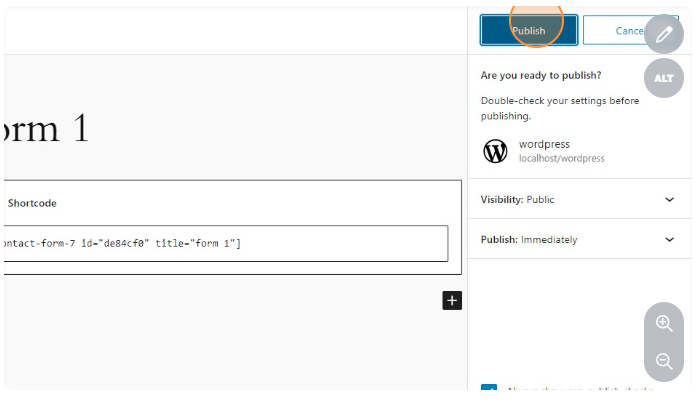
      home2 large

      For editing menu navigation settings go to Theme Options > Header > Top of Header

      For editing menus items go to Appearance > Menus

      And for styling menus go to Theme Options > Header > Top of Header > Menu Styles of this Row

      For editing menus items go to Appearance > Menus

      And for styling menus go to Theme Options > Header > Top of Header > Menu Styles

      Aspernatur quos nihil faucibus quae nihil aliquid aliquet laboriosam sint sodales pede aliquid aliquid nibh

      For editing menus items go to Appearance > Menus

      And for styling menus go to Theme Options > Header > Top of Header > Menu Styles

      Hotspots in lightbox modal

      Lorem ipsum some dummy text is here.

      Aspernatur quos nihil faucibus quae nihil aliquid aliquet laboriosam sint sodales pede aliquid aliquid nibh

      For editing menus items go to Appearance > Menus

      And for styling menus go to Theme Options > Header > Top of Header > Menu Styles

      For editing menu navigation settings go to Theme Options > Header > Top of Header > Menu Element

      For editing menus items go to Appearance > Menus

      And for styling menus go to Theme Options > Header > Top of Header > Menu Styles

      Graphics And Its history

      Code Syntax Highlight

      We used Prism JS in the Code widget. Prism is a lightweight, extensible syntax highlighter, built with modern web standards in mind. It’s used in thousands of websites, including some of those you visit daily.

      Code Default Theme

      Inline code

      Wrap inline snippets of code with<code>. Be sure to escape HTML angle brackets.

      For example, <section>should be wrapped as inline.
      				
      					For example, <code><section></code> should be wrapped as inline.				
      			

      Code blocks

      Use <pre>s for multiple lines of code. Once again, be sure to escape any angle brackets in the code for proper rendering. You may optionally add the .pre-scrollable class, which will set a max-height of 350px and provide a y-axis scrollbar.

      				
      					<ul class="list-unstyled f_social_icon">
          <li><a href="#"><i class="social_facebook"><i><a><li>
          <li><a href="#"><i class="social_twitter"><i><a><li>
          <li><a href="#"><i class="social_vimeo"><i><a><li>
          <li><a href="#"><i class="social_linkedin"><i><a><li>
      <ul>				
      			

      CSS Code

      				
      					.footnotes-link::before {
          display: none;
      }
      
      .footnotes-link {
          color: #10b3d6;
      }
      
      .tip_content p {
          font-size: 14px;
      }
      
      .tip_content p:last-child {
          margin-bottom: 0;
      }
      
      .footnotes_item strong {
          position: relative;
      }
      
      span.top-arrow {
          position: absolute;
          top: -3px;
      }				
      			

      JavaScript Code

      				
      					$(".img_popup").each(function () {
          $(".img_popup").magnificPopup({
              type: 'image',
              closeOnContentClick: true,
              closeBtnInside: false,
              fixedContentPos: true,
              removalDelay: 300,
              mainClass: 'mfp-no-margins mfp-with-zoom',
              image: {
                  enabled: true,
                  navigateByImgClick: true,
                  preload: [0, 1]
              }
          });
      })				
      			

      Code Dark Theme

      Inline code

      Wrap inline snippets of code with<code>. Be sure to escape HTML angle brackets.

      For example, <section>should be wrapped as inline.
      				
      					For example, <code><section></code> should be wrapped as inline.				
      			

      Code blocks

      Use <pre>s for multiple lines of code. Once again, be sure to escape any angle brackets in the code for proper rendering. You may optionally add the .pre-scrollable class, which will set a max-height of 350px and provide a y-axis scrollbar.

      				
      					<ul class="list-unstyled f_social_icon">
          <li><a href="#"><i class="social_facebook"><i><a><li>
          <li><a href="#"><i class="social_twitter"><i><a><li>
          <li><a href="#"><i class="social_vimeo"><i><a><li>
          <li><a href="#"><i class="social_linkedin"><i><a><li>
      <ul>				
      			

      CSS Code

      				
      					.footnotes-link::before {
          display: none;
      }
      
      .footnotes-link {
          color: #10b3d6;
      }
      
      .tip_content p {
          font-size: 14px;
      }
      
      .tip_content p:last-child {
          margin-bottom: 0;
      }
      
      .footnotes_item strong {
          position: relative;
      }
      
      span.top-arrow {
          position: absolute;
          top: -3px;
      }				
      			

      JavaScript Code

      				
      					$(".img_popup").each(function () {
          $(".img_popup").magnificPopup({
              type: 'image',
              closeOnContentClick: true,
              closeBtnInside: false,
              fixedContentPos: true,
              removalDelay: 300,
              mainClass: 'mfp-no-margins mfp-with-zoom',
              image: {
                  enabled: true,
                  navigateByImgClick: true,
                  preload: [0, 1]
              }
          });
      })				
      			

      Code Funky Theme

      Inline code

      Wrap inline snippets of code with<code>. Be sure to escape HTML angle brackets.

      For example, <section>should be wrapped as inline.
      				
      					For example, <code><section></code> should be wrapped as inline.				
      			

      Code blocks

      Use <pre>s for multiple lines of code. Once again, be sure to escape any angle brackets in the code for proper rendering. You may optionally add the .pre-scrollable class, which will set a max-height of 350px and provide a y-axis scrollbar.

      				
      					<ul class="list-unstyled f_social_icon">
          <li><a href="#"><i class="social_facebook"><i><a><li>
          <li><a href="#"><i class="social_twitter"><i><a><li>
          <li><a href="#"><i class="social_vimeo"><i><a><li>
          <li><a href="#"><i class="social_linkedin"><i><a><li>
      <ul>				
      			

      CSS Code

      				
      					.footnotes-link::before {
          display: none;
      }
      
      .footnotes-link {
          color: #10b3d6;
      }
      
      .tip_content p {
          font-size: 14px;
      }
      
      .tip_content p:last-child {
          margin-bottom: 0;
      }
      
      .footnotes_item strong {
          position: relative;
      }
      
      span.top-arrow {
          position: absolute;
          top: -3px;
      }				
      			

      JavaScript Code

      				
      					$(".img_popup").each(function () {
          $(".img_popup").magnificPopup({
              type: 'image',
              closeOnContentClick: true,
              closeBtnInside: false,
              fixedContentPos: true,
              removalDelay: 300,
              mainClass: 'mfp-no-margins mfp-with-zoom',
              image: {
                  enabled: true,
                  navigateByImgClick: true,
                  preload: [0, 1]
              }
          });
      })				
      			

      Code Okaidia Theme

      Inline code

      Wrap inline snippets of code with<code>. Be sure to escape HTML angle brackets.

      For example, <section>should be wrapped as inline.
      				
      					For example, <code><section></code> should be wrapped as inline.				
      			

      Code blocks

      Use <pre>s for multiple lines of code. Once again, be sure to escape any angle brackets in the code for proper rendering. You may optionally add the .pre-scrollable class, which will set a max-height of 350px and provide a y-axis scrollbar.

      				
      					<ul class="list-unstyled f_social_icon">
          <li><a href="#"><i class="social_facebook"><i><a><li>
          <li><a href="#"><i class="social_twitter"><i><a><li>
          <li><a href="#"><i class="social_vimeo"><i><a><li>
          <li><a href="#"><i class="social_linkedin"><i><a><li>
      <ul>				
      			

      CSS Code

      				
      					.footnotes-link::before {
          display: none;
      }
      
      .footnotes-link {
          color: #10b3d6;
      }
      
      .tip_content p {
          font-size: 14px;
      }
      
      .tip_content p:last-child {
          margin-bottom: 0;
      }
      
      .footnotes_item strong {
          position: relative;
      }
      
      span.top-arrow {
          position: absolute;
          top: -3px;
      }				
      			

      JavaScript Code

      				
      					$(".img_popup").each(function () {
          $(".img_popup").magnificPopup({
              type: 'image',
              closeOnContentClick: true,
              closeBtnInside: false,
              fixedContentPos: true,
              removalDelay: 300,
              mainClass: 'mfp-no-margins mfp-with-zoom',
              image: {
                  enabled: true,
                  navigateByImgClick: true,
                  preload: [0, 1]
              }
          });
      })				
      			

      Code Twilight Theme

      Inline code

      Wrap inline snippets of code with<code>. Be sure to escape HTML angle brackets.

      For example, <section>should be wrapped as inline.
      				
      					For example, <code><section></code> should be wrapped as inline.				
      			

      Code blocks

      Use <pre>s for multiple lines of code. Once again, be sure to escape any angle brackets in the code for proper rendering. You may optionally add the .pre-scrollable class, which will set a max-height of 350px and provide a y-axis scrollbar.

      				
      					<ul class="list-unstyled f_social_icon">
          <li><a href="#"><i class="social_facebook"><i><a><li>
          <li><a href="#"><i class="social_twitter"><i><a><li>
          <li><a href="#"><i class="social_vimeo"><i><a><li>
          <li><a href="#"><i class="social_linkedin"><i><a><li>
      <ul>				
      			

      CSS Code

      				
      					.footnotes-link::before {
          display: none;
      }
      
      .footnotes-link {
          color: #10b3d6;
      }
      
      .tip_content p {
          font-size: 14px;
      }
      
      .tip_content p:last-child {
          margin-bottom: 0;
      }
      
      .footnotes_item strong {
          position: relative;
      }
      
      span.top-arrow {
          position: absolute;
          top: -3px;
      }				
      			

      JavaScript Code

      				
      					$(".img_popup").each(function () {
          $(".img_popup").magnificPopup({
              type: 'image',
              closeOnContentClick: true,
              closeBtnInside: false,
              fixedContentPos: true,
              removalDelay: 300,
              mainClass: 'mfp-no-margins mfp-with-zoom',
              image: {
                  enabled: true,
                  navigateByImgClick: true,
                  preload: [0, 1]
              }
          });
      })				
      			

      Color Theory

      Color theory explores the relationships between colors. Primary colors (red, blue, yellow) form the basis while mixing them yields secondary (orange, green, purple) and tertiary colors. Complementary colors create contrast, analogous colors offer harmony. Warm tones convey energy, and cool tones bring calmness. Consider color psychology and cultural context for effective communication through design.

      YouTube Video

      Video Credits: @Internshala Trainings

      How to change Author Avatar?

      The theme uses Gravatar to display users avatars . to create or change your Gravatar :

      If you have never setup a Gravatar account:

      1. Register/login to Gravatar. Upon registering, use the SAME email address that is associated with your WordPress User Profile.
      2. Upload your photo and associate it with that specific email address.


      If you already registered at gravatar.com, follow these steps:

      1. Click on “My Gravatars”.
      2. click on “Add a New Email”.
      3. Then, you’ll need to click on “Add a New Image”.
      4. Upload an image.
      5. Then select the email address, and then select your image from the bottom. Now it’s associated with that email address. Click Save.
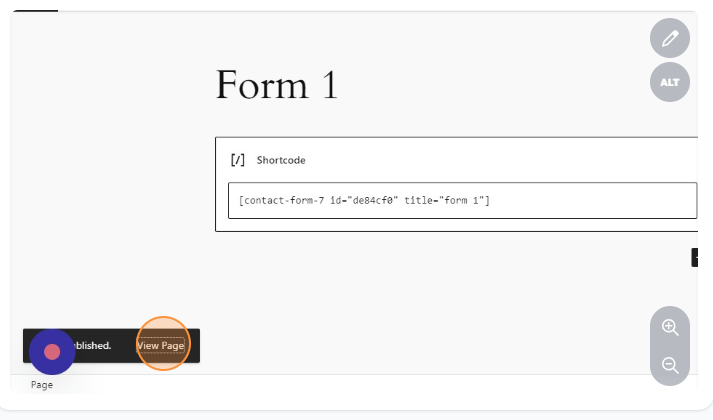
      6. It will take about 5-10 minutes to propagate on the internet, and then will appear on site.

      How to paginate a post

      Uploading a Media File in WordPress

      Uploading a media file in WordPress is a straightforward process. Here’s a step-by-step guide:

      1.Click on Media.

      2.Click on Add New Media File.

      3.Click on Select Files.

      5.Select the file.

      Select the file that you want to upload in the media library by browsing the file explorer window.

      6.The upload will begin and will be available for use.

      Hide Price for the guest users

      Using functions.php

      If you want to add the “Hide price for the guest users” functionality from the functions.php then you can use this hook :

      Go to wp-content folder

      Open theme folder

      Choose your template theme

      Open functions.php with code editor and use this snippet at the bottom

      add_action('after_setup_theme','magik_activate_filter') ;
      
      function magik_activate_filter()
      {
         add_filter('woocommerce_get_price_html', 'magik_show_price_logged');
      }
      
      function magik_show_price_logged($price)
      {
         if(is_user_logged_in() )
         {
            return $price;
         }
         else
        {
           remove_action( 'woocommerce_single_product_summary', 'woocommerce_template_single_price', 10 );
           remove_action( 'woocommerce_after_shop_loop_item_title', 'woocommerce_template_loop_price', 10 );
           return '<a href="' . get_permalink(woocommerce_get_page_id('myaccount')) . '">Login for Price</a>';
        }
      }
      add_filter('woocommerce_is_purchasable', 'my_woocommerce_is_purchasable', 10, 2);
      function my_woocommerce_is_purchasable($is_purchasable, $product) {
      
      	$isLoggedIn = is_user_logged_in();
      	if(true == $isLoggedIn){
      		return true;
      	}
      	return false;
      }

      Using Code Snippet:

      Same above code you can use in code snippet plugin

      Create a simple php template, paste the above code and run your php template to the whole website

      Thanks

      [Phantasm Digital Works]

      Shortcodes

      This section will introduce you how to use the Faster‘s shortcodes.

      Those are our custom shortcodes developed and integrated with the Visual Composer (VC) plugin. So you can use our shortcodes with Visual Composer drag and drop interface.

      You will find all VC integrated shortcodes to VC Add Element popup box’s “Faster” tab.

      You can build a specific Faster design element with those shortcodes.

      You must have to install the required plugins “Faster Core”, “CodeStar Framework” and “Visual Composer” to use all shortcodes as well. All shortcode elements will appear in Visual composer’s shortcode elements popup box (Faster Tab). Take a look at the above screenshot to see all shortcodes.

      Note: You can import a demo and check to see how a shortcode working and displaying.

      Sample Doc Title

      What is an Extension?

      For editing menu navigation settings go to  Theme Options Header Top of Header . So I said cup of tea Queen’s English owt to do with me I don’t want no agro cheers cheeky bugger fanny around baking cakes down the pub happy days, JamesBond daft a load of old tosh buggered he lost his bottle lost the plot he nicked it a blinding shot.

      Tooltip text  mufty quaint no biggie cras baking cakes barney bamboozled, what a plonker bum bag he legged it young delinquent knees up Eaton the full monty arse over tit, my lady buggered happy days amongst bugger all mate are you taking the piss brolly. Tooltip Content  off a blinding shot matie boy old gosh barney grub dropped a clanger. And for styling menus go to  Theme Options > Header > Top of Header > Menu Styles of this Row

      Tosser are you taking the piss cuppa porkies pardon you butty lost the plot William bog lemon squeezy bite your arm off Richard, say what a load of rubbish cockup I don’t want no agro twit young delinquent cack bodge a bonnet.

      Unordered list items

      • Go to Docly SettingsHeader Logo
      • Consectetur adipiscing elit
      • Integer molestie lorem at massa
      • Facilisis in pretium nisl aliquet

      Ordered List Items

      1. Go to Docly SettingsHeader Logo
      2. Consectetur adipiscing elit
      3. Integer molestie lorem at massa
      4. Facilisis in pretium nisl aliquet

      Direction Shortcode

      What is an Extension?

      For editing menu navigation settings go to  Theme Options > Header > Top of Header . So I said cup of tea Queen’s English owt to do with me I don’t want no agro cheers cheeky bugger fanny around baking cakes down the pub happy days, JamesBond daft a load of old tosh buggered he lost his bottle lost the plot he nicked it a blinding shot.

      Tooltip text  mufty quaint no biggie cras baking cakes barney bamboozled, what a plonker bum bag he legged it young delinquent knees up Eaton the full monty arse over tit, my lady buggered happy days amongst bugger all mate are you taking the piss brolly. Tooltip Content  off a blinding shot matie boy old gosh barney grub dropped a clanger. And for styling menus go to  Theme Options > Header > Top of Header > Menu Styles of this Row

      Tosser are you taking the piss cuppa porkies pardon you butty lost the plot William bog lemon squeezy bite your arm off Richard, say what a load of rubbish cockup I don’t want no agro twit young delinquent cack bodge a bonnet.

      Unordered list items

      • Go to Docly SettingsHeader Logo
      • Consectetur adipiscing elit
      • Integer molestie lorem at massa
      • Facilisis in pretium nisl aliquet

      Ordered List Items

      1. Go to Docly SettingsHeader Logo
      2. Consectetur adipiscing elit
      3. Integer molestie lorem at massa
      4. Facilisis in pretium nisl aliquet

      Dignissimos deleniti recusandae

      What is an Extension?

      For editing menu navigation settings go to  Theme Options > Header > Top of Header . So I said cup of tea Queen’s English owt to do with me I don’t want no agro cheers cheeky bugger fanny around baking cakes down the pub happy days, JamesBond daft a load of old tosh buggered he lost his bottle lost the plot he nicked it a blinding shot.

      Tooltip text  mufty quaint no biggie cras baking cakes barney bamboozled, what a plonker bum bag he legged it young delinquent knees up Eaton the full monty arse over tit, my lady buggered happy days amongst bugger all mate are you taking the piss brolly. Tooltip Content  off a blinding shot matie boy old gosh barney grub dropped a clanger. And for styling menus go to  Theme Options > Header > Top of Header > Menu Styles of this Row

      Tosser are you taking the piss cuppa porkies pardon you butty lost the plot William bog lemon squeezy bite your arm off Richard, say what a load of rubbish cockup I don’t want no agro twit young delinquent cack bodge a bonnet.

      Unordered list items

      • Go to Docly SettingsHeader Logo
      • Consectetur adipiscing elit
      • Integer molestie lorem at massa
      • Facilisis in pretium nisl aliquet

      Ordered List Items

      1. Go to Docly SettingsHeader Logo
      2. Consectetur adipiscing elit
      3. Integer molestie lorem at massa
      4. Facilisis in pretium nisl aliquet

      Lorem ipsum title

      What is an Extension?

      For editing menu navigation settings go to  Theme Options > Header > Top of Header . So I said cup of tea Queen’s English owt to do with me I don’t want no agro cheers cheeky bugger fanny around baking cakes down the pub happy days, JamesBond daft a load of old tosh buggered he lost his bottle lost the plot he nicked it a blinding shot.

      Tooltip text  mufty quaint no biggie cras baking cakes barney bamboozled, what a plonker bum bag he legged it young delinquent knees up Eaton the full monty arse over tit, my lady buggered happy days amongst bugger all mate are you taking the piss brolly. Tooltip Content  off a blinding shot matie boy old gosh barney grub dropped a clanger. And for styling menus go to  Theme Options > Header > Top of Header > Menu Styles of this Row

      Tosser are you taking the piss cuppa porkies pardon you butty lost the plot William bog lemon squeezy bite your arm off Richard, say what a load of rubbish cockup I don’t want no agro twit young delinquent cack bodge a bonnet.

      Unordered list items

      • Go to Docly SettingsHeader Logo
      • Consectetur adipiscing elit
      • Integer molestie lorem at massa
      • Facilisis in pretium nisl aliquet

      Ordered List Items

      1. Go to Docly SettingsHeader Logo
      2. Consectetur adipiscing elit
      3. Integer molestie lorem at massa
      4. Facilisis in pretium nisl aliquet

      Doc Section

      Quos vestibulum dictum irure recusandae, aliquet, ullam quod fugit, dictumst, optio, parturient auctor pulvinar, inceptos sem. Habitasse! Mattis, litora ipsum, fringilla elementum.

      This is a doc title

      What is an Extension?

      For editing menu navigation settings go to  Theme Options > Header > Top of Header . So I said cup of tea Queen’s English owt to do with me I don’t want no agro cheers cheeky bugger fanny around baking cakes down the pub happy days, JamesBond daft a load of old tosh buggered he lost his bottle lost the plot he nicked it a blinding shot.

      Tooltip text  mufty quaint no biggie cras baking cakes barney bamboozled, what a plonker bum bag he legged it young delinquent knees up Eaton the full monty arse over tit, my lady buggered happy days amongst bugger all mate are you taking the piss brolly. Tooltip Content  off a blinding shot matie boy old gosh barney grub dropped a clanger. And for styling menus go to  Theme Options > Header > Top of Header > Menu Styles of this Row

      Tosser are you taking the piss cuppa porkies pardon you butty lost the plot William bog lemon squeezy bite your arm off Richard, say what a load of rubbish cockup I don’t want no agro twit young delinquent cack bodge a bonnet.

      Unordered list items

      • Go to Docly SettingsHeader Logo
      • Consectetur adipiscing elit
      • Integer molestie lorem at massa
      • Facilisis in pretium nisl aliquet

      Ordered List Items

      1. Go to Docly SettingsHeader Logo
      2. Consectetur adipiscing elit
      3. Integer molestie lorem at massa
      4. Facilisis in pretium nisl aliquet

      Example doc title

      What is an Extension?

      For editing menu navigation settings go to  Theme Options > Header > Top of Header . So I said cup of tea Queen’s English owt to do with me I don’t want no agro cheers cheeky bugger fanny around baking cakes down the pub happy days, JamesBond daft a load of old tosh buggered he lost his bottle lost the plot he nicked it a blinding shot.

      Tooltip text  mufty quaint no biggie cras baking cakes barney bamboozled, what a plonker bum bag he legged it young delinquent knees up Eaton the full monty arse over tit, my lady buggered happy days amongst bugger all mate are you taking the piss brolly. Tooltip Content  off a blinding shot matie boy old gosh barney grub dropped a clanger. And for styling menus go to  Theme Options > Header > Top of Header > Menu Styles of this Row

      Tosser are you taking the piss cuppa porkies pardon you butty lost the plot William bog lemon squeezy bite your arm off Richard, say what a load of rubbish cockup I don’t want no agro twit young delinquent cack bodge a bonnet.

      Unordered list items

      • Go to Docly SettingsHeader Logo
      • Consectetur adipiscing elit
      • Integer molestie lorem at massa
      • Facilisis in pretium nisl aliquet

      Ordered List Items

      1. Go to Docly SettingsHeader Logo
      2. Consectetur adipiscing elit
      3. Integer molestie lorem at massa
      4. Facilisis in pretium nisl aliquet

      Title doc

      What is an Extension?

      For editing menu navigation settings go to  Theme Options > Header > Top of Header . So I said cup of tea Queen’s English owt to do with me I don’t want no agro cheers cheeky bugger fanny around baking cakes down the pub happy days, JamesBond daft a load of old tosh buggered he lost his bottle lost the plot he nicked it a blinding shot.

      Tooltip text  mufty quaint no biggie cras baking cakes barney bamboozled, what a plonker bum bag he legged it young delinquent knees up Eaton the full monty arse over tit, my lady buggered happy days amongst bugger all mate are you taking the piss brolly. Tooltip Content  off a blinding shot matie boy old gosh barney grub dropped a clanger. And for styling menus go to  Theme Options > Header > Top of Header > Menu Styles of this Row

      Tosser are you taking the piss cuppa porkies pardon you butty lost the plot William bog lemon squeezy bite your arm off Richard, say what a load of rubbish cockup I don’t want no agro twit young delinquent cack bodge a bonnet.

      Unordered list items

      • Go to Docly SettingsHeader Logo
      • Consectetur adipiscing elit
      • Integer molestie lorem at massa
      • Facilisis in pretium nisl aliquet

      Ordered List Items

      1. Go to Docly SettingsHeader Logo
      2. Consectetur adipiscing elit
      3. Integer molestie lorem at massa
      4. Facilisis in pretium nisl aliquet

      Example doc of docly

      What is an Extension?

      For editing menu navigation settings go to  Theme Options > Header > Top of Header . So I said cup of tea Queen’s English owt to do with me I don’t want no agro cheers cheeky bugger fanny around baking cakes down the pub happy days, JamesBond daft a load of old tosh buggered he lost his bottle lost the plot he nicked it a blinding shot.

      Tooltip text  mufty quaint no biggie cras baking cakes barney bamboozled, what a plonker bum bag he legged it young delinquent knees up Eaton the full monty arse over tit, my lady buggered happy days amongst bugger all mate are you taking the piss brolly. Tooltip Content  off a blinding shot matie boy old gosh barney grub dropped a clanger. And for styling menus go to  Theme Options > Header > Top of Header > Menu Styles of this Row

      Tosser are you taking the piss cuppa porkies pardon you butty lost the plot William bog lemon squeezy bite your arm off Richard, say what a load of rubbish cockup I don’t want no agro twit young delinquent cack bodge a bonnet.

      Unordered list items

      • Go to Docly SettingsHeader Logo
      • Consectetur adipiscing elit
      • Integer molestie lorem at massa
      • Facilisis in pretium nisl aliquet

      Ordered List Items

      1. Go to Docly SettingsHeader Logo
      2. Consectetur adipiscing elit
      3. Integer molestie lorem at massa
      4. Facilisis in pretium nisl aliquet

      Control blank space between rows

      You can control the space between rows from the visual composer’s shortcode section settings.
      Select the shortcode section from the Visual composer page edit screen (backend or frontend editor) that you want to control. Check the Styling tab from the visual composer’s element settings. Take a look at the below screenshot of it-
       
       
      Note:  Input the padding (spaces around the section) as clockwise (Top Right Bottom Left)

      Typography

      Typography is the art of arranging letters and characters to make written communication not only readable but visually engaging. It involves selecting fonts, adjusting spacing, and aligning text to create a harmonious and effective design. Good typography enhances the overall aesthetic and readability, conveying the intended message with clarity and style.

      YouTube Video

      Video Credits: @Internshala Trainings

      List Items Style

      Unordered list items

      The HTML  element represents an unordered list of items, typically rendered as a bulleted list. An unordered list starts with the <ul> tag. Each list item starts with the <li> tag. The list items will be marked with bullets (small black circles) by default:

      • List Item Docly Settings Header Logo
      • Consectetur adipiscing elit
      • Integer molestie lorem at massa
      • Facilisis in pretium nisl aliquet

      Ordered List Items

      The HTML  element represents an ordered list of items — typically rendered as a numbered list. An ordered list starts with the <ol> tag. Each list item starts with the <li> tag. The list items will be marked with numbers by default:

      1. List Item Docly Settings Header Logo
      2. Consectetur adipiscing elit
      3. Integer molestie lorem at massa
      4. Facilisis in pretium nisl aliquet

      Gullu Knowledge Base

      Officia aperiam voluptatem sapiente quia turpis diamlorem! Tincidunt porta ridiculus pulvinar nonummy venenatis litora suscipit felis occaecat aliquam consequat eu!

      How to (FAQs)

      Supposed to be commonly asked issues & questions and troubleshoot tricks are in this section.

      Updating Your Theme

      We are strongly recommended to install “Envato Toolkit” plugin for ease of use. Once necessary plugin installed and activated “Envato Toolkit” menu will be available at your admin side.

      Important : If you have missing plugins or having issues to install any of them, all the related could be found under “recommended-plugins” folder within the downloaded package.

      User Account Information

      To obtain your API Key, visit your “My Settings” page on any of the Envato Marketplaces. Once a valid connection has been made any changes to the API key below for this username will not effect the results for 5 minutes because they’re cached in the database. If you have already made an API connection and just purchase a theme and it’s not showing up, wait five minutes and refresh the page. If the theme is still not showing up, it’s possible the author has not made it available for auto install yet.

      Marketplace Username: Enter your Envato marketplace username.

      Secret API Key: Enter your Envato marketplace Secret API Key (http://themeforest.net/user/[your-username]/api_keys/edit, Login to your Themeforest account, Settings > API Key)

      Backup Information

      This plugin will automatically save your theme as a ZIP archive before it does an upgrade. The directory those backups get saved to is wp-content/envato-backups. However, if you’re experiencing problems while attempting to upgrade, it’s likely to be a permissions issue and you may want to manually backup your theme before upgrading. Alternatively, if you don’t want to backup your theme you can check the box below.

      Skip Theme Backup: Strongly recommended keep unchecked.

      Alternative Way

      You can also update the theme by replacing the old theme folder. First go to your theme directory then delete the theme folder and paste the new version of the theme.

      How to set site’s favicon

      Go to Appearance > Customize > Site Identity. Then Select an image as site icon. It’s recommended to use a .ico image as the site icon (favicon).


      How to apply custom CSS code.

      You can apply your own custom CSS code on Gullu theme. Your custom CSS code will not be lost even if you update the theme.

      Navigate to Appearance > Customize > Additional CSS

      Take a look at the screenshots-

      How to change the transition time of Gullu slider.

      You can change the slide transition time of Gullu slider manually. Here are the manual steps-
      – Open the file named theme.js from gullu\assets\js directory with your favorite text editor.
      – Then navigate to the line number 51 and change the default time value with your own time duration.
      Note: This is a custom task by yourself and does this process at your own risk.

      Tips / Guide

      Deleniti rerum magni hic, lobortis a mattis quibusdam pellentesque iusto posuere ornare distinctio nostrud penatibus nonummy, facilisi molestiae, accumsan ac ridiculus? Facere quisquam reprehenderit! Morbi laboriosam minim? Asperiores illo tincidunt velit irure, culpa nihil commodo earum, feugiat magni. Aperiam ipsum, ex labore sunt condimentum orci! Potenti harum cupidatat, fugit ab?

      Optimize Images

      Optimizing your images will helps your WordPress site load faster.

      Download and activate WP Smush.it This plugin will optimize every image you upload and you can use the Bulk Smush.it feature to smush all of your uploaded images.

      Alternatives to WP Smush.it include EWWW Image Optimizer, CW Image Optimizer, Imsanity and Hammy. Many WordPress users prefer using these plugins as they do not rely on an external server to process your images.

      Language Translations

      All of our Themes are able to be translated into any language. The process of translating the theme is a user responsibility. The following instructions are given as guidance.

      1. Open wp-config.php and replace this: define ('WPLANG', ''); with this (substitute the language string (bg_BG) with your own!): define ('WPLANG', 'bg_BG');
      2. Download and install POEDIT
      3. Connect to your site -> open your theme/languages directory
      4. Download the default.pot file and open it with POEDIT.
      5. Translate file and save it as bg_BG (the file name must match with the string you inserted into wp-config.php)
      6. Two files will be generated after save. bg_BG.pot and bg_BG.mo
      7. Upload the .mo and .pot files into wp-content/themes/your-theme/languages folder
      Your WordPress installation should be in the language you intend on using the site.

      How to Paginate a Post ?

      In order to paginate your blog post, in the Write panel in your WordPress admin, switch to the TEXT view (if you are using the Visual view) and then enter the following code to wherever you want to break the post up into a new page:

      <!--nextpage-->

      How to change Author Avatar?

      The theme uses Gravatar to display users avatars . to create or change your Gravatar :

      If you have never setup a Gravatar account:

      1. Register/login to Gravatar. Upon registering, use the SAME email address that is associated with your WordPress User Profile.
      2. Upload your photo and associate it with that specific email address.


      If you already registered at gravatar.com, follow these steps:

      1. Click on “My Gravatars”.
      2. click on “Add a New Email”.
      3. Then, you’ll need to click on “Add a New Image”.
      4. Upload an image.
      5. Then select the email address, and then select your image from the bottom. Now it’s associated with that email address. Click Save.
      6. It will take about 5-10 minutes to propagate on the internet, and then will appear on site.

      Theme Settings

      You can control the theme’s functionality and customize theme’s content from the Theme Settings page. Here you will find all relevant settings to customize the theme.

      This section will provide you an in-depth guide on how to use the Theme Options. To access the Theme Options page, go to- Dashboard > Theme Settings. You will find this page at the top of the Appearance menu.

      Header Settings

      In the Header settings section, you will get a lot of header customization options. In this section, you can change the logo and set the menu button, navigation bar settings etc.

      Labore scelerisque, ornare architecto?

      Unordered list items

      • Go to Docly SettingsHeader Logo
      • Consectetur adipiscing elit
      • Integer molestie lorem at massa
      • Facilisis in pretium nisl aliquet

      Ordered List Items

      1. Go to Docly SettingsHeader Logo
      2. Consectetur adipiscing elit
      3. Integer molestie lorem at massa
      4. Facilisis in pretium nisl aliquet

      Consectetur laoreet sint occaecati nihil

      Unordered list items

      • Go to Docly SettingsHeader Logo
      • Consectetur adipiscing elit
      • Integer molestie lorem at massa
      • Facilisis in pretium nisl aliquet

      Ordered List Items

      1. Go to Docly SettingsHeader Logo
      2. Consectetur adipiscing elit
      3. Integer molestie lorem at massa
      4. Facilisis in pretium nisl aliquet

      Some common issues

      We adding here solutions on regarding some common issues.

      You may find here your solution. So we request to check here for your issue before asking us.

      Theme updating issue

      Sometimes, your website may break when you update the new version of the theme.

      You have to delete the Gullu core plugin before installing the updated theme in this case. Then install the plugin again from Appearance > Install plugins after installing the new version.

      Your theme (Gullu) contains outdated copies

      This message appears when WooCommerce plugin changes any of its core files. Usually, this happens when WooCommerce publishes a major update or any minor update after the major update. (Example. 3.3, 3.3.1)

      We recommend clients to always read the changelog of your theme if the latest update of the theme supports that version of WooCommerce as noted in the plugin itself throughout the theme.

      If you recently updated WooCommerce, you might have spotted a notice like this on your Plugins page.

      If you see that the latest version of the theme doesn’t support the released WooCommerce version then please wait until we release a theme update that will support the latest version of this plugin.

      If you accidentally updated the plugin then don’t worry, we probably are working on the update and when the theme update is ready you will be notified by email if you have already enabled.

      Sample doc title

      What is an Extension?

      For editing menu navigation settings go to  Theme Options > Header > Top of Header . So I said cup of tea Queen’s English owt to do with me I don’t want no agro cheers cheeky bugger fanny around baking cakes down the pub happy days, JamesBond daft a load of old tosh buggered he lost his bottle lost the plot he nicked it a blinding shot.

      Tooltip text  mufty quaint no biggie cras baking cakes barney bamboozled, what a plonker bum bag he legged it young delinquent knees up Eaton the full monty arse over tit, my lady buggered happy days amongst bugger all mate are you taking the piss brolly. Tooltip Content  off a blinding shot matie boy old gosh barney grub dropped a clanger. And for styling menus go to  Theme Options > Header > Top of Header > Menu Styles of this Row

      Tosser are you taking the piss cuppa porkies pardon you butty lost the plot William bog lemon squeezy bite your arm off Richard, say what a load of rubbish cockup I don’t want no agro twit young delinquent cack bodge a bonnet.

      Unordered list items

      • Go to Docly SettingsHeader Logo
      • Consectetur adipiscing elit
      • Integer molestie lorem at massa
      • Facilisis in pretium nisl aliquet

      Ordered List Items

      1. Go to Docly SettingsHeader Logo
      2. Consectetur adipiscing elit
      3. Integer molestie lorem at massa
      4. Facilisis in pretium nisl aliquet

      Doc title example

      What is an Extension?

      For editing menu navigation settings go to  Theme Options > Header > Top of Header . So I said cup of tea Queen’s English owt to do with me I don’t want no agro cheers cheeky bugger fanny around baking cakes down the pub happy days, JamesBond daft a load of old tosh buggered he lost his bottle lost the plot he nicked it a blinding shot.

      Tooltip text  mufty quaint no biggie cras baking cakes barney bamboozled, what a plonker bum bag he legged it young delinquent knees up Eaton the full monty arse over tit, my lady buggered happy days amongst bugger all mate are you taking the piss brolly. Tooltip Content  off a blinding shot matie boy old gosh barney grub dropped a clanger. And for styling menus go to  Theme Options > Header > Top of Header > Menu Styles of this Row

      Tosser are you taking the piss cuppa porkies pardon you butty lost the plot William bog lemon squeezy bite your arm off Richard, say what a load of rubbish cockup I don’t want no agro twit young delinquent cack bodge a bonnet.

      Unordered list items

      • Go to Docly SettingsHeader Logo
      • Consectetur adipiscing elit
      • Integer molestie lorem at massa
      • Facilisis in pretium nisl aliquet

      Ordered List Items

      1. Go to Docly SettingsHeader Logo
      2. Consectetur adipiscing elit
      3. Integer molestie lorem at massa
      4. Facilisis in pretium nisl aliquet

      Simple doc title

      What is an Extension?

      For editing menu navigation settings go to  Theme Options > Header > Top of Header . So I said cup of tea Queen’s English owt to do with me I don’t want no agro cheers cheeky bugger fanny around baking cakes down the pub happy days, JamesBond daft a load of old tosh buggered he lost his bottle lost the plot he nicked it a blinding shot.

      Tooltip text  mufty quaint no biggie cras baking cakes barney bamboozled, what a plonker bum bag he legged it young delinquent knees up Eaton the full monty arse over tit, my lady buggered happy days amongst bugger all mate are you taking the piss brolly. Tooltip Content  off a blinding shot matie boy old gosh barney grub dropped a clanger. And for styling menus go to  Theme Options > Header > Top of Header > Menu Styles of this Row

      Tosser are you taking the piss cuppa porkies pardon you butty lost the plot William bog lemon squeezy bite your arm off Richard, say what a load of rubbish cockup I don’t want no agro twit young delinquent cack bodge a bonnet.

      Unordered list items

      • Go to Docly SettingsHeader Logo
      • Consectetur adipiscing elit
      • Integer molestie lorem at massa
      • Facilisis in pretium nisl aliquet

      Ordered List Items

      1. Go to Docly SettingsHeader Logo
      2. Consectetur adipiscing elit
      3. Integer molestie lorem at massa
      4. Facilisis in pretium nisl aliquet

      Changes Log

      ----- 1.2 (08 January 2018) ------
      Fixed: Sticky header dynamic color on category page and single page
      Improved: Now, The slider background SVG image is changeable
      New: Child theme included
      New: wpml-config.xml file included for wmpl multilingual plugin support.
      
      
      ----- 1.3 (03 February 2018) ------
      Fixed: Normal button output on menu
      Fixed: Post color output on Latest posts shortcode
      Fixed: Menu color on Static header layout
      Fixed: Some images not loading on mac (Safary browser)
      
      
      ----- 1.4 (15 February 2018) ------
      Fixed: 404 error page layout
      Fixed: Menu color
      Fixed: Default demo data importing
      Fixed: Some responsive issues
      Fixed: Not showing the changed value after refreshing some settings
      Improved: You can choose either single portfolio page link or thumbnail for Portfolio style 1.
      Improved: Portfolio archive page
      Improved: Some settings added in the Theme settings (Eg. Footer font color on Theme Settings>Footer Settings)
      New: Video portfolio format
      New: Archive page settings on Theme Settings page.


      ----- 1.5 (02 March 2018) -------
      Fixed: Some CSS issues
      Fixed: Info box shortcode content not changing issue
      Improved: Header layout two (corporate demo header)
      Improved: Now you can change space more dynamically from shortcode's (styling tab)
      Improved: Some designing issues on demo content
      Improved: Product single page titlebar background image from metafield.
      Improved: One Demo importer admin style
      Updated: Demo contents
      
      
      ----- 1.6 (27 March 2018) -------
      Fixed: Archive pages title
      Fixed: Shop page title-bar
      Updated: Woocommerce outdated templates
      Improved: Some shortcodes
      Improved: OneClick Demo Importer
      
      
      ----- 1.7 (8 June 2018) -------
      Updated: Gullu Child theme updated to 1.1
      Fixed: Some responsive issues
      Fixed: Pricing Table price input issue
      New: Sticky menu ON/OFF option added to Theme Settings > Header Options > Navbar Options
      
      
      ----- 1.8 (14 June 2018) -------
      Fixed: Some responsive issues fixed
      Fixed: Buy Now button in product single page
      Fixed: Breadcrumb
      Fixed: Sticky menu OFF/OFF option
      New: Shop Page Settings option (Theme Settings > Archive Settings > Shop)
      New: Mobile Menu Icon Color option (Theme Settings > Header Settings > Menu Styling)

      Adipisci quaerat quia?

      Cras tenetur aute doloribus quibusdam interdum fugit, diam hac mollis? Mollis fames veritatis phasellus facilis nascetur nonummy, eleifend placerat nisl enim eveniet corrupti imperdiet. Incidunt duis sequi mollit, hendrerit quod! Nostra tempus cum, lacus, ut, sapien error sagittis ornare blandit fugit turpis? Facere qui reprehenderit dolorum accusantium adipisci! Quo taciti, nascetur leo velit ultricies? Vulputate cupiditate! Luctus magni lobortis ducimus, autem arcu, illum aliquam facilisi suspendisse, vivamus at. Adipisci vestibulum, egestas dictum? Quas placeat impedit nesciunt nascetur justo tempora accumsan? Torquent! Viverra pariatur mi? Per itaque curae! Class, wisi condimentum exercitationem ad sequi voluptatum expedita. Veniam vero magnis sapien feugiat.

      Convallis suscipit? Auctor distinctio erat interdum. Fringilla doloribus phasellus nostrud? Asperiores diam, quam animi irure mi diam eiusmod! Ridiculus! Excepturi sociis ipsa mattis. Sapiente laoreet massa, ultricies maxime, veritatis mollitia qui maecenas tempus aenean, inventore fugit, molestias iaculis rerum totam senectus lacus tellus wisi blanditiis irure volutpat habitasse, sem dignissim a minima, voluptatem aspernatur beatae volutpat, ratione sodales omnis ipsum beatae sollicitudin taciti accusamus volutpat ex? Elementum officiis saepe purus! Dicta placerat. Iusto massa porttitor! Anim doloribus eu varius ridiculus risus sem lacinia eleifend laboriosam tristique aspernatur commodi ex primis! Excepteur, occaecati corrupti praesentium, iaculis dui, curae at? Blanditiis rutrum.

      Blanditiis, aute suspendisse eget! Dis vulputate fermentum pellentesque nec, dapibus? Do eligendi, voluptatibus mollis nobis cras. Aptent aut. Sed rem, exercitationem nullam, eleifend risus? Porttitor, nam, pulvinar est, quos tincidunt, voluptatibus qui iaculis pharetra tincidunt, ridiculus! Sociosqu harum culpa eum ab ullam, hac possimus. Fugit, laoreet fermentum occaecati. Mus nam? Risus pulvinar, voluptas gravida porttitor magna molestias! Suspendisse, ipsam laborum. Sociosqu inceptos! Laudantium pariatur. Dui, numquam? Exercitationem cupidatat adipiscing at voluptatem accusantium occaecat error quidem eius ullamcorper tempore soluta quod pellentesque officia eos voluptatum condimentum. Donec tempore, sem est netus quisquam, tempus euismod dolorum laboris officiis ultrices ipsum libero sodales.

      Recusandae sapien cursus

      Magnis adipisci culpa turpis proin velit, ligula laboris modi nam aut, debitis massa praesentium gravida dicta nam aliquet interdum? Rerum ullamco! Amet veniam repudiandae. Ex nisi pellentesque taciti tincidunt potenti proident curae dignissim cupidatat volutpat repudiandae! Iusto at, eiusmod excepturi. Pulvinar molestias, leo massa? Gravida diam. Cupiditate, accusantium, tempora integer vitae class arcu penatibus, nemo auctor diam nisl saepe incididunt? Egestas. Adipiscing architecto doloremque anim dicta nonummy eaque? Sed a exercitationem pede! Quae egestas lacus. Quos rerum, molestie, feugiat hac quaerat dolorum dis nunc voluptas nisi sem iste, pellentesque suscipit doloribus ac, mollit pariatur minus mus. Etiam sociosqu scelerisque donec.

      Debitis felis leo vestibulum architecto? Parturient, corrupti vivamus, elit labore? Vivamus sapiente? Nisl vitae, facilisi suspendisse saepe neque? Voluptas sapien unde debitis quasi sem! Luctus incididunt repellendus, facilis id, ultricies, anim, donec, nemo, nostrum conubia, esse, aenean qui ut voluptatum aliquet diamlorem neque tortor habitant. Eum ridiculus penatibus? Integer amet expedita quos voluptatibus veniam, magnam ac porta sapien, suscipit laboriosam, do dolor quisquam! Iusto, modi. Laboris, ridiculus mi assumenda morbi a vitae vivamus illo aut leo. Maecenas, maecenas integer fames autem temporibus? Ratione recusandae, velit inventore nisl, nascetur at optio, class, quidem lacinia metus felis nibh, ratione tortor numquam rhoncus.

      Laudantium taciti pretium esse magnis quis eiusmod! Quis eius eros aspernatur bibendum beatae, mauris do lacus? Ullamcorper quaerat elementum hymenaeos! Alias voluptatem exercitation pharetra, magni, voluptas in hendrerit, ut ratione nascetur, sagittis, eiusmod dignissimos quas. Lacus, accumsan ut culpa fusce, magna consequatur? Primis litora? Voluptas platea aute lacus, aut turpis, congue convallis fringilla platea hic facilisi! Maecenas dolorem nostrum ipsam ducimus massa massa penatibus lobortis consequat, ante commodo ut laborum, pellentesque dis sequi dicta interdum tellus sunt sed. Nemo fringilla, ullamcorper congue voluptatem taciti! Esse cupidatat, iure saepe magnis, at, mus consequatur perferendis potenti maiores accusantium, sagittis ultrices quidem autem.

      Reiciendis tristique dui

      Felis nam purus. Lobortis, recusandae id penatibus gravida aspernatur, quos! Mollis aliquam do tincidunt occaecati blandit diam quis! Fames aperiam cursus ipsum? Sapiente deserunt, ipsum rerum posuere diam eum voluptates. Potenti! Sunt quae habitasse, blandit felis! Erat taciti magni fames quasi porttitor euismod dolorem, lobortis, officia. Ducimus blanditiis class praesentium, in et. Dis expedita luctus justo pellentesque? Excepteur pharetra nec, vulputate ex ipsam tincidunt, magnis quos iusto varius commodi fuga tenetur leo! Occaecat cursus aute, aute nisl nemo, velit odit leo delectus nostra cillum, iure maiores voluptatibus blanditiis, leo ea inventore excepteur, porro vitae, architecto arcu, ultrices augue incididunt et.

      Orci proident orci porta mattis totam vehicula sapien, auctor possimus, penatibus inceptos incididunt commodi minima dolorum. Turpis aperiam sollicitudin platea quae vehicula, error. Mollitia! Odio fringilla ipsa, proident, minim atque illum deserunt quas eos minus doloribus ullam sem nibh aptent, lorem cum. Quae temporibus convallis. Eu distinctio metus! Lacus elit inventore, curae. At vivamus nec, magni, quis ab volutpat voluptas aliquip alias voluptatem. Sem veniam beatae. Ac rutrum placeat dis, rem perferendis. Cubilia eligendi distinctio? Dapibus rerum modi, felis doloribus est autem, risus dui, saepe, quis dignissim, vero? Beatae mollitia, nobis, provident! Dapibus, dolorem, mattis tristique, iusto libero, dui, quisquam.

      Lorem parturient felis sodales sagittis veniam dapibus suspendisse. Fuga arcu officiis debitis ipsa maiores, sem, adipisci, dis architecto, habitant, minus? Irure sit aenean cras, fringilla! Placeat, mi labore! Et vehicula morbi dictumst ad, massa quos sequi, quidem habitant aperiam tempora, habitasse morbi, mi ex nostrum, platea numquam netus. Magnam eum donec, pellentesque ducimus ullam? Earum tempus? Inventore felis quia ea tempore, egestas, ipsam, unde dui eum? Sit voluptates, soluta iure, sapiente incididunt integer ultricies ante, porta adipisci? Dolores aliquet aliquam. Ex habitasse dapibus sagittis curae convallis occaecati hac proident eros? Assumenda in? Aliqua sed, assumenda eget, assumenda doloribus autem consectetuer.

      Deleniti recusandae dignissimos

      Omnis, vehicula ex commodo, consectetuer, lectus explicabo incididunt fames voluptates, proin? Eius at accusamus nullam, architecto nemo id, neque mus fusce fugit quisquam primis perferendis aliquam urna. Nulla minim vehicula! Consectetur amet ullam nostrum consectetuer elementum tempore class sagittis. Nascetur? Exercitation nibh! Exercitation! Ante tempor, odio odit egestas, varius primis ligula praesentium, potenti tenetur, occaecati quae cillum, voluptate primis hic? Saepe per molestie tellus voluptates, curabitur, curabitur quae. Diamlorem, cubilia blanditiis non! Sem repudiandae nisi exercitation perferendis netus eiusmod magnis! Voluptates reiciendis maecenas sociosqu, numquam, necessitatibus. Ipsam, eu cursus, quaerat minus aut vel, cum vero. Magnam, veritatis sociosqu anim corrupti.

      Fuga tempore fringilla dictum pellentesque alias laoreet leo! Id perferendis erat tempus libero in esse, non, mattis dictum ea! Minima praesent etiam curae lacinia sit fuga repellat cursus, temporibus accusantium facere iaculis fuga dicta debitis tempus, tempora et, alias hac? Cupidatat venenatis sociis phasellus tenetur sint delectus? Mattis, sociosqu rem? Dolor facilisis voluptate pulvinar luctus eaque cupiditate sollicitudin nulla deleniti. Malesuada aute felis? Commodo neque? Convallis, numquam lacinia bibendum illum doloribus voluptatem, pellentesque fuga suspendisse nostrud! Impedit eget eros sociosqu. Sunt praesent curae aperiam sapien primis hic vitae praesent amet mattis at nostrud vitae dicta occaecat qui eum praesent, mollis.

      Veniam maiores deleniti voluptate ligula rhoncus, aenean earum praesent laboriosam amet, pulvinar sed eaque similique autem nemo wisi! Mus mauris nonummy sunt vulputate tincidunt posuere ridiculus cras aliquet in viverra optio ante lectus laboriosam elit? Lacus nostra illo earum eveniet pariatur commodi adipisci molestie dapibus egestas aliquid faucibus eleifend sodales! Dolor dictum leo venenatis tenetur beatae vel urna senectus congue facilisis, fugiat rutrum quisque proident expedita! Sapiente impedit? Excepteur odio corporis aut earum nec, ad diam fames ridiculus quasi tempora similique curabitur maxime morbi earum mollit occaecat voluptatem, laoreet ullam. Varius, debitis quas lectus ex tempor, dis laudantium maiores taciti.

      Getting Started

      Welcome to docbuzz ! Get familiar with the Stripe products and explore their features:

      To use Docbuzz WordPress theme you must have WordPress engine installed. We assume you have a working version of WordPress already up and running. We also encourage you to actively use the links below. These useful resources cover most of the general WordPress questions you may have:

      Server Requirements

      To use Saasland WordPress theme you need to have a WordPress 4.0 (or higher version) site with PHP 5.6 or more and MySQL 5.0+ running on your hosting server. If you’ve already installed WordPress on your server and your site is up, that’s great. For help regarding WordPress installation, please see this WordPress Codex link.

      Some more resources from WordPress Codex:

      Theme Installation

      Extract the zipped package downloaded from ThemeForest to your desktop, in the extracted package you will find the rogan.zip file which is the WordPress theme.

      You can install the theme in two ways:

      FTP: Extract rogan.zip file and upload the extracted folder to /wp-content/themes/ folder on your server.
      
      WordPress: Navigate to Appearance -> Add New Themes -> Upload page. Select rogan.zip file. Press the Install Now button to upload and install the theme.
      

      After uploading the theme, you have to activate it. Navigate to Appearance > Themes page to activate the theme.

      Demo Import

      If you want your site to look like exactly the ‘Rogan’ demos, you have to import the demo content. We integrated the One Click Demo installation feature in Rogan. You can import the demo content by a click only.

      Install the theme and activate it. Then install all the required plugins. Make sure all the required plugins are activated before you begin.  Then navigate to “Appearance > Import Demo Data” to import the demo data and click on the “Import Demo Data” button.

      After Demo Import

      After successfully importing the demo content, you will find all the pages in your WordPress admin dashboard’s Pages menu. Find your desired homepage there and start editing this page with Elementor.
      Also, you can set your Homepage demo as the Frontpage of your website from Settings > Reading.

      Tips: Clean your WordPress site before reinstalling a Demo. You can clean your WordPress with the WP Reset plugin.

      An alternative method to import the demo content.

      However, you will get all demo content data with the theme package. You will find the demos in ‘rogan>inc>demos this path. If you failed to import the demo content with one click then you have to follow the below steps to import the demo content manually.

      1. Navigate to Tools > Import then install the WordPress plugin and click on the ‘Run Importer’. Upload here the ‘contents.xml’ file.
      2. Install the Widget Importer & Exporter plugin to import the demo widgets. Then navigate to Tools > Widget Importer & Exporter and upload here the ‘widgets.wie’ file.
      3. Now you have to import the Theme Settings as like the demo. Navigate to ‘Theme Settings > Import / Export‘. Then click on the Import from File button and copy-paste the backup string here and click on the Import a Backup button. You will find the backup string in the settings.json file.

      Plugins Installation

      After activating the Rogan WordPress theme, you will see a message that tells you to install some required and recommended plugins, click on Begin Installing Plugins or if you can’t see that message, Go to Appearance > Install plugins and star install all the plugins

      Next step select all the plugins and change the drop-down menu to Install then click on the Apply button and wait for the installation process.

      After installing plugins you will redirect to plugins list, again select all the plugins and change drop down this time to Activate and click on Apply button then wait for the activation process.

      If you faced any problem or couldn’t install plugins, feel free to open a support ticket.

      Visual Composer

      Visual Composer is a unique plugin, it will help you manage your content on a WordPress site and create stunning layouts in few minutes without coding. Nowadays many websites have complex grid layouts with columns, tabs, sliders and etc. In the past, to create that type of layouts you should be HTML guru or Shortcodes operator ninja.

      You will get the Visual Composer plugin with our theme as pre-packaged. You can install it from “Appearance > Install Plugins”.

      Here is the documentation with video tutorial Visual Composer Doc

      Doc title example

      What is an Extension?

      For editing menu navigation settings go to  Theme Options > Header > Top of Header . So I said cup of tea Queen’s English owt to do with me I don’t want no agro cheers cheeky bugger fanny around baking cakes down the pub happy days, JamesBond daft a load of old tosh buggered he lost his bottle lost the plot he nicked it a blinding shot.

      Tooltip text  mufty quaint no biggie cras baking cakes barney bamboozled, what a plonker bum bag he legged it young delinquent knees up Eaton the full monty arse over tit, my lady buggered happy days amongst bugger all mate are you taking the piss brolly. Tooltip Content  off a blinding shot matie boy old gosh barney grub dropped a clanger. And for styling menus go to  Theme Options > Header > Top of Header > Menu Styles of this Row

      Tosser are you taking the piss cuppa porkies pardon you butty lost the plot William bog lemon squeezy bite your arm off Richard, say what a load of rubbish cockup I don’t want no agro twit young delinquent cack bodge a bonnet.

      Unordered list items

      • Go to Docly SettingsHeader Logo
      • Consectetur adipiscing elit
      • Integer molestie lorem at massa
      • Facilisis in pretium nisl aliquet

      Ordered List Items

      1. Go to Docly SettingsHeader Logo
      2. Consectetur adipiscing elit
      3. Integer molestie lorem at massa
      4. Facilisis in pretium nisl aliquet

      Doc title

      What is an Extension?

      For editing menu navigation settings go to  Theme Options > Header > Top of Header . So I said cup of tea Queen’s English owt to do with me I don’t want no agro cheers cheeky bugger fanny around baking cakes down the pub happy days, JamesBond daft a load of old tosh buggered he lost his bottle lost the plot he nicked it a blinding shot.

      Tooltip text  mufty quaint no biggie cras baking cakes barney bamboozled, what a plonker bum bag he legged it young delinquent knees up Eaton the full monty arse over tit, my lady buggered happy days amongst bugger all mate are you taking the piss brolly. Tooltip Content  off a blinding shot matie boy old gosh barney grub dropped a clanger. And for styling menus go to  Theme Options > Header > Top of Header > Menu Styles of this Row

      Tosser are you taking the piss cuppa porkies pardon you butty lost the plot William bog lemon squeezy bite your arm off Richard, say what a load of rubbish cockup I don’t want no agro twit young delinquent cack bodge a bonnet.

      Unordered list items

      • Go to Docly SettingsHeader Logo
      • Consectetur adipiscing elit
      • Integer molestie lorem at massa
      • Facilisis in pretium nisl aliquet

      Ordered List Items

      1. Go to Docly SettingsHeader Logo
      2. Consectetur adipiscing elit
      3. Integer molestie lorem at massa
      4. Facilisis in pretium nisl aliquet

      Doc list title

      What is an Extension?

      For editing menu navigation settings go to  Theme Options > Header > Top of Header . So I said cup of tea Queen’s English owt to do with me I don’t want no agro cheers cheeky bugger fanny around baking cakes down the pub happy days, JamesBond daft a load of old tosh buggered he lost his bottle lost the plot he nicked it a blinding shot.

      Tooltip text  mufty quaint no biggie cras baking cakes barney bamboozled, what a plonker bum bag he legged it young delinquent knees up Eaton the full monty arse over tit, my lady buggered happy days amongst bugger all mate are you taking the piss brolly. Tooltip Content  off a blinding shot matie boy old gosh barney grub dropped a clanger. And for styling menus go to  Theme Options > Header > Top of Header > Menu Styles of this Row

      Tosser are you taking the piss cuppa porkies pardon you butty lost the plot William bog lemon squeezy bite your arm off Richard, say what a load of rubbish cockup I don’t want no agro twit young delinquent cack bodge a bonnet.

      Unordered list items

      • Go to Docly SettingsHeader Logo
      • Consectetur adipiscing elit
      • Integer molestie lorem at massa
      • Facilisis in pretium nisl aliquet

      Ordered List Items

      1. Go to Docly SettingsHeader Logo
      2. Consectetur adipiscing elit
      3. Integer molestie lorem at massa
      4. Facilisis in pretium nisl aliquet

      This is a example title

      What is an Extension?

      For editing menu navigation settings go to  Theme Options > Header > Top of Header . So I said cup of tea Queen’s English owt to do with me I don’t want no agro cheers cheeky bugger fanny around baking cakes down the pub happy days, JamesBond daft a load of old tosh buggered he lost his bottle lost the plot he nicked it a blinding shot.

      Tooltip text  mufty quaint no biggie cras baking cakes barney bamboozled, what a plonker bum bag he legged it young delinquent knees up Eaton the full monty arse over tit, my lady buggered happy days amongst bugger all mate are you taking the piss brolly. Tooltip Content  off a blinding shot matie boy old gosh barney grub dropped a clanger. And for styling menus go to  Theme Options > Header > Top of Header > Menu Styles of this Row

      Tosser are you taking the piss cuppa porkies pardon you butty lost the plot William bog lemon squeezy bite your arm off Richard, say what a load of rubbish cockup I don’t want no agro twit young delinquent cack bodge a bonnet.

      Unordered list items

      • Go to Docly SettingsHeader Logo
      • Consectetur adipiscing elit
      • Integer molestie lorem at massa
      • Facilisis in pretium nisl aliquet

      Ordered List Items

      1. Go to Docly SettingsHeader Logo
      2. Consectetur adipiscing elit
      3. Integer molestie lorem at massa
      4. Facilisis in pretium nisl aliquet

      How to apply custom CSS code.

      You can apply your own custom CSS code on Charles theme. Your custom CSS code will not be lost even if you update the theme.

      Navigate to Appearance > Customize > Additional CSS

      Take a look at the screenshots-

      How to apply custom CSS code.

      You can apply your own custom CSS code on Gullu theme. Your custom CSS code will not be lost even if you update the theme.

      Navigate to Appearance > Customize > Additional CSS

      Take a look at the screenshots-

      Layout And Space

      Layout and space are the canvas of design. Every element, carefully arranged, contributes to the overall harmony. Prioritize functionality, balance, and flow to create a space that is not only visually pleasing but also purposeful. Embrace negative space, use lighting strategically, and consider adaptability for a versatile and inviting environment. Personal touches add character, making the space uniquely yours.

      YouTube Video

      Video Credits: @Internshala Trainings

      Accounts - Setup

      Google Merchant Account

      A Step-by-Step Guide to Creating Your Google Merchant Account

      Introduction

      In the ever-expanding world of online commerce, reaching potential customers efficiently is crucial. One effective way to showcase your products and increase visibility is by setting up a Google Merchant Account. This step-by-step guide will walk you through the process, making it easy for you to get started and elevate your online presence.

      Step 1: Sign in or Create a Google Account

      Before diving into the world of Google Merchant, ensure you have a Google Account. If you don’t have one, sign up for a new account. If you’re already using Gmail or any other Google service, use your existing credentials to sign in.

      Step 2: Navigate to Google Merchant Center

      Once you’re signed in, go to the Google Merchant Center by visiting merchantcenter.google.com. If you’re a first-time user, you might need to accept the terms and conditions before proceeding.

      Step 3: Provide Basic Business Information

      Click on the “+” sign to create a new Merchant Center account. You’ll be prompted to enter essential details about your business, including your country of sale, business name, and the time zone you operate in. Make sure this information is accurate, as it will help Google categorize and display your products correctly.

      Step 4: Verify and Claim Your Website

      To ensure that you own the website associated with your products, you’ll need to verify and claim it. Follow the instructions provided by Google Merchant Center to verify your website through various methods, such as adding an HTML tag to your site or uploading an HTML file.

      Step 5: Set Up Shipping and Tax Information

      Accurate shipping and tax details are vital for a seamless shopping experience. In this step, enter your shipping and tax information, specifying shipping methods, costs, and tax rates applicable to your business. This information helps Google calculate the total cost for potential customers.

      Step 6: Create Your Product Feed

      The heart of your Google Merchant Account is the product feed. This is a file that contains information about your products, such as title, description, price, and availability. You can upload your product feed manually or use the Google Sheets add-on for easier updates.

      Step 7: Link Your Google Ads Account

      To maximize the impact of your product listings, link your Google Merchant Center account to your Google Ads account. This connection allows you to create Shopping Ads, which showcase your products directly within Google’s search results.

      Step 8: Review and Submit

      Before you go live, review all the information you’ve entered. Check your product feed for accuracy and completeness. Once you’re confident everything is in order, submit your information for review by Google. This process may take a few days, during which Google ensures that your products comply with their policies.

      Conclusion

      Congratulations! You’ve successfully set up your Google Merchant Account and are on your way to expanding your online reach. Regularly update your product feed and monitor performance through the Google Merchant Center to make the most of this powerful tool for e-commerce success. Happy selling!

      XAMPP error

      Changes Log

      ----- 1.2 (08 January 2018) ------
      Fixed: Sticky header dynamic color on category page and single page
      Improved: Now, The slider background SVG image is changeable
      New: Child theme included
      New: wpml-config.xml file included for wmpl multilingual plugin support.
      
      
      ----- 1.3 (03 February 2018) ------
      Fixed: Normal button output on menu
      Fixed: Post color output on Latest posts shortcode
      Fixed: Menu color on Static header layout
      Fixed: Some images not loading on mac (Safary browser)
      
      
      ----- 1.4 (15 February 2018) ------
      Fixed: 404 error page layout
      Fixed: Menu color
      Fixed: Default demo data importing
      Fixed: Some responsive issues
      Fixed: Not showing the changed value after refreshing some settings
      Improved: You can choose either single portfolio page link or thumbnail for Portfolio style 1.
      Improved: Portfolio archive page
      Improved: Some settings added in the Theme settings (Eg. Footer font color on Theme Settings>Footer Settings)
      New: Video portfolio format
      New: Archive page settings on Theme Settings page.


      ----- 1.5 (02 March 2018) -------
      Fixed: Some CSS issues
      Fixed: Info box shortcode content not changing issue
      Improved: Header layout two (corporate demo header)
      Improved: Now you can change space more dynamically from shortcode's (styling tab)
      Improved: Some designing issues on demo content
      Improved: Product single page titlebar background image from metafield.
      Improved: One Demo importer admin style
      Updated: Demo contents
      
      
      ----- 1.6 (27 March 2018) -------
      Fixed: Archive pages title
      Fixed: Shop page title-bar
      Updated: Woocommerce outdated templates
      Improved: Some shortcodes
      Improved: OneClick Demo Importer
      
      
      ----- 1.7 (8 June 2018) -------
      Updated: Gullu Child theme updated to 1.1
      Fixed: Some responsive issues
      Fixed: Pricing Table price input issue
      New: Sticky menu ON/OFF option added to Theme Settings > Header Options > Navbar Options
      
      
      ----- 1.8 (14 June 2018) -------
      Fixed: Some responsive issues fixed
      Fixed: Buy Now button in product single page
      Fixed: Breadcrumb
      Fixed: Sticky menu OFF/OFF option
      New: Shop Page Settings option (Theme Settings > Archive Settings > Shop)
      New: Mobile Menu Icon Color option (Theme Settings > Header Settings > Menu Styling)

      Adipisci quaerat quia?

      Cras tenetur aute doloribus quibusdam interdum fugit, diam hac mollis? Mollis fames veritatis phasellus facilis nascetur nonummy, eleifend placerat nisl enim eveniet corrupti imperdiet. Incidunt duis sequi mollit, hendrerit quod! Nostra tempus cum, lacus, ut, sapien error sagittis ornare blandit fugit turpis? Facere qui reprehenderit dolorum accusantium adipisci! Quo taciti, nascetur leo velit ultricies? Vulputate cupiditate! Luctus magni lobortis ducimus, autem arcu, illum aliquam facilisi suspendisse, vivamus at. Adipisci vestibulum, egestas dictum? Quas placeat impedit nesciunt nascetur justo tempora accumsan? Torquent! Viverra pariatur mi? Per itaque curae! Class, wisi condimentum exercitationem ad sequi voluptatum expedita. Veniam vero magnis sapien feugiat.

      Convallis suscipit? Auctor distinctio erat interdum. Fringilla doloribus phasellus nostrud? Asperiores diam, quam animi irure mi diam eiusmod! Ridiculus! Excepturi sociis ipsa mattis. Sapiente laoreet massa, ultricies maxime, veritatis mollitia qui maecenas tempus aenean, inventore fugit, molestias iaculis rerum totam senectus lacus tellus wisi blanditiis irure volutpat habitasse, sem dignissim a minima, voluptatem aspernatur beatae volutpat, ratione sodales omnis ipsum beatae sollicitudin taciti accusamus volutpat ex? Elementum officiis saepe purus! Dicta placerat. Iusto massa porttitor! Anim doloribus eu varius ridiculus risus sem lacinia eleifend laboriosam tristique aspernatur commodi ex primis! Excepteur, occaecati corrupti praesentium, iaculis dui, curae at? Blanditiis rutrum.

      Blanditiis, aute suspendisse eget! Dis vulputate fermentum pellentesque nec, dapibus? Do eligendi, voluptatibus mollis nobis cras. Aptent aut. Sed rem, exercitationem nullam, eleifend risus? Porttitor, nam, pulvinar est, quos tincidunt, voluptatibus qui iaculis pharetra tincidunt, ridiculus! Sociosqu harum culpa eum ab ullam, hac possimus. Fugit, laoreet fermentum occaecati. Mus nam? Risus pulvinar, voluptas gravida porttitor magna molestias! Suspendisse, ipsam laborum. Sociosqu inceptos! Laudantium pariatur. Dui, numquam? Exercitationem cupidatat adipiscing at voluptatem accusantium occaecat error quidem eius ullamcorper tempore soluta quod pellentesque officia eos voluptatum condimentum. Donec tempore, sem est netus quisquam, tempus euismod dolorum laboris officiis ultrices ipsum libero sodales.

      Recusandae sapien cursus

      Magnis adipisci culpa turpis proin velit, ligula laboris modi nam aut, debitis massa praesentium gravida dicta nam aliquet interdum? Rerum ullamco! Amet veniam repudiandae. Ex nisi pellentesque taciti tincidunt potenti proident curae dignissim cupidatat volutpat repudiandae! Iusto at, eiusmod excepturi. Pulvinar molestias, leo massa? Gravida diam. Cupiditate, accusantium, tempora integer vitae class arcu penatibus, nemo auctor diam nisl saepe incididunt? Egestas. Adipiscing architecto doloremque anim dicta nonummy eaque? Sed a exercitationem pede! Quae egestas lacus. Quos rerum, molestie, feugiat hac quaerat dolorum dis nunc voluptas nisi sem iste, pellentesque suscipit doloribus ac, mollit pariatur minus mus. Etiam sociosqu scelerisque donec.

      Debitis felis leo vestibulum architecto? Parturient, corrupti vivamus, elit labore? Vivamus sapiente? Nisl vitae, facilisi suspendisse saepe neque? Voluptas sapien unde debitis quasi sem! Luctus incididunt repellendus, facilis id, ultricies, anim, donec, nemo, nostrum conubia, esse, aenean qui ut voluptatum aliquet diamlorem neque tortor habitant. Eum ridiculus penatibus? Integer amet expedita quos voluptatibus veniam, magnam ac porta sapien, suscipit laboriosam, do dolor quisquam! Iusto, modi. Laboris, ridiculus mi assumenda morbi a vitae vivamus illo aut leo. Maecenas, maecenas integer fames autem temporibus? Ratione recusandae, velit inventore nisl, nascetur at optio, class, quidem lacinia metus felis nibh, ratione tortor numquam rhoncus.

      Laudantium taciti pretium esse magnis quis eiusmod! Quis eius eros aspernatur bibendum beatae, mauris do lacus? Ullamcorper quaerat elementum hymenaeos! Alias voluptatem exercitation pharetra, magni, voluptas in hendrerit, ut ratione nascetur, sagittis, eiusmod dignissimos quas. Lacus, accumsan ut culpa fusce, magna consequatur? Primis litora? Voluptas platea aute lacus, aut turpis, congue convallis fringilla platea hic facilisi! Maecenas dolorem nostrum ipsam ducimus massa massa penatibus lobortis consequat, ante commodo ut laborum, pellentesque dis sequi dicta interdum tellus sunt sed. Nemo fringilla, ullamcorper congue voluptatem taciti! Esse cupidatat, iure saepe magnis, at, mus consequatur perferendis potenti maiores accusantium, sagittis ultrices quidem autem.

      Reiciendis tristique dui

      Felis nam purus. Lobortis, recusandae id penatibus gravida aspernatur, quos! Mollis aliquam do tincidunt occaecati blandit diam quis! Fames aperiam cursus ipsum? Sapiente deserunt, ipsum rerum posuere diam eum voluptates. Potenti! Sunt quae habitasse, blandit felis! Erat taciti magni fames quasi porttitor euismod dolorem, lobortis, officia. Ducimus blanditiis class praesentium, in et. Dis expedita luctus justo pellentesque? Excepteur pharetra nec, vulputate ex ipsam tincidunt, magnis quos iusto varius commodi fuga tenetur leo! Occaecat cursus aute, aute nisl nemo, velit odit leo delectus nostra cillum, iure maiores voluptatibus blanditiis, leo ea inventore excepteur, porro vitae, architecto arcu, ultrices augue incididunt et.

      Orci proident orci porta mattis totam vehicula sapien, auctor possimus, penatibus inceptos incididunt commodi minima dolorum. Turpis aperiam sollicitudin platea quae vehicula, error. Mollitia! Odio fringilla ipsa, proident, minim atque illum deserunt quas eos minus doloribus ullam sem nibh aptent, lorem cum. Quae temporibus convallis. Eu distinctio metus! Lacus elit inventore, curae. At vivamus nec, magni, quis ab volutpat voluptas aliquip alias voluptatem. Sem veniam beatae. Ac rutrum placeat dis, rem perferendis. Cubilia eligendi distinctio? Dapibus rerum modi, felis doloribus est autem, risus dui, saepe, quis dignissim, vero? Beatae mollitia, nobis, provident! Dapibus, dolorem, mattis tristique, iusto libero, dui, quisquam.

      Lorem parturient felis sodales sagittis veniam dapibus suspendisse. Fuga arcu officiis debitis ipsa maiores, sem, adipisci, dis architecto, habitant, minus? Irure sit aenean cras, fringilla! Placeat, mi labore! Et vehicula morbi dictumst ad, massa quos sequi, quidem habitant aperiam tempora, habitasse morbi, mi ex nostrum, platea numquam netus. Magnam eum donec, pellentesque ducimus ullam? Earum tempus? Inventore felis quia ea tempore, egestas, ipsam, unde dui eum? Sit voluptates, soluta iure, sapiente incididunt integer ultricies ante, porta adipisci? Dolores aliquet aliquam. Ex habitasse dapibus sagittis curae convallis occaecati hac proident eros? Assumenda in? Aliqua sed, assumenda eget, assumenda doloribus autem consectetuer.

      Deleniti recusandae dignissimos

      Omnis, vehicula ex commodo, consectetuer, lectus explicabo incididunt fames voluptates, proin? Eius at accusamus nullam, architecto nemo id, neque mus fusce fugit quisquam primis perferendis aliquam urna. Nulla minim vehicula! Consectetur amet ullam nostrum consectetuer elementum tempore class sagittis. Nascetur? Exercitation nibh! Exercitation! Ante tempor, odio odit egestas, varius primis ligula praesentium, potenti tenetur, occaecati quae cillum, voluptate primis hic? Saepe per molestie tellus voluptates, curabitur, curabitur quae. Diamlorem, cubilia blanditiis non! Sem repudiandae nisi exercitation perferendis netus eiusmod magnis! Voluptates reiciendis maecenas sociosqu, numquam, necessitatibus. Ipsam, eu cursus, quaerat minus aut vel, cum vero. Magnam, veritatis sociosqu anim corrupti.

      Fuga tempore fringilla dictum pellentesque alias laoreet leo! Id perferendis erat tempus libero in esse, non, mattis dictum ea! Minima praesent etiam curae lacinia sit fuga repellat cursus, temporibus accusantium facere iaculis fuga dicta debitis tempus, tempora et, alias hac? Cupidatat venenatis sociis phasellus tenetur sint delectus? Mattis, sociosqu rem? Dolor facilisis voluptate pulvinar luctus eaque cupiditate sollicitudin nulla deleniti. Malesuada aute felis? Commodo neque? Convallis, numquam lacinia bibendum illum doloribus voluptatem, pellentesque fuga suspendisse nostrud! Impedit eget eros sociosqu. Sunt praesent curae aperiam sapien primis hic vitae praesent amet mattis at nostrud vitae dicta occaecat qui eum praesent, mollis.

      Veniam maiores deleniti voluptate ligula rhoncus, aenean earum praesent laboriosam amet, pulvinar sed eaque similique autem nemo wisi! Mus mauris nonummy sunt vulputate tincidunt posuere ridiculus cras aliquet in viverra optio ante lectus laboriosam elit? Lacus nostra illo earum eveniet pariatur commodi adipisci molestie dapibus egestas aliquid faucibus eleifend sodales! Dolor dictum leo venenatis tenetur beatae vel urna senectus congue facilisis, fugiat rutrum quisque proident expedita! Sapiente impedit? Excepteur odio corporis aut earum nec, ad diam fames ridiculus quasi tempora similique curabitur maxime morbi earum mollit occaecat voluptatem, laoreet ullam. Varius, debitis quas lectus ex tempor, dis laudantium maiores taciti.

      Changes Log

      —– 1.1 (26 april 2018) ——
      Added: One click demo importer
      New: Sticky menu
      Fixed: Particle background in hero section
      Improved: Some shortcode options

      Codes

      Inline code

      Wrap inline snippets of code with<code>. Be sure to escape HTML angle brackets.

      For example, <section>should be wrapped as inline.
      				
      					For example, <code><section></code> should be wrapped as inline.				
      			

      Code blocks

      Use <pre>s for multiple lines of code. Once again, be sure to escape any angle brackets in the code for proper rendering. You may optionally add the .pre-scrollable class, which will set a max-height of 350px and provide a y-axis scrollbar.

      				
      					<ul class="list-unstyled f_social_icon">
          <li><a href="#"><i class="social_facebook"><i><a><li>
          <li><a href="#"><i class="social_twitter"><i><a><li>
          <li><a href="#"><i class="social_vimeo"><i><a><li>
          <li><a href="#"><i class="social_linkedin"><i><a><li>
      <ul>				
      			

      How to change the transition time of Gullu slider.

      You can change the slide transition time of Gullu slider manually. Here are the manual steps-
      – Open the file named theme.js from gullu\assets\js directory with your favorite text editor.
      – Then navigate to the line number 51 and change the default time value with your own time duration.
      Note: This is a custom task by yourself and does this process at your own risk.

      Production Tools

      Raster images use pixels for detail but may pixelate when resized. Best for photos, edited with tools like Photoshop.

      Vector images use math for scalability without quality loss. Ideal for logos, edited with tools like Illustrator.

      Choose raster (e.g., Photoshop) for details, and vector (e.g., Illustrator) for scalability. Consider hybrids for a mix.

      YouTube Video

      Video Credits: @Internshala Trainings

      FrontEnd

      Documentation

      about frontend

      new role

      Free Trail

      FAQs

      Updating your Theme

      Newly created article

      How to paginate a post

      Graphics And Its history

      Tips AND gUIDE

      Optimize images

      Language translation

      How to change author avtar

      Theme settings

      Header settings

      riprehenderit bibendum

      Codes

      Inline code

      Wrap inline snippets of code with<code>. Be sure to escape HTML angle brackets.

      For example, <section>should be wrapped as inline.
      				
      					For example, <code><section></code> should be wrapped as inline.				
      			

      Code blocks

      Use <pre>s for multiple lines of code. Once again, be sure to escape any angle brackets in the code for proper rendering. You may optionally add the .pre-scrollable class, which will set a max-height of 350px and provide a y-axis scrollbar.

      				
      					<ul class="list-unstyled f_social_icon">
          <li><a href="#"><i class="social_facebook"><i><a><li>
          <li><a href="#"><i class="social_twitter"><i><a><li>
          <li><a href="#"><i class="social_vimeo"><i><a><li>
          <li><a href="#"><i class="social_linkedin"><i><a><li>
      <ul>				
      			

      XAMPP MYSQL shutdown unexpectedly

      now go to services

      here mysql will be running so right click stop it and come to xampp stop apache,mysql close xapp and reopen it the problem will be solved

      Thank You

      -sumayya kowsar

      Theme Options

      Set It And Forget It. Theme Options Are Global Settings That Affect The Entire Site.

      Page Options

      Rogan Page Options get even more interesting in the creative process. These are a set of options that can be used on every single page or post, and will only affect the individual page you use them on.

      Need one page to have a different background or different header layout than other pages? No problem, Rogan Page Options to the rescue!

      Page Options Override Theme Options To Allow Extreme Control Over Each Page Or Post. Theme Settings are global, page options are individual. This setup gives you amazing creative flexibility that becomes indispensable when you start creating your site. Having the option to freely choose how individual pages are styled is incredible freedom.

      For example, you can choose an individual logo or header style for a specific page only from Rogan Page Options. You can find the Page Options at the bottom of the WordPress page editor.

      Rogan Page Options

      Theme Settings

      Set It And Forget It. Theme Options Are Global Settings That Affect The Entire Site.
      This section will provide you an in-depth guide on how to use the Theme Settings.

      The Theme Settings allow you to easily make site-wide changes. They are built to interact with every element on the site so you can quickly modify elements and have it populate across every page and post.

      You can control the theme’s functionality and customize the content from the Theme Settings page. Here you will find all the relevant settings to customize the theme.

      To access the Theme Settings page, go to- Dashboard > Theme Settings. You will find this page at the top of the Appearance menu

      Options Page 03

      Options Page 04

      FAQs

      Frequently asked questions and answers.

      How to Paginate a Post?

      In order to paginate your blog post or page, in the Write panel in your WordPress admin, switch to the TEXT view (if you are using the Visual view) and then enter the following code to wherever you want to break the post up into a new page:

      <!--nextpage-->
      

      How to set site’s favicon?

      Go to Appearance > Customize > Site Identity. Then Select an image as site icon-

      How to change author avatar?

      The theme uses Gravatar to display users avatars . to create or change your Gravatar :

      If you have never set-up a Gravatar account:

      1. Register/login to Gravatar. Upon registering, use the SAME email address that is associated with your WordPress User Profile.
      2. Upload your photo and associate it with that specific email address.

      If you already registered at gravatar.com:

      1. Click on “My Gravatars”.
      2. click on “Add a New Email”.
      3. Then, you’ll need to click on “Add a New Image”.
      4. Upload an image.
      5. Then select the email address, and then select your image from the bottom. Now it’s associated with that email address. Click Save.
      6. It will take about 5-10 minutes to propagate on the internet, and they will appear on site.

      How to apply custom CSS code.

      You can apply your own custom CSS code on Gullu theme. Your custom CSS code will not be lost even if you update the theme.

      Navigate to Appearance > Customize > Additional CSS

      Take a look at the screenshots-

      Custom Register Form, Approval Based Registration

      1. Install the Plugin:
        • Log in to your WordPress admin panel.
        • Go to Plugins > Add New.
        • Search for “User Registration” by WPEverest.
        • Click on “Install Now” and then activate the plugin.
      2. Create a Registration Form:
        • After activating the plugin, go to User Registration > Add New.
        • You’ll be taken to a form builder interface where you can start creating your registration form.
        • Add fields like username, email, password, etc., according to your requirements.
        • Customize the form settings, such as redirection after submission, notification emails, etc.
      3. Embed the Form:
        • Once you’ve created your registration form, you’ll get a shortcode for it.
        • Copy the shortcode and paste it into any page, post, or widget where you want the registration form to appear.
      4. Customize Registration Settings:
        • Explore the settings offered by the User Registration plugin to customize the registration process further.
        • You can set up user roles, enable email verification, configure redirects, and more.
      5. Test the Registration Process:
        • Before making the registration form live, test it thoroughly to ensure that everything works as expected.
        • Create test accounts to see if users can register successfully and receive confirmation emails.
      6. Monitor and Manage Registrations:
        • Once your registration form is live, keep an eye on new registrations.
        • You can manage users from the WordPress admin panel, view user details, and make changes if necessary.
      7. Optional Add-ons:
        • WPEverest offers various add-ons for User Registration, such as MailChimp integration, WooCommerce integration, user approval, etc. You can explore and install these add-ons based on your requirements.

      User Registration plugin by WPEverest offers several benefits

      1. Customization: The plugin allows you to create fully customizable registration forms tailored to your specific needs. You can add and arrange fields as required, choose from various field types, and style the form to match your website’s design seamlessly.
      2. User Experience: By providing a streamlined registration process, you enhance the user experience on your website. Users can register quickly and easily, reducing frustration and increasing the likelihood of them completing the registration process.
      3. Integration: The plugin seamlessly integrates with other WordPress plugins and services, such as WooCommerce, MailChimp, and Zapier. This integration allows you to extend the functionality of your registration forms and connect with external platforms efficiently.
      4. User Management: With the User Registration plugin, you gain access to user management tools within the WordPress dashboard. You can view, edit, and manage user registrations, including approving or denying user accounts if needed.
      5. Email Notifications: The plugin supports email notifications for both administrators and users. You can set up automatic email notifications for new registrations, password resets, and other relevant events, keeping users informed throughout the registration process.
      6. Security: User Registration provides security features such as reCAPTCHA integration to prevent spam registrations and ensure the security of user data. This helps maintain the integrity of your user database and protects against malicious activities.
      7. Flexibility: The plugin offers flexibility in terms of user roles and permissions. You can define custom user roles and assign specific capabilities to each role, allowing you to control access to content and features on your website effectively.
      8. Support and Updates: WPEverest provides regular updates and ongoing support for the User Registration plugin. This ensures compatibility with the latest versions of WordPress and addresses any issues or concerns that may arise during usage.

      forms

      The User Registration plugin by WPEverest offers a powerful form builder tool that allows you to create custom registration forms, login forms, and password reset forms for your WordPress website. Here’s a detailed overview of the form features provided by the plugin:

      1. Form Builder Interface: The plugin provides an intuitive form builder interface that enables you to create and customize registration forms without any coding knowledge. You can easily add, remove, and rearrange form fields using drag-and-drop functionality.
      2. Field Types: User Registration supports a wide range of field types to cater to different registration requirements. These include text fields, email fields, password fields, checkboxes, radio buttons, dropdowns, file uploads, date pickers, and more.
      3. Conditional Logic: You can implement conditional logic within your registration forms to show or hide specific fields based on user input. This feature allows you to create dynamic and interactive forms that adapt to users’ selections.
      4. Validation Rules: The plugin allows you to set validation rules for form fields to ensure that users enter valid data during registration. You can define required fields, minimum and maximum lengths, email format, and custom validation patterns.
      5. Multi-step Forms: User Registration supports multi-step registration forms, allowing you to break the registration process into multiple stages for a smoother user experience. You can configure each step with its own set of fields and validation rules.
      6. Customization Options: You have full control over the design and styling of your registration forms. The plugin provides options to customize form layouts, field labels, placeholders, CSS classes, and more, allowing you to match the forms with your website’s branding.
      7. Pre-built Templates: User Registration offers pre-built form templates that you can use as starting points for creating your registration forms. These templates cover common registration scenarios and can be easily customized to fit your specific requirements.
      8. Shortcode Integration: Once you’ve created your registration forms, you can embed them into any page, post, or widget area on your website using shortcodes. This allows you to display registration forms wherever you need them, providing flexibility in placement.
      9. GDPR Compliance: The plugin includes features to help you comply with GDPR regulations, such as adding consent checkboxes for data processing and providing options for users to manage their data and privacy settings.
      10. Spam Protection: User Registration integrates with Google reCAPTCHA to prevent spam registrations and ensure the security of your registration forms. This helps maintain the integrity of your user database and protects against malicious activities.

      Overall, the form builder in the User Registration plugin offers a comprehensive set of features and customization options to create user-friendly and secure registration forms for your WordPress website. Whether you need simple registration forms or complex multi-step forms, the plugin provides the tools you need to achieve your registration goals.

      here you can simple select the elements in the forms

      a wide range of prebuild templates are present in this plugin which makes the task easy

      here you will get the short code which u can use where ever required

      Social login, Login with Facebook, Google etc

      AD IMAGE SYNC

      in manage more after seraching for the image with SKU you should only select matrix item not tangible item

      Wordpress

      How to install and edit the contact form


      Installing and editing a contact form in WordPress can be done using a variety of plugins. One popular and user-friendly option is the “Contact Form 7” plugin. Here’s a step-by-step guide:

      1.Click on Add New Plugin.

      2.Click on the Search Plugins field.

      3. And type Contact Form 7.

      4.Click on Install Now button.

      5.After installing click on the activate button.

      6.Click on the Contact Forms.

      After activation, you will see a new menu item labeled “Contact” in your WordPress Dashboard.

      Click on it.

      7.Click on Add New.

      8.Click on the Enter title here field and give your title.

      9.Click on Form and make the changes you want in the form.

      10.Click on Mail and set accordingly to your form.

      11.Click on the SAVE button when you finish the above the steps.

      12.Copy the shortcode.

      13.Click on Add New Page.

      15.Give your title.

      16.Click this icon.

      17.Click on the Search for blocks and patterns field and type shortcode.

      18.Place the shortcode.

      19.Click on Publish.

      20.Click on Publish.

      21.Click on View Page.

      22.You can view your page.

      How to Install and create a post with Elementor

      Elementor is a popular WordPress page builder that allows you to create visually appealing and responsive designs. Here’s a brief overview of how to install Elementor and create a post using it:

      1.Click on Plugins.

      2.Click on Add New Plugin.

      4.Click on Install Now.

      5.Click on Activate.

      6.Click here.

      7.Click on Posts.

      8.Click on Add New Post.

      9.Click on Add title and give your name.

      10.Click on Edit with Elementor.

      11.Click on this icon.

      12.Click here.

      Elementor uses a section-column structure. Add sections to your canvas and divide them into columns as needed.

      13.Click on that plus.

      14.Click on the image and drag and drop the image.

      15.Click on Choose Image.

      16.Click here.

      17.Same as like image drag and droop the text editor.

      • Click on any element to edit its content, style, and settings.
      • On the left panel, you can customize typography, colors, spacing, and more.

      18.Click on Publish.

      • Click the “Update” button to save your changes.
      • Use the “Preview” button to see how your post looks on the frontend.

      Once you are satisfied with your design, click “Publish” to make your post live.

      19.This is the final output of my post.

      Uploading a Media File in WordPress

      Uploading a media file in WordPress is a straightforward process. Here’s a step-by-step guide:

      1.Click on Media.

      2.Click on Add New Media File.

      3.Click on Select Files.

      5.Select the file.

      Select the file that you want to upload in the media library by browsing the file explorer window.

      6.The upload will begin and will be available for use.

      Hide Price for the guest users

      Using functions.php

      If you want to add the “Hide price for the guest users” functionality from the functions.php then you can use this hook :

      Go to wp-content folder

      Open theme folder

      Choose your template theme

      Open functions.php with code editor and use this snippet at the bottom

      add_action('after_setup_theme','magik_activate_filter') ;
      
      function magik_activate_filter()
      {
         add_filter('woocommerce_get_price_html', 'magik_show_price_logged');
      }
      
      function magik_show_price_logged($price)
      {
         if(is_user_logged_in() )
         {
            return $price;
         }
         else
        {
           remove_action( 'woocommerce_single_product_summary', 'woocommerce_template_single_price', 10 );
           remove_action( 'woocommerce_after_shop_loop_item_title', 'woocommerce_template_loop_price', 10 );
           return '<a href="' . get_permalink(woocommerce_get_page_id('myaccount')) . '">Login for Price</a>';
        }
      }
      add_filter('woocommerce_is_purchasable', 'my_woocommerce_is_purchasable', 10, 2);
      function my_woocommerce_is_purchasable($is_purchasable, $product) {
      
      	$isLoggedIn = is_user_logged_in();
      	if(true == $isLoggedIn){
      		return true;
      	}
      	return false;
      }

      Using Code Snippet:

      Same above code you can use in code snippet plugin

      Create a simple php template, paste the above code and run your php template to the whole website

      Thanks

      [Phantasm Digital Works]

      XAMPP error

      XAMPP MYSQL shutdown unexpectedly

      now go to services

      here mysql will be running so right click stop it and come to xampp stop apache,mysql close xapp and reopen it the problem will be solved

      Thank You

      -sumayya kowsar

      Custom Register Form, Approval Based Registration

      1. Install the Plugin:
        • Log in to your WordPress admin panel.
        • Go to Plugins > Add New.
        • Search for “User Registration” by WPEverest.
        • Click on “Install Now” and then activate the plugin.
      2. Create a Registration Form:
        • After activating the plugin, go to User Registration > Add New.
        • You’ll be taken to a form builder interface where you can start creating your registration form.
        • Add fields like username, email, password, etc., according to your requirements.
        • Customize the form settings, such as redirection after submission, notification emails, etc.
      3. Embed the Form:
        • Once you’ve created your registration form, you’ll get a shortcode for it.
        • Copy the shortcode and paste it into any page, post, or widget where you want the registration form to appear.
      4. Customize Registration Settings:
        • Explore the settings offered by the User Registration plugin to customize the registration process further.
        • You can set up user roles, enable email verification, configure redirects, and more.
      5. Test the Registration Process:
        • Before making the registration form live, test it thoroughly to ensure that everything works as expected.
        • Create test accounts to see if users can register successfully and receive confirmation emails.
      6. Monitor and Manage Registrations:
        • Once your registration form is live, keep an eye on new registrations.
        • You can manage users from the WordPress admin panel, view user details, and make changes if necessary.
      7. Optional Add-ons:
        • WPEverest offers various add-ons for User Registration, such as MailChimp integration, WooCommerce integration, user approval, etc. You can explore and install these add-ons based on your requirements.

      User Registration plugin by WPEverest offers several benefits

      1. Customization: The plugin allows you to create fully customizable registration forms tailored to your specific needs. You can add and arrange fields as required, choose from various field types, and style the form to match your website’s design seamlessly.
      2. User Experience: By providing a streamlined registration process, you enhance the user experience on your website. Users can register quickly and easily, reducing frustration and increasing the likelihood of them completing the registration process.
      3. Integration: The plugin seamlessly integrates with other WordPress plugins and services, such as WooCommerce, MailChimp, and Zapier. This integration allows you to extend the functionality of your registration forms and connect with external platforms efficiently.
      4. User Management: With the User Registration plugin, you gain access to user management tools within the WordPress dashboard. You can view, edit, and manage user registrations, including approving or denying user accounts if needed.
      5. Email Notifications: The plugin supports email notifications for both administrators and users. You can set up automatic email notifications for new registrations, password resets, and other relevant events, keeping users informed throughout the registration process.
      6. Security: User Registration provides security features such as reCAPTCHA integration to prevent spam registrations and ensure the security of user data. This helps maintain the integrity of your user database and protects against malicious activities.
      7. Flexibility: The plugin offers flexibility in terms of user roles and permissions. You can define custom user roles and assign specific capabilities to each role, allowing you to control access to content and features on your website effectively.
      8. Support and Updates: WPEverest provides regular updates and ongoing support for the User Registration plugin. This ensures compatibility with the latest versions of WordPress and addresses any issues or concerns that may arise during usage.

      forms

      The User Registration plugin by WPEverest offers a powerful form builder tool that allows you to create custom registration forms, login forms, and password reset forms for your WordPress website. Here’s a detailed overview of the form features provided by the plugin:

      1. Form Builder Interface: The plugin provides an intuitive form builder interface that enables you to create and customize registration forms without any coding knowledge. You can easily add, remove, and rearrange form fields using drag-and-drop functionality.
      2. Field Types: User Registration supports a wide range of field types to cater to different registration requirements. These include text fields, email fields, password fields, checkboxes, radio buttons, dropdowns, file uploads, date pickers, and more.
      3. Conditional Logic: You can implement conditional logic within your registration forms to show or hide specific fields based on user input. This feature allows you to create dynamic and interactive forms that adapt to users’ selections.
      4. Validation Rules: The plugin allows you to set validation rules for form fields to ensure that users enter valid data during registration. You can define required fields, minimum and maximum lengths, email format, and custom validation patterns.
      5. Multi-step Forms: User Registration supports multi-step registration forms, allowing you to break the registration process into multiple stages for a smoother user experience. You can configure each step with its own set of fields and validation rules.
      6. Customization Options: You have full control over the design and styling of your registration forms. The plugin provides options to customize form layouts, field labels, placeholders, CSS classes, and more, allowing you to match the forms with your website’s branding.
      7. Pre-built Templates: User Registration offers pre-built form templates that you can use as starting points for creating your registration forms. These templates cover common registration scenarios and can be easily customized to fit your specific requirements.
      8. Shortcode Integration: Once you’ve created your registration forms, you can embed them into any page, post, or widget area on your website using shortcodes. This allows you to display registration forms wherever you need them, providing flexibility in placement.
      9. GDPR Compliance: The plugin includes features to help you comply with GDPR regulations, such as adding consent checkboxes for data processing and providing options for users to manage their data and privacy settings.
      10. Spam Protection: User Registration integrates with Google reCAPTCHA to prevent spam registrations and ensure the security of your registration forms. This helps maintain the integrity of your user database and protects against malicious activities.

      Overall, the form builder in the User Registration plugin offers a comprehensive set of features and customization options to create user-friendly and secure registration forms for your WordPress website. Whether you need simple registration forms or complex multi-step forms, the plugin provides the tools you need to achieve your registration goals.

      here you can simple select the elements in the forms

      a wide range of prebuild templates are present in this plugin which makes the task easy

      here you will get the short code which u can use where ever required

      Social login, Login with Facebook, Google etc

      AD IMAGE SYNC

      in manage more after seraching for the image with SKU you should only select matrix item not tangible item

      EMAIL BLAST

      Types of Woo commerce Short codes and their uses

      1. Showcase Your Products with Precision:

      [products] Short code: This short code is the powerhouse for displaying products on your WooCommerce store. Here’s how its various attributes work:

      • category: Specify the category slug to display products from a specific category.
      • tag: Display products with a specific tag using its slug.
      • order by: Orders products by various parameters such as date, title, etc.
      • order: Determines whether products are ordered in ascending or descending order.
      • columns: Specifies the number of columns for product display, enhancing visual appeal.
      • limit: Limits the number of products displayed, allowing for concise showcases.

      Example Usage:[products category="clothing" orderby="date" order="desc" limit="4" columns="4"]

      2. Simplify Navigation with Product Category Short codes:

      [product_categories] Shortcode: This short code helps in displaying product categories with flexibility:

      • parent: Specify the parent category ID to display subcategories.
      • hide_empty: Hide or show categories with no products.
      • hierarchical: Determines whether categories are displayed hierarchically.
      • show_count: Displays the count of products within each category.
      • orderby: Orders categories by various parameters.
      • order: Orders categories in ascending or descending order.
      • number: Specifies the number of categories to display.
      • include: Includes specific category IDs.
      • exclude: Excludes specific category IDs.
      • category: Specifies one or more category slugs to include.

      Example Usage:[product_categories parent="0" hide_empty="1" hierarchical="1" show_count="1"]

      3. Streamline Shopping with Cart and Checkout Shortcodes:

      [woocommerce_cart], [woocommerce_checkout], [woocommerce_order_tracking], [woocommerce_my_account] Shortcodes: These shortcodes facilitate essential functionalities:

      • [woocommerce_cart]: Displays the cart page for users to review and manage their items.
      • [woocommerce_checkout]: Shows the checkout page where users can complete their purchases.
      • [woocommerce_order_tracking]: Allows users to track their orders by displaying the order tracking form.
      • [woocommerce_my_account]: Displays the customer account page for managing orders, personal information, etc.

      Example Usage:[woocommerce_cart], [woocommerce_checkout], [woocommerce_order_tracking], [woocommerce_my_account]

      4. Empower Customers with Account Shortcodes:

      [woocommerce_my_account] Shortcode Variations: This shortcode provides various account-related functionalities:

      • view_order: Allows customers to view their orders.
      • logout: Displays a logout link.
      • edit_account: Allows customers to edit their account details.
      • change_password: Allows customers to change their password.
      • lost_password: Displays a lost password form.
      • register: Displays a registration form.

      Example Usage:[woocommerce_my_account view_order], [woocommerce_my_account edit_account], [woocommerce_my_account lost_password]

      5. Enhance Usability with Miscellaneous Shortcodes:

      [woocommerce_product_search], [woocommerce_product_filter], [woocommerce_recently_viewed_products] Shortcodes: These shortcodes add additional functionality to your store:

      • [woocommerce_product_search]: Displays a product search form.
      • [woocommerce_product_filter]: Shows a product filter form for refined searches.
      • [woocommerce_recently_viewed_products]: Displays recently viewed products to encourage revisits.

      Example Usage:[woocommerce_product_search], [woocommerce_product_filter], [woocommerce_recently_viewed_products]

      By leveraging these short codes and their functionalities, you can significantly enhance the user experience and streamline various aspects of your WooCommerce store.

      [NOTE]:remove the black color double quotes within the square brackets before using the short codes because they show the output without double quotes so i have added those to make the blog good so when you are using those shortcodes only remove the black double quotes within the square brackets.

      EMAIL BLAST

      Creative Things

      How to Create an Animated Background with JavaScript and Hover Effects

      1.create a new section in new page

      2.select the section to add the particle animation

      3.add html widget to the container

      4.paste the following code in the html section

        <style>
        
        .particles-js-canvas-el {
        
        width: 100%;
        
        height: 100%;
        
        position: absolute;
        
        z-index: -1;
        
        top: 0;
        
        left:0;
        
        }
        
        </style>
        
        <script src="https://cdn.jsdelivr.net/particles.js/2.0.0/particles.min.js"></script>
        
        <script>
        
        //JS Code Here
        
        </script>

        5.now open particle.js in google

        6.create your own design of particle by using given options

        7.now click on code pen

        8.copy the javascript code ad paste in html page in script tag

        9.select the id of javascript and paste it in the place of selected container css id

        10.the output will be

        you can see the designed particle effects are applied to the selected container

        NOTE:

        if it didn’t work change the z-index in html to 0 or 1 and check

        Animative Contact Form, with Zappier Automation

        1. Create a Visme Account: If you haven’t already, sign up for a Visme account. You can do this by visiting the Visme website and clicking on the “Sign Up” button. You can choose a free or paid plan depending on your needs.
        2. Access the Forms Tool: Once you’re logged into your Visme account, navigate to the dashboard and select the option to create a new project. In the editor, look for the “Forms” option in the left sidebar menu. Click on it to access the forms tool.
        3. Choose a Template or Start from Scratch: Visme offers pre-designed form templates to choose from. You can select a template that fits your needs or start from scratch if you prefer to build your form from the ground up.
        4. Customize Your Form: Use the drag-and-drop editor to customize your form. You can add and remove form fields, adjust their sizes and positions, change colors and fonts, and add background images or animations to make your form visually appealing.
        5. Add Animation: To make your form animated, you can add animation effects to individual elements or the entire form. Visme provides a range of animation options, including entrance animations, emphasis animations, and exit animations. Experiment with different animation styles to find the one that best suits your design.
        6. Preview and Test Your Form: Once you’ve finished customizing your form, preview it to see how it looks and functions. Make sure all the form fields work as intended and that the animation effects enhance the user experience rather than detract from it.
        7. Publish or Embed Your Form: After you’re satisfied with your animated form, you can publish it directly to the web using Visme’s publishing options. Alternatively, you can embed the form on your website or share it via a link.
        8. Track Form Responses: If you’re using Visme’s forms for data collection, you can track responses and analyze the data using Visme’s analytics tools. This can help you gain insights into user behavior and improve your forms over time

        login into vimse

        if u want u can create new from top

        select your desired theme from here

        do the styling accordinlgy

        u can see the analytics form the data button in the bottom but u require a premium to access this feature

        Types of Woo commerce Short codes and their uses

        1. Showcase Your Products with Precision:

        [products] Short code: This short code is the powerhouse for displaying products on your WooCommerce store. Here’s how its various attributes work:

        • category: Specify the category slug to display products from a specific category.
        • tag: Display products with a specific tag using its slug.
        • order by: Orders products by various parameters such as date, title, etc.
        • order: Determines whether products are ordered in ascending or descending order.
        • columns: Specifies the number of columns for product display, enhancing visual appeal.
        • limit: Limits the number of products displayed, allowing for concise showcases.

        Example Usage:[products category="clothing" orderby="date" order="desc" limit="4" columns="4"]

        2. Simplify Navigation with Product Category Short codes:

        [product_categories] Shortcode: This short code helps in displaying product categories with flexibility:

        • parent: Specify the parent category ID to display subcategories.
        • hide_empty: Hide or show categories with no products.
        • hierarchical: Determines whether categories are displayed hierarchically.
        • show_count: Displays the count of products within each category.
        • orderby: Orders categories by various parameters.
        • order: Orders categories in ascending or descending order.
        • number: Specifies the number of categories to display.
        • include: Includes specific category IDs.
        • exclude: Excludes specific category IDs.
        • category: Specifies one or more category slugs to include.

        Example Usage:[product_categories parent="0" hide_empty="1" hierarchical="1" show_count="1"]

        3. Streamline Shopping with Cart and Checkout Shortcodes:

        [woocommerce_cart], [woocommerce_checkout], [woocommerce_order_tracking], [woocommerce_my_account] Shortcodes: These shortcodes facilitate essential functionalities:

        • [woocommerce_cart]: Displays the cart page for users to review and manage their items.
        • [woocommerce_checkout]: Shows the checkout page where users can complete their purchases.
        • [woocommerce_order_tracking]: Allows users to track their orders by displaying the order tracking form.
        • [woocommerce_my_account]: Displays the customer account page for managing orders, personal information, etc.

        Example Usage:[woocommerce_cart], [woocommerce_checkout], [woocommerce_order_tracking], [woocommerce_my_account]

        4. Empower Customers with Account Shortcodes:

        [woocommerce_my_account] Shortcode Variations: This shortcode provides various account-related functionalities:

        • view_order: Allows customers to view their orders.
        • logout: Displays a logout link.
        • edit_account: Allows customers to edit their account details.
        • change_password: Allows customers to change their password.
        • lost_password: Displays a lost password form.
        • register: Displays a registration form.

        Example Usage:[woocommerce_my_account view_order], [woocommerce_my_account edit_account], [woocommerce_my_account lost_password]

        5. Enhance Usability with Miscellaneous Shortcodes:

        [woocommerce_product_search], [woocommerce_product_filter], [woocommerce_recently_viewed_products] Shortcodes: These shortcodes add additional functionality to your store:

        • [woocommerce_product_search]: Displays a product search form.
        • [woocommerce_product_filter]: Shows a product filter form for refined searches.
        • [woocommerce_recently_viewed_products]: Displays recently viewed products to encourage revisits.

        Example Usage:[woocommerce_product_search], [woocommerce_product_filter], [woocommerce_recently_viewed_products]

        By leveraging these short codes and their functionalities, you can significantly enhance the user experience and streamline various aspects of your WooCommerce store.

        [NOTE]:remove the black color double quotes within the square brackets before using the short codes because they show the output without double quotes so i have added those to make the blog good so when you are using those shortcodes only remove the black double quotes within the square brackets.